DBX is an open-source cross-platform database client designed to connect to a wide range of databases from a single application. It supports more than 100 database and data services, including PostgreSQL, MySQL, SQLite, Redis, MongoDB, DuckDB, SQL Server, Oracle, Cloudflare D1, and ClickHouse.
The project goes beyond traditional database management tools by combining a native desktop application with Docker and web deployments, a command-line interface, AI-assisted SQL, and Model Context Protocol support for AI coding agents.
Features
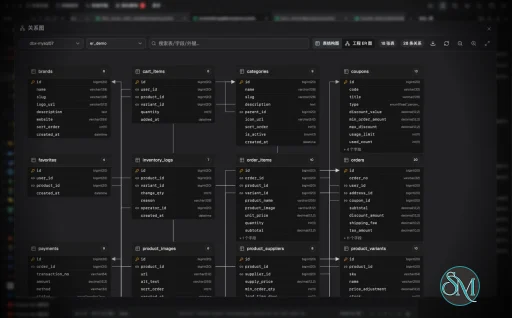
DBX provides a database browser with support for schemas, tables, columns, indexes, foreign keys, and triggers. Its query editor is based on CodeMirror 6 and includes SQL syntax highlighting, metadata-aware autocomplete, query history, saved SQL snippets, formatting, and diagnostics.
Key features include:
Support for 100+ databases and data services
PostgreSQL, MySQL, SQLite, Redis, MongoDB, DuckDB, SQL Server, Oracle, and more
Cloudflare D1 support
SQL editor with autocomplete
SQL formatting and diagnostics
Query history
Saved SQL snippets
Data grid with virtual scrolling
Inline data editing
SQL preview before saving changes
Filtering and sorting
Full-text search
CSV, JSON, Markdown, XLSX, and SQL INSERT exports
Schema browser
Database search
AI SQL assistant
SQL explanation and optimization
AI-generated SQL safety checks
Claude, OpenAI, Ollama, and OpenAI-compatible model support
MCP server
CLI
Docker deployment
Web interface
Plugin ecosystem
Kafka, RabbitMQ, Pulsar, MQTT, and other middleware consoles
The AI integration is particularly notable. Users can describe a database operation in natural language and have DBX generate SQL, explain existing queries, optimize them, or help diagnose errors. DBX also applies safety checks to AI-generated SQL before execution.
MCP support allows compatible AI coding tools such as Claude Code, Cursor, and Windsurf to interact with configured databases through DBX. The available operations include listing connections, browsing tables, executing SQL, and opening tables in the DBX interface.
Download DBX v0.6.74 - Software Mirrors |
|---|
DBX v0.6.74 for WindowsDBX_0.6.74_x64_en-US.msi | 43.58 MB DBX_0.6.74_x64-win7-server2008r2-offline-setup.exe | 180.15 MB DBX_0.6.74_x64-setup.exe | 33.49 MB DBX_0.6.74_x64-portable.zip | 44.05 MB DBX_0.6.74_x64-offline-setup.exe | 317.66 MB DBX_0.6.74_arm64_en-US.msi | 41.41 MB DBX_0.6.74_arm64-setup.exe | 30.88 MB DBX_0.6.74_arm64-portable.zip | 42.02 MB DBX_0.6.74-beta.20261125.1_x64_en-US.msi | 43.58 MB DBX_0.6.74-beta.20261125.1_x64-setup.exe | 33.49 MB |
DBX v0.6.74 for macOSDBX_0.6.74_arm64.dmg | 44.57 MB |
DBX v0.6.74 for LinuxDBX_0.6.74_arm64.rpm | 46.74 MB DBX_0.6.74_arm64.deb | 46.73 MB DBX_0.6.74_arm64.AppImage | 115.88 MB DBX_0.6.74_amd64.deb | 48.38 MB DBX_0.6.74_amd64.AppImage | 119.15 MB DBX_0.6.74-beta.20261125.1_arm64.rpm | 46.74 MB DBX_0.6.74-beta.20261125.1_arm64.deb | 46.73 MB DBX_0.6.74-beta.20261125.1_arm64.AppImage | 115.88 MB DBX_0.6.74-beta.20261125.1_amd64.deb | 48.38 MB DBX_0.6.74-beta.20261125.1_amd64.AppImage | 119.15 MB |
Others Download related to DBX v0.6.74DBX_0.6.74_x64-browser-static.tar.gz | 43.53 MB DBX_0.6.74_arm64-browser-static.tar.gz | 41.69 MB DBX_0.6.74-beta.20261125.1_fnos.fpk | 79.33 kB DBX_0.6.74-beta.20261125.1_arm64.app.tar.gz | 44.9 MB dbx-web_0.6.74_x86_64-browser-static.zip | 41.62 MB |
DBX v0.6.74 Source Code |
DBX v0.6.74 Release Notes:新功能
改进
修复
|
Performance and Compatibility
DBX is built with Tauri 2, Vue 3, TypeScript, and Rust. Its backend uses technologies including SQLx, Tiberius, Redis libraries, and MongoDB support. The project emphasizes a small application footprint and states that the desktop application is approximately 25 MB without a bundled Java runtime, Python environment, or Chromium browser.
Native applications are available for Windows, macOS, and Linux. DBX can also run as a Docker-hosted web application, making it possible to provide database access through a browser or deploy it on a server. Published Docker images support both amd64 and arm64 architectures.
The Docker deployment stores application data in a persistent volume, while connection, plugin, AI, and tunnel credentials are encrypted before being stored in the DBX database. Desktop builds additionally use the operating system's credential storage facilities, including Windows Credential Manager, macOS Keychain, and Linux Secret Service.
The breadth of supported databases is a major advantage, but support is not necessarily identical across every connector. DBX uses a combination of native drivers and agent-based profiles, so the available capabilities can vary depending on the database and connection method.
System Requirements
DBX supports:
Windows
macOS
Linux
Docker
Web browsers through the self-hosted web interface
The desktop application is designed to run without a separate Java runtime, Python environment, or bundled Chromium installation.
Docker deployments support both amd64 and arm64 architectures.
For Windows, the project provides an MSI installer and also supports installation through Scoop and WinGet. macOS users can install it through Homebrew or a DMG package, while Linux users can use Flatpak or the available release packages.
Pros and Cons
Pros
Free and open source
Supports 100+ databases and services
Lightweight native desktop application
Windows, macOS, and Linux support
Docker and web deployment
SQL editor with autocomplete and formatting
Data editing and filtering
Multiple export formats
AI SQL assistant
Ollama support for local AI
MCP server
CLI
AI coding agent integration
PostgreSQL, MySQL, SQLite, Redis, MongoDB, and DuckDB support
Cloudflare D1 support
Middleware and message queue consoles
Plugin ecosystem
Encrypted credential storage
Cons
The large number of supported systems can make the interface and feature set feel complex
Functionality can differ between native and agent-based database connectors
AI features require an external or local model
Advanced MCP and CLI workflows require additional configuration
A broad feature set means it can take time to learn the application
How to Install
DBX provides several installation methods.
On Windows, install it through WinGet:
winget install t8y2.dbxScoop is also supported:
scoop bucket add dbx https://github.com/t8y2/scoop-bucket
scoop install dbx
On macOS, install it through Homebrew:
brew install --cask dbxLinux users can install DBX through Flatpak or download the appropriate package from the project's releases.
For a self-hosted web deployment, Docker can be used:
docker run -d --pull=always --name dbx -p 4224:4224 \
  -v dbx-data:/app/data \
  t8y2/dbx:latest
The web interface is then available on port 4224. Docker Compose deployment is also supported.
After installation, create a database connection, enter the required credentials, and use the schema browser or SQL editor to begin working with the database.
Final Verdict
DBX is a broad database management tool that combines conventional database-client functionality with newer AI and developer-oriented capabilities. Its support for more than 100 databases, native desktop applications, Docker deployment, CLI, and web interface makes it suitable for users who regularly work across different database systems.
The AI and MCP integration is one of its more distinctive features. Instead of treating AI as a separate chatbot, DBX can expose configured database connections to compatible AI agents and let them browse schemas or execute SQL through an MCP interface.
Its lightweight Tauri and Rust architecture is also appealing for users who want a database client without the heavier runtime requirements associated with some established alternatives. However, the sheer breadth of supported databases and features means that connector capabilities and workflows can vary, and advanced AI or MCP functionality requires additional configuration.
Post a Comment/Report Broken Link: