Multica is an open-source platform designed to manage and orchestrate AI agents within development workflows. Instead of running a single AI assistant, it allows multiple agents to collaborate, execute tasks, and share knowledge across projects.
It essentially acts like a control center where:
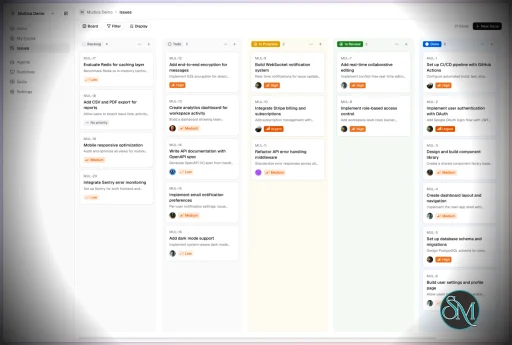
AI agents are assigned tasks
Progress is tracked in real time
Outputs and skills are reused across workflows
Multica currently supports Claude Code, Codex, OpenClaw, and OpenCode out of the box. The daemon auto-detects whichever CLIs you have installed. Since it’s open source, you can also add your own backends.
Download Multica v0.8.2 - Software Mirrors |
|---|
Multica v0.8.2 for Windowsmultica_windows_arm64.zip | 7.02 MB multica_windows_amd64.zip | 7.89 MB multica-desktop-0.8.2-windows-x64.exe | 189.02 MB multica-desktop-0.8.2-windows-arm64.exe | 188.43 MB multica-cli-0.8.2-windows-arm64.zip | 7.02 MB multica-cli-0.8.2-windows-amd64.zip | 7.89 MB |
Multica v0.8.2 for macOSmultica_darwin_arm64.tar.gz | 7.23 MB multica_darwin_amd64.tar.gz | 7.86 MB multica-desktop-0.8.2-mac-x64.zip | 236.37 MB multica-desktop-0.8.2-mac-x64.dmg | 245.56 MB multica-desktop-0.8.2-mac-arm64.zip | 228.48 MB multica-desktop-0.8.2-mac-arm64.dmg | 237.65 MB multica-cli-0.8.2-darwin-arm64.tar.gz | 7.23 MB multica-cli-0.8.2-darwin-amd64.tar.gz | 7.86 MB |
Multica v0.8.2 for Linuxmultica_linux_arm64.tar.gz | 6.91 MB multica_linux_amd64.tar.gz | 7.67 MB multica-desktop-0.8.2-linux-x86_64.rpm | 147.54 MB multica-desktop-0.8.2-linux-x86_64.AppImage | 238.69 MB multica-desktop-0.8.2-linux-arm64.deb | 167.81 MB multica-desktop-0.8.2-linux-arm64.AppImage | 238.53 MB multica-desktop-0.8.2-linux-amd64.deb | 174.66 MB multica-desktop-0.8.2-linux-aarch64.rpm | 141.9 MB multica-cli-0.8.2-linux-arm64.tar.gz | 6.91 MB multica-cli-0.8.2-linux-amd64.tar.gz | 7.67 MB |
Others Download related to Multica v0.8.2checksums.txt | 1.15 kB |
Multica v0.8.2 Source Code
Multica v0.8.2 Source code (zip)
Multica v0.8.2 Source code (tar.gz)
|
Multica v0.8.2 Release Notes: Changelog- e77e13abcacbab666af7a88238a587c73306c35c MUL-6907 feat(i18n): add complete Russian localization for web and desktop (#9832)
- d6a9f0ec161b45b1172b97ce316c6395a1cf34e7 MUL-8043: feat(issues): include sub-issue runs in execution logs and timelines (#9283)
- 632445ec4e36f3aec990846581dcc5ef46c27a21 MUL-8165: launch the new homepage, with one URL per language (#10266)
- 05259b84e2a228b23521b52e9b1c818741ce38fb MUL-8329 feat(views): widen the issue and chat reading column on wide screens (#10162)
- 02ba30fb4d13e45dfd6617269527bff65aa5018e MUL-8472: feat(projects): enable private projects for everyone (#10273)
- 9adeb9822580f63cae2da9e5cde35cecb95ac3d7 MUL-8472: feat(projects): private project access and member management (#9868)
- bc5b792db247277c8ea4d196a63162ba2f3175ff MUL-8516 feat(apps): redesign Connected Apps — team accounts, per-agent apps, confirmations (#9849)
- e437b11a718d6afce9cd800ba5b8554f3691a133 MUL-8571 ZIC-396 fix(hermes): own Windows task gateways without breakaway (#9963)
- 41885a6d816834663dad8e6944658e2ac8555844 MUL-8641: fix(skills): add explicit local source choice and batch folder imports (#9505)
- 9c0967a0db82b35b867b9643988736f8e9ff2eb5 MUL-8686 fix(daemon): reclaim build caches from idle chats (#10038)
- 83964c5cec4db06bb8b82e95f38a4ce26b8f9e89 MUL-8696: allow squad handoffs from the agent picker (#10137)
- 343f3df8a7d23a87d1806808615db01d529df84a MUL-8702: unify annotation saves and whole-draft sends (#10165)
- 75ce6f58b112e082b69274bfd4607bb2be6b2f9c MUL-8705 docs(contributing): simplify PR and issue templates, require UI screenshots (#10059)
- 2592b54772fd6669c43a38fc5c2e904aa121c169 MUL-8706 test(service): assert delegated-failure recovery tests on fixture rows, not global sweep totals (#10061)
- d0c5eb1c5916d118bb3061b4496aec833e26e9d9 MUL-8709 fix(attachments): respect quoted fields when detecting CSV delimiters (#10062)
- 048f7228017e24d3358e21e5e7fa54a9e8dc8153 MUL-8711 refactor(brand): drop the launch icon mode and the onboarding star-row entrance (#10077)
- 2d2ec694f18f8d302c803dd09114efeba35b56a3 MUL-8712 fix(sidebar): drop the title tooltip on sidebar issue rows (#10064)
- df7b2eaeac4528e158422ce64cbe2743afa9a203 MUL-8718 docs(agents): DB-backed tests assert on fixture rows, not global query totals (#10070)
- 2dd88c2ace0237c10474276690abd775d16b48e3 MUL-8725 feat(tooling): upload PR evidence as native GitHub attachments (#10156)
- 73975653323750d04c27047ea9c986ef06bdf6a1 MUL-8744 fix(landing): remove the header logo hover hop animation (#10101)
- 8310dee5bca8938bd94123e452eb4f472e13a04b MUL-8745: feat(deliverables): a link that always opens the latest version (#10102)
- 64e62a125351ca5a350ac36b45c7048ebc54a09a MUL-8754 fix(views): refetch a failed issue mention when the window regains focus (#10111)
- bf768883a8bf97aeefaa30a715b78097876270fc MUL-8758 BOYF-670 fix(core): recover pending invitations on focus and reconnect (#10115)
- b962fb8b033cfa46c6a143b8f6128b622edb5762 MUL-8759 feat(views): show project icon in sidebar project tree (#10116)
- 0620f2bf9ccf1557b698f78c26661f0cfef34f3e MUL-8760: fix(server): heal a drifted issue_counter only when a number collides (#10117)
- 48c521c65f2438e60961d528feae6ae4fe06a662 MUL-8764 feat(rail): reorder the rail spaces by drag (#10121)
- 07764420104f813f7ee9383347b47189e6235df4 MUL-8766 fix(sidebar): stop opening an issue's project on every issue page (#10123)
- 4e3c56b50f95c61838278d133a2ee9e9814fb9e1 MUL-8771 fix(sidebar): use the shared drag click guard in pinned, views and projects (#10124)
- ac5f97c5d6568f24496b4323d7c759cb0cc44abc MUL-8772: feat(appearance): Appearance settings and themeable built-in themes (#10126)
- 741bb5790a660d4970cb98d02a5a16b367a76775 MUL-8775 fix(dev-env): report a stale API or busy web instead of a foreign listener (#10127)
- 98bd2628b660e889485acd7f9ab34a2a76ccc597 MUL-8776 fix(desktop): align title-bar actions with the page column, merge the issue window header into the traffic-light row (#10128)
- 9d9ac9f7c72e00ea3c9f494efcfad2f3f94ee38d MUL-8777 fix(layout): one left edge per column, one header band across columns (#10140)
- ad2bfcd5038b46ae7b2d317771df5486d30b868a MUL-8778 feat(ui): rectangle buttons and chips, round only for named exceptions (#10132)
- d1f32dad63bb55f47711751c21567ca6d3415760 MUL-8779 feat(rail): narrow the app rail from 64px to 56px (#10130)
- 5a851d4d571e374ea1df45b2ce1726a3671eed98 MUL-8780 fix(dev-env): wait for our own web server while it compiles instead of calling the port busy (#10129)
- badeeae535724c3cd8cdcd139f4e5cb4a99caca3 MUL-8781 fix(core): cap the dev User Timing buffer so React render measures stop leaking (#10131)
- 0404281d9deb4e9d6357e89a3db089fffd87072e MUL-8782 fix(rail): show the full name when a rail label is cut off (#10133)
- b4b9ab92bf11df1e34d03b4c35945e5e1f60a022 MUL-8784 chore(core): enforce the core package boundary with ESLint (#10134)
- 8886a0b4d88a1e022282d3475bc37da439941203 MUL-8786 fix(views): show the full property label when it is cut off (#10138)
- 9b64577708f8b9af594e8e3cd2ef7bc307b321e6 MUL-8787 feat(dev-env): make up C=desktop starts a signed-in Desktop with an optional CDP port (#10141)
- ae446567abfb304049f303f596a48da6e2e8f30e MUL-8788 chore(views): enforce no store definitions in packages/views with ESLint (#10139)
- f0033556c26895eca28602a59f6afea7c7b266a2 MUL-8790 chore: enforce the dependency catalog and narrow mobile's core imports; sync boundary docs (#10142)
- d914c296fa895b097120850a1eff0ab0493e3c4e MUL-8791 feat(dev-env): attach helper for scripting the managed Desktop over CDP (#10143)
- 762790e812f81064a3c235d521ed8fd528cfeb56 MUL-8792 fix(ui): let keyboard users reach cut-off text behind a tooltip (#10147)
- f006fc4126fde712373a1035f1b69dfbe499621e MUL-8795 chore: upgrade apps/web fumadocs to match apps/docs and drop --webpack (#10152)
- 456561047cba7462933a35fc396b9170603a3848 MUL-8796 feat(dev-env): capture the managed Desktop's native macOS window (#10154)
- cc6d2436eecde51aefa27d86d009378e40fca43f MUL-8797 feat(inbox): align the inbox filter with the issue filter (#10161)
- 7a926b824fcf7a3687097f353d6a34f79d8b568d MUL-8800 fix(scripts): run entry guards on real paths so symlinked runs don't silently pass (#10158)
- df86af12e166366242aa667d475adfbe89648648 MUL-8801 fix(desktop): keep electron-vite's NODE_ENV out of the daemon env (#10159)
- b586dd96cc272ce15ac228274443766a18d05231 MUL-8802 fix(desktop): strip the dev launcher's pnpm/turbo/electron-vite env from the daemon (#10160)
- 015183fba82691a1e1cff73567b74c8ffcf6d517 MUL-8807 test(desktop): fail fast when a unit test loads the real electron package (#10163)
- 855ec009f016647f57a1a5b0d5e6cc0bac349e0a MUL-8808 feat(dev-env): onboarded web workspace and one-shot chat/builder/issue fixtures (#10166)
- baf8c37ba23a3531e30b16fd15034b2d9e38ac16 MUL-8809 fix(views): give the floating chat window's icon-only header buttons accessible names (#10164)
- 5f53158b811a45a4bc0b73e0479cddfb021576b6 MUL-8813 chore(eslint): fail lint on icon-size Buttons without an accessible name (#10168)
- 0465fef013e309998c22939a2f1e2839db1d93ba MUL-8816 chore(eslint): fail lint on icon-only native buttons without an accessible name (#10172)
- 11b0698b196b563fc8bfa459f45e694a89875bd6 MUL-8820: feat(projects): add a rename entry to project menus (#10171)
- b37b0f0005adc6aea7917cce7cd66d639c980ec8 MUL-8821: simplify connected app access (#10177)
- bebc2791bd2074dfff27a2e163dbc06e43d5d3bd MUL-8822 feat: ask for a GitHub star after an agent finishes enough issues (#10182)
- f68c891d3b735098d0fa6ef8cd8455d7736d1b3b MUL-8829: fix CLI comment attachment binding (#10184)
- e842560f1754eb9ef578d192d96100ecfb9319c9 MUL-8835: fix(auth): preserve a new bearer session after a stale 401 (#10209)
- 4d11ec31ce1011a21b46aae40f7676fdfb55a318 MUL-8853: feat(dev-env): let an agent start its own environment's daemon (#10221)
- 668c0c9f7027d4ee2974d130de2fd796d725fdce MUL-8854 feat(cli,workflows): carry status icon through new_status and issue-status (#10220)
- 3ac4969d333423a02766e5b0d581b3efb3108eed MUL-8857: fix(cli): stop telling a live task to delete its own marker (#10224)
- 8c8ca7d851dfe944b507708442becbdb2b61131f MUL-8858: test(cli): run cmd/multica tests outside the host's task marker (#10225)
- 4d8cdc3d01f4ac17208122cc32efaebefa5a6078 MUL-8859: fix(storage): disable legacy local file entry (#10252)
- cc8e4717acdab061c30000b86ea91f7bb49082ed MUL-8889: feat(sidebar): add Edit view to a saved view's menu (#10228)
- 4810b4205847aea07bc6b53d0f59d25967af96ba MUL-8891: fix(views): slim the space panel scrollbar (#10229)
- 74d491c73309d8a5555323278b95e487a7831d81 MUL-8893: test(repocache): clear host GIT_CONFIG_* vars in TestGitEnv (#10230)
- 06ca0bfe16f32ad273e81b3fde394c3d4e743c3f MUL-8897: docs(config): document zero-duration watchdog overrides (#10234)
- e1411d222c3b72c9d8b0434e4a41e63daae22a81 MUL-8899: feat(qoder): issue short-lived single-repo tokens from workspace GitHub App (#10236)
- e99e053ba6abfeedd7329aded7863dcb1c449470 MUL-8907 feat(brand): thinner large icon star and a team-of-stars OG card (#10250)
- 0085ab2d0d1e1b2a1b1eccf39184dc05e3dbf01c MUL-8908: fix(issues): restore typing in filter submenus (#10249)
- 251e20de4990c5ce17af6ab8a5254ee1e4b9bf38 MUL-8908: fix(skills): restore typing in the Labels filter search (#10253)
- 72847f9eb12dba6e25a9035f8605e149a5f62533 MUL-8910: feat(issues): narrow annotation popover, icon send button (#10256)
- df6d6ee8f8d8c13de86129b604f30c99eb00923c MUL-8910: fix(issues): keep reply chip row clear of the placeholder (#10254)
- 1ca17b6069146623776df1621b9d7cddbc200fad MUL-8912: feat(environments): show the environments an issue started in its sidebar (#10265)
- 2f23f76d9cb827a3b43a4d6e2e8d49a5313340f4 MUL-8914: fix(workflows): drop the "(from project)" suffix so the workflow name fits (#10260)
- a8a31668c231be92caf24643ef9d97868286aa24 MUL-8919: simplify connected app setup for agents (#10268)
- 6e3beef2c7b1ad879df8b7cdd9dfc8d7db97d025 MUL-8919: use consistent outline buttons for app connections (#10277)
- 53ee72ec0eb6734177e69fa732ee2e4e35ef7c81 MUL-8932: docs(agents): require concurrent-index cleanup registration and migration prefix check (#10272)
- 8356a999f1e22c060676b0ba545da0e0065d54c0 MUL-8933: ⌘K hands to an agent through a fixed row instead of guessing (#10286)
- 38dc55070c0ac99787a06262cae9476825972c67 MUL-8935: chore(release): prepare v0.8.2 changelog (#10278)
- 4ec4739eb6869b498f7bfebb167f8c551283f90e docs(contributing): accept screen recordings as UI evidence (#10078)
- 5983213f6e3027c0394250269107b12756a5b4e2 feat(agent): add the Muse app backend (remote receptionist) [MUL-7945] (#9155)
- 8abb2b4afa4e54a3dce77202c8cd95a62bbc43e4 feat(cli): add --project filter to issue search (#10088)
- e7592c57edd446e6c743ddd89335b23c269ffa56 feat(cli): control per-issue PR auto-complete (#10057)
- b3b0fa6420fe7b4493667af08cff6db8e051fdfa feat(comments): reply directly from selection annotations (MUL-8702) (#10065)
- 9f47c142b9bf10c4261a4cd02a412a9fe73ebc9d feat: open web issues in desktop (MUL-8735) (#10170)
- c6c279495bc3922789690b51f211d9022754759f fix(attachments): restore authenticated local previews (MUL-8859) (#10263)
- 980611f20790b1eb3a034418b3a91cfd68fb2d71 fix(autopilot): 接受 issue 更新的 map 载荷 (#10262)
- 57fa7580469a9b3dae5ebe99629107b7dd6438e7 fix(autopilots): stop a running run-only run from run history (#10097)
- 78dd3a2aec2e879cde0679f284cc4046e825bdc4 fix(cli): fail daemon start without matching child health (#10207)
- ea619f7f78e7ab55d51cec46ce096c38fa9f6a1f fix(cli): prefer exact agent names for squads and autopilots (#10215)
- 94908f3c614114afaafa43ee119a24348f6f679a fix(cli): validate self-host health before saving config (MUL-8851) (#10240)
- 611b428eaaaba839c4d7c134ff5cd14c0cd21769 fix(codex): stream agent text while the answer is generated (#10100)
- c54de2bd2b3313d2044450a16051d67587c13fd9 fix(connected-apps): pass stored Composio user ID during execution (#10174)
- b5ac15690dcd0728280699b2c5ddfee5bdb61f2a fix(editor): sign streamed video, audio and PDF previews afresh (MUL-8892) (#10232)
- f18fec61b2b5e4e1495f9be7f5bf1b944735a6c9 fix(i18n): add the Russian reply annotation keys missing since #10065 (#10153)
- 337c3335bf647f915a432a15a7beca9e995ca4e4 fix(i18n): add the Russian skills keys missing since #9505 (#10146)
- 2d1b19a7db19b7e3c2cf89036e64f9efd74f60eb fix(issues): clear date filters in unread empty states (#10104)
- a9434451e1c7c5a72798e0b65fdfb769a9249dab fix(issues): offer retry for failed first list pages (#10044)
- 967a0edf1e1010af6089a1263f9a18082268949b fix(issues): retain duplicate marking feedback after picker closes (#10114)
- cdf05edc04946280f39d6bd8443c30c0a667eb86 fix(paths): reserve the chat channel bind routes as workspace slugs (#10223)
- 282f48eed2531f467ed4e6febc2a59b590d3e711 fix(squads): correct custom picker trigger semantics (#10068)
- 4239ec11eaa67541c28bb20e836768263e363286 fix(team): limit agent status previews and persist section collapse (#10066)
- 10f0ab332e57035feadae43cff2cd511f0d1d1f1 fix(views): fold turned-off system wakeups into wakeup history (#10258)
- 6eea1426b9c6184b356beb2c3380551944d813fd fix(views): give the issue views' icon-only Mark done, Archive, Pin and Add issue buttons accessible names (#10167)
- 32778f1ad4e0aa2982d1efef1846ceb8fe7c4962 fix(views): provide auth fixtures for create-project tests (#10280)
- 08b51247566597fc68a782cba118eabd8bdb3381 fix: align project creation access and collapse optional properties (#10270)
- dc8f5fbff949f3481bfbd608c04b88ec607a56dc perf(ci): reduce frontend validation overhead (MUL-8789) (#10145)
- 10d4496df43e142077cab9b1584e81d5a01d6387 perf(search): prune terminal-issue comments in open-only issue search (#10098)
- b7f8efcaae6c5f3273c0038252b5d10c81b41068 refactor(star-prompt): remove the deployment opt-out switch (#10292)
- ccd3bc5c6d549e25da99e139af5ea1685ea529a5 test(daemon): fix flaky TestLocalPathLockerSerializes (#10148)
- 34690a5f45548121f02fdebf7b60ed0776e31c87 test(execenv): force the commit failure whatever the host signing format (#10238)
|
Key Features
1. AI Agents as Teammates
Multica treats AI agents like real contributors. You can assign tasks, monitor progress, and manage their work similar to human developers.
2. Multi-Agent Orchestration
Instead of relying on a single AI model, Multica coordinates multiple agents working together on complex tasks, improving efficiency and scalability.
3. Skill Reuse and Compounding
One of its most innovative features is skill accumulation. Agents can reuse previously learned solutions, reducing redundancy and improving performance over time.
4. Real-Time Workflow Tracking
You get a unified dashboard where you can:
This makes it suitable for structured development environments.
5. CLI and Web Interface
Multica provides both:
It supports local and cloud-based environments, offering flexibility in deployment.
6. Open Source and Flexible
Being open source, Multica allows:
This makes it appealing for teams that want control over their AI infrastructure.
Performance and Use Cases
Multica is designed for advanced workflows rather than casual use. It performs best in environments where multiple AI agents are needed to collaborate.
Typical use cases include:
AI-assisted software development
Automation pipelines
Multi-step research and analysis
DevOps and engineering workflows
Its ability to coordinate agents makes it especially useful for complex tasks that go beyond simple prompts.
Quick Install
curl -fsSL https://raw.githubusercontent.com/multica-ai/multica/main/scripts/install.sh | bash
Installs the Multica CLI on macOS and Linux. Works with Homebrew or downloads the binary directly.
Windows (PowerShell):
irm https://raw.githubusercontent.com/multica-ai/multica/main/scripts/install.ps1 | iex
Then configure, authenticate, and start the daemon in one command:
multica setup # Connect to Multica Cloud, log in, start daemon
Self-hosting? Add --with-server to deploy a full Multica server on your machine:
curl -fsSL https://raw.githubusercontent.com/multica-ai/multica/main/scripts/install.sh | bash -s -- --with-server
multica setup self-host
Requires Docker. See the Self-Hosting Guide for details.
Getting Started
1. Set up and start the daemon
multica setup # Configure, authenticate, and start the daemon
The daemon runs in the background and auto-detects agent CLIs (claude, codex, openclaw, opencode) on your PATH.
2. Verify your runtime
Open your workspace in the Multica web app. Navigate to Settings → Runtimes — you should see your machine listed as an active Runtime.
What is a Runtime? A Runtime is a compute environment that can execute agent tasks. It can be your local machine (via the daemon) or a cloud instance. Each runtime reports which agent CLIs are available, so Multica knows where to route work.
3. Create an agent
Go to Settings → Agents and click New Agent. Pick the runtime you just connected and choose a provider (Claude Code, Codex, OpenClaw, or OpenCode). Give your agent a name — this is how it will appear on the board, in comments, and in assignments.
4. Assign your first task
Create an issue from the board (or via multica issue create), then assign it to your new agent. The agent will automatically pick up the task, execute it on your runtime, and report progress — just like a human teammate.
User Experience
The concept behind Multica is powerful, but it comes with complexity.
Requires understanding of AI agents and workflows
Setup may involve configuring runtimes and integrations
More suited for developers than beginners
However, once configured, it provides a highly structured and scalable system.
Pros and Cons
Pros
Open source and highly customizable
Supports multi-agent collaboration
Reusable skill system improves efficiency
Real-time workflow tracking
Flexible deployment options
Cons
Still early-stage and evolving
Setup complexity is high
Requires technical knowledge
Not suitable for simple AI tasks
Who Should Use Multica
Multica is ideal for:
Developers working with AI agents
Teams building automated workflows
Companies experimenting with agent-based systems
Advanced users exploring AI orchestration
It is not designed for casual users who just need a simple chatbot.
Final Verdict
Multica represents the next step in AI tooling, moving from single assistants to collaborative AI systems. While still evolving, it introduces a powerful concept that could shape how teams use AI in development.
Multica is a promising platform for advanced users who want to build scalable, multi-agent AI workflows with full control and flexibility.
If you are exploring multi-agent AI systems or building automated development workflows, Multica is an emerging tool worth paying attention to. It introduces a new way to treat AI agents not just as tools, but as collaborative team members working alongside developers.
Post a Comment/Report Broken Link: