Multica is an open-source platform designed to manage and orchestrate AI agents within development workflows. Instead of running a single AI assistant, it allows multiple agents to collaborate, execute tasks, and share knowledge across projects.
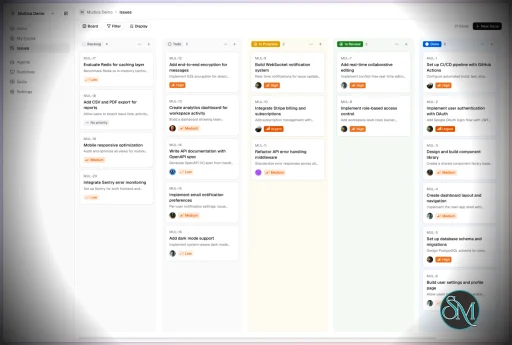
It essentially acts like a control center where:
AI agents are assigned tasks
Progress is tracked in real time
Outputs and skills are reused across workflows
Multica currently supports Claude Code, Codex, OpenClaw, and OpenCode out of the box. The daemon auto-detects whichever CLIs you have installed. Since it’s open source, you can also add your own backends.
Download Multica v0.8.1 - Software Mirrors |
|---|
Multica v0.8.1 for Windowsmultica_windows_arm64.zip | 6.94 MB multica_windows_amd64.zip | 7.8 MB multica-desktop-0.8.1-windows-x64.exe | 188.19 MB multica-desktop-0.8.1-windows-arm64.exe | 187.62 MB multica-cli-0.8.1-windows-arm64.zip | 6.94 MB multica-cli-0.8.1-windows-amd64.zip | 7.8 MB |
Multica v0.8.1 for macOSmultica_darwin_arm64.tar.gz | 7.14 MB multica_darwin_amd64.tar.gz | 7.76 MB multica-desktop-0.8.1-mac-x64.zip | 235.37 MB multica-desktop-0.8.1-mac-x64.dmg | 244.58 MB multica-desktop-0.8.1-mac-arm64.zip | 227.49 MB multica-desktop-0.8.1-mac-arm64.dmg | 236.68 MB multica-cli-0.8.1-darwin-arm64.tar.gz | 7.14 MB multica-cli-0.8.1-darwin-amd64.tar.gz | 7.76 MB |
Multica v0.8.1 for Linuxmultica_linux_arm64.tar.gz | 6.82 MB multica_linux_amd64.tar.gz | 7.57 MB multica-desktop-0.8.1-linux-x86_64.rpm | 146.63 MB multica-desktop-0.8.1-linux-x86_64.AppImage | 237.69 MB multica-desktop-0.8.1-linux-arm64.deb | 167.35 MB multica-desktop-0.8.1-linux-arm64.AppImage | 237.54 MB multica-desktop-0.8.1-linux-amd64.deb | 173.47 MB multica-desktop-0.8.1-linux-aarch64.rpm | 141.17 MB multica-cli-0.8.1-linux-arm64.tar.gz | 6.82 MB multica-cli-0.8.1-linux-amd64.tar.gz | 7.57 MB |
Others Download related to Multica v0.8.1checksums.txt | 1.15 kB |
Multica v0.8.1 Source Code
Multica v0.8.1 Source code (zip)
Multica v0.8.1 Source code (tar.gz)
|
Multica v0.8.1 Release Notes: Changelog- 3faf996d92cb666bb21050957e1b30043614b542 MUL-4066: feat(skills): skill version history and restore (#9632)
- f02a6aa60e572d3038b06328b565eaeb9b3a4fd6 MUL-7563 perf(chat): virtualize session history lists (#8637)
- 16ce2df18c325cce1b3760704169373b4f741086 MUL-7782 feat(plugin-api): task transcript endpoint GET /v1/tasks/{task_id}/messages (#8914)
- 3c94e1cc1cf1e1acfddd9f1e18ad0de2c0976f9e MUL-8022: feat(daemon): persist idle and tool watchdog settings (#9258)
- e9e4f6315177c122fcf8af2fdc2943285d9e4032 MUL-8316: feat: restrict issue deletion to creators and workspace admins (#9789)
- 5a01c8f3cba8d7bffdae667da923742aec1acb64 MUL-8461 feat(docs): add Traditional Chinese (zh-Hant) docs locale (#9786)
- bcdf970c76c2e9f41960381a76a3a6d399fe700f MUL-8463: fix(daemon): keep a worktree turn's leftovers off its branch once the agent commits (#9870)
- be8818cbbd0695be07f62a292128b3fa15b1a787 MUL-8495 fix(lark): retain explicitly selected context media (#9813)
- e4a9bb5bcf10a03c6941ea3eea6dcb2bfc60c666 MUL-8498 feat(views): add Read state → Unread filter (#9842)
- 7d1b3f1ec4abcb4b392eaf2bf4b50c7c6c9a0019 MUL-8511: fix(views): preserve scalar property drafts during live updates (BOYF-301) (#9831)
- 0f1782289f13c1982db51d0dd169926a6deb3ae1 MUL-8521: feat(whats-new): add v0.8.0 highlights (#9933)
- bcc811b4cf2fbbece85c7c199d07f94601f67484 MUL-8521: feat(whats-new): in-app release highlights card and rail panel (#9851)
- b2db446c0a709a9d61434293b85017f21e111132 MUL-8523: feat(views): introduce features on their empty pages (#9852)
- 06601fb2db734d94e525ff576366ec278298e509 MUL-8525 fix(daemon): recover checkouts orphaned by a cancelled worktree add (#9838)
- 50aea8fae509462b6bd65283ad07646a8143a4f4 MUL-8548: fix(hermes): preserve dependency environments across turns (#9866)
- 9b807053175c2dc1a85eab386481ea1bf3673cec MUL-8550: feat(issues): add "Subscribed by me" relation filter (#9877)
- 70a76256808c876155d3d01c24b3145e44c6f4a3 MUL-8556: feat(inbox): give Inbox and Chat lists their own width and compact inbox rows (#9882)
- 548cb13b63cba5a4d969ec6d3f57ee13f4516825 MUL-8557: feat(views): set up a new view right where it is named (#9886)
- 8de3af982affdcf3510f301f873529d79f9b0370 MUL-8558: fix(sidebar): open an unread issue on its newest unread run (#9887)
- 1a720ff91b7232ae3adff46831e05f706b35b115 MUL-8566 feat(qoder): run chat turns with attachments on Qoder Cloud Agents (#9894)
- c1910823bac54e421da5a1756c49b7e33ef9d664 MUL-8567 fix(handler): canonicalize advanced-filter fingerprints like the compiler (#9895)
- a899b531f6aa7d002f1b63de6b2799e920d2f801 MUL-8570: feat(qoder): attach files a chat agent delivers to its reply (#9899)
- ddaaf6a7684cd5090f3b749a21fd435ab8e715f8 MUL-8573 fix(editor): preserve nested fences through Markdown saves (#9902)
- 2a3e4aa61436192256b1367713d46c21e4f58c92 MUL-8576: feat(whats-new): move the read entry into the Help menu, swap the gift icon (#9908)
- 72f9a391bf00dae0ce7e35428e9a673b5e97984f MUL-8577 fix(auth): reject unsupported CLI callbacks without web login fallback (#9906)
- 8a7f58330b73fca763c2c293c4f73646e0747120 MUL-8578: feat(qoder): run squad leader turns on Qoder Cloud Agents (#9907)
- 1281b3817ad9bedad89ca28dd47b2a32b73a1ba4 MUL-8579: feat(attachments): make the inline preview size configurable
- bc1be25041e3f4cd66b2059e0332bc5e0ae22cd8 MUL-8585: fix(web,docs): require Next.js 16.4.5 for GHSA-673q-mjm6-r5xr (#9914)
- fe5fd221ad60aaa9befe0bf2d28ea40d9243862a MUL-8586: avoid default owner escalation for CLI gaps (#9915)
- e9bb73a22e3fa61c11302fa4136b0044e9b84acc MUL-8588 feat(inbox): read an issue's notifications when it is opened outside the inbox (#9921)
- 17582d160bc8ede366538e13b8a9c685dce19e66 MUL-8589: fix(service): keep backslashes in formatted agent output (#9917)
- 7c984c0f1668666e3642ca17f30f76777798432c MUL-8590 fix(sidebar): keep the Unread row while the issue opened from it is read (#9919)
- dd42d0331f89fc08cb7111d4569d6a715c0cf55f MUL-8591: refactor(views): one shared rule for client filter dependencies (#9926)
- e0ce246499c11db37a804ea0d3dc2c8a0bcbf3ca MUL-8596 feat(inbox): opening an issue reads its informational Inbox notifications (#9928)
- d54fd96b841ece551cc706c331842cecba4a29b3 MUL-8599: feat(sidebar): make the Unread view opt-in via its star (#9929)
- d66ba279638a24dae5ce94f0b577331ee7d6a9db MUL-8602: fix(views): retryable error for sidebar project rows when the status catalog fails (#9934)
- 88091a4da05e91927a4e58d95a2e4d5089050fd0 MUL-8603: fix Quick Create CLI resolution in login shells (#9937)
- 1ca4b43be1f82a069b2df6b3ccfe79bf44999367 MUL-8609: fix(upload): stream 100 MiB uploads through web without truncation (#9905)
- 3fb17f0d5377ad1dc8de923bcb5ac647274ef9bc MUL-8611 feat(i18n): add Spanish (es) locale (#8650)
- f2d365cfeb5b7b5b9421da43a80cbebb4671995a MUL-8617 feat(issues): default all issue panels to updated date ordering (#9947)
- b6b2402c01d67fb26177832d65970f58c7c53e1a MUL-8618 fix(inbox): opening an issue reads all of its notifications (#9959)
- b3f1e6bf612b03b4db3fee873b197828e7961520 MUL-8620 fix(agent): isolate runtime probes and reject wrapper logs (#9957)
- 565c9128d76324942cf40363f0a7c6ac573e5c67 MUL-8621 feat(whats-new): drop the rail launcher and update card, keep a quieter What's new in the Help menu (#9952)
- bd1cffaa217ba411bcbe0970b5cd5b62bc295902 MUL-8628 fix(wecom): ask the room to open the 1:1 when WeCom refuses a private reply (#9956)
- 71f225ac4acffbbc6f96d3683fab256758a5687e MUL-8634: feat(slack): expose source metadata in chat threads and task prompts (#9975)
- ee8604de4741d71d2f51e5ced7f0eb126b03ea0e MUL-8636 feat(workspace): pin workspaces to the top of the switcher (#9974)
- f230f9f55bdfc4de68015473b07de329a5079f87 MUL-8647 perf(agents): virtualize recent work history (#9985)
- a0842256b5cb1942279a44fc12ceae6ca7309a85 MUL-8649 feat(issues): add selective parent field copying for sub-issues (#9988)
- 4dd9df8b9d4f8eb7cfd12d3d08d54ac8788f5398 MUL-8651 fix(sidebar): reveal clipped project and issue titles on hover and focus (#9991)
- 9c087798a7de8befc040138226198ae2fd237595 MUL-8653: fix(editor): show pending state on attachment download buttons (#9993)
- 690e85093edf04ea7296d201df1d89fbdd8cd15e MUL-8655: fix(agent): check Linux pidfd support before launching Pi (#10019)
- 8105995e721b3f61ed3a84784d11ef7c41f575a4 MUL-8658: fix(issues): show safe load errors and scoped retry (#10001)
- 7c75b34a23fdb636c67c39e60d158e6eeeec6d3b MUL-8663 fix(chat): bind collection requests to their workspace (#10007)
- dada82fa6d9ed18b6d78cae6e3292d1b67465095 MUL-8664 fix(views): ellipsize overlong labels in runtime and model pickers (#10008)
- 6077ec33df8a600220837983bc4dba69263fe054 MUL-8667: fix(ui): preserve modifier shortcuts in time inputs (#10011)
- 8a6cb87c5fd9f65a5ca5409c2f84712e178c9d00 MUL-8672 fix(views): lock avatar crop through encoding and upload handoff (BOYF-524) (#10018)
- e3aec6e8b6a23b8dfc5fa125acfa9954bc2688a0 MUL-8681: Fix/project delete confirmation (#10029)
- 164290ee14f63fe009ca304db21de9879db104c8 MUL-8683 fix(attachments): align Markdown image preview sequences across clients (#10034)
- 994d6977aa03ef69a4c4307819d692d53d71986c MUL-8687 feat(brand): star icon and G2 wordmark with the star on the i (#10051)
- b1ea927def6490c43bedff537b6f4ed9a47fa828 MUL-8694: chore(release): add v0.8.1 changelog and highlights (#10050)
- 6644bf019be05abea2996148c1491253d47806b4 MUL-8700 fix(views): HTML viewer Fit scales a wider document down to fit (#10055)
- 6710cdfd73f6397da42cf49860b90e2837d13e62 MUL-8701 chore(brand): commit the asset generator and check the wordmark copies stay in sync (#10056)
- 1973091b7f5d78ebafa68f61c8edb47aff9601b9 docs(readme): align Japanese README with product terms and localized docs (#9982)
- acf784b7dcb0a3135fe14feca805d3077bcc1461 feat(agents): expose thinking level in properties sidebar (MUL-8594) (#9923)
- 98846ce564a6a7a0d26cb4f071263700003d3041 feat(cli): add updated time range filters to issue list (#9994)
- 68bda1b0ff678b7f1027ce0a19c5a18a6f403bf4 feat(projects): let creators delete their projects (MUL-8630) (#9965)
- 2c89ef94b67165407eb5536dd022718dd29fc67e feat(skills): add frontend list search (#9936)
- 7a12304f1473c71e0cee970c773246eaf96abc49 feat: let agents read the issues in a saved view (MUL-8532) (#9855)
- 56d6c55c64a982a9d27a115068beeafa2e413937 fix(agent): check Pi cleanup capability before launch (#9996)
- f88fdd08ec96cddc138e6310ceda4320916308d9 fix(agents): move pending tasks along when an agent switches runtime (#9960)
- 3d3db2fb7eebf2a1397620b3a324d00383ea1dda fix(agents): offer Integrations on Qoder Cloud Agents agents (#9893)
- 77cdcfa8d9ef073abd56e2315a751aadb4459f3b fix(agents): remove deleted skills from create drafts (MUL-8598) (#9931)
- 266560ca20b2e230cfa6efbc5cdedea01d4143b2 fix(cli): acknowledge label attachment without returned labels (BOYF-256) MUL-8494 (#9811)
- 61e7e8f966f53478f3efe68ec50c5a5fdd00a51f fix(cli): classify attachment download body network errors (#10010)
- ccd53fabeb0e2c247e099059e6fc965f40cab616 fix(composer): blur the reply box after a posted reply (#9194)
- 12ce618c41300e4c657ef6111ec8f7e8a4dd91db fix(desktop): restore background issue tabs after restart (MUL-8679) (#10037)
- 7c15cc4e7485088ffca5e655f683ffebc2155f03 fix(docs): bypass locale routing for favicon (#9946)
- 25f4843164a8d51cd0d709faef2e23039324fcda fix(editor): insert comment quick actions from cached catalog (MUL-8593) (#9927)
- 27b987aba1a11b7874cfc95bd5549cb50d8c41b4 fix(editor): re-sign download of CDN images quoted from another comment (#9920)
- 3c5c8b245359b9b8e913a47f97211f2a3426f149 fix(inbox): keep the archived filter menu open while a new filter loads (#9941)
- fbb8aac6205927d5d058b705429615e3b599dea6 fix(issues): move Restore to inbox into the issue's more-actions menu (#9883)
- 0d63bfc6556ca8a57512c818b897673b28d381c3 fix(kiro): expose and apply thinking levels (MUL-8595) (#9925)
- 2ae2f08005f05956ec5c8f99a3d7dc0681c84925 fix(runtimes): show online machine count in sidebar (#9943)
- 8cc95bcea78e3be04e0112f3039c68bc624c326f fix(search): preserve delegation during IME Shift+Enter (#9981)
- d2e14f716e4e98ece9699e682e11faa0268c9769 fix(sidebar): show squads as a single navigation entry (#10048)
- 6a43ddb3441ed36ca48b5bcb977f3582cb80ca71 fix(skills): retain platform hints after name collisions (#9949)
- 9912701f9a0fca3222631c75683aa90d465222e5 fix(traecli): add file-based skill loading guidance (#9930)
- 99cda462145cb4eb2a72101f2409429c9594022f fix(ui): dismiss nested issue pickers on outside click (MUL-8650) (#9990)
- 6959199196b67eb2e8cb75394f2e24cc672658fc fix(ui): preserve editable selection after clipboard fallback (#10016)
- 8c03c552d16c8dc4ec9bf99b085fb5afffb33162 fix(ui): restore calendar keyboard selection focus (MUL-8668) (#10014)
- c681f71791e3e785f1742743acdaf03c1e8c1d2d fix(views): preserve IME input in filters, title rename and find (MUL-8509) (#9829)
- 2e679d7f827c54768f77ef84f68e47fe8db25fac fix(web): drop duplicated v prefix in zh download release-notes link (#9884)
- 32b3c076515ff89463b26177b5d90c9b2e1194b5 fix(workflows): explain inherited task step mismatches (#10039)
- 66dd459b9f713a45955ecf28c8dddad9cefb3f6b fix: move skill labels to the bottom of properties (#10047)
- 4c70f3600b576593f8a8ed7c3fe1d9d28136152b perf(attachments): lazy-load inline images with reserved dimensions (MUL-8182) (#9453)
|
Key Features
1. AI Agents as Teammates
Multica treats AI agents like real contributors. You can assign tasks, monitor progress, and manage their work similar to human developers.
2. Multi-Agent Orchestration
Instead of relying on a single AI model, Multica coordinates multiple agents working together on complex tasks, improving efficiency and scalability.
3. Skill Reuse and Compounding
One of its most innovative features is skill accumulation. Agents can reuse previously learned solutions, reducing redundancy and improving performance over time.
4. Real-Time Workflow Tracking
You get a unified dashboard where you can:
This makes it suitable for structured development environments.
5. CLI and Web Interface
Multica provides both:
It supports local and cloud-based environments, offering flexibility in deployment.
6. Open Source and Flexible
Being open source, Multica allows:
This makes it appealing for teams that want control over their AI infrastructure.
Performance and Use Cases
Multica is designed for advanced workflows rather than casual use. It performs best in environments where multiple AI agents are needed to collaborate.
Typical use cases include:
AI-assisted software development
Automation pipelines
Multi-step research and analysis
DevOps and engineering workflows
Its ability to coordinate agents makes it especially useful for complex tasks that go beyond simple prompts.
Quick Install
curl -fsSL https://raw.githubusercontent.com/multica-ai/multica/main/scripts/install.sh | bash
Installs the Multica CLI on macOS and Linux. Works with Homebrew or downloads the binary directly.
Windows (PowerShell):
irm https://raw.githubusercontent.com/multica-ai/multica/main/scripts/install.ps1 | iex
Then configure, authenticate, and start the daemon in one command:
multica setup # Connect to Multica Cloud, log in, start daemon
Self-hosting? Add --with-server to deploy a full Multica server on your machine:
curl -fsSL https://raw.githubusercontent.com/multica-ai/multica/main/scripts/install.sh | bash -s -- --with-server
multica setup self-host
Requires Docker. See the Self-Hosting Guide for details.
Getting Started
1. Set up and start the daemon
multica setup # Configure, authenticate, and start the daemon
The daemon runs in the background and auto-detects agent CLIs (claude, codex, openclaw, opencode) on your PATH.
2. Verify your runtime
Open your workspace in the Multica web app. Navigate to Settings → Runtimes — you should see your machine listed as an active Runtime.
What is a Runtime? A Runtime is a compute environment that can execute agent tasks. It can be your local machine (via the daemon) or a cloud instance. Each runtime reports which agent CLIs are available, so Multica knows where to route work.
3. Create an agent
Go to Settings → Agents and click New Agent. Pick the runtime you just connected and choose a provider (Claude Code, Codex, OpenClaw, or OpenCode). Give your agent a name — this is how it will appear on the board, in comments, and in assignments.
4. Assign your first task
Create an issue from the board (or via multica issue create), then assign it to your new agent. The agent will automatically pick up the task, execute it on your runtime, and report progress — just like a human teammate.
User Experience
The concept behind Multica is powerful, but it comes with complexity.
Requires understanding of AI agents and workflows
Setup may involve configuring runtimes and integrations
More suited for developers than beginners
However, once configured, it provides a highly structured and scalable system.
Pros and Cons
Pros
Open source and highly customizable
Supports multi-agent collaboration
Reusable skill system improves efficiency
Real-time workflow tracking
Flexible deployment options
Cons
Still early-stage and evolving
Setup complexity is high
Requires technical knowledge
Not suitable for simple AI tasks
Who Should Use Multica
Multica is ideal for:
Developers working with AI agents
Teams building automated workflows
Companies experimenting with agent-based systems
Advanced users exploring AI orchestration
It is not designed for casual users who just need a simple chatbot.
Final Verdict
Multica represents the next step in AI tooling, moving from single assistants to collaborative AI systems. While still evolving, it introduces a powerful concept that could shape how teams use AI in development.
Multica is a promising platform for advanced users who want to build scalable, multi-agent AI workflows with full control and flexibility.
If you are exploring multi-agent AI systems or building automated development workflows, Multica is an emerging tool worth paying attention to. It introduces a new way to treat AI agents not just as tools, but as collaborative team members working alongside developers.
Post a Comment/Report Broken Link: