Multica is an open-source platform designed to manage and orchestrate AI agents within development workflows. Instead of running a single AI assistant, it allows multiple agents to collaborate, execute tasks, and share knowledge across projects.
It essentially acts like a control center where:
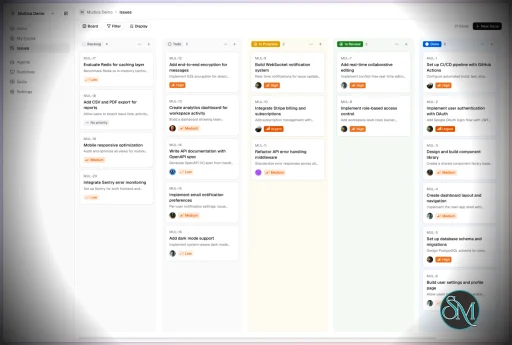
AI agents are assigned tasks
Progress is tracked in real time
Outputs and skills are reused across workflows
Multica currently supports Claude Code, Codex, OpenClaw, and OpenCode out of the box. The daemon auto-detects whichever CLIs you have installed. Since it’s open source, you can also add your own backends.
Download Multica v0.8.0 - Software Mirrors |
|---|
Multica v0.8.0 for Windowsmultica_windows_arm64.zip | 6.89 MB multica_windows_amd64.zip | 7.75 MB multica-desktop-0.8.0-windows-x64.exe | 188.18 MB multica-desktop-0.8.0-windows-arm64.exe | 187.62 MB multica-cli-0.8.0-windows-arm64.zip | 6.89 MB multica-cli-0.8.0-windows-amd64.zip | 7.75 MB |
Multica v0.8.0 for macOSmultica_darwin_arm64.tar.gz | 7.09 MB multica_darwin_amd64.tar.gz | 7.71 MB multica-desktop-0.8.0-mac-x64.zip | 235.55 MB multica-desktop-0.8.0-mac-x64.dmg | 245.16 MB multica-desktop-0.8.0-mac-arm64.zip | 227.66 MB multica-desktop-0.8.0-mac-arm64.dmg | 237.3 MB multica-cli-0.8.0-darwin-arm64.tar.gz | 7.09 MB multica-cli-0.8.0-darwin-amd64.tar.gz | 7.71 MB |
Multica v0.8.0 for Linuxmultica_linux_arm64.tar.gz | 6.78 MB multica_linux_amd64.tar.gz | 7.53 MB multica-desktop-0.8.0-linux-x86_64.rpm | 146.43 MB multica-desktop-0.8.0-linux-x86_64.AppImage | 237.35 MB multica-desktop-0.8.0-linux-arm64.deb | 166.23 MB multica-desktop-0.8.0-linux-arm64.AppImage | 237.2 MB multica-desktop-0.8.0-linux-amd64.deb | 172.68 MB multica-desktop-0.8.0-linux-aarch64.rpm | 141.09 MB multica-cli-0.8.0-linux-arm64.tar.gz | 6.78 MB multica-cli-0.8.0-linux-amd64.tar.gz | 7.53 MB |
Others Download related to Multica v0.8.0checksums.txt | 1.15 kB |
Multica v0.8.0 Source Code
Multica v0.8.0 Source code (zip)
Multica v0.8.0 Source code (tar.gz)
|
Multica v0.8.0 Release Notes: Changelog- b77b0694318118dcda816667fb974cc65fdcfbb3 MUL-5491: feat(metrics): add MiniMax-M3 standard-tier pricing (#6128)
- 98eb195b046ec16290016c31305f1e8878b81981 MUL-6991: fix(skills): advertise filesystem-allocated skill names (#7941)
- 2115a513a375bfe2910b76725b617504faee4b25 MUL-7686: feat(runtime): add native ZCode protocol support (#9514)
- 15461e0328ebc18948cbba109c93f34aa68a26d2 MUL-7698: fix(agent): prefer terminal Hermes provider errors (#8825)
- 5a2cc891ac338eed1919aa11a1eef5957cd82cec MUL-8250: feat(issues): statuses follow the issue's workflow, Default included (#9540)
- 3191de1930c297cf8aed7f9049eb56970ef5e370 MUL-8385 feat(wecom): show the run's steps and reasoning in the bubble while it works (#9696)
- 354243b45947f3c872cafc21e72a35ffc8bcf50d MUL-8386: feat(cli): add workflow and project workflow commands (#9714)
- 7468052dc3e2b06770248d221a624b4613df6403 MUL-8388: feat(wecom): create and connect a bot by scanning a QR code (#9697)
- 53c4bbe5cdee3644279e35b39e3f732b4c6e7fa9 MUL-8395 fix(lark): distinguish bound bots from verified message reception (#9709)
- d5297e2f8da125df2deaa2cd0ea1f8f7e5342ace MUL-8400: fix(execenv): disable Codex agents for catalog-v2 models (#9719)
- 3451e311a629170e14cffc2765ac63834de372b3 MUL-8401: fix(wecom): deliver a relayed seal to the replica holding the bubble (#9717)
- 8333e9bf444f047e92ea37f422637d421ba8ba4e MUL-8402: feat(agent): support Pi 1.4 RPC steering (#9716)
- 0d2607010b1063d30fd52b56e97342ea7f1e854a MUL-8405: fix(agent): drain Claude control replies before closing stdin (#9721)
- 40e42d157266975045a992662cca1f751a55dc1f MUL-8406 fix(onboarding): count computers and scope model discovery (#9730)
- 77c17eb3610de47230830107dfb2ec8b86c41de8 MUL-8410 fix(qoder): run chat turns on Qoder Cloud Agents (#9726)
- 9da40d6696ec3b003442535198a09e6727ca5465 MUL-8411 fix(i18n): use AI 代理 for agent in zh-Hant copy (#9727)
- ac131c55cb83a499a578bc7c647deb570c5596d0 MUL-8416 fix(comments): keep thread owner when root folds into a queued task (#9735)
- 249fdf2d84be0cd4d4415502d9641ec5a3e31478 MUL-8417 fix(chat): open the floating chat with its messages already showing (#9737)
- e8ae72c9dfc1b4474b61a9087f51b33cbee6a048 MUL-8418: fix(usage): correct Cursor variant and OpenAI GPT-5.6 pricing (#9739)
- 727acf20082f247d552db0efab1b09de7d1b39d3 MUL-8419 fix(cli): warn when repo checkout falls back to a stale cache (#9738)
- c185771772cfb2e8bfa5a6b239e1ca3e31791eea MUL-8421: fix(agent): load Multica-installed skills in the Pi runtime via --skill (#9741)
- 893c6b9a1623a6103e677ae64b99bdba3be44bb1 MUL-8422 feat(attachments): page the viewer from a pager under the stage (#9745)
- 22a05d832bbe8aee9b0873ff6bb31ae1fe122fc5 MUL-8423 chore(ui-lab): remove the UI Lab design workbench (#9746)
- e9ba02f6ff1a70b3ce74d0f53325b83b1a7c1e1c MUL-8424 fix(sidebar): light a clicked issue at once instead of All issues first (#9747)
- 38a65f498891f7b4f5db0dc6eb54811793f8bfae MUL-8425 feat(sidebar): right-click quick actions on sidebar issues (#9749)
- 97056cfca998699f3310dce7127dd95ea72a90a8 MUL-8425 fix(issues): open Assignee as a submenu in issue menus (#9752)
- ca7cdb9d5dc128c50c7b0ee5ff141eaeed2e6d5d MUL-8427 feat(sidebar): add a Me and my agents assignee option to the project issue settings (#9750)
- 061a43ae1c0f6b9bd01e113f1f6fcecf63169989 MUL-8429 feat(sidebar): sync Projects settings across devices and push view changes live (#9751)
- 1b778dae1cb15c7d4040b7fc1a2ce0b6439f763d MUL-8430 docs(readme): refresh screenshots for the 1.0 layout (#9754)
- 4bfa91645060a7da1314fb1c9ccc036154879fa7 MUL-8431 feat(layout): name the rail's work space Work instead of Issues (#9748)
- 631d770344b08131a5f57621d8fd14aa527661e5 MUL-8432 feat(desktop): open each workspace in its own window (#9755)
- 4d85b17ff7d1c43024c895a49bda2ab2325f93e8 MUL-8436 feat(issues): Agent status filter, savable into views (#9753)
- f306f98fe2efd88ac59745cdd6f8cb857ee0bd31 MUL-8437 feat(sidebar): change an issue's status from its sidebar icon (#9756)
- 79568902d8451992692a7656b3afa215e0204b75 MUL-8438 feat(sidebar): unread dot for finished agent runs (#9759)
- 0d627e54e1bd4d2521359f293d04521246495ce2 MUL-8439 fix(sidebar): keep the open issue and project in place when an edit filters them out (#9758)
- 939f1a8ece11360ef461f7b17f430649466f527d MUL-8441: default to one issue, one PR; point sub-issue runs at their parent (#9844)
- 37c8fb5a172ac3f2108b8f6e175a603f6fa3a7bf MUL-8448: fix Quick Create default assignment via picker context (#9793)
- cde4175ce340d4f39776eb9b5db73ad8bcf3b148 MUL-8450 fix(telegram): preserve literal bot mentions in private messages (#9769)
- 1c82a5b3f1a890d38d1488b310662ae93a84e6d8 MUL-8453: fix(daemon): retry tasks interrupted by shutdown (#9778)
- c321e49098cd1a3e01714a179c0bfca78c510e0f MUL-8459 refactor(issues): drop redundant text from the advanced filter panel (#9779)
- 485140d89049048c8acc4608e893568d8874d24a MUL-8466: STOE-30: report per-run token usage incrementally from ACP usage_update (#9791)
- f8554cdba92f1f22aecad34a235f9f62a885bda8 MUL-8474: build: use TypeScript 7 for workspace type checks (#9806)
- 92911409c8cc19fc055226082e083e92a706444f MUL-8483: feat(inbox): Needs action / Activity sections, shared read state, per-kind routing in Inbox settings (#9815)
- 3794359792e1e310d89d0488b46efff66e9d2369 MUL-8489: feat(agents): make agent settings easy to reach (#9818)
- 84a15b5fd073376217552a6e8b2cae3dc1879f9b MUL-8490: feat(agents): bring back list search as a header icon (#9821)
- f3b434e2d2736c80e590a2d2dec6e7e7081d8144 MUL-8493: fix(skills): show skill import limit errors in the CLI and raise the file-count cap to 512 (#9823)
- ed7c001778c0226e4ac4e5c4133d6a047922e226 MUL-8496 feat(qoder): run issues with attachments through Qoder Files and image blocks (#9814)
- 82492f94d669e504a2fda36fb6c76f4ac7d65f2e MUL-8510: fix(ghsnapshot): drop cancelled workflow runs that a newer run of the same workflow replaced from the PR rollup (#9860)
- d35410c0b7589f4f2da68ec8d4a2e9a49d42376a MUL-8526: feat(wakeup): add PR review wakeup trigger (--until-pr reviewed) (#9839)
- d52e48f8c737eff69f971db906c95727e911fe57 MUL-8534: fix Devin model discovery with API key authentication (#9859)
- 87ec077e5f56ff66342caef1df1638780acfdf2e MUL-8539: feat: report Qoder Cloud Agents credits usage (#9857)
- cb5ed4f33e363b0444b86a62400ca0c4f85cb7fb MUL-8541: feat(inbox): route comments by who they @mention, not who wrote them (#9864)
- 4e22663a61702c2c0e0b1e8fc35b6786272a791a MUL-8541: revert the two-section Inbox (#9815, #9864) (#9875)
- 9044fb6fb4f628c3b7e822732048f214a33df9c4 MUL-8544: fix(ui): drop the outline on the selected tab in dark mode (#9874)
- 9b1ab4f9eed9153a94719596eb8a728d2770f065 MUL-8546: docs(changelog): release 0.8.0 (#9871)
- e06640a565ec0601f56d90c1d491b3a5711ee822 Revert "MUL-8526: feat(wakeup): add PR review wakeup trigger (--until-pr revi…" (#9862)
- 58402f5d11d2f8f3a22c1bb9fe0d6c52992d3dbe feat(brand): apply Multica brand v3.1 everywhere (#9836)
- 049ca20ec5b80cb9bbe56dcd4f1896d6f2722ee6 feat(comments): surface thread resolution on roots-only list (#9858)
- 7c186016a54eded8566e17163c5e2d5620a888ab feat(core): multica 1.0 part 1 (MUL-8317) (#9635)
- e8b6a97643ccc35efbcf2a4675c8d088a288ed6e feat(runtime): runtime-wide concurrency limit (MUL-8328) (#9795)
- 8fde89a69580b0460cc05131af0b48fe5381fca0 feat(views): unify empty states and add first-run guidance (#9843)
- 908456c60192907f3c7e65709e18846f08eea2f8 feat(wecom): tell the sender when the media budget gives up on an attachment, and count every failure (#9695)
- a71532df3f4f345ae2024447c6202f8bc5e175d3 fix(agents): make mobile builder panes usable (ZIC-385, MUL-8415) (#9764)
- ba51f6e3c8175a65e982f541ff6e4c8ba4d57b62 fix(autopilots): move Edit next to Run now in the detail header (MUL-8480) (#9800)
- 82918d30fc251c4ee27d6b95abd3d97bd5c5b1a0 fix(cli): preserve literal issue attachment paths (#9787)
- f75db6ad55fbdfcf04849295d2231db2fe654fd6 fix(daemon): resume Claude sessions across continued local worktrees (MUL-8413) (#9734)
- 33124064dba035158a05d676c251e3d30127ac5f fix(handler): drop advanced-filter conditions whose values empty out (#9766)
- 950e16bf19c31ff2323566ad67d0a1b94fe4227a fix(qoder): support quick-create with Qoder Cloud Agents (MUL-8412) (#9728)
- 16f0d307dd066d1ce6b73b3fdc648e3e100dda09 fix(realtime): announce comments folded into a queued run (#9702)
- 2fa08f70f3d324cd656b4bef14a16e7073982359 fix(runtimes): delete Agent Builder carriers with their custom runtime profile (MUL-8443) (#9797)
- b6fc06820ad0f055722531920510cb6c12b49050 fix(settings): hide Browser notifications search result where the row does not render (#9867)
- b4e68dce80cc7411d3e05e5c94beae1c6f9ef435 fix(sidebar): align project row + button with Projects header + (#9835)
- 6a60658e85b42aea7173ee9e53f4cb8ca2004977 fix(skills): publish skill:updated for supporting-file writes (MUL-8447) (#9767)
- dc7c986eab3b4ae0a972e75e8378baeb52683652 fix(skills): render label picker trigger as an inline property value (#9790)
- 24b54bc09cebc4234af27ddafabd78b9c49626ad fix(views): drop the uncleared Autopilots rail dot (MUL-8533) (#9853)
- a7a61f15f148ba8c901fe24a36a61d6d73e247d6 fix(web): stop clipping the active changelog node's halo (#9810)
- 53b3fba3d0817995ea1c684429989c1b47cab062 fix(wecom): read a long answer in a bubble to the end (#9692)
- b90696903dedf3339652d75249ba965b9d76a57b test(lark): isolate legacy receipt backfill databases (#9776)
- abdb6124a03f66c37df475f2b67e05f3ad6c7179 test(server): resolve repo dirs relative to the package dir, not runtime.Caller (#9850)
|
Key Features
1. AI Agents as Teammates
Multica treats AI agents like real contributors. You can assign tasks, monitor progress, and manage their work similar to human developers.
2. Multi-Agent Orchestration
Instead of relying on a single AI model, Multica coordinates multiple agents working together on complex tasks, improving efficiency and scalability.
3. Skill Reuse and Compounding
One of its most innovative features is skill accumulation. Agents can reuse previously learned solutions, reducing redundancy and improving performance over time.
4. Real-Time Workflow Tracking
You get a unified dashboard where you can:
This makes it suitable for structured development environments.
5. CLI and Web Interface
Multica provides both:
It supports local and cloud-based environments, offering flexibility in deployment.
6. Open Source and Flexible
Being open source, Multica allows:
This makes it appealing for teams that want control over their AI infrastructure.
Performance and Use Cases
Multica is designed for advanced workflows rather than casual use. It performs best in environments where multiple AI agents are needed to collaborate.
Typical use cases include:
AI-assisted software development
Automation pipelines
Multi-step research and analysis
DevOps and engineering workflows
Its ability to coordinate agents makes it especially useful for complex tasks that go beyond simple prompts.
Quick Install
curl -fsSL https://raw.githubusercontent.com/multica-ai/multica/main/scripts/install.sh | bash
Installs the Multica CLI on macOS and Linux. Works with Homebrew or downloads the binary directly.
Windows (PowerShell):
irm https://raw.githubusercontent.com/multica-ai/multica/main/scripts/install.ps1 | iex
Then configure, authenticate, and start the daemon in one command:
multica setup # Connect to Multica Cloud, log in, start daemon
Self-hosting? Add --with-server to deploy a full Multica server on your machine:
curl -fsSL https://raw.githubusercontent.com/multica-ai/multica/main/scripts/install.sh | bash -s -- --with-server
multica setup self-host
Requires Docker. See the Self-Hosting Guide for details.
Getting Started
1. Set up and start the daemon
multica setup # Configure, authenticate, and start the daemon
The daemon runs in the background and auto-detects agent CLIs (claude, codex, openclaw, opencode) on your PATH.
2. Verify your runtime
Open your workspace in the Multica web app. Navigate to Settings → Runtimes — you should see your machine listed as an active Runtime.
What is a Runtime? A Runtime is a compute environment that can execute agent tasks. It can be your local machine (via the daemon) or a cloud instance. Each runtime reports which agent CLIs are available, so Multica knows where to route work.
3. Create an agent
Go to Settings → Agents and click New Agent. Pick the runtime you just connected and choose a provider (Claude Code, Codex, OpenClaw, or OpenCode). Give your agent a name — this is how it will appear on the board, in comments, and in assignments.
4. Assign your first task
Create an issue from the board (or via multica issue create), then assign it to your new agent. The agent will automatically pick up the task, execute it on your runtime, and report progress — just like a human teammate.
User Experience
The concept behind Multica is powerful, but it comes with complexity.
Requires understanding of AI agents and workflows
Setup may involve configuring runtimes and integrations
More suited for developers than beginners
However, once configured, it provides a highly structured and scalable system.
Pros and Cons
Pros
Open source and highly customizable
Supports multi-agent collaboration
Reusable skill system improves efficiency
Real-time workflow tracking
Flexible deployment options
Cons
Still early-stage and evolving
Setup complexity is high
Requires technical knowledge
Not suitable for simple AI tasks
Who Should Use Multica
Multica is ideal for:
Developers working with AI agents
Teams building automated workflows
Companies experimenting with agent-based systems
Advanced users exploring AI orchestration
It is not designed for casual users who just need a simple chatbot.
Final Verdict
Multica represents the next step in AI tooling, moving from single assistants to collaborative AI systems. While still evolving, it introduces a powerful concept that could shape how teams use AI in development.
Multica is a promising platform for advanced users who want to build scalable, multi-agent AI workflows with full control and flexibility.
If you are exploring multi-agent AI systems or building automated development workflows, Multica is an emerging tool worth paying attention to. It introduces a new way to treat AI agents not just as tools, but as collaborative team members working alongside developers.
Post a Comment/Report Broken Link: