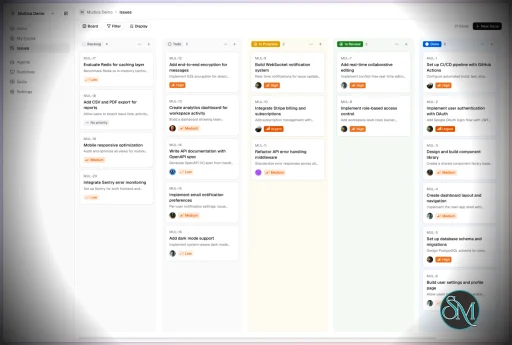
Multica is an open-source platform designed to manage and orchestrate AI agents within development workflows. Instead of running a single AI assistant, it allows multiple agents to collaborate, execute tasks, and share knowledge across projects.
It essentially acts like a control center where:
AI agents are assigned tasks
Progress is tracked in real time
Outputs and skills are reused across workflows
Multica currently supports Claude Code, Codex, OpenClaw, and OpenCode out of the box. The daemon auto-detects whichever CLIs you have installed. Since it’s open source, you can also add your own backends.
Download Multica v0.11.1 - Software Mirrors |
|---|
Multica v0.11.1 for Windowsmultica_windows_arm64.zip | 7.27 MB multica_windows_amd64.zip | 8.17 MB multica-desktop-0.11.1-windows-x64.exe | 195.87 MB multica-desktop-0.11.1-windows-arm64.exe | 195.37 MB multica-cli-0.11.1-windows-arm64.zip | 7.27 MB multica-cli-0.11.1-windows-amd64.zip | 8.17 MB |
Multica v0.11.1 for macOSmultica_darwin_arm64.tar.gz | 7.5 MB multica_darwin_amd64.tar.gz | 8.14 MB multica-desktop-0.11.1-mac-x64.zip | 248.69 MB multica-desktop-0.11.1-mac-x64.dmg | 258.37 MB multica-desktop-0.11.1-mac-arm64.zip | 239.43 MB multica-desktop-0.11.1-mac-arm64.dmg | 249.04 MB multica-cli-0.11.1-darwin-arm64.tar.gz | 7.5 MB multica-cli-0.11.1-darwin-amd64.tar.gz | 8.14 MB |
Multica v0.11.1 for Linuxmultica_linux_arm64.tar.gz | 7.16 MB multica_linux_amd64.tar.gz | 7.95 MB multica-desktop-0.11.1-linux-x86_64.rpm | 156.05 MB multica-desktop-0.11.1-linux-x86_64.AppImage | 251.32 MB multica-desktop-0.11.1-linux-arm64.deb | 179.1 MB multica-desktop-0.11.1-linux-arm64.AppImage | 253.65 MB multica-desktop-0.11.1-linux-amd64.deb | 184.22 MB multica-desktop-0.11.1-linux-aarch64.rpm | 151.67 MB multica-cli-0.11.1-linux-arm64.tar.gz | 7.16 MB multica-cli-0.11.1-linux-amd64.tar.gz | 7.95 MB |
Others Download related to Multica v0.11.1checksums.txt | 1.15 kB |
Multica v0.11.1 Source Code
Multica v0.11.1 Source code (zip)
Multica v0.11.1 Source code (tar.gz)
|
Multica v0.11.1 Release Notes: Changelog- 528cd82711f2f99eedd04e4d3a68c6c31b514659 MUL-8370 fix(docs): restrict doc and folder deletion to creators and admins (#10946) (@Bohan-J)
- dea291501487e4c2fc07995c8c6c3875d5a024c0 MUL-9153: feat(dev): dev-fixtures task kind holds a running agent task (#10924) (@forrestchang)
- 61cb1f18950cb3b1f1fbf68659b2b20367bb1364 MUL-9539: test(perf): benchmark big issues and Inbox switching on a large workspace (#10891) (@multica-eve)
- 9776231579fbfa27a553c65be8f57a97af82441f MUL-9539: test(perf): one-command core-path comparison; digest the whole dataset generator (#10927) (@Bohan-J)
- 63cebc194804125d9e7846c029724c25f7ab80f4 MUL-9549: feat(cli): manage the inbox from the CLI with owner-gated writes (#10861) (@forrestchang)
- ffc02aaf2d66b640057f349456c30dbaf97ee11e MUL-9575: perf(inbox): mount only the visible rows once the Work panel shows the whole Inbox (#10902) (@multica-eve)
- 84bf627f2ffff90826cbcc71dd24deacc4f1f225 MUL-9609 perf(desktop): benchmark tab switches and Inbox clicks, cut per-switch render work (#10939) (@multica-eve)
- e67937b15bdc4ca33a9c4299a43355014adff0f0 MUL-9612: test(perf): run the core-path benchmark on Desktop, with idle CPU and memory growth (#10930) (@multica-eve)
- 10d23898adbc99322ee6d77b0d06938ebd7d1f0a MUL-9616: fix(prompt): align chat wakeup, docs and inbox agent-facing text (#10941) (@multica-eve)
- 32fc2ad9a4129755cc0a946f518b8a9ae34476ac MUL-9635 fix(inbox): retry busy inbox reads and show a load error instead of an empty Inbox (#10959) (@multica-eve)
- 1fecba3a303b644c611b453ce2212264b30e3449 MUL-9644 feat(inbox): keep each inbox to its newest 2,000 notifications (#10969) (@multica-eve)
- c08ba8fc2d429a3b96a41b8bb73d07200cce188b MUL-9644 fix(inbox): keep a woken issue's return rank without waiting on the trimmer (#10973) (@multica-eve)
- e1fe10d6694848e35dd1aa00e08cd11d93e545ac MUL-9651 fix(inbox): scope unread summary to a task's bound workspace (#10974) (@multica-eve)
- ee4626c07364bdf5c208790b84e41d154cdaeb54 MUL-9651: changelog for 0.11.1 (#10972) (@multica-eve)
- d08a9d99b6f2055ee29e6939a70f6d5e25566855 docs: clarify Antigravity reasoning model selection (#10914) (@ADanMan)
- 315b06ed8cd53be0a4bb64a9e67d66eb65c9ea47 docs: explain agent and repository working directories (#10901) (@ADanMan and @multica-eve)
- 9bcdb539e17982ea73334260f0835eabcca06a65 docs: fix CLI installation and clarify private projects and comment skills (MUL-9617) (#10937) (@forrestchang)
- 7b7c98bc27c9e8d02b525f260649a955d3f6884a docs: keep dev workers out of backend test databases (#10900) (@ADanMan and @multica-eve)
- 608c6454b9b7aaf90b182b90ec87620fb570bd9c docs: translate Hermes dependency reinstall troubleshooting (#10915) (@ADanMan)
- 38442ead47dcf899b6005948ead23fe33da43e9b feat(billing): Free / Pro / Business plans, checkout by plan, and plan switching (MUL-9484) (#10885) (@multica-eve)
- e16c89b6141b7a12ff9e7534657e08b20220c3a5 feat(billing): show the no-card Business trial in the app (MUL-9485) (#10956) (@multica-eve)
- 0c10f0e00e16c6524c46707b260218cc7d1d9dbd feat(channels): add shared help command (MUL-9553) (#10865) (@gogodjzhu and @multica-eve)
- 820594f2d3b4cc5c0375c3df7e37e5f63e49f071 feat(docs): add lightweight Docs with version history (MUL-8370) (#10176) (@Bohan-J)
- e6507d78471b6710041822067675b6b2308aeb62 feat(docs): put Docs behind the docs_v1 feature flag (MUL-9645) (#10970) (@Bohan-J)
- 4f7bfd5e2dfdaa38f346b22c472a9f33de39d345 feat(docs): search docs by content for people and agents (MUL-8370) (#10954) (@multica-eve)
- 24761d76a0c624b7dd6bda23e5a4289a24837019 feat(issues): put the issue sidebar on floating cards (MUL-9592) (#10922) (@forrestchang)
- e18fe48271f1be0d642d64ea7b419c4f676b3c09 feat(issues): split the issue sidebar into an action card and one property card (MUL-9592) (#10928) (@forrestchang)
- 1ebe305375f9456e8be0b028443d7b2687ca1ad3 fix(agent): report runtime version probe timeouts (#10908) (@ADanMan and @multica-eve)
- 358d05301d77c7cc116e89c5d20b092a398c0261 fix(attachments): keep task-token attachment reads in the bound workspace (#10975) (@multica-eve)
- 65410a76d604ce1f05065bc66eff0136f45ab371 fix(cli): distinguish incomplete responses from unreachable servers (#10904) (@ADanMan)
- 169f0c9e21cea977f754f7e5260d96f62dbc84cf fix(daemon): keep Codex timeout default when watchdog is off (#10906) (@ADanMan)
- 38c5cabeb1acf769ea2fd72a34760544682f6be3 fix(docs): drop NUL bytes from doc and folder text (#10936) (@pseudoyu)
- aa15cd6bada432f1dd54a084361b64a27fa7c953 fix(docs): keep a space typed at the end of the title across autosave (#10935) (@pseudoyu)
- cbe57a4964174e937844a2a25a3eb486f5ece31f fix(docs): show a deleted doc as not found (#10953) (@pseudoyu)
- d4ab1bcc38e9abc2284391edee5448d0b662215f fix(editor): open attachment links in the in-app viewer instead of the raw URL (MUL-9566) (#10886) (@forrestchang)
- 5f74c8ec80dcd426746e2b6c040630a30a6a68ab fix(execenv): expose shared bundled marketplaces in per-task codex-home (#10881) (@WitMiao)
- 5dcabc501fdb2cb7e7691d8b5818e4c9a1b5fc5b fix(inbox): light the Work panel Inbox row of an issue opened from it again (#10903) (@multica-eve)
- 76a4dd4c7c1ff8574b23147da7414d75bbbf73eb fix(issues): drop NUL bytes from issue and project text (#10944) (@pseudoyu and @multica-eve)
- bb0e5e4e49a274c8dc55d6551a8da7a329fe53a2 fix(issues): reveal the clipped header title on hover (#10917) (@JenniferWood)
- 6c8a74bb466fc3e3927bff6d7e44760826a6c8cf fix(projects): clear stale branch when repository URL changes (#10889) (@LANBuilds and @multica-eve)
- 4b3697363002247e46332f40499b3104844f3241 fix(views): keep every page's scroll position across Desktop tab switches (MUL-9567) (#10896) (@multica-eve)
- 3212e49fb32c037c44c9a7f14aa50b407fee2178 perf(deliverables): load downscaled thumbnails in image tiles (MUL-9563) (#10892) (@forrestchang)
- 3a181ffc8f827face1f71f938cf178be37537fd5 perf(i18n): share useT's translator and i18n view across components (MUL-9538) (#10913) (@forrestchang)
- 9aadf3701c00e3fcad6f95146ed69c9a0f0f2376 perf(inbox): warm a notification's issue before it is opened (MUL-9538) (#10893) (@forrestchang)
- 9bdfb69afc89168379c773aa971928d33b935971 perf(issues): a deep link's first frame renders only its target (MUL-9538) (#10910) (@forrestchang)
- f5831e594297e4574326c81f67509cc9dfea5b48 perf(issues): land deep links on the target without mounting the history (MUL-9538) (#10874) (@forrestchang)
- 26fbe260b16b444b059e4b9f12c7ce461b497b43 perf(rich-content): parse a comment's Markdown once and reuse it across mounts (MUL-9538) (#10911) (@forrestchang)
- 87dcb5746f103be5f72763ac0f8f37d9b7e4cd73 perf(web): reuse and fully prefetch route payloads (MUL-9538) (#10920) (@forrestchang)
- ffe80875eb002ab21db7f73b5a171be995bc9fff revert: issue sidebar floating cards (MUL-9592) (#10948) (@forrestchang)
- b2f3fac92cd2e27a682416b5031ca5b0c4b17f57 test(agent): write fixture executables under the fork lock (#10940) (@pseudoyu and @multica-eve)
- 020a7354ec5cd5f50b0ffed14d71446c7196f6f8 test(handler): give paginated task fixtures ids no other package uses (#10955) (@pseudoyu)
- 482ea80f595ca6b91362c11320baa0b6510f2e85 test(inbox): walk every /api/inbox route for the owner gate (MUL-9595) (#10921) (@forrestchang)
- a697573741d0c53e7aeb484325de79a7c5e2158f test(perf): end the open step at the first screen, not an offscreen comment (MUL-9539) (#10929) (@multica-eve)
- de9f8c204e12206067dad2c93513f0b7adcc8570 test(perf): measure Inbox jumps to a deep comment, cold and warm (MUL-9538) (#10894) (@forrestchang)
- fe4b13a3c3ac01d4213cab7e03b536f5d2bf2f21 test(projects): probe every route that loads a project object by id (MUL-9597) (#10925) (@forrestchang)
|
Key Features
1. AI Agents as Teammates
Multica treats AI agents like real contributors. You can assign tasks, monitor progress, and manage their work similar to human developers.
2. Multi-Agent Orchestration
Instead of relying on a single AI model, Multica coordinates multiple agents working together on complex tasks, improving efficiency and scalability.
3. Skill Reuse and Compounding
One of its most innovative features is skill accumulation. Agents can reuse previously learned solutions, reducing redundancy and improving performance over time.
4. Real-Time Workflow Tracking
You get a unified dashboard where you can:
This makes it suitable for structured development environments.
5. CLI and Web Interface
Multica provides both:
It supports local and cloud-based environments, offering flexibility in deployment.
6. Open Source and Flexible
Being open source, Multica allows:
This makes it appealing for teams that want control over their AI infrastructure.
Performance and Use Cases
Multica is designed for advanced workflows rather than casual use. It performs best in environments where multiple AI agents are needed to collaborate.
Typical use cases include:
AI-assisted software development
Automation pipelines
Multi-step research and analysis
DevOps and engineering workflows
Its ability to coordinate agents makes it especially useful for complex tasks that go beyond simple prompts.
Quick Install
curl -fsSL https://raw.githubusercontent.com/multica-ai/multica/main/scripts/install.sh | bash
Installs the Multica CLI on macOS and Linux. Works with Homebrew or downloads the binary directly.
Windows (PowerShell):
irm https://raw.githubusercontent.com/multica-ai/multica/main/scripts/install.ps1 | iex
Then configure, authenticate, and start the daemon in one command:
multica setup # Connect to Multica Cloud, log in, start daemon
Self-hosting? Add --with-server to deploy a full Multica server on your machine:
curl -fsSL https://raw.githubusercontent.com/multica-ai/multica/main/scripts/install.sh | bash -s -- --with-server
multica setup self-host
Requires Docker. See the Self-Hosting Guide for details.
Getting Started
1. Set up and start the daemon
multica setup # Configure, authenticate, and start the daemon
The daemon runs in the background and auto-detects agent CLIs (claude, codex, openclaw, opencode) on your PATH.
2. Verify your runtime
Open your workspace in the Multica web app. Navigate to Settings → Runtimes — you should see your machine listed as an active Runtime.
What is a Runtime? A Runtime is a compute environment that can execute agent tasks. It can be your local machine (via the daemon) or a cloud instance. Each runtime reports which agent CLIs are available, so Multica knows where to route work.
3. Create an agent
Go to Settings → Agents and click New Agent. Pick the runtime you just connected and choose a provider (Claude Code, Codex, OpenClaw, or OpenCode). Give your agent a name — this is how it will appear on the board, in comments, and in assignments.
4. Assign your first task
Create an issue from the board (or via multica issue create), then assign it to your new agent. The agent will automatically pick up the task, execute it on your runtime, and report progress — just like a human teammate.
User Experience
The concept behind Multica is powerful, but it comes with complexity.
Requires understanding of AI agents and workflows
Setup may involve configuring runtimes and integrations
More suited for developers than beginners
However, once configured, it provides a highly structured and scalable system.
Pros and Cons
Pros
Open source and highly customizable
Supports multi-agent collaboration
Reusable skill system improves efficiency
Real-time workflow tracking
Flexible deployment options
Cons
Still early-stage and evolving
Setup complexity is high
Requires technical knowledge
Not suitable for simple AI tasks
Who Should Use Multica
Multica is ideal for:
Developers working with AI agents
Teams building automated workflows
Companies experimenting with agent-based systems
Advanced users exploring AI orchestration
It is not designed for casual users who just need a simple chatbot.
Final Verdict
Multica represents the next step in AI tooling, moving from single assistants to collaborative AI systems. While still evolving, it introduces a powerful concept that could shape how teams use AI in development.
Multica is a promising platform for advanced users who want to build scalable, multi-agent AI workflows with full control and flexibility.
If you are exploring multi-agent AI systems or building automated development workflows, Multica is an emerging tool worth paying attention to. It introduces a new way to treat AI agents not just as tools, but as collaborative team members working alongside developers.
Post a Comment/Report Broken Link: