Multica is an open-source platform designed to manage and orchestrate AI agents within development workflows. Instead of running a single AI assistant, it allows multiple agents to collaborate, execute tasks, and share knowledge across projects.
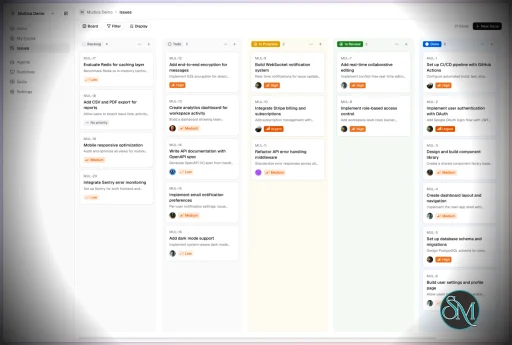
It essentially acts like a control center where:
AI agents are assigned tasks
Progress is tracked in real time
Outputs and skills are reused across workflows
Multica currently supports Claude Code, Codex, OpenClaw, and OpenCode out of the box. The daemon auto-detects whichever CLIs you have installed. Since it’s open source, you can also add your own backends.
Download Multica v0.11.0 - Software Mirrors |
|---|
Multica v0.11.0 for Windowsmultica_windows_arm64.zip | 7.24 MB multica_windows_amd64.zip | 8.13 MB multica-desktop-0.11.0-windows-x64.exe | 195.75 MB multica-desktop-0.11.0-windows-arm64.exe | 195.25 MB multica-cli-0.11.0-windows-arm64.zip | 7.24 MB multica-cli-0.11.0-windows-amd64.zip | 8.13 MB |
Multica v0.11.0 for macOSmultica_darwin_arm64.tar.gz | 7.46 MB multica_darwin_amd64.tar.gz | 8.1 MB multica-desktop-0.11.0-mac-x64.zip | 248.42 MB multica-desktop-0.11.0-mac-x64.dmg | 258.09 MB multica-desktop-0.11.0-mac-arm64.zip | 239.17 MB multica-desktop-0.11.0-mac-arm64.dmg | 248.78 MB multica-cli-0.11.0-darwin-arm64.tar.gz | 7.46 MB multica-cli-0.11.0-darwin-amd64.tar.gz | 8.1 MB |
Multica v0.11.0 for Linuxmultica_linux_arm64.tar.gz | 7.13 MB multica_linux_amd64.tar.gz | 7.91 MB multica-desktop-0.11.0-linux-x86_64.rpm | 155.88 MB multica-desktop-0.11.0-linux-x86_64.AppImage | 251.05 MB multica-desktop-0.11.0-linux-arm64.deb | 179 MB multica-desktop-0.11.0-linux-arm64.AppImage | 253.39 MB multica-desktop-0.11.0-linux-amd64.deb | 183.95 MB multica-desktop-0.11.0-linux-aarch64.rpm | 151.43 MB multica-cli-0.11.0-linux-arm64.tar.gz | 7.13 MB multica-cli-0.11.0-linux-amd64.tar.gz | 7.91 MB |
Others Download related to Multica v0.11.0checksums.txt | 1.15 kB |
Multica v0.11.0 Source Code
Multica v0.11.0 Source code (zip)
Multica v0.11.0 Source code (tar.gz)
|
Multica v0.11.0 Release Notes: Changelog- 874897897fdd9ab8e26158521a0d14c1ffa2d452 MUL-7745 MUL-9463: fix(squads): run an @agent mention of the assigned squad's leader as a leader task (#8918) (@ADanMan)
- ed46a867d294e0faa00306ecc6bdc59293fbe42c MUL-8211: MUL-8209: feat(autopilots): payload conditions on webhook event filters (#9485) (@gsayer)
- 425cf08b6286260900f34b7dd8369597b414a747 MUL-8549 feat(weixin): add native QR-linked WeChat IM channel (#9869) (@luxuze)
- 861c0ca357db6baf62e9ffb61dacea6e70a04a7f MUL-8549 fix(weixin): show the QR directly in the connect dialog (#10795) (@multica-eve)
- b70c8b96d0c638e73802336063abfe3734f69f65 MUL-9102: Support GitLab system hook merge request events (#10411) (@xiaoAriana)
- b490006d26ad22d145ce3b461e7441edb9415955 MUL-9193: feat(autopilots): edit webhook filter rules and conditions in place (#10800) (@multica-eve)
- 0e917ecf4c45d26b15acc8671cfe8fa21d53daf0 MUL-9193: fix(autopilots): edit each webhook trigger from its own row (#10793) (@multica-eve)
- fe5fb2333f24edc94153ecf339856676c7bb553c MUL-9402: preserve latest scroll offsets when switching issue views (#10736) (@Bohan-J)
- 0a4795db3cd2f20da58ea2157de8d06ac4d8c366 MUL-9406: gate stable release promotion and recover updater failures (#10750) (@multica-eve)
- 9b3982711d254346537b608890967c286304dc55 MUL-9409: perf(issues): virtualize long-content threads and remember reply heights (#10744) (@Bohan-J)
- 1ed474c9716e8438c677c7eaed96082da494951d MUL-9418 refactor(billing): remove the issue count limit and the billing test page (#10808) (@multica-eve)
- 46a0c508751b8a3e53fb9b1d555238d470417d03 MUL-9425: bind custom runtimes to the selected machine (#10746) (@multica-eve)
- 0e3b2f204cf18a956d9dfddb18a5474e27e74b0a MUL-9433: fix(composio): preserve empty tool arguments (#10763) (@multica-eve)
- 4c691ba31c70130945a146dcd0af7caa2fa47ef1 MUL-9442: complete Copy link with title in issue and project menus (#10769) (@multica-eve and @polli-agent[bot])
- 7e9c077031381ac18edfa76305fcdfd3a4844405 MUL-9456: bound inbox read load and coalesce summary refreshes (PR1) (#10798) (@multica-eve)
- 2a6cd018486ff1345df5f2967f96be0975318f13 MUL-9460: fix HTML preview fragment navigation (#10797) (@multica-eve)
- 4ad6d830364e4e34f4ad7ac475d1ff8fee4628bd MUL-9474 fix(weixin): let agent owners manage WeChat connections (#10802) (@luxuze)
- 84ab6ff0254356f6165ee12157c251ecb84b453f MUL-9501: fix(daemon): stop claim delivery from deadlocking concurrent chat sends (#10828) (@forrestchang)
- 2f9df1b6d739b875ddf04bab010b29d2c1a1ef48 MUL-9504: docs: document agent/runtime row lock order and modes (#10832) (@forrestchang)
- cb190810a659c1a61c4a86d9f6ecfc9df4b086d8 MUL-9559: docs(changelog): release 0.11.0 (#10884) (@multica-eve)
- 6fc64f22cc4ba1b20303224ccdc5f6fa348b99f8 chore(entitlement): remove retired issue count compatibility fixtures (#10812) (@multica-eve)
- aefd8ac7c08fc89cdc9f849dec0196f8971ebe1e docs(autopilots): explain GitLab webhook action filters (MUL-9480) (#10809) (@Bohan-J)
- 56dabd7cf57405948acf83d55ef664b5ef17cbc9 docs(daemon): describe Cursor MCP logins for agents without MCP config (MUL-9517) (#10841) (@forrestchang)
- a7a9cecac9c6d57bb9f173d09f6342a40171293f docs(lark): clarify source ids for batched and recovered runs (#10856) (@ADanMan)
- a17a0e0fc335264febc3621e347073e6596ae54b docs: complete WeChat guides and channel references (MUL-9446) (#10773) (@forrestchang)
- 31add55b533c0fbcd746c85c652fb5be9fefdd14 docs: document chat wakeups and sync guide translations (MUL-9533) (#10855) (@forrestchang and @multica-eve)
- 288601166cd411baa3b75d94d33b9270394ecd45 docs: remove unreferenced docs/engineering notes (MUL-9405) (#10734) (@Bohan-J)
- 11179821ff21a24f9747d0e4e9e8c503751025f2 feat(chat): chat wakeups — come back to the conversation when dispatched work finishes (MUL-9439) (#10770) (@forrestchang)
- 0dfa8290ca7771ca35fd4bbe6da2148356244c0d feat(cli): add read-only inbox list with owner-triggered access (MUL-9382) (#10726) (@multica-eve and @robertn702)
- 1c216916899798e81419412f2ad7eaecbb74b181 feat(cli): allow autopilot squad assignees (#4576 rebased onto main) (#10709) (@AkkiaS7 and @multica-eve)
- ca516b2df5ead17dc35bde9bfb8e739b1c5959c4 feat(editor): mention projects from any editor, not only chat (MUL-9496) (#10820) (@forrestchang)
- 505026479d93edeb8aa42d849a7974d92b4d7416 feat(entitlement): observe mode and per-workspace over-limit records (MUL-9481) (#10811) (@multica-eve)
- 2d4da48ce077fa42abae3cbda70c2508a366deac feat(entitlement): paid-feature restrictions with read-only downgrade, starting with private projects (MUL-9482) (#10819) (@multica-eve)
- 8fa8e4f72598755360aa0930970de17e682b4d3a feat(issues): add sub-issues to the issue sidebar (#10786) (@boyfeiyu and @multica-eve)
- 23727a6387ca207b1b6cc2c673b0e8a755951420 feat(issues): offer target-agent skills in comment slash menu (#10774) (@AstralSolipsism and @multica-eve)
- 75e06b14462543273067750ac933bced8e27a503 feat(issues): tell the caller why an issue write started no run (#10858) (@xiaoke12345678 and @multica-eve)
- ba201d48ca79e9285273d0f8bc1c5078fc92bea0 feat(mobile): steer running chat replies and keep an explicit queue (MUL-9404) (#10735) (@multica-eve)
- 69c76cc2fe656ef8bafe22579060b17e794ed983 feat(notifications): mute status changes by default (MUL-9449) (#10778) (@forrestchang)
- 71683141a764ed3b1620db4bc26a2d0a098f135c feat(runtimes): show Claude Code and Codex plan limits on runtime pages (MUL-9427) (#10752) (@multica-eve)
- bdf02f70c4576f99c6c796d965a00d24bc9459d0 feat(views): text icon for the workspace logo (#10792) (@DonYum)
- fd3aa99e5bea1c134ed9aa4aa3d540563d6c80a3 feat: default to non-interrupting Chat steering (MUL-9374) (#10715) (@Bohan-J)
- 4c5a6a52b02d0b2fea1eed40af8209ef1155dddc feat: project folders, with server/ee and packages/ee (MUL-9390) (#10817) (@forrestchang)
- 0fb8e4a4c8331ea1b6ebf2f6e7b9937638d66674 fix(agent): invoke explicitly selected skills across chat and issue comments (#10772) (@AstralSolipsism and @multica-eve)
- 9c2277a830fb476ea71b15ba10120f2d020afb37 fix(attachments): refresh image access when opening the viewer (#10854) (@ADanMan and @multica-eve)
- fda2dbf5b9218b3fec58204712740e9c49678ba8 fix(autopilots): deduplicate webhook issues by delivery (#10559) (@wzc1753)
- 633fc580d2667923d91d2c4f4202c0c3ff47ad93 fix(autopilots): match GitLab pipeline and job statuses (#10810) (@Bohan-J)
- a1a52750dfe94e5bacb4903e45dbef60934e0b08 fix(chat): follow up by default when acting toward others for the user (#10826) (@forrestchang)
- b6018d5a566ac96fab7a071ea355e46541de3d7c fix(cli): clarify cross-issue wakeups in wakeup events output (MUL-9468) (#10814) (@multica-eve)
- 2dfa62c1207558807c2be392240a1c343b5a0c9b fix(comments): suppress same-issue agent self-mentions (#10765) (@multica-eve)
- b12c1e54ebe4f19bd13e8f85500e587ab07c8b17 fix(daemon): derive safe names for plugin MCP servers (#10837) (@Frezc)
- f1c4090ed0ae832759749ea0ab0a38cb39e9d67a fix(daemon): keep Cursor MCP logins across tasks for agents without MCP config (MUL-9470) (#10836) (@forrestchang)
- 670082cffe0b6c25ea36d62fb31939adbd2d5e93 fix(daemon): keep tracked runtime briefs out of agent commits (#10787) (@leilei3167 and @multica-eve)
- 9be1dba7bf5cad298ce1b465aec0cb332580b3a3 fix(daemon): persist Cursor MCP logins per agent and show a login entry when missing (MUL-9450) (#10780) (@forrestchang)
- a266acdd46699f81cba3062208c2f230d0ef5108 fix(daemon): re-probe the pi context-load baseline at 1.5.2 (#10713) (@rwifeng and @multica-eve)
- 84c626cda95ad8a851fd98bbff198855fd554103 fix(daemon): release execution capacity while Direct tasks wait for a directory (#10846) (@ADanMan)
- 7a08b0fecd3fa77f0fdadc8a97d56b5ac6139113 fix(daemon): retain actionable DSH profile startup diagnostics (#10747) (@ADanMan)
- 428ef30fed49ad3233ef041e74999ecc8fa3168e fix(desktop): keep tab Pin/Close clickable in fullscreen on a secondary display (#10825) (@rawlencecn)
- 44f5346e1ef03ea1d6b96062de35495a2207630a fix(desktop): prevent Windows arm64 update downgrades (#10749) (@multica-eve)
- 7d5af76dc71b56c3011a03ba90957fdec9499126 fix(desktop): require the target CLI before packaging (#10212) (@ADanMan)
- 5600e0dbcd8ffb3351df8a0f2feeaf455e091610 fix(dev-env): make down honours C= and destroy refuses it (MUL-9471) (#10799) (@forrestchang)
- 358928eab0a7078d3e2a9df6458e6f13da39bfe2 fix(dev-env): restart a daemon that is not running the current build (MUL-9502) (#10827) (@forrestchang)
- 5ed074b4f8e22cbf631b49fb0d7b4697794e6353 fix(dev-env): restart an api that was compiled before uncommitted server/ changes (MUL-9513) (#10833) (@forrestchang)
- b7e537974c420c008a229dbdbae3f9f7e0081f85 fix(inbox): keep status/priority labels from collapsing to an ellipsis (MUL-9407) (#10737) (@Bohan-J)
- 36c11d17c41a6e30f2d88a8d231f3ce89b588240 fix(inbox): land notification clicks on their comment below long descriptions (MUL-9492) (#10872) (@multica-eve)
- 0f3e15f1d9dca781155e2fe475161f8c5e499b44 fix(inbox): require owner-triggered runs to read archived notifications (MUL-9411) (#10739) (@multica-eve)
- 001a382512f0a28f8c187763feb8ff9a945f959f fix(inbox): stop notifying squad members on @squad mentions (#10794) (@Bohan-J)
- cd969f84829187bf482ba119e9b1379d01f645bc fix(issues): log why an issue write did not start a run (#10857) (@xiaoke12345678)
- dddb27c793cb51fe95339f22c34e5fb71778c840 fix(issues): report failed field updates after navigation (#10848) (@ADanMan)
- d24caa8fdcaed5ec4f442a57353a136649136ec2 fix(issues): start the assignee's run when a coordinator promotes its own issue (#10840) (@499376536 and @multica-eve)
- a0ee9738cd56ce0348f6a743ccafb37170b6d23a fix(migrate): give runtime rate limits a unique migration number (#10768) (@ADanMan)
- dec0f23fe78d3f15d943089214ae2cf1ac3f5b5c fix(projects): decode pasted GitHub branch URLs (#10875) (@LANBuilds)
- ba10632093a69178be5a0902ecca256005e519bd fix(rail): mark all chats read from the Chat rail menu (MUL-9499) (#10824) (@forrestchang)
- fe0059cb21315ed1a5e06767a2e52f8ce65ef18b fix(runtimes): trim the Codex credit balance to two decimals (#10816) (@forrestchang)
- 24d6777150b3dd0e5f2dd0d468fb98d74e680540 fix(selfhost): pass the generated Postgres password to Compose on first run (#10523) (@mookechee and @multica-eve)
- f1e2dbe3a3a3661fe350b888edc214e938b9653f fix(server): keep squad leader fallback for agent comments that mention people (MUL-9436) (#10760) (@AkkiaS7 and @multica-eve)
- cf648114c420795a7c0a6c00516469fb3d65afa6 fix(server): restore GitLab webhook action filtering (MUL-9476) (@DDxxg)
- a86a6c7b24f2bf2dfca637f99127f7a53fa06d9b fix(settings): MUL-9467 manage multiple GitHub connections (#10804) (@multica-eve)
- 0f583db12cce91a084e24a0b3091c28504e9920b fix(skills): enforce size limits on manual writes (#10761) (@Frezc and @multica-eve)
- 62ef4370a540e35d1c99c5dcbc7eceb03c54844b fix(tasks): create retries on the agent's current runtime (#10788) (@xiaoke12345678)
- 47b8fc3af7c2addb7906ce459fb496e136c30a46 fix(tasks): leave the parent's session behind when a retry changes runtime (#10859) (@pseudoyu)
- 1c35d16909b7ae5e859cdba758bf725050e5b3e0 fix(tasks): serialize pending writes with runtime rebinding (#10801) (@multica-eve)
- 4a826aadc012099d449360836a2d09be0f31f623 fix(views): keep intro actions clickable after carousel paging (#10813) (@catPaw-s)
- 47a92f2d3122aff440aebbe513d719ba71ad2f3c fix(views): restore Projects board horizontal scroll (MUL-9403) (#10733) (@Bohan-J)
- e7a41d8b05df2acb0d03a32e9832d8d9135d183d fix(views): restore the board's horizontal scroll across tab switches (#10720) (@rawlencecn)
- a1b8052d8f2a296be913e7a94bac3db7ec22898c fix: deliver Chat steering and show current-run hint (MUL-9410) (#10743) (@Bohan-J)
- acf9f6c3fd191b99e7d87cc3ecba53bd707006cc fix: distinguish skill package sizes and context delivery totals (#10764) (@ADanMan and @multica-eve)
- ff41e7a77010fcac63f9d1e7244161fe99b6b69e fix: remove explicit queue action from chat input (#10738) (@Bohan-J)
- 5bb66f20ffe7718a59da1700e3d57e1c5f2e5901 perf(inbox): open notifications at the issue's canonical URL (MUL-9538) (#10868) (@forrestchang)
- cf3709212613eddd9fc557c0a900ca62a111116d perf(issues): find in a long issue without rendering its history (MUL-9538) (#10860) (@forrestchang)
- 6073d1e39cd0ee284d7b9812a8accf9a85089564 perf(issues): stop sidebar toggles from re-rendering the issue timeline (MUL-9426) (#10767) (@Bohan-J)
- ffbe30256f1534d8603b8a549c69337a77a96ec6 test(daemon): await DSH provisioning before fixture cleanup (#10852) (@ADanMan)
|
Key Features
1. AI Agents as Teammates
Multica treats AI agents like real contributors. You can assign tasks, monitor progress, and manage their work similar to human developers.
2. Multi-Agent Orchestration
Instead of relying on a single AI model, Multica coordinates multiple agents working together on complex tasks, improving efficiency and scalability.
3. Skill Reuse and Compounding
One of its most innovative features is skill accumulation. Agents can reuse previously learned solutions, reducing redundancy and improving performance over time.
4. Real-Time Workflow Tracking
You get a unified dashboard where you can:
This makes it suitable for structured development environments.
5. CLI and Web Interface
Multica provides both:
It supports local and cloud-based environments, offering flexibility in deployment.
6. Open Source and Flexible
Being open source, Multica allows:
This makes it appealing for teams that want control over their AI infrastructure.
Performance and Use Cases
Multica is designed for advanced workflows rather than casual use. It performs best in environments where multiple AI agents are needed to collaborate.
Typical use cases include:
AI-assisted software development
Automation pipelines
Multi-step research and analysis
DevOps and engineering workflows
Its ability to coordinate agents makes it especially useful for complex tasks that go beyond simple prompts.
Quick Install
curl -fsSL https://raw.githubusercontent.com/multica-ai/multica/main/scripts/install.sh | bash
Installs the Multica CLI on macOS and Linux. Works with Homebrew or downloads the binary directly.
Windows (PowerShell):
irm https://raw.githubusercontent.com/multica-ai/multica/main/scripts/install.ps1 | iex
Then configure, authenticate, and start the daemon in one command:
multica setup # Connect to Multica Cloud, log in, start daemon
Self-hosting? Add --with-server to deploy a full Multica server on your machine:
curl -fsSL https://raw.githubusercontent.com/multica-ai/multica/main/scripts/install.sh | bash -s -- --with-server
multica setup self-host
Requires Docker. See the Self-Hosting Guide for details.
Getting Started
1. Set up and start the daemon
multica setup # Configure, authenticate, and start the daemon
The daemon runs in the background and auto-detects agent CLIs (claude, codex, openclaw, opencode) on your PATH.
2. Verify your runtime
Open your workspace in the Multica web app. Navigate to Settings → Runtimes — you should see your machine listed as an active Runtime.
What is a Runtime? A Runtime is a compute environment that can execute agent tasks. It can be your local machine (via the daemon) or a cloud instance. Each runtime reports which agent CLIs are available, so Multica knows where to route work.
3. Create an agent
Go to Settings → Agents and click New Agent. Pick the runtime you just connected and choose a provider (Claude Code, Codex, OpenClaw, or OpenCode). Give your agent a name — this is how it will appear on the board, in comments, and in assignments.
4. Assign your first task
Create an issue from the board (or via multica issue create), then assign it to your new agent. The agent will automatically pick up the task, execute it on your runtime, and report progress — just like a human teammate.
User Experience
The concept behind Multica is powerful, but it comes with complexity.
Requires understanding of AI agents and workflows
Setup may involve configuring runtimes and integrations
More suited for developers than beginners
However, once configured, it provides a highly structured and scalable system.
Pros and Cons
Pros
Open source and highly customizable
Supports multi-agent collaboration
Reusable skill system improves efficiency
Real-time workflow tracking
Flexible deployment options
Cons
Still early-stage and evolving
Setup complexity is high
Requires technical knowledge
Not suitable for simple AI tasks
Who Should Use Multica
Multica is ideal for:
Developers working with AI agents
Teams building automated workflows
Companies experimenting with agent-based systems
Advanced users exploring AI orchestration
It is not designed for casual users who just need a simple chatbot.
Final Verdict
Multica represents the next step in AI tooling, moving from single assistants to collaborative AI systems. While still evolving, it introduces a powerful concept that could shape how teams use AI in development.
Multica is a promising platform for advanced users who want to build scalable, multi-agent AI workflows with full control and flexibility.
If you are exploring multi-agent AI systems or building automated development workflows, Multica is an emerging tool worth paying attention to. It introduces a new way to treat AI agents not just as tools, but as collaborative team members working alongside developers.
Post a Comment/Report Broken Link: