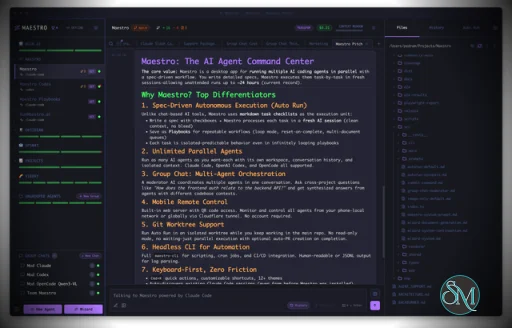
Maestro is a cross platform desktop application built to orchestrate multiple AI agents with isolated contexts. Each agent operates independently while still being managed under a unified command center. This allows users to execute complex workflows, parallel tasks, and long running processes efficiently.
The tool is open source and actively developed, targeting users who work with AI assisted development, research, automation, and experimentation.
Download Maestro v1.0.3 - AI Agent Command Center - Software Mirrors |
|---|
Maestro v1.0.3 - AI Agent Command Center for Windows |
Maestro v1.0.3 - AI Agent Command Center for macOSmaestro-1.0.3-x64-mac.zip | 248.4 MB maestro-1.0.3-x64-mac.dmg | 250.3 MB |
Maestro v1.0.3 - AI Agent Command Center for Linuxmaestro-1.0.3-x86_64.rpm | 144.19 MB maestro-1.0.3-x86_64.AppImage | 248.73 MB maestro-1.0.3-arm64.deb | 176.63 MB maestro-1.0.3-arm64.AppImage | 249 MB |
Maestro v1.0.3 - AI Agent Command Center Source CodeMaestro v1.0.3 - AI Agent Command Center Source code (zip) Maestro v1.0.3 - AI Agent Command Center Source code (tar.gz) |
Maestro v1.0.3 - AI Agent Command Center Release Notes:1.0.3 Highlights⏰ A scheduled prompt can come back to the conversation that asked for it.maestro-cli cue schedule --here (or --tab) delivers the prompt into that tab when it fires. It waits behind a busy turn, marks the tab unread, and never moves your view, and if you closed the tab, it opens a new one with a toast. Agents use this now: ask one to "check back in 20 minutes" and the follow-up arrives in the same tab instead of in History. If you customized the CLI or Cue prompts in Settings > Maestro Prompts, your version stays; compare it with the new default there to pick this up.
⚙️ Settings search changes the setting for you. An on/off result shows its switch right on the row and flips in place, and a bigger setting opens its full section under the row. Down arrow walks the results, Space flips or expands, Right and Left expand and collapse, and Enter still jumps to the tab.
🌗 Themes can track your device's light and dark mode. Turn on Follow System Appearance in Settings > Themes and pick one light theme and one dark theme. Each screen follows its own device, so a phone on the web interface switches with the phone while the desktop follows the computer.
📋 Environment variables take plain .env text. Every env var editor has a Basic / Advanced toggle. Advanced is one box of KEY=value lines: paste a .env file or a block from a provider's docs, or copy an agent's variables back out. A line that does not parse is listed with its line number, and # KEY=value parks a variable without deleting it.
🧠 Huge transcripts no longer take Maestro down. Resuming a long conversation read the whole transcript at once, so a few hundred megabytes could crash the app and anything past about 512 MB would not open. Maestro now reads only the messages it shows, loads several times faster, and the usage data scan reads transcripts line by line for the same reason.
Also in 1.0.3
|
Key Features
Maestro allows users to run multiple AI agents in parallel while keeping their context, state, and execution separated. This enables large tasks to be broken down and handled simultaneously.
The Auto Run and Playbook system lets users define workflows that execute steps automatically. These workflows can loop, batch tasks, or run unattended, making them suitable for long or repetitive operations.
Maestro supports group chat coordination where multiple agents collaborate within a single task. The tool handles routing and coordination to produce unified results.
Remote monitoring and control features allow users to observe and manage agent activity even when away from the main workstation.
A built in command line interface enables headless execution and scripting, allowing Maestro to integrate into broader automation workflows.
Ease of Use
Maestro is designed for users with technical experience. While it is not a beginner focused tool, its interface is structured for efficiency, especially for users familiar with development tools and multitasking environments.
Once configured, workflows are repeatable and easy to manage.
Performance and Compatibility
Maestro runs on Windows, macOS, and Linux. Performance scales based on system resources and the number of agents running concurrently. The application remains responsive even during complex orchestration tasks when used on modern hardware.
Because Maestro coordinates agents rather than performing heavy computation itself, overall performance largely depends on external AI services and configurations.
Pros and Cons
Advantages include powerful multi agent orchestration, parallel execution, automation through playbooks, command line support, and open source flexibility.
Limitations include a learning curve for new users, reliance on external AI models for functionality, and a focus on advanced workflows rather than simple chat usage.
Final Verdict
Maestro is a capable and thoughtfully designed orchestration tool for managing AI agents at scale. Its focus on parallel workflows, automation, and centralized control makes it a strong choice for advanced users working with AI assisted tasks.
For those who need structured AI agent orchestration rather than simple interaction, Maestro delivers a reliable and efficient solution.
Maestro is an open source agent orchestration tool that provides a centralized desktop environment for managing and running multiple AI agents and workflows simultaneously. It is designed for developers and advanced users who need structured coordination, parallel execution, and automation across AI driven tasks.
Maestro focuses on improving productivity when working with multiple agents by offering orchestration, monitoring, and workflow control from a single interface.
Developer:
Pedram Amini
Operating System:
Windows / macOS / Linux
Date Added:
2026-11-12T05:07:25.463Z
Categories:
Post a Comment/Report Broken Link: