KillerPDF is a lightweight PDF conversion and document processing application that focuses on simplicity, speed, and privacy. Instead of relying on cloud-based services, it performs PDF operations locally on your computer, allowing you to convert, merge, split, compress, and manage PDF documents without uploading sensitive files to external servers.
For users who frequently work with confidential documents, KillerPDF offers a practical alternative to online PDF tools.
Many online PDF services require users to upload documents before processing them. While convenient, this approach may not be suitable for business documents, contracts, invoices, or personal files.
KillerPDF addresses this by processing documents locally whenever possible. This reduces privacy concerns while also eliminating the need to wait for files to upload and download.
The application is designed with a straightforward interface that emphasizes common PDF tasks over complex editing features.
Key Features of KillerPDF
PDF Conversion
KillerPDF supports converting documents between PDF and various file formats, making it easier to work with reports, presentations, and office documents.
The conversion process is simple and requires only a few steps.
Merge PDF Files
Users can combine multiple PDF files into a single document.
This feature is useful for creating reports, assembling scanned documents, or organizing related files into one PDF.
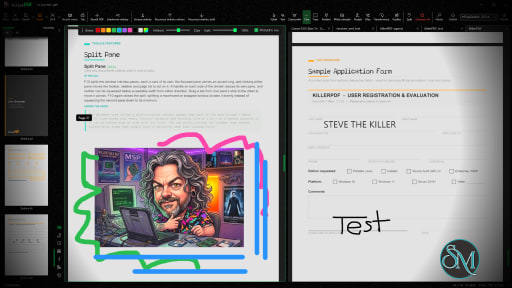
Split PDF Documents
Large PDF files can be divided into smaller documents or individual pages.
This makes it easier to extract specific sections without modifying the original file.
PDF Compression
The built-in compression tool helps reduce PDF file sizes while maintaining acceptable document quality.
Smaller files are easier to email, upload, and archive.
Local Processing
One of KillerPDF's strongest advantages is local document processing.
Keeping files on your own computer improves privacy and may also speed up processing for large documents since there is no need to transfer files over the internet.
Easy-to-Use Interface
The application focuses on essential PDF tools with a clean interface that is suitable for beginners.
Most operations require only selecting a file, choosing the desired action, and saving the result.
Download KillerPDF v1.9.5 - Software Mirrors |
|---|
KillerPDF v1.9.5 for WindowsKillerPDF.exe | 41.73 MB KillerPDF-Store.exe | 101.2 MB KillerPDF-Portable.exe | 101.2 MB |
Others Download related to KillerPDF v1.9.5SHA256SUMS.txt | 360 B KillerPDF-1.9.5-src.zip | 47.23 MB |
KillerPDF v1.9.5 Source Code
KillerPDF v1.9.5 Source code (zip)
KillerPDF v1.9.5 Source code (tar.gz)
|
KillerPDF v1.9.5 Release Notes:
1.9.5 brings Trash Polka, a black theme with tattoo-style ink in your accent color, and right-click cards you can customize, along with a Merge files dialog, moving tabs between windows, session restore, EPUB export, PDF/UA validation and a round of security fixes.
Security
- Updates install only when their certificate chains to KillerPDF's certificate authority, and revoked certificates are refused.
- Setup can no longer be hijacked by a program running without admin rights.
- The Explorer and Outlook preview runs in Windows' low-integrity sandbox again.
- Redact checks the finished file and refuses to save when a redacted word survives in bookmarks, link names, scripts or document details.
- Working copies made while editing are deleted as soon as they are replaced, so redacted text no longer lingers in a temporary file.
- A
killerpdf://open link downloads only from the public internet, so a web page can't use it to reach devices on your network.
- Files and links sent to a running KillerPDF go only to a copy running as you.
- Extracted attachments can't use tricky Windows names to land under a different name, more file types count as executable, and saved files are marked as downloaded.
- The Signatures panel says "Certification broken" when a no-changes certified document was changed. It used to read as a pass.
- Converting Word and Excel files no longer refreshes external links or runs Excel 4.0 macros.
- PDFs built to hang the renderer, the preview or the repair code now stop or open in seconds.
- Password-protected saves get a random document ID, and a password for a file that couldn't be read is forgotten after two minutes.
- A signing certificate loaded from a .pfx can't have its private key exported while it signs.
- The crash window's GitHub report link no longer includes your folder names.
- OCR languages download from a pinned version of the Tesseract files.
Fixed
- Redact asks about pages that have to become images instead of failing with "cannot be redacted without replacing them with an image". (#499)
- Redacting a signed PDF no longer blanks the visible signature box. (#505)
- A text box on a page that already has comments stays editable after saving and reopening. (#466)
- Flatten Forms, Optimize and form data import work on forms whose field list is damaged. (#466)
- Paste pastes what you copied last, not a picture or shape copied earlier. (#497)
- Math symbols and brackets in TeX PDFs draw correctly. (#510)
- Merge and the attachment tools handle three more kinds of valid PDF, including iLovePDF files with repeated attachment names. (#455)
- Uninstall prompts, the print dialog, report windows and other leftover English text now follow your language. (#506)
- German and other long translations fit their windows and buttons. (#508)
- Export to Word, HTML, Markdown and text keeps the spaces between words in PDFs that space words by position. (#507, thanks @jayhemnani9910)
- Pinch-to-zoom on a precision touchpad zooms again. (#494)
- The Stamp preview shows watermarks and page numbers under your markup, where Apply puts them. (#478)
- A generated table of contents uses the document's own page size instead of always Letter. (#512)
- The arrow keys and dragging move a locked replacement's cover, and turning its layers on or off no longer freezes the window. (#467)
- Selecting a text box shows its own font and style on the text bar.
- Edit paragraph works on recognized text over a scan.
- A macro's Redact step works on slightly damaged PDFs, like the command line does.
- Two portable copies sharing a data folder no longer lose each other's settings, and a power cut can't empty the settings file.
- A file that fails to open no longer shows up in Recent.
- Back and Forward work after clicking a page thumbnail.
- Clear Page clears the page you right-clicked, and Edit on a signature opens the signature editor.
- Show Shortcuts in Menus works on the right-click cards again.
- Chinese and Japanese file names in the title bar and tabs use the same font as the menus. (#490)
--pdfua --json names PDF/UA-2 when it checked PDF/UA-2 files.
- The active tab matches the page area in every theme, and notices, previews and menu icons look right on dark themes.
Changed
- KillerPDF needs Windows 10 or later, and older Windows now gets a clear message. (#509)
- Right-click menus are cards of icon tiles, grouped by task, with Delete as a trash button on the card's title.
- Right-clicking the toolbar or the sidebar opens a tile card for its options. Moving the sidebar is now Ctrl+Alt+Shift with an arrow key.
- Menus and cards have even spacing and readable text in every theme.
- Rotate counterclockwise is now Ctrl+L, and Convert Scan to Text is Ctrl+Shift+R.
- Bookmark data, Form data, Preflight and Mark pages open a small card instead of a dialog.
- JPEG 2000 images are decoded by OpenJPEG instead of CoreJ2K.
- On the command line,
--redact removes hidden information by default, and --attachments no longer overwrites files without --overwrite.
- Dialogs center on the pane they came from in a split view.
Added
- Trash Polka, a black theme with tattoo-style ink in your accent color.
- Customizable right-click cards: rearrange the tiles, or hide them in a drawer.
- A picture that is part of the page gets the full picture card: turn, flip, replace and color correct it.
- A Merge files dialog where you add files and folders and drag them into order. (#495)
- Move a tab to another KillerPDF window by dragging it or from its right-click menu. (#503)
- Reopen Closed Tab on Ctrl+Shift+T. (#502)
- Restore last session brings back your open tabs at launch.
- Export to EPUB, in the app and with
--export. (#493)
- PDF/UA-1 and PDF/UA-2 checking in Preflight and with
--pdfua. (#491)
- Arrange aligns, spaces and sizes several selected marks. (#504)
- Comb fields can be edited like any other text, and form recognition finds them. (#500, thanks @Signum21)
- Create Signature is now a signature editor with threshold, pen width, feathering and ink color.
- A New folder button in the open and save dialogs, also on Ctrl+Shift+N. (#498)
--batch-render takes --secrets-stdin, so a password stays out of the process list.
|
Performance and User Experience
KillerPDF performs common PDF tasks quickly and provides an uncomplicated workflow.
Because the application focuses on core document processing rather than advanced publishing features, the interface remains easy to understand even for first-time users.
Performance depends primarily on the size and complexity of the documents being processed, but common operations such as merging, splitting, and compression are generally completed quickly.
Pros
Simple and easy to use.
Local document processing for better privacy.
PDF conversion tools.
Merge and split PDF files.
PDF compression.
Fast processing.
Suitable for everyday document management.
Lightweight interface.
Cons
Lacks advanced PDF editing features found in professional software.
Feature set is more limited than comprehensive PDF suites.
Platform availability may be limited depending on the release.
Some specialized workflows may require dedicated PDF editing software.
Who Should Use KillerPDF?
KillerPDF is a good choice for students, office workers, freelancers, and home users who regularly perform basic PDF tasks such as converting, merging, splitting, and compressing documents.
It is especially suitable for users who prefer processing sensitive files locally instead of uploading them to online services.
Final Verdict
KillerPDF focuses on doing common PDF tasks efficiently without unnecessary complexity. Its emphasis on local processing makes it attractive for privacy-conscious users, while its clean interface keeps everyday document management simple.
Although it is not intended to replace professional PDF editing software, it covers many of the most frequently used PDF operations with minimal effort.
Post a Comment/Report Broken Link: