KillerPDF v1.9.1

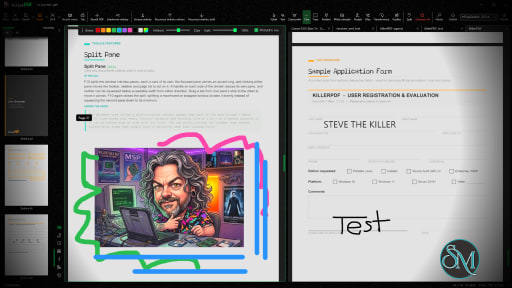
KillerPDF is a lightweight PDF conversion and document processing application that focuses on simplicity, speed, and privacy. Instead of relying on cloud-based services, it performs PDF operations locally on your computer, allowing you to convert, merge, split, compress, and manage PDF documents without uploading sensitive files to external servers.

For users who frequently work with confidential documents, KillerPDF offers a practical alternative to online PDF tools.

Many online PDF services require users to upload documents before processing them. While convenient, this approach may not be suitable for business documents, contracts, invoices, or personal files.

KillerPDF addresses this by processing documents locally whenever possible. This reduces privacy concerns while also eliminating the need to wait for files to upload and download.

The application is designed with a straightforward interface that emphasizes common PDF tasks over complex editing features.

Key Features of KillerPDF

PDF Conversion

KillerPDF supports converting documents between PDF and various file formats, making it easier to work with reports, presentations, and office documents.

The conversion process is simple and requires only a few steps.

Merge PDF Files

Users can combine multiple PDF files into a single document.

This feature is useful for creating reports, assembling scanned documents, or organizing related files into one PDF.

Split PDF Documents

Large PDF files can be divided into smaller documents or individual pages.

This makes it easier to extract specific sections without modifying the original file.

PDF Compression

The built-in compression tool helps reduce PDF file sizes while maintaining acceptable document quality.

Smaller files are easier to email, upload, and archive.

Local Processing

One of KillerPDF's strongest advantages is local document processing.

Keeping files on your own computer improves privacy and may also speed up processing for large documents since there is no need to transfer files over the internet.

Easy-to-Use Interface

The application focuses on essential PDF tools with a clean interface that is suitable for beginners.

Most operations require only selecting a file, choosing the desired action, and saving the result.

Download KillerPDF v1.9.1 - Software Mirrors

KillerPDF v1.9.1 for Windows

KillerPDF.exe | 32.9 MB

KillerPDF-Store.exe | 92.84 MB

KillerPDF-Portable.exe | 92.84 MB

Others Download related to KillerPDF v1.9.1

SHA256SUMS.txt | 360 B

KillerPDF-1.9.1-src.zip | 32.44 MB

KillerPDF v1.9.1 Source Code

KillerPDF v1.9.1 Source code (zip)

KillerPDF v1.9.1 Source code (tar.gz)

KillerPDF v1.9.1 Release Notes:

1.9.1 strengthens redaction and protected-file handling, preserves edits through saves and exports, and improves paragraph editing, search, scan quality, damaged-PDF recovery, and Windows previews.

Fixed

  • Redaction removes covered content from repeated images and text, including identical image samples stored with different encodings, content outside a crop box, and content behind a divided spread. Rasterized pages lose their old search layer, and verification checks for surviving text.
  • Redaction clears hidden copies, private editor data, parent-field values, structure descriptions, Header & Footer descriptions, and comments referenced by replies. Deep structure trees are cleaned completely or refused.
  • Find and Redact includes current text edits and form values, removes matched overlays, and refuses stale search marks. Ligatures, invisible characters, and words split across lines remain searchable without losing literal hyphens.
  • Redaction finds annotation appearance text, including button captions, signature names, and stamps. Unreadable page, field, or annotation content is identified instead of reported as no match; macro and command line redaction save nothing and exit with 3 when a search is incomplete.
  • Damaged protected PDFs are refused before a rewrite can break encryption, signatures, certification, or Reader usage rights. Missing or escaped security entries and intervening comments cannot bypass those checks, and files that cannot be unlocked are not imported as garbled pages.
  • Saving, reducing, or protecting signed PDFs asks before removing signatures or usage rights, including signatures with missing or damaged optional details. Certified PDFs that permit form filling retain valid signatures and field locks through Save and Save As.
  • Failed form conversion, flattening, and text replacement preserve pending values, formatting, document state, and history. Deleting a field retires its pending values so a recreated field cannot inherit them; Undo restores the deleted values.
  • Image and separation exports ask before replacing their actual output files and preserve existing output on write failure. Distinct ink names no longer collide, and data merge refuses to overwrite its input template.
  • Malformed nested stream lengths, color spaces, or long bookmark chains no longer crash the app and lose other tabs' unsaved work. Save failures when moving fields, placing presets, scaling or reordering pages, and editing bookmarks report an error.
  • Explorer previews initialize correctly in the Windows preview host and keep their interface responsive through resize and reuse. Incomplete and failed pages show an accessible warning and Retry while readable neighbors remain available.
  • Redaction preserves unrelated images, transparency, colors, Type 3 text, patterns, masks, and stamps that share resources. Shared image lists and tagged forms no longer cause false failures, crop-offset marks stay aligned, and harmless distant drawing content prompts for rasterization less often.
  • Image export and OCR-generated PDFs include current form values, formatting, visible markup, and page orientation without changing the open document. Font-size-only form edits survive saving and printing.
  • The Text tool works in Single, Two-Page, and Grid views after page turns and tab changes. Editing a line keeps its own size and position, places replacement text above intervening content, and refuses later content or clips that would hide it without removing a neighboring numeral or watermark.
  • Find counts each occurrence within a word, and Replace Current changes only the selected occurrence. Find and Replace preserves unmatched ligature letters, honors field length limits and read-only fields, and recalculates dependent form values.
  • Search runs in the background, cancels superseded queries, and keeps each tab's results and options separate. Damaged-document searches retain readable matches and name unreadable pages; the search-text command exits with 3 for incomplete results.
  • Command line printing keeps a small image cache for long documents while preserving selected-page order and copies.
  • Black-and-white and palette scans retain their full resolution in the viewer, exports, and print. Convert Scan to Text keeps remaining scanned words sharp without unnecessarily enlarging small scans.
  • Edit paragraph accepts justified and line-by-line text, browser and Ghostscript output, pdfTeX font expansion, tagged inline content, and additional color spaces without refusing unrelated content elsewhere on the page.
  • Edit paragraph preserves spaces, ligatures, line-end word joins, intentional line breaks, indentation, baselines, and underlines. It identifies uncertain joins and mixed styles, accepts Greek, Cyrillic, CJK, math, symbols, and combining accents, and explains unsupported shaping or unidentified characters.
  • Edit paragraph protects tables, neighboring columns, later overlapping content, clipped or masked text, layers, forms, and replacement-text tags. Missing fonts use a closer installed match or permit deletion; modest width adjustment keeps edits within the paragraph and is disclosed.
  • Recoverable damaged PDFs can be saved, printed, extracted, reduced, and searched. Recovery retains readable objects, duplicate field entries, metadata, file identifiers, and protection; harmless leftover encryption data and incorrect page counts no longer prevent saving.
  • Extract, Merge, and Rebuild accept Pillow cross-reference generations, valid checkbox and radio fields without Off appearances, alternate file-specification spellings, differing mask resolutions, and valid DeviceN metadata. Damaged associated-file entries are omitted without losing the attachment (#455, #463).
  • Merge and Rebuild tolerate additional damaged metadata, layer, name, form, and structure entries. Repair prompts run behind a busy overlay, explain failures and changed-document cancellation, and reject empty documents cleanly. Folder and command line merges retain healthy bookmarks and report skipped files and lost bookmarks.
  • Reduce File Size preserves shared-resource text and images, default color spaces, and separate layers with matching names. Reduce and Sanitize handle indirect stream lengths, unused resources, stale entries, and unrelated damage; shared-image reduction and size-limited splitting are faster.
  • Attachment removal and Sanitize cover associated entries, annotations, actions, and unreadable links, then verify removal. Attachment edits target the chosen item despite duplicate, blank, case-varying, or conflicting names, preserve portfolio startup selection, and update the panel immediately.
  • Document Info tolerates damaged metadata and dates, preserves unreadable values unless replaced, and retains translated titles, authors, and languages. Initial View, Page Labels, and metadata repair accept valid zero zoom and tolerate malformed opening-view data.
  • Page sizes, Transform, flattened output, and DPI-based images honor PDF UserUnit scaling while selection and redaction keep their original coordinates. The footer and Transform use a scan's actual pixel dimensions (#462).
  • Calculator-based colors use zero-filled right shifts and correct halfway rounding. Type 3 selection and search measurements, malformed numeric content, and shapes interrupted by graphics-state saves render correctly; impossible pattern grids and damaged inline images report bounded failures.
  • Command line replacement counts completed matches and reports partial failure. Orientation fixes save with the supplied password and retain encryption. Store updates retain the installation's bundled runtime.
  • Form-field typing stays in the field instead of firing tool shortcuts, and clicking outside releases it. Escape cancels text edits; AltGr combinations type their characters. Signature pickers close after selection, and placing a signature while filling a field does not stamp it twice.
  • The sidebar remembers deliberate arrow and F9 changes across restarts.
  • Find and Redact results keep page numbers separate from text. Repaired documents explain when they need resaving before editing, and failed or declined empty-document opens leave no half-open tab.

Changed

  • Command line --optimize accepts --invalidate-signatures; Optimize and Remove attachments macros accept invalidateSignatures. Signed or usage-rights files remain unchanged without explicit consent.
  • Editing existing text temporarily shows that line's appearance without changing the Text tool's defaults. The text bar is more compact and folds its opacity controls in narrow windows.
  • Edit paragraph places the page beside its options, keeps refusals visible, and makes selection and resizing easier. Its title bar, Accessibility Review, Guided Tasks, Watched Folder, and the certificate catalog follow the standard wording.

Performance and User Experience

KillerPDF performs common PDF tasks quickly and provides an uncomplicated workflow.

Because the application focuses on core document processing rather than advanced publishing features, the interface remains easy to understand even for first-time users.

Performance depends primarily on the size and complexity of the documents being processed, but common operations such as merging, splitting, and compression are generally completed quickly.

Pros

  • Simple and easy to use.

  • Local document processing for better privacy.

  • PDF conversion tools.

  • Merge and split PDF files.

  • PDF compression.

  • Fast processing.

  • Suitable for everyday document management.

  • Lightweight interface.

Cons

  • Lacks advanced PDF editing features found in professional software.

  • Feature set is more limited than comprehensive PDF suites.

  • Platform availability may be limited depending on the release.

  • Some specialized workflows may require dedicated PDF editing software.

Who Should Use KillerPDF?

KillerPDF is a good choice for students, office workers, freelancers, and home users who regularly perform basic PDF tasks such as converting, merging, splitting, and compressing documents.

It is especially suitable for users who prefer processing sensitive files locally instead of uploading them to online services.

Final Verdict

KillerPDF focuses on doing common PDF tasks efficiently without unnecessary complexity. Its emphasis on local processing makes it attractive for privacy-conscious users, while its clean interface keeps everyday document management simple.

Although it is not intended to replace professional PDF editing software, it covers many of the most frequently used PDF operations with minimal effort.
KillerPDF v1.9.1
Free
Software Informations:
Developer:

Operating System:
Windows
Date Added:
2026-10-31T15:47:21.925Z
Categories:

Post a Comment/Report Broken Link: