GitButler is a desktop Git client that helps developers manage multiple branches more efficiently. It introduces the concept of stacked branches, allowing developers to build features incrementally while keeping changes organized and reviewable.
The tool is designed to work alongside popular Git hosting platforms while enhancing local repository management.
Download GitButler 0.23.3 - Software Mirrors |
|---|
Download GitButler GitButler 0.23.3
For macOS Silicon (M1/M2/M3) Download GitButler GitButler 0.23.3
For macOS Intel Download GitButler GitButler 0.23.3
For Windows Intel | Download GitButler GitButler 0.23.3
For Linux Silicon (M1/M2/M3) (RPM) Download GitButler GitButler 0.23.3
For Linux Silicon (M1/M2/M3) (AppImage) Download GitButler GitButler 0.23.3
For Linux Silicon (M1/M2/M3) (Debian) Download GitButler GitButler 0.23.3
For Linux Silicon (M1/M2/M3) Download GitButler GitButler 0.23.3
For Linux Intel (RPM) Download GitButler GitButler 0.23.3
For Linux Intel (AppImage) Download GitButler GitButler 0.23.3
For Linux Intel (Debian) Download GitButler GitButler 0.23.3
For Linux Intel |
GitButler CLI install:curl -fsSL https://gitbutler.com/install.sh | sh |
GitButler 0.23.3 Release Notes:Changes
- Updating the workspace now updates linked worktrees too
- Operations that update linked worktrees now preserve conflicting uncommitted changes with conflict markers
Fixes
- Repositories owned by another user now explain how to allow access with
safe.directory
- Fixes branch apply, unapply and update operations writing encrypted files or Git LFS pointers instead of usable file contents in git-crypt and Git LFS repositories
- Fixes unnecessary conflicts and incorrect file contents when combining branches based on different target commits
- Fixes updating the workspace leaving local branches behind after they were merged
- Fixes failed checkouts leaving files partly written or losing uncommitted edits
- Fixes project loading failing when another process deletes an untracked file while changes are being read
CLI
but commit, but amend, but discard and but diff now accept Git-style paths, including relative and absolute paths, directories and .
but undo now refuses operations it cannot safely reverse on branches checked out in linked worktrees
but now gives clearer errors and recovery steps for repository, branch, worktree, push, merge, undo and forge authentication problems, and suggests alternatives to unsupported commands
but push --dry-run now reports branches that cannot be pushed, including branches containing conflicted commits, and exits non-zero if any are refused
but reword now reads commit messages or branch names from a file or stdin with -F
but amend now defaults to the latest commit when the target branch is unambiguous
but amend now refuses when there are no changes to amend
but diff now accepts several file targets
but diff and but show now support --stat for changed-file and line counts
but pr new now accepts messages with blank lines before the title
but amend -t and but squash -t now accept branches checked out in linked worktrees
but worktree new, but worktree remove and but branch delete now handle worktree directories deleted outside GitButler
but commit runs Git commit hooks again in the main checkout; -n/--no-hooks or --no-verify skips them (linked-worktree commits still skip hooks)
but pull now removes stale remote-tracking branches after updating
but now reports linked worktrees whose uncommitted changes gained conflict markers
- Fixes
but uncommit being blocked by unrelated conflicted commits
- Fixes
but resolve conflicts suggesting a resolution command for the wrong commit
- Fixes
but diff reporting clean files as missing
- Fixes amending an empty branch rewriting the commit below it
- Fixes
but resolve overlooking conflicted commits in linked worktrees
- Fixes
but failing to open repositories beneath a previously registered project whose .git directory was removed
- Fixes
but pull leaving local branches behind after they were merged
Native app
Highlights from the native app, available under "Experimental" in settings:
- Adds split panes for pages and terminals, with drag-and-drop arrangement, keyboard navigation and saved page positions
- The navigator can now appear as tabs across the top of the window, with drag-and-drop ordering for projects and worktrees
- Adds a command editor for customizing keyboard shortcuts and finding commands by pressing their keys
- Adds
but://open links to projects, branches, commits, uncommitted changes, files and lines, tabs and settings
- Files in the working tree can now be edited directly in the diff, including tracked files with no changes
- Committing changes with dependencies now offers to stack the required branches instead of creating a partial commit
- Adds an option to archive or delete clean worktrees after an update finds their branches merged
|
Key Features
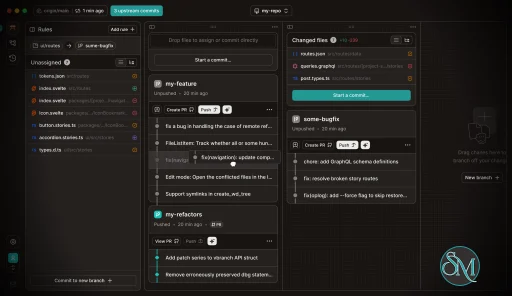
GitButler provides a visual branch management interface that clearly shows relationships between branches. This makes it easier to understand how feature branches depend on one another.
Stacked branch workflows allow developers to split large changes into smaller logical pieces. Each stack can be reviewed independently, improving collaboration and code review quality.
The interface simplifies rebasing, merging, and conflict resolution. Developers can perform complex Git operations without relying heavily on command line commands.
GitButler also enhances pull request preparation by helping structure commits and branches cleanly before pushing to a remote repository.
Ease of Use
GitButler offers a clean and modern user interface. The visual approach makes branch management more intuitive compared to command line tools.
While experienced Git users may already understand advanced workflows, GitButler helps reduce mistakes and speeds up daily tasks. New users may still need basic Git knowledge to fully understand branching concepts.
Performance and Compatibility
GitButler runs as a desktop application and integrates with existing Git repositories. It is designed to operate efficiently without significant system overhead.
Compatibility with standard Git repositories ensures that users can adopt it without changing their existing workflow or hosting provider.
Pros and Cons
Advantages include intuitive stacked branch management, strong visualization tools, simplified rebasing workflows, and improved pull request preparation.
Limitations may include learning curve for new workflow concepts and reliance on desktop application usage rather than web based management.
Final Verdict
GitButler is an innovative Git client that modernizes branch management and simplifies complex development workflows. Its stacked branch approach and visual interface make it a valuable tool for developers seeking cleaner collaboration and more efficient version control management.
For teams looking to improve Git workflow organization and code review clarity, GitButler is a strong and practical choice.
GitButler is a modern Git client designed to simplify complex branch management and improve developer workflows. It focuses on stacked branches, visual clarity, and streamlined collaboration, making it especially appealing for teams that work with feature branches and pull request based development.
Unlike traditional Git interfaces, GitButler aims to reduce friction in everyday version control operations.
Post a Comment/Report Broken Link: