FrostWire is a BitTorrent based client and media downloader available for Windows, macOS, Linux, and Android. It was originally built on the LimeWire codebase and later evolved into an independent project with its own development direction. FrostWire focuses on simplicity, speed, and transparency, making it accessible to both beginners and advanced users.
The software supports torrent downloads, magnet links, direct cloud downloads, and media streaming. Its open source nature allows users to trust the software and understand how it handles data and connections.
Download FrostWire Desktop FrostWire 7.1.6-build-339 |
|---|
Download From SourceForge Download FrostWire Latest (Windows 64bit) Download FrostWire 6.7.9 (Windows 32bit) Download FrostWire Latest (Mac OS x86_64) Download FrostWire Latest (Mac OS arm64) Download FrostWire Latest (Linux x86_64 tarball) Download FrostWire Latest (Linux arm64 tarball) Download FrostWire Latest (Android 8+) |
|
Mac OS arm64 - frostwire-7.1.6-arm64.pkg (169.86 MB) Mac OS x86_64 - frostwire-7.1.6-x86_64.pkg (171.58 MB) Linux arm64 tarball - frostwire-7.1.6.arm64.tar.gz (180.32 MB) Windows 64bit - frostwire-7.1.6.windows.exe (169.13 MB) Linux x86_64 tarball - frostwire-7.1.6.x86_64.tar.gz (194.03 MB) Android APK - frostwire-android-release-3.1.4-b775-plus.apk (78.49 MB) |
FrostWire 7.1.6-build-339 Release Notes: FrostWire 7.1.6: fewer freezes on slower computers, a Linux installer that updates in place, and search that works again
Desktop build 339 · November 26, 2026
FrostWire 7.1.6 keeps removing work from the thread that draws the window, which is where most freezes on slower computers came from. It also fixes a handful of crashes users reported, brings back search results from a working engine, and makes the Linux installer update an existing installation.
Search works again
The old MagnetDL search was reading from a service that no longer answers. FrostWire now searches ApiBay (apibay.org) instead.
Fewer freezes, especially on slower computers
- Startup and first use: Swing's menus, sliders, progress bars, table headers, tooltips, the Library, the Options window and the text of other languages are prepared in the background at startup, so opening them the first time no longer waits on the disk. Fonts for other scripts (Arabic, Hebrew, Thai, Korean, Japanese, Chinese) are prepared too, in Lite mode as well, and Lite now reads the installed font list in the background after the window shows.
- Automatic performance mode now picks Lite on computers with four or fewer processors and the 512 MB memory limit, which ran slowly in Full mode.
- Library and drag and drop: dragging a finished download with a big folder out of FrostWire lists its files in the background as the drag starts; the Library opens without an error when two parts of the program ask for its table at once.
- Choosers and dialogs: Browse and the other folder choosers no longer wait for the disk to say whether your last folder still exists.
Crashes and errors fixed
Clicking the Library tab right after starting FrostWire, pressing the tab-switch shortcut with no search open, typing with a Windows input method, and pasting into the Library no longer fail with an error. If the chosen theme cannot be loaded, FrostWire starts with the default theme and tells you. If FrostWire's own files, or Java's, are damaged at startup, it now says so in a dialog and offers the download page instead of closing without a word.
Linux installer
The tar.gz package installs FrostWire into /opt/frostwire for every user, or into ~/.local/share/frostwire with --user (no administrator rights). Running the install.sh of a newer package updates that installation in place and keeps your settings, library and transfers.
Reddit links are gone
FrostWire no longer links to reddit.com. Find us on Discord, X, Facebook and Instagram.
Library updates
Newer sqlite, FlatLaf, Netty, Bouncy Castle and re2j.
Full changelog
- fix:the first search suggestion painted after starting FrostWire no longer freezes the window while Java links its record comparison code (#1563)
- fix:when Java's own files are damaged and FrostWire can't start (a Java class missing right after launch), it now says so in the system's own dialog and offers the download page instead of closing without a word (#1541)
- fix:on computers where FrostWire runs in Lite mode, the first text in a language the interface font lacks no longer freezes the window while Java reads the installed fonts; the list is read in the background after the window shows (#1562)
- change:Automatic performance mode now picks Lite on computers with 4 or fewer processors and the 512 MB memory limit, which ran slowly in Full mode (#1512)
- update:re2j 1.9, Spotless 8.12.0
- change:reports of the Windows input method opening its candidate list, which FrostWire cannot change, are no longer sent (#1351)
- fix:opening the Library tab right after starting FrostWire no longer fails with a "duplicate setting key" error when two parts of the program ask for the Library table at once
- fix:the first progress bar or skinned control painted after starting FrostWire no longer freezes the window while Java loads its smooth-edge drawing code (#1563)
- fix:dragging a finished download with a big folder out of FrostWire (to Finder, for example) no longer freezes the window while its files are listed; the list is prepared in the background as the drag starts (#1511)
- fix:opening Tools > Options no longer freezes the window while FrostWire reads its saved answers file from a busy disk (#1563)
- new:Linux: the tar.gz installer now installs FrostWire into /opt/frostwire for every user (or into ~/.local/share/frostwire with --user, no administrator rights), and running the install.sh of a newer package updates that installation in place, replacing the old files and keeping your settings, library and transfers; uninstall.sh removes it
- fix:starting FrostWire on Windows no longer freezes the splash while FlatLaf's native library is copied to the temp folder, and the first menu no longer builds the tooltip manager on the interface thread (#1330, #1563)
- fix:clicking the Library tab for the first time right after starting FrostWire no longer fails with an error (#1586)
- fix:pressing the tab-switch shortcut when no search is open no longer fails with an error (#1588)
- fix:text no longer fails to draw for the rest of the session on a computer where the JDK's text shaper cannot start; FrostWire switches to the older shaper at startup and says so in its crash reports (#1587)
- fix:search: MagnetDL's dead proxy is replaced by ApiBay (apibay.org), a search engine that works
- fix:pasting on the Library tree or into the Library file table no longer logs a "Not a drop" error
- fix:starting FrostWire no longer waits on the computer while it creates the IceBridge identity; it is created in the background once FrostWire has started (#1534)
- fix:if the chosen theme cannot be loaded, FrostWire starts with the default theme and tells you once in the status bar, instead of failing to start
- fix:Browse and the other folder choosers no longer freeze the window while the disk answers whether the last folder you used still exists; that is checked in the background at startup (#1411)
- fix:the update popup can be resized and its text wraps to the window
- fix:tooltips are plain text, so hovering them no longer parses HTML on the window's thread
- fix:the Pieces tab refreshes without waiting for its animation to finish drawing
- fix:the first date cell no longer freezes the window while the date format for your language is built; it is built in the background at startup (#1563)
- fix:freeze reports tell apart the stalls that come from the Windows window system (cursor lookups, showing windows, popup menus) from stalls caused by FrostWire (#1552)
- fix:when FrostWire's own files are missing or unreadable at startup (an interrupted install or update, a security program), it says so and offers the download page instead of closing without a word (#1541)
- fix:crash and freeze reports include the first failure of the JDK parts that have failed to start on some Windows computers (networking, files, JPEG, text), so the cause can be told apart (#1587)
- fix:the first text on screen no longer freezes the window on slow computers while Windows loads fonts: the fonts, bold and larger sizes, the setup wizard's language names and the characters outside Latin text are prepared in the background at startup (#1562)
- fix:Lite mode no longer skips preparing the characters of other languages' scripts: file names and search results in Arabic, Hebrew, Thai, Korean, Japanese or Chinese no longer freeze the window the first time they are drawn (#1562)
- fix:more of Swing's menus, sliders, progress bars, table headers and FrostWire's own screens are prepared in the background at startup, so opening them the first time no longer waits on the disk (#1563)
- fix:tooltips near the edge of the window stay inside it, so Windows doesn't have to create a separate window for them (#1552)
- fix:the window's icon is prepared at every size Windows asks for, so moving FrostWire to another screen no longer stalls while the icon is resized (#1552)
- fix:when a finishing download is selected again with its details open, the window is no longer laid out again (#1563)
- fix:typing in the search field with a Windows input method (IME) no longer crashes when the input method asks where the text is before the field has a size (#1591)
- fix:when FrostWire has to report a crash, the window no longer freezes while it checks the Telluride version (#1592)
- fix:crash reports now say the first error that caused the crash, so failures that look the same can be told apart
- update:FrostWire no longer links to reddit.com; find us on Discord, X, Facebook and Instagram
- update:newer versions of the libraries FrostWire uses: sqlite, FlatLaf, Netty and Bouncy Castle
 |
Key Features of FrostWire
BitTorrent Client
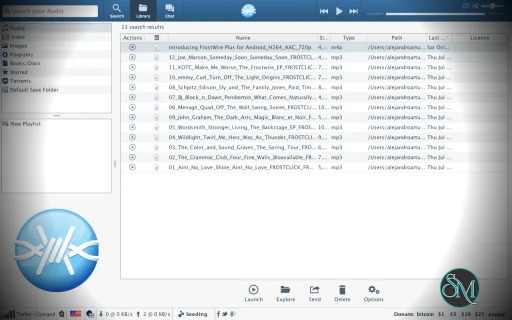
FrostWire includes a full featured BitTorrent client that supports magnet links, torrent files, and decentralized trackers. Users can manage downloads easily with pause, resume, and priority controls.
Built In Search
The application offers an integrated search engine that helps users find torrents and media content without leaving the app. Search results are organized and easy to filter.
Media Preview and Streaming
FrostWire allows users to preview audio and video files before completing the download. This helps save time and storage by verifying content first.
Cloud Downloader
Users can download files directly from cloud storage services and HTTP links. This makes FrostWire useful beyond torrent downloading.
Bandwidth and Speed Control
The software provides detailed bandwidth management options. Users can limit upload and download speeds to avoid network congestion.
Cross Platform Support
FrostWire runs on multiple operating systems including desktop and mobile platforms. This allows consistent usage across devices.
Open Source and Ad Free
FrostWire is open source and does not include hidden trackers or forced advertisements. This makes it a trusted choice for privacy conscious users.
Media Player Integration
The built in media player supports common audio and video formats, allowing users to play files directly after download.
Benefits of Using FrostWire
Easy to Use Interface
The layout is clean and intuitive, making it suitable for new users while still offering advanced options for experienced users.
All in One Download Solution
FrostWire combines torrent downloading, cloud downloads, and media playback in one application.
Community Driven Development
Being open source, FrostWire benefits from community contributions and continuous improvements.
Free and Transparent
Users get full access to all features without licensing fees or feature restrictions.
Suitable for Multiple Use Cases
From media downloads to large file transfers, FrostWire adapts to various needs.
FrostWire remains a reliable and user friendly solution for file sharing and media downloads. With its open source foundation, cross platform support, and integrated tools, it offers a complete and trustworthy experience. For users who want a free, transparent, and capable torrent client with additional media features, FrostWire continues to be a strong and dependable choice.
FrostWire is a free and open source file sharing application that allows users to search, download, and stream content across multiple platforms. It is well known for its clean interface, strong community support, and cross platform compatibility. FrostWire is commonly used for peer to peer file sharing, media downloads, and content discovery while giving users full control over bandwidth and privacy settings.
Post a Comment/Report Broken Link: