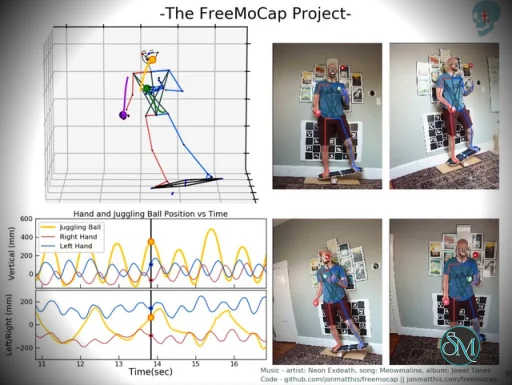
FreeMoCap is a free and open-source markerless motion capture system that allows users to record 3D human movement using standard webcams or video files instead of specialised motion capture suits.
Unlike traditional mocap systems that require body markers and high-end camera arrays, FreeMoCap relies on software-based tracking and computer vision techniques. This makes motion capture more affordable and accessible for students, indie creators, and researchers.
Download FreeMoCap v2.0.0-alpha.26 - Software Mirrors |
|---|
FreeMoCap v2.0.0-alpha.26 for Windowsfreemocap_server_2.0.0-alpha.26_windows-x64-cpu.zip | 306.62 MB |
FreeMoCap v2.0.0-alpha.26 for macOSfreemocap_server_2.0.0-alpha.26_macos-arm64-apple-silicon.zip | 373.37 MB freemocap_server_2.0.0-alpha.26_linux-x64-cpu.zip | 530.06 MB freemocap_2.0.0-alpha.26_macos-arm64-apple-silicon.zip | 414.61 MB freemocap_2.0.0-alpha.26_macos-arm64-apple-silicon.dmg | 429.65 MB |
FreeMoCap v2.0.0-alpha.26 for Linux |
FreeMoCap v2.0.0-alpha.26 Source Code |
FreeMoCap v2.0.0-alpha.26 Release Notes:FreeMoCap v2.0.0-alpha.26FreeMoCap v2.0.0-alpha.26 brings improvements to markerless tracking accuracy and reliability, greater control over hardware acceleration, and a number of fixes to data output, logging, and processing. This release focuses on addressing issues reported by our community and making FreeMoCap more reliable across different computers and hardware configurations.What's NewONNX Execution Provider SelectionUsers can now choose which execution provider FreeMoCap uses for RTMPose inference. The new Execution provider dropdown is available in both real-time tracking and post-processing settings. Depending on the available ONNX Runtime installation, options may include:
Improved MediaPipe Face TrackingMediaPipe face tracking now uses a head-centered image crop, based on existing facial and head landmarks, instead of performing detection across the entire camera image. This is intended to improve face detection when the subject occupies a smaller portion of the image, particularly in full-body motion capture recordings.Bug Fixes and ImprovementsRTMPose Whole-Body Output OrderingFixed an issue where RTMPose whole-body keypoints were being incorrectly separated into hand and face outputs. Previously, the exported left-hand, right-hand, and face files could contain keypoints belonging to different anatomical regions. The updated model definitions and dependencies address this mismatch so the exported data corresponds to the intended keypoints.Reprojection Error OutputFixed an issue where reprojection error columns existed in the exported motion capture data but contained no values. Reprojection error data is now passed into the reconstructed skeleton output, allowing users to inspect an important measure of multi-camera reconstruction quality.Model Download and Initialization ReliabilityImproved model initialization behavior to address race conditions that could occur when multiple processing workers attempted to download or prepare the same models simultaneously. These changes are particularly relevant to multi-camera processing and first-time model initialization.Post-Processing StabilityImproved error handling and resource cleanup in post-processing video workers. These changes help ensure that errors during tracking or video processing are reported more reliably and that associated resources are properly released.Logging and DiagnosticsSeveral improvements have been made to logging:
Update NotificationsImproved the update notification interface and update-check behavior. FreeMoCap now supports automatic checks on startup, clearer feedback when checking manually, and dismissible update notifications.What's Changed
Known IssuesSome known issues remain under investigation:
Alpha Release NoticeAlpha means Busted! FreeMoCap 2.0 is still under active development. While this release addresses a number of reported bugs, users may encounter unexpected behavior, incomplete functionality, or problems that affect recorded and processed data. We recommend keeping copies of important recordings and checking outputs before using them in research or production workflows.InstallationDownload the appropriate installer for your operating system from the [FreeMoCap download page](https://freemocap.org/download.html). Thank you to all our contributors and community members for helping improve FreeMoCap!Not sure which build to download? See the download guide: https://docs.freemocap.org/freemocap/download GPU (CUDA) builds — hosted on Cloudflare R2(Too large for GitHub's 2 GB asset limit.) |
Key Features of FreeMoCap
Markerless Motion Capture
FreeMoCap captures full-body motion without requiring wearable markers or suits. It processes recorded video to reconstruct 3D skeletal movement data.
Multi-Camera and Video Support
Users can connect multiple webcams for better depth accuracy or import pre-recorded video footage. This flexibility allows you to scale your setup based on your budget and technical requirements.
Data Export and Analysis
Captured motion data can be exported in formats such as CSV and NumPy arrays. It also supports workflows compatible with 3D animation tools like Blender. Built-in analysis tools help users inspect skeletal tracking results.
Open-Source Ecosystem
FreeMoCap is fully open source, allowing developers to modify, extend, and integrate it into research or production pipelines. The project benefits from active community contributions and ongoing development.
Performance and Usability
FreeMoCap typically runs in a Python environment and may require installation through package managers. While it provides a graphical interface, initial setup, camera calibration, and environment configuration may require technical familiarity.
Accuracy: Motion tracking can be surprisingly detailed with proper lighting and calibration, though results vary based on camera quality and positioning.
Processing Speed: Most workflows rely on post-processing rather than real-time tracking.
Ease of Use: Setup can be complex for beginners, especially those unfamiliar with Python or camera calibration workflows.
Pros and Cons
Pros
Completely free and open source
No specialised hardware required
Flexible export formats for animation and research
Strong developer and academic community
Cons
Technical setup may be challenging
Limited real-time processing
Accuracy depends heavily on camera setup and lighting
Final Verdict
FreeMoCap stands out as a capable and accessible open-source motion capture platform. While it may not fully replace high-end professional mocap systems for commercial film or AAA game production, it provides impressive performance considering its zero cost.
If you’re interested in motion capture but don’t want to invest in expensive suits or proprietary systems, FreeMoCap offers a compelling alternative.
Sources
Official documentation: https://docs.freemocap.org
GitHub repository: https://github.com/freemocap/freemocap
Developer:
The FreeMoCap Project.
Operating System:
Windows / macOS / Linux
Date Added:
2026-11-11T20:07:20.488Z
Categories:
Post a Comment/Report Broken Link: