FluidVoice v1.6.13

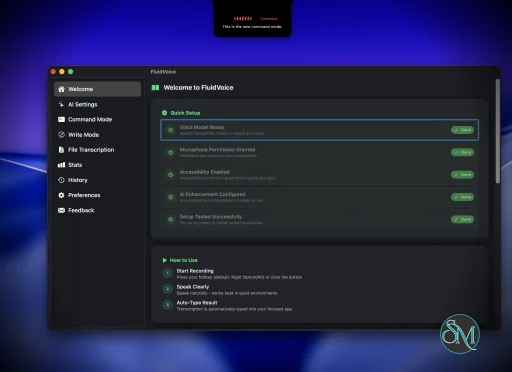
FluidVoice is a free and open source voice-to-text application for macOS that brings fast, local AI-powered dictation to virtually any app. Designed with privacy and performance in mind, it performs speech recognition directly on your Mac, allowing users to dictate text into documents, emails, chat applications, code editors, and more without relying on cloud-based transcription services.

Unlike many dictation tools that require subscriptions or send recordings to remote servers, FluidVoice adopts a local-first approach. It supports multiple on-device speech recognition models, including Parakeet, Whisper, Apple Speech, and Cohere Transcribe, allowing users to choose between speed, language support, and transcription accuracy. Optional AI enhancements can be enabled using providers such as OpenAI or Groq, but these features are entirely optional.

The application integrates seamlessly with macOS, enabling users to dictate directly into nearly any text field using a global keyboard shortcut.

Key Features of FluidVoice

Local AI Speech Recognition

FluidVoice performs transcription locally whenever supported models are used. This improves privacy while reducing latency, making dictation feel nearly instantaneous on Apple Silicon Macs.

Multiple Speech Models

Users can choose from several transcription engines, including Apple Speech, Whisper, NVIDIA Parakeet, and Cohere models. This flexibility allows users to balance speed, hardware requirements, and multilingual support according to their needs.

Universal Dictation

The application works across virtually any macOS application. Whether writing emails, editing documents, chatting in Slack, coding in an IDE, or taking notes, FluidVoice can insert text directly into the active application.

Command Mode

One of the standout additions is Command Mode, which enables voice commands to perform actions on macOS beyond simple dictation. This expands the application into a lightweight voice assistant for productivity workflows.

AI Text Enhancement

Raw dictation can be automatically cleaned up with optional AI processing. Grammar correction, punctuation, rewriting, and formatting are available when compatible AI providers are configured.

Open Source

FluidVoice is fully open source, allowing developers and security researchers to inspect the codebase, contribute improvements, and verify its privacy claims.

Download FluidVoice v1.6.13 - Software Mirrors

FluidVoice v1.6.13 for macOS

Fluid-oss-1.6.13.dmg | 79.53 MB

Fluid-oss-1.6.13.zip | 79.68 MB

FluidVoice v1.6.13 Release Notes:

FluidVoice v1.6.13

What's New

  • Fluid 1.1 Ripple and Splash: updated on-device cleanup, with Ripple offering a faster alternative to Splash. Both are research previews; review your text before sending.
  • Fluid Speech Pro: our most accurate local dictation model for Apple Silicon. Pro, Mini and Pico support 25 languages.
  • Edit Mode (Beta): a dedicated Edit 1.1 model on Apple Silicon, with settings separate from dictation and continued support for your own API providers.
  • Qwen3 ASR 1.7B: on-device dictation on Apple Silicon with automatic detection of 30 languages.
  • Apple Intelligence for Command Mode: use Apple's on-device model on supported Macs running macOS 27 or later.

Improvements

  • Compact, consistent start and end prompts with visible countdowns and clearer button feedback.
  • Detected calls stop recording after a cancellable countdown. Muting or losing a call window no longer ends an active recording prematurely.
  • Automatic captures computer audio and your microphone, including when recording again. Online meetings no longer silently switch to microphone-only recording.
  • Choose the meeting app and microphone before recording, with recent choices first and better handling of disconnected microphones and restarted apps.
  • Rename meetings while recording. Renaming a saved meeting keeps its summary.
  • Meeting transcripts use Fluid Speech Pro with an available Parakeet fallback. Redo a finished transcript in another supported language using its saved audio.
  • Saved dictionary replacements now apply to completed meeting transcripts. Redo also refreshes replacements, with improved English number and currency formatting.
  • Smoother live captions with Reduce Motion support. Local tools can also read live captions through the local API.
  • More consistent formatting for spoken quantities and currencies, plus named emoji, while preserving code, filenames and identifiers.
  • Accepted dictionary corrections save their audio and original/corrected text locally for future training. Nothing is uploaded, and FluidVoice tells you if audio cannot be saved.
  • Choose how soon dictionary suggestions appear, without repeated delays while editing.
  • Dashboard recommends speech and cleanup models for your Mac, with download-and-activate actions and dismissible suggestions.
  • AI Providers is now AI Settings, with clearer Edit Mode and Cleanup Styles controls. Restoring older settings preserves your Edit provider.
  • Choose an Apple Speech language and region on macOS 26 or later.
  • Choose your own accent color in Settings.
  • New recording sounds and stop cues, with sound settings now under Dictation.
  • Shortcuts now distinguish left and right modifier keys. Re-record existing shortcuts to choose a specific side.
  • Fluid Intelligence screen context is off by default, with optional setup and a reminder to review AI changes.

Fixes

  • Preserve opening speech, short replies and sentence endings, with more readable overlapping speech and fewer duplicate words.
  • Reduce false incomplete-transcription warnings during normal recording startup and shutdown.
  • Keep previous transcripts when redo fails or is interrupted, and keep loaded meeting history visible if saved files cannot be read.
  • Improved Google Meet detection and more reliable saved recording preferences.
  • Trained words keep working after reloading Fluid Speech Pro.
  • Better first-word recognition in short Parakeet dictations, with fixes for skipped short audio and final snippets.
  • More reliable pasting and recovery in slow editors, web editors and consecutive dictations. Undelivered text stays on the clipboard for manual recovery.
  • Improved text-field detection in Electron apps and restored dictation in Muse.
  • Verify, update or delete downloaded cleanup models without activating them first. The active model stays clearly marked.
  • More reliable model downloads, automatic retries for interrupted speech downloads, and uninterrupted setup when resizing Dashboard.
  • Better alignment and readability in the Small dictation overlay.
  • Clearer Cancel Recording shortcut validation. Unsupported modifier-only assignments reset to Esc; valid shortcuts and disabled settings are preserved.
  • Preserve older dictation history and its saved audio when updating FluidVoice.
  • Turning off Read my screen discards captured context. Screen-word matching handles everyday contractions more accurately.
  • Fix simultaneous transcript exports mixing content or overwriting temporary files.
  • Stronger local API protection against browser-based access and clearer meeting-sharing permission errors.

Contributors

Thanks to @ParamKataria, @grohith327, @TokuiNico, @sabbah13, @postoso, @andrewmitchell-automations, @Livvux and @BenjaminPrice for 1.6.13 fixes and improvements.

Performance and User Experience

FluidVoice delivers an impressive user experience, especially on Apple Silicon hardware. Dictation starts quickly, transcription appears with minimal delay, and the lightweight interface stays out of the way during everyday work.

The application integrates well with macOS through menu bar controls, global shortcuts, and accessibility features. Users who spend long hours writing documentation, emails, or code can significantly reduce keyboard usage.

Community feedback has also been overwhelmingly positive, with many users praising its performance, privacy, and the fact that it remains completely free and open source.

Pros

  • Completely free and open source.

  • Local-first speech recognition for improved privacy.

  • Extremely fast transcription on Apple Silicon.

  • Supports multiple AI speech models.

  • Works across nearly all macOS applications.

  • Optional AI-powered text enhancement.

  • Active development with frequent updates.

Cons

  • Primarily optimized for macOS.

  • Best performance requires Apple Silicon hardware.

  • Some advanced AI features require external API keys.

  • Initial model downloads can consume significant disk space.

Who Should Use FluidVoice?

FluidVoice is ideal for writers, developers, students, journalists, content creators, and professionals who spend significant time typing on a Mac. It is especially valuable for users seeking a private, subscription-free alternative to commercial dictation software.

Those who prioritize offline processing and open source software will find it particularly appealing.

Final Verdict

FluidVoice demonstrates that high-quality voice dictation does not require expensive subscriptions or cloud processing. Its combination of local AI transcription, excellent performance, broad application compatibility, and active open source development makes it one of the strongest dictation solutions available for macOS.

For Mac users looking for a fast, privacy-focused voice-to-text application, FluidVoice is an outstanding choice.
FluidVoice v1.6.13
Free
Software Informations:
Developer:

Operating System:
macOS
Date Added:
2026-11-14T03:07:20.817Z
Categories:

Post a Comment/Report Broken Link: