ALEAPP, short for Android Logs, Events, and Protobuf Parser, is an open source digital forensics tool for analyzing Android full system extractions. It parses Android artifacts and converts the results into structured forensic reports, making it easier to investigate application activity, system events, usage data, and other information stored on an Android device.
The project is aimed primarily at digital forensic investigators and DFIR professionals. It provides both command line and graphical interfaces and supports several types of forensic input, including extracted file systems, archives, and raw disk images.
Features
ALEAPP provides a modular artifact parsing system designed specifically for Android forensic analysis.
Key features include:
Android full system extraction analysis
Android logs, events, and Protobuf parsing
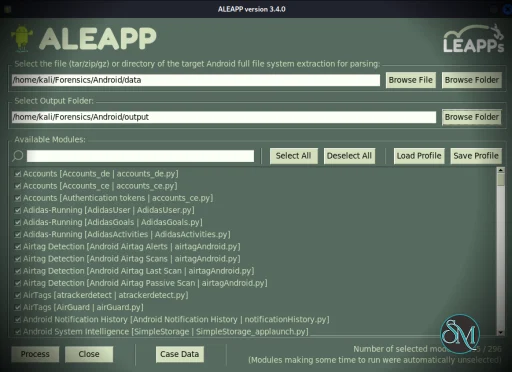
Graphical user interface
Command line interface
File system extraction support
ZIP, TAR, and GZIP input
Raw disk image support
EnCase E01 acquisition support
HTML reports
TSV output
Timeline support
Case data files
Custom parsing profiles
Dynamically loaded artifact plugins
Selective artifact processing
Support for Android application artifacts
Direct processing of supported disk images without mounting
Cross-platform operation
Python-based architecture
The plugin architecture is one of ALEAPP's strongest features. Artifact modules are loaded dynamically and define the files they process, their category, requirements, notes, and processing function. This makes the project extensible as new Android artifacts are discovered.
Download ALEAPP v2026.4.5 - Software Mirrors |
|---|
ALEAPP v2026.4.5 for Windows |
ALEAPP v2026.4.5 for macOS |
ALEAPP v2026.4.5 for Linux |
ALEAPP v2026.4.5 Source Code |
ALEAPP v2026.4.5 Release Notes:ALEAPP v2026.4.5
New Contributors
Which file to download
aleapp. Started without arguments, from the
Applications folder or a double-click, it opens the window. Given arguments in a terminal,
it is the command line. On macOS the command line is inside the app:
aleapp
are those of earlier releases, but there is no aleappGUI any more, since aleapp
without arguments opens the window. On Windows the zip holds the whole program as one
file, aleapp.exe, which can be put wherever the tool expects it; there is no installer.
The executable inside the macOS app needs the folder it came in; on Linux the AppImage is
the whole program.
aleapp.exe on Windows unpacks itself to a temporary folder each time it starts, so it
takes a few seconds to start, and it does not run where a policy (AppLocker, WDAC) forbids
running programs from the temporary folder. There, run ALEAPP from source; the README has
the steps.
First launchThe macOS disk images are signed with a Developer ID and notarised by Apple, so they open without a warning. The Windows binaries are not signed yet, so SmartScreen says "Windows protected your PC" the first time. Choose More info, then Run anyway. On Linux, make the AppImage executable once (chmod +x ALEAPP-*.AppImage). It needs FUSE
to start; where FUSE is not available, run it with --appimage-extract-and-run.
If you would rather not clear a warning, run from source instead; the README has the steps.
Verify what you downloadedSHA256SUMS.txt covers every file in this release. On macOS or Linux, from the folder you
downloaded into:
sha256sum in place of shasum -a 256 on Linux. On Windows, in PowerShell:
SHA256SUMS.txt, which is lower case.
LinuxThe build is made on Ubuntu 22.04, so it needs glibc 2.35 or newer and will not start on an older distribution.Code signing policyThe code signing policy covers Windows signing, team roles and privacy. |
ALEAPP is a useful tool for investigators who need to extract meaningful information from Android forensic images without manually examining thousands of individual files.
Its main strength is automation. Android applications and the operating system generate large amounts of databases, XML files, logs, Protobuf data, and other artifacts. ALEAPP identifies supported artifacts and processes them into structured reports, reducing the amount of repetitive manual analysis required.
The modular design also makes ALEAPP practical for an evolving Android ecosystem. New artifact parsers can be added as plugins, and existing modules can be updated independently. This is particularly important for Android forensics because application storage formats and operating system artifacts change frequently.
Raw image support is another useful capability. ALEAPP can process supported .img, .dd, .bin, and split image files as well as EnCase E01 acquisitions directly. The tool does not require the image to be mounted, and it reads only the files requested by the artifact modules.
The GUI makes the software easier to approach for investigators who prefer not to work entirely from a terminal. At the same time, the CLI makes it possible to integrate ALEAPP into repeatable forensic workflows and scripts.
The main limitation is that ALEAPP is an artifact parser rather than a complete digital forensics platform. It does not replace dedicated acquisition, evidence management, case management, or advanced forensic analysis software.
It also requires investigators to understand Android artifacts and forensic methodology. A parsed artifact is not automatically proof of an event, and results need to be interpreted within the context of the device, extraction method, application, and available evidence.
For Android artifact triage, however, ALEAPP offers a strong combination of automation, extensibility, and broad forensic coverage.
Performance and Compatibility
ALEAPP supports several input formats, including extracted file systems, ZIP, TAR, GZIP, raw disk images, and E01 acquisitions.
Performance depends heavily on the size of the extraction, number of artifacts being processed, storage speed, and the selected artifact modules. Large Android extractions can contain substantial amounts of application and system data, so processing time can vary considerably.
The ability to select artifact categories and use custom profiles can help reduce unnecessary processing when an investigation is focused on particular evidence.
ALEAPP runs on Windows, macOS, and Linux when installed from source, with PyInstaller configurations provided for creating standalone executables on all three platforms.
System Requirements
ALEAPP currently requires:
Python 3.10 or newer
Dependencies listed in
requirements.txtTkinter for the GUI on Linux
The project provides PyInstaller specifications for creating standalone versions for Windows, macOS, and Linux, allowing ALEAPP to run without a separate Python installation after compilation.
On Linux, Tkinter can be installed separately through the operating system's package manager.
Pros and Cons
Pros
Free and open source
Designed specifically for Android forensics
Large collection of artifact parsers
GUI and CLI interfaces
Supports Android full system extractions
Supports raw disk images
Supports E01 forensic acquisitions
Supports ZIP, TAR, and GZIP inputs
Generates HTML and TSV reports
Timeline support
Custom parsing profiles
Extensible plugin architecture
Cross-platform
Can process raw images without mounting them
Cons
Intended for forensic professionals rather than general users
Requires knowledge of Android forensic artifacts
Not a complete digital forensics suite
Large extractions can take significant processing time
Results require proper forensic interpretation
Python dependencies are required when running directly from source
How to Install
The simplest approach for investigators is to use a compiled version of ALEAPP if one is available for the target operating system.
For a source installation, install Python 3.10 or newer and clone the ALEAPP repository. Install the required Python dependencies with:
pip3 install -r requirements.txtLinux users who want to use the graphical interface also need Tkinter. On Debian and Ubuntu-based systems, it can be installed with:
sudo apt-get install python3-tkALEAPP can then be started through the command line with the appropriate input type and output directory, or the graphical interface can be launched with aleappGUI.py.
For users who need a standalone executable, the project includes PyInstaller specifications for Windows, macOS, and Linux.
Frequently Asked Questions
What is ALEAPP?
ALEAPP is an open source forensic parser for analyzing Android logs, events, Protobuf data, application artifacts, and other information contained in Android full system extractions.
What does ALEAPP stand for?
ALEAPP stands for Android Logs, Events, and Protobuf Parser.
What operating systems does ALEAPP support?
ALEAPP can be used on Windows, macOS, and Linux. The repository includes PyInstaller configurations for building standalone versions for all three platforms.
Does ALEAPP have a graphical interface?
Yes. ALEAPP provides both a GUI and command line interface.
Can ALEAPP analyze Android disk images?
Yes. ALEAPP supports raw disk images including IMG, DD, BIN, and split image files, as well as EnCase E01 acquisitions.
Does ALEAPP need to mount a disk image?
No. Its raw image functionality can search supported file systems directly without mounting the image or requiring administrator rights.
Can ALEAPP analyze ZIP and TAR files?
Yes. ZIP, TAR, and GZIP inputs are supported.
Can ALEAPP create timelines?
Yes. Artifact modules can submit records to ALEAPP's timeline output in addition to HTML and TSV reports.
Can ALEAPP be extended?
Yes. ALEAPP uses dynamically loaded artifact plugins. Developers can add new Python modules to the artifact system to support additional Android data sources.
Is ALEAPP a complete forensic suite?
No. ALEAPP specializes in Android artifact parsing and triage. It is better viewed as one component of a broader digital forensics workflow.
Post a Comment/Report Broken Link: