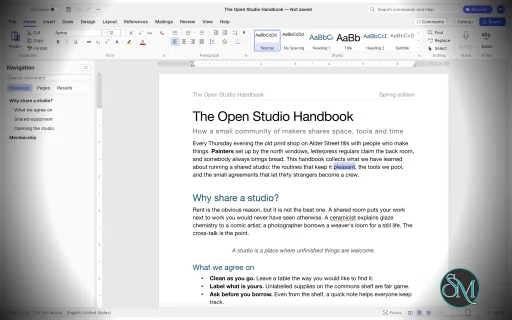
WordCraft is a free, open-source word processor designed as an alternative to Microsoft Word. Developed by the ArtCraft team, it is written in Rust and aims to reproduce familiar Word workflows while providing native applications for desktop operating systems and a browser-based version.
The application goes beyond basic text editing. It includes document formatting, styles, tables, page layout, references, comments, tracked changes, mail merge, and PDF export. It can open and save DOCX files, making it a potential option for users who regularly exchange documents with Microsoft Office users.
WordCraft also includes command-line tools and Model Context Protocol (MCP) integration, allowing compatible AI agents to create, inspect, edit, and export documents programmatically.
Although its feature set is extensive, WordCraft is still approaching maturity for everyday writing. Users who rely on complex Word documents or specialized publishing workflows should test compatibility before making it their primary word processor.
Features
Document Editing and Formatting
WordCraft provides a familiar ribbon-style interface with formatting controls for fonts, sizes, bold and italic text, underlining, colors, highlighting, superscript, and subscript.
It supports paragraph alignment, indentation, line spacing, tabs, borders, shading, and other layout options. The Format Painter lets users copy formatting between document elements, while built-in styles help maintain consistent formatting across longer documents.
The editor also includes AutoCorrect, smart quotes, automatic list formatting, find and replace with regular expressions, and standard undo and redo functionality.
These features make WordCraft suitable for writing reports, letters, essays, and other everyday documents.
DOCX Compatibility and File Formats
WordCraft supports reading and writing Microsoft Word's DOCX format. It also supports importing and exporting ODT, RTF, HTML, Markdown, and plain-text documents.
PDF export produces selectable text and supports links and bookmarks, making it useful for distributing reports and other finished documents.
The ability to work with common document formats is one of WordCraft's main advantages. However, opening a DOCX file does not guarantee that every element will render identically to Microsoft Word. Complex layouts, embedded objects, and less common formatting features should be checked after import.
Styles, Themes, and Page Layout
WordCraft includes paragraph and character styles, style sets, themes, and a live style gallery. Users can create or modify styles to maintain consistent formatting throughout a document.
Page-layout controls include margins, page size, orientation, columns, section breaks, page breaks, headers, footers, page numbers, watermarks, and page borders.
The application also supports automatic hyphenation, line numbering, drop caps, and text wrapping around pictures and shapes.
These capabilities are useful for creating structured reports, academic papers, business documents, and longer publications.
Tables, Images, and Graphics
WordCraft supports tables with merged and split cells, borders, shading, banded styles, sorting, and formulas. Rows can split across pages, and table headers can repeat on subsequent pages.
Images can be inserted, resized, cropped, rotated, recolored, and adjusted for brightness, contrast, and transparency. Additional features include picture styles, shapes, and text boxes with floating positioning and text wrapping.
The editor also supports converting text into tables and tables into text, helping users restructure information without recreating content manually.
References and Academic Writing
WordCraft provides a collection of tools for structured and academic documents, including:
Automatic tables of contents.
Footnotes and endnotes.
Citations and bibliographies in APA, MLA, Chicago, and IEEE styles.
Captions and tables of figures.
Cross-references and indexes.
Tables of authorities.
These tools make WordCraft particularly interesting for students, researchers, and professionals who work with long documents containing references and supporting material.
Users preparing formal academic submissions should verify that the generated references and formatting comply with their institution's requirements.
Comments, Track Changes, and Proofreading
WordCraft includes comments displayed in document margins or a dedicated pane. Track Changes allows users to review edits and accept or reject individual changes.
Document comparison, spelling and grammar suggestions, a thesaurus, word counting, and an accessibility checker provide additional support for reviewing and refining documents.
The application also includes document inspection and editing restrictions.
These features are valuable for collaborative editing and document review, although teams should test their specific review workflows before replacing established Microsoft Word processes.
Mail Merge
WordCraft supports mail merge using CSV data sources and document fields. Users can insert merge fields, configure address blocks and greeting lines, preview personalized documents, and generate merged output.
Envelope and label tools are also included.
This can help automate repetitive administrative tasks such as generating letters, notices, certificates, and personalized business documents.
AI and Command-Line Automation
WordCraft is designed to support both manual editing and programmatic document manipulation. Its editing engine exposes commands that are shared across the graphical interface, keyboard shortcuts, command search, CLI, JSON control channel, and MCP server.
The command-line interface supports document conversion, text extraction, structural inspection, rendering, and scripted editing.
For example, convert a Word document to PDF:
wordcraft-cli convert report.docx report.pdf
Extract its text:
wordcraft-cli text report.docx
Inspect the document structure as JSON:
wordcraft-cli inspect report.docx
These capabilities make WordCraft useful for batch processing, document-generation pipelines, and AI-assisted workflows. Compatible agents can inspect documents and execute editing commands without relying exclusively on screenshots or mouse interaction.
Download WordCraft v0.9.0 - Software Mirrors |
|---|
WordCraft v0.9.0 for Windowswordcraft-0.9.0-windows-x86.msi | 77.23 MB wordcraft-0.9.0-windows-x86-portable.zip | 92.68 MB wordcraft-0.9.0-windows-x64.msi | 78.7 MB wordcraft-0.9.0-windows-x64-portable.zip | 95.46 MB wordcraft-0.9.0-windows-arm64.msi | 75.57 MB wordcraft-0.9.0-windows-arm64-portable.zip | 92.64 MB |
WordCraft v0.9.0 for macOSwordcraft-cli-0.9.0-macos-universal.zip | 84.65 MB wordcraft-0.9.0-macos-universal.dmg | 105.79 MB |
WordCraft v0.9.0 for Linuxwordcraft-0.9.0-linux-x86_64.tar.gz | 96.27 MB wordcraft-0.9.0-linux-x86_64.rpm | 97.06 MB wordcraft-0.9.0-linux-x86_64.pkg.tar.zst | 74.76 MB wordcraft-0.9.0-linux-x86_64.flatpak | 69.22 MB wordcraft-0.9.0-linux-x86_64.deb | 97.61 MB wordcraft-0.9.0-linux-x86_64.AppImage.zsync | 321.47 kB wordcraft-0.9.0-linux-x86_64.AppImage | 91.78 MB wordcraft-0.9.0-linux-riscv64.tar.gz | 95.14 MB wordcraft-0.9.0-linux-riscv64.rpm | 95.95 MB wordcraft-0.9.0-linux-riscv64.deb | 96.31 MB wordcraft-0.9.0-linux-aarch64.tar.gz | 93.52 MB wordcraft-0.9.0-linux-aarch64.rpm | 94.89 MB wordcraft-0.9.0-linux-aarch64.pkg.tar.zst | 72.84 MB wordcraft-0.9.0-linux-aarch64.flatpak | 66.23 MB wordcraft-0.9.0-linux-aarch64.deb | 95.52 MB wordcraft-0.9.0-linux-aarch64.AppImage.zsync | 311.92 kB wordcraft-0.9.0-linux-aarch64.AppImage | 89.05 MB |
WordCraft v0.9.0 for BSDwordcraft-0.9.0-freebsd-x86_64.tar.gz | 99.24 MB |
Others Download related to WordCraft v0.9.0wordcraft-web-0.9.0.zip | 15.69 MB |
WordCraft v0.9.0 Source Code
WordCraft v0.9.0 Source code (zip)
WordCraft v0.9.0 Source code (tar.gz)
|
WordCraft v0.9.0 Release Notes: [!NOTE]
FreeBSD aarch64 is dropped from this release. We had to cut releases, and we cannot build this target within the 5-hour CI limit for any of the Craft apps, so we are dropping it for now. This is a known blocker, flagged for a future fix in storytold/craft-common-actions#39. FreeBSD x86_64 and every other platform are included.
What's Changed- Resolve exact OpenType full font names by @finwarman in #2516
- Recognize the Symbol PCL6 font alias by @finwarman in #2521
- Retain cell top insets across table row page breaks by @finwarman in #2524
- Remember Navigation Pane visibility across launches (#2526) by @dhruvLearner8 in #2528
- Keep leading U+3000/NBSP in Markdown import and round trip by @Silvertree2010 in #2538
- #1876: Web Layout text fills the window width by @dkhlapov in #2539
- A new source's Tag follows Word's format; editing keeps the Tag (#2094) by @dkhlapov in #2571
- #2592: Split Cells and Convert Text to Table dialogs by @dkhlapov in #2593
- Preserve REF field hyperlinks in PDF exports by @finwarman in #2597
- Font list: entries of tall-ascent fonts are no longer cut off (#2570) by @dkhlapov in #2598
- Preserve cached field result formatting by @finwarman in #2605
- Read Mode keeps the keyboard and shows whole, unobscured columns (#1772) by @dkhlapov in #2591
- Comments readable in the dark theme (#2045) by @dkhlapov in #2563
- Prefer a covering text face for missing black-circle glyphs by @finwarman in #2582
- DOCX: keep the glossary document (building blocks) by @dkhlapov in #2631
- #498: Indonesian (id-ID) spelling proofing by @benandez in #2576
- Keep custom footnote/endnote marks as text inside the note on DOCX save by @Silvertree2010 in #2647
- Promote the cell below when deleting a vertical merge's first row by @Silvertree2010 in #2649
- fix(commands): Export PDF and PNG without a path ask where to save by @charan-rathore in #2665
- #2634: a table inserted in right-to-left text is right to left, so Tab moves left by @benandez in #2688
- Format Painter: double-click keeps it on, armed and sticky look different (#2785) by @MarekSpodBiedry in #2822
- Update ROADMAP.md by @EncodeE55 in #2020
- DOCX: a style ID defined twice is its last definition by @Morzilla in #2031
- Automatic text in a styled text box takes the shape style's font colour by @Morzilla in #2032
- A cell emptied by widow control takes its row to the next page by @Morzilla in #2035
- Tests: the Alt+0233 test expects the system code page's character by @alik654zx in #2040
- Fonts: keep Arial Unicode MS fallbacks proportional by @finwarman in #2657
- CLI: allow explicit field updates during conversion by @finwarman in #2014
- #1297: copied equations go in the MathML clipboard formats Word reads by @benandez in #2614
- Shapes: preserve DrawingML outline dashes by @finwarman in #2661
- #1270: pasted HTML blockquote is an indented paragraph, not Quote by @benandez in #2737
- Different First Page: page 1's header can be edited and inserted (#2826) by @benandez in #2833
- Text effects: legacy outline, shadow, emboss and imprint are drawn (#2534) by @naxvog in #2548
- Give the status bar zoom percentage a fixed width by @Silvertree2010 in #2059
- Columns on selected text go in their own section (#2024) by @alik654zx in #2071
- Tab strip never draws tabs over Comments / Editing / Share (#2026) by @HyakoV3 in #2084
- fix(engine): ensure nextFootnote navigates only footnotes and skips endnotes by @divyanshu2074 in #2114
- fix(engine): exclude carriage returns from word count character statistics by @divyanshu2074 in #2116
- Fix Find navigation to show search results (#2096) by @FredApps in #2118
- Ribbon tab clicks no longer scroll the page to the caret while a footer is edited (#2054) by @MarekSpodBiedry in #2121
- fix(engine): use table_formula parse_number for table sorting by @divyanshu2074 in #2126
- Backspace and Delete remove a section break, imported or not by @marcoarnulfo in #2133
- fix(engine): support switches and quoted bookmarks when updating REF and PAGEREF fields by @divyanshu2074 in #2149
- Lists: Enter on an empty nested item numbered by its paragraph style moves it up a level (#2143) by @marcoarnulfo in #2151
- Layout: the caret after spaces hanging past the margin stays at the margin by @marcoarnulfo in #2152
- fix(engine): resolve section and section pages context when unlinking fields by @divyanshu2074 in #2156
- fix(doc): preserve overparen, underparen, and brackets in LaTeX group characters by @divyanshu2074 in #2163
- #1549: one Thai face for a run in a missing Thai font by @C00kieMonsta in #2175
- fix(engine): support nested quotations and opening delimiters in smart quotes by @divyanshu2074 in #2176
- #2068: Recently Used Fonts at the top of the font list by @C00kieMonsta in #2192
- Web: keep preferences such as dark mode between visits (#2132) by @benandez in #2205
- Draw undrawable private-use list bullets as the level's default bullet, not an icon-font glyph (#1683) by @benandez in #2206
- #1885: dialog close box fills red on hover, whole box clickable by @C00kieMonsta in #2090
- Context menu: Remove Table of Contents on a TOC entry (#2179) by @dhruvLearner8 in #2217
- fix(docx): support hex without hash, rgb(), and case-insensitive color names in VML and DrawingML by @divyanshu2074 in #2222
- AutoCorrect: reversing a capitalisation adds an automatic exception, as in Word (#1857) by @dkhlapov in #2227
- fix(engine): support none in wordart reflection and outline color by @divyanshu2074 in #2238
- Numbered headings: heading-linked multilevel list presets keep the heading styles (#1793) by @dkhlapov in #2239
- fix(docx): trim marker id, bound bookmarks map, and support bookmarkEnd name fallback by @divyanshu2074 in #2252
- AutoCorrect: replace the double-hyphen arrow (#2223) by @FredApps in #2263
- Hover tip on a table of contents link says Current Document (#2177) by @dhruvLearner8 in #2281
- Theme: default to system appearance by @GhostMitra in #718
- Focus the Insert Hyperlink address box (#1610) by @FredApps in #1642
- DOCX: read every VML shape in a
w:pict, and a v:group's members by @Hamza0101 in #1662 - i18n(pl): citation style names, audit coverage and attribution (#750) by @olekkut in #1720
- UI: Font dropdown list height doesn't update when filter results increase by @mbaksa in #1732
- Ink to Shape: two-stroke arrows and closed-triangle heads (gap 12) by @dkhlapov in #1778
- Track Changes Options: Moves (move tracking, Moved from/to marks and colours) (gap 5) by @dkhlapov in #1779
- Update Field works in headers, footers, notes and text boxes; printing updates every field (#1706) by @dkhlapov in #1780
- #1906: content-control Properties OK inherits theme text by @SlavenDj in #1920
- macOS: dialogs put Cancel left of the default button, and ⌘. cancels by @kkilchrist in #1835
- #1861: searchable Interface Theme command (View, light/dark/system + toggle) by @SlavenDj in #1868
- #1902: clipboard and styles pane actions return focus to the document by @SlavenDj in #1914
- #1904: bookmark dialog placeholder when no bookmarks by @SlavenDj in #1917
- #1905: empty keys list shows (none) by @SlavenDj in #1919
- Fonts: bounded family caches; math follows font changes (#1354) by @dkhlapov in #1929
- Clamp negative margins before checking they leave text room by @Silvertree2010 in #1941
- Web: input-method rewrites erase before retyping, so non-Latin typing no longer repeats (part of #1480) by @dkhlapov in #1949
- DOCX: mixed Hebrew/Latin keeps its order in Word (runs split by direction, w:rtl and language) (#1543) by @dkhlapov in #1950
- Rendering and PDF check image limits before allocating (#1321) by @dkhlapov in #2001
- Tables: Backspace removes a selected table, rows or columns; Delete clears them (part of #1844) by @dkhlapov in #2005
- Hebrew: field results like STYLEREF draw right to left; smart quotes match Word (#1670) by @dkhlapov in #2007
- A mouse drag on a table no longer scrolls the view to the caret (#1738) by @dkhlapov in #2008
- Turkish case mapping: i/İ and ı/I capitalise correctly (#1923) by @dkhlapov in #2009
- fix(formats): support none and dual scripts in mmultiscripts, mpadded phantoms, menclose borders, and mtable column align by @divyanshu2074 in #2300
- Contributors: add Marco Arnulfo by @marcoarnulfo in #2302
- fix(docbin): handle default codepage, VT_I4, multiple property sets, and FILETIME dates by @divyanshu2074 in #2304
- Copying a picture or shape replaces the clipboard's old text, so Paste duplicates it by @marcoarnulfo in #2306
- fix(docbin): correct sprmTCellWidth operand parsing and handle percentage widths by @divyanshu2074 in #2312
- Keep spaces that follow a tab in the ODT round trip by @Silvertree2010 in #2317
- fix(math): parse array column specs, support starred operatorname and tag, preserve delim sep in latex by @divyanshu2074 in #2353
- fix(pdf): scale bookmark destination coordinates with page Fit and support case-insensitive bookmark lookup by @divyanshu2074 in #2364
- fix(smart_art): normalize layout and color identifiers and preserve item text with leading whitespace by @divyanshu2074 in #2365
- #1743: Ctrl+wheel zoom no longer scrolls the document by @dkhlapov in #2386
- DOCX: positional tabs (w:ptab) keep their alignment, base and leader and go to the margins or indents, as in Word (#2367) by @marcoarnulfo in #2387
- Fonts: restore missing strokes in hint-reliant Chinese fonts by @xyz9516 in #2389
- Layout: automatic space between Asian text and Latin text or digits (autoSpaceDE, autoSpaceDN) (#2358) by @marcoarnulfo in #2397
- fix(formats): support html entities, wbr zero-width break, and page-break-after by @divyanshu2074 in #2400
- Refresh DATE/TIME fields when opening .doc/.dot by extension by @Silvertree2010 in #2418
- #1843: Read Aloud speaks Russian text with a Russian voice by @dkhlapov in #2430
- Share AutoFit donor reductions equally by @finwarman in #2464
- Include table-cell headings in regenerated TOCs by @finwarman in #2482
- Fix PDF outline targets after leading page breaks by @finwarman in #2484
- DOCX: two lines in one and horizontal in vertical (
w:eastAsianLayout) survive a save by @imachus in #2486 - Honor table row keep-next during pagination by @finwarman in #2494
- Word's Spike: Ctrl+F3 collects cuts, Ctrl+Shift+F3 inserts them by @marcoarnulfo in #2507
- docs: how to install spelling dictionaries (pt_BR example) by @JoaoAugusto00 in #2510
- ODT export: sections are saved (gap 19) by @dkhlapov in #1777
- Restrict Editing: exceptions don't open page setup or styles; tracked-changes protection keeps revisions by @dfgodvan in #1881
- mcp: let open_document take a password by @Bra1nZ in #1796
- #1873: Backstage back chevron uses plain inset in macOS full screen by @SlavenDj in #1879
- #1895: recovery page buttons keep theme text colors by @SlavenDj in #1898
- Grey out and guard ribbon split buttons when disabled by @Silvertree2010 in #1918
- Equations: a script runs until a space or operator, as in Word (V_dd, x_2a) (#1609) by @dkhlapov in #1951
- Fonts: the font scan leaves out faces with no outline or color bitmap tables by @dotCooCoo in #1972
- PDF tests read ActualText spans, so RTL extraction no longer depends on the installed Arabic font (#1773) by @Sriram-PR in #1973
- Escape block syntax after manual line breaks in Markdown export by @Silvertree2010 in #1980
- Keep font-cache tests valid with optional Thai fonts by @IanHollow in #1981
- Contributors: dotCooCoo's entry shows the GitHub profile name again by @dotCooCoo in #1982
- File › Close closes the document and keeps the window (#1712) by @D13GOOOO in #1996
- Fonts: bold Arial Black is not emboldened again, as in Word by @naxvog in #1750
- cli: open a password-protected Word file with --password by @Bra1nZ in #1770
- RTF export: sections are saved (gap 19) by @dkhlapov in #1776
- Proofing: -ically adverbs such as "specifically" are no longer flagged (#1694) by @benandez in #1854
- Tables: include behind-text frames in cell alignment by @finwarman in #1871
- #1903: undo-history footer Cancel closes the popup by @SlavenDj in #1916
- Tables: add editable Cell Margins dialog (#1960) by @justinjohn0306 in #1988
- Lowercase list items no longer get a grammar underline (#1741) by @dkhlapov in #1783
- ASK and SET fields show nothing (#1765) by @dkhlapov in #1785
- Tables: at-least rows taller than a page start on a fresh page; header rows follow (#1742) by @dkhlapov in #2004
- DOCX: a w:u without w:val draws no underline by @marcoarnulfo in #2380
- OpenType ligatures follow w14:ligatures: model, DOCX read and write, shaping by @marcoarnulfo in #2351
- Text boxes: framed paragraphs run with the box's text, not drawn over each other by @marcoarnulfo in #2383
- Paste: plain text keeps the formatting of the paragraph it lands in by @seif9116 in #2424
- Preserve zero effect extents on rotated drawings by @finwarman in #2432
- #1789: Add Font imports every selected font file by @dkhlapov in #2404
- Layout: preserve additive spacing after section breaks by @finwarman in #2433
- Layout: keep narrow cell line widths by @finwarman in #2436
- DOCX: strict line heights with a unit are points under auto (#2329) by @PanSHIgg in #2439
- Preserve inherited cell margins on partial overrides by @finwarman in #2434
- Layout: preserve equation baselines under exact line spacing by @finwarman in #2435
- fix(ui): offer Save As for imported Word files by @OPUZZLES in #2448
- Layout: exclude floating anchors from line font metrics by @finwarman in #2462
- DOCX: opening no longer copies the document's pictures by @arcanii in #2441
- Update Field after save and reopen of a table of contents (#2182) by @dkhlapov in #2553
- Preserve direct TOC number tabs during refresh by @finwarman in #2475
- fix(ui): expose save confirmation context to screen readers by @OPUZZLES in #2489
- fix(ui): deliver control input in inactive windows by @OPUZZLES in #2530
- Fonts Word embeds as subsets lay out the text set in them (#2240) by @D13GOOOO in #2540
- i18n: French interface catalog completed (2,615 entries) with native-speaker review by @rem5411 in #2492
- Insert › Shapes keeps the selected shape and text (#2019) by @D13GOOOO in #2030
- A floating object's anchor takes no room on a line by @Morzilla in #2033
- Symbols keep their symbol font when the text font changes (#2036) by @dkhlapov in #2037
- Legacy form fields are drawn: check boxes, and drop-downs' selected entry by @Morzilla in #2076
- Proofing: a hyphenated word added to the dictionary is no longer flagged by @marcoarnulfo in #2085
- RTF: formatting and paragraph-mark revisions are read and written (gap 19) by @dkhlapov in #2088
- #1945: Hide the Quick Access Toolbar and show it again by @C00kieMonsta in #2089
- #1878: Rulers thin out with the zoom and span the caret's page by @C00kieMonsta in #2093
- DOCX: ink inside groups and drawing canvases survives saving (gap 2) by @dkhlapov in #2097
- fix(render, pdf): fix vertical double and wave border rendering by @divyanshu2074 in #2113
- fix(doc): strip negative sign when formatting numbers rounded to zero by @divyanshu2074 in #2122
- fix(formats): support relative font size values in HTML font tags by @divyanshu2074 in #2130
- fix(docx): support self-closing w:compat in settings merge by @divyanshu2074 in #2131
- fix(formats): trim whitespace when parsing numeric XML attributes in ODT by @divyanshu2074 in #2137
- Insert › Shapes menu: an icon for each shape and connector by @fluorine in #2142
- fix(web): download after asynchronous save-picker rejection by @FredApps in #2145
- fix(layout): support field format switches without whitespace after \* by @divyanshu2074 in #2147
- Picture Styles, Border and Artistic Effects replace the last one instead of stacking (#2052) by @D13GOOOO in #2148
- fix(formats): handle negative timezone offsets and flexible day digits in spreadsheet iso_datetime by @divyanshu2074 in #2154
- fix(formats): emit \landscape in RTF export when section is landscape by @divyanshu2074 in #2159
- Save writes the chosen file when its folder refuses a temporary file (macOS privacy protection) (#2138) by @benandez in #2167
- fix(layout): support quoted bookmark names with spaces in PAGEREF fields by @divyanshu2074 in #2169
- SmartArt: type into items; open the Text Pane by double-click or frame button by @fluorine in #2170
- fix(formats): support quoted and non-latin charset declarations in HTML decode by @divyanshu2074 in #2180
- fix(formats): resolve sub-location and external URLs in RTF HYPERLINK fields by @divyanshu2074 in #2181
- #1552: no spelling squiggle under the word being typed by @C00kieMonsta in #2183
- fix(doc, formats): support OEM character set 255 in charset_code_page by @divyanshu2074 in #2195
- fix(engine): count multi-column spanning cells once in table formula ranges by @divyanshu2074 in #2200
- fix(formats): preserve tilde characters in LaTeX URLs and raw arguments by @divyanshu2074 in #2202
- fix(formats): support cell and paragraph borders in RTF export by @divyanshu2074 in #2207
- Highlight: No Color becomes the button's choice (#2105) by @benandez in #2208
- fix(formats): enforce tag boundary when skipping raw text elements in HTML by @divyanshu2074 in #2257
- Font dialog: Kerning for fonts and its Points and above size by @marcoarnulfo in #2295
- #537: test that System pins the title bar to the desktop's light/dark answer on Linux by @benandez in #2559
- fix(ui): keep note editing text readable (#2545) by @OPUZZLES in #2562
- #1963: wordcraft-cli runs a script file by @dkhlapov in #2566
- Ignore explicit page breaks inside table cells by @finwarman in #2574
- Reserve footer flow-table border clearance by @finwarman in #2585
- Dragging the scrollbar names the page at the top of the window (#2551) by @D13GOOOO in #2575
- layout: preserve subpoint table grid widths by @finwarman in #2589
- Watermarks in header table cells drawn behind the text (#1775) by @dkhlapov in #2580
- Ribbon tooltips show why a control is disabled (#1086) by @dkhlapov in #2623
- Drop Cap Options dialog (#2601) by @dkhlapov in #2602
- Keep the line in an empty section starting a page by @finwarman in #2609
- #1273: equations from Word files keep all their content by @benandez in #2613
- #1230: Insert Caption on pictures and shapes; Different First Page in Page Setup by @benandez in #2615
- #1327: protection checks cover tables, Paste Formatting and recipient refresh by @dkhlapov in #2618
- Recipient list: find box and merged-only view (#1576) by @dkhlapov in #2621
- Keep explicit text:s spaces at paragraph ends on ODT import by @Silvertree2010 in #2641
- Use the Default Paragraph Style font when importing ODT (#2804) by @MarekSpodBiedry in #2823
- Keep the ODT paragraph 'Keep with next' option on import and export (#2813) by @MarekSpodBiedry in #2825
- Count shared continuous-section pages in SECTIONPAGES by @finwarman in #2654
- Fix page-relative footer table height and body wrapping by @finwarman in #2659
- Page setup: resolve section correctly when focus is in a header, footer or note (#2072) by @GhostMitra in #2663
- Fix stray leading space in RTF list items on export by @Silvertree2010 in #2667
- #2108: File › Print scales pages to another paper size by @benandez in #2699
- Keep floating body tables clear of header tables by @finwarman in #2660
- fix: a dragged picture, shape or text box is no longer left behind on its page by @GavinQiEr in #2720
- fix: dropping an object near the top of the next page no longer sends it back by @GavinQiEr in #2829
- Count shared table borders in row minimums by @finwarman in #2789
- fix(macos): skip wgpu indirect validation on Intel Macs so launch no longer exits (#2652) by @Higgs32584 in #2845
- File page: the back arrow no longer ends WordCraft when accessibility is on by @arcanii in #2856
- Decode ISO 8859-1 Hunspell dictionaries so the original pt_BR works (#2824) by @MarekSpodBiedry in #2904
- Proofing: say when a dictionary is installed but unreadable, with file and reason (#2830) by @MarekSpodBiedry in #2900
- Keep the Insert SmartArt dialog within the window (#2832) by @MarekSpodBiedry in #2902
- DOCX: Word 2007 WordArt (VML textpath) in the body is shown as text, not dropped (#2875) by @MarekSpodBiedry in #2903
- Keep the selection's font when typing over a backward selection by @Silvertree2010 in #2911
- Fit inline text boxes with Resize shape to fit text to their text by @Silvertree2010 in #2912
- #2573: Picture Format › Size takes sizes in any unit, pixels too, and opens a Size dialog by @matteo-andreuzza in #2889
- References: Word sources file import in Manage Sources (#2640) by @PanSHIgg in #2897
- Split Cells on merged cells: divisor message and 1x1 top-row cut (#2592) by @dkhlapov in #2913
- Ribbon groups shrink to fit the window (#662) by @dkhlapov in #708
- Mail merge review follow-ups: keep the filter on failure, cap spreadsheet text (#1287) by @dkhlapov in #1295
- Comments: a draft survives a failed commit (#1348) by @dkhlapov in #1512
- Tests: fitting exact-height rows move on whole by @finwarman in #1641
- Italian: fixes from a native speaker review by @lucAmbr0 in #1717
- File (Backstage): an icon beside each side-menu item (#1714) by @D13GOOOO in #1723
- Scroll the selected command into view in Customize Keyboard by @Silvertree2010 in #1731
- Ribbon collapse review follow-ups: collapsed groups stay open, Styles kept (#1285) by @dkhlapov in #1293
- ci: configure Dependabot for Cargo and GitHub Actions by @dylanmtaylor in #2951
- cli: keep the non-UTF-8 file name test off macOS by @maxm11 in #2993
- render: keep the legacy font effect test off antialiasing by @maxm11 in #2990
- Layout: a word after a slash wraps whole, like Word (#2963) by @Faabyy in #2985
- Ruler: margin handles on even mirrored pages edit the visible edge's stored margin (#2914) by @dhruvLearner8 in #2975
- Selection rectangles walk only the paragraphs the range reaches by @dfgodvan in #2967
- Layout: a roman page number in the footer stays roman when the body shows the page count by @dfgodvan in #2966
- Cross-reference: caption labels of your own are Reference types (#2940) by @dhruvLearner8 in #2957
- A Word 2003 XML or web page saved as .doc opens by what it holds (#2853) by @D13GOOOO in #2942
- fix(ui): keep recent fonts visible after an unmatched query (#2068) by @OPUZZLES in #2929
- Limit table row deferral to genuine widow splits by @finwarman in #2925
- Keep a single trailing space when exporting a paragraph to ODT by @Silvertree2010 in #3066
- Clippy passes on Windows and Linux again (#2845 follow-up) by @D13GOOOO in #3006
- Add @SlavenDj to contributors/people.toml by @SlavenDj in #3048
- #3035: WordArt reflection swatch follows the theme text colour by @SlavenDj in #3055
- #3034: SmartArt Pyramid separators follow the theme line colour by @SlavenDj in #3052
- #3033: file browser Open/Save uses the themed primary button by @SlavenDj in #3047
- #2892: rules end flat on screen, like the PDF export by @SlavenDj in #3061
- #3037: file browser says when a folder (or the filter) shows no items by @SlavenDj in #3054
- #3036: AutoCorrect Replace list says when the filter matches nothing by @SlavenDj in #3053
- #3032: Styles pane greys out Delete for built-in styles by @SlavenDj in #3051
- #3031: Tabs dialog says the list is empty instead of a blank box by @SlavenDj in #3050
- #3040: undo-history row returns focus to the document by @SlavenDj in #3044
- #3038: mini toolbar highlight swatch returns focus to the document by @SlavenDj in #3042
- #3039: mini toolbar font colour Automatic returns focus to the document by @SlavenDj in #3043
- Paste: Ctrl+V pastes a clipboard picture even when Ctrl is released before V (#3049) by @jcagudelo12 in #3058
- #2999: a file dialog that "cancels" at once asks again without a parent, then shows the built-in browser by @benandez in #3030
- #2972: regression tests for File page AccessKit focus paths (mac chevron, Options back, Blank document) by @benandez in #3019
- Opening a missing recent file keeps File open and shows the error (#2938) by @MarekSpodBiedry in #3012
- Size the text cursor by the font, not the line spacing (#2920) by @MarekSpodBiedry in #3011
- #3045: the empty window's ribbon tabs stay live, so File reaches the Start screen by @SlavenDj in #3064
- Navigation pane: a long heading wraps within the pane instead of ending in an ellipsis (#3015) by @GabrielMatozo in #3029
- #3067: script parse test compares paths with Path::join by @D13GOOOO in #3106
- Write large whole numbers without decimals in format_number by @Silvertree2010 in #3107
- Keep a single leading space in HTML export paragraphs by @Silvertree2010 in #3102
- Keep an ordered list's start number in Markdown import by @Silvertree2010 in #3103
- Fix Paragraph::sentence_at at the first character of a sentence by @Silvertree2010 in #3105
- Restrict Editing: forms protection keeps a form's content controls by @pick2510 in #3112
- Content controls: typed text takes the control's formatting, in any language by @pick2510 in #3116
- RTF import: heading and code formatting compared with the file's own stylesheet (gap 19 follow-up) by @dkhlapov in #2236
- The caret and clicks land between the letters of a ligature (#1974) by @dkhlapov in #2006
- docs: drop references to competing commercial software by @dylanmtaylor in #2854
New Contributors- @dhruvLearner8 made their first contribution in #2528
- @charan-rathore made their first contribution in #2665
- @EncodeE55 made their first contribution in #2020
- @FredApps made their first contribution in #2118
- @C00kieMonsta made their first contribution in #2175
- @olekkut made their first contribution in #1720
- @SlavenDj made their first contribution in #1920
- @xyz9516 made their first contribution in #2389
- @imachus made their first contribution in #2486
- @JoaoAugusto00 made their first contribution in #2510
- @Bra1nZ made their first contribution in #1796
- @Sriram-PR made their first contribution in #1973
- @IanHollow made their first contribution in #1981
- @seif9116 made their first contribution in #2424
- @PanSHIgg made their first contribution in #2439
- @rem5411 made their first contribution in #2492
- @fluorine made their first contribution in #2142
- @GavinQiEr made their first contribution in #2720
- @Higgs32584 made their first contribution in #2845
- @matteo-andreuzza made their first contribution in #2889
- @lucAmbr0 made their first contribution in #1717
- @maxm11 made their first contribution in #2993
- @Faabyy made their first contribution in #2985
- @jcagudelo12 made their first contribution in #3058
- @GabrielMatozo made their first contribution in #3029
- @pick2510 made their first contribution in #3112
Full Changelog: v0.8.0...v0.9.0
|
Performance and Compatibility
WordCraft is written in Rust and uses a modular architecture for document editing, typography, pagination, rendering, and file conversion. Its interface uses the native GPU-oriented egui framework rather than Electron or Tauri.
The project emphasizes responsive editing through cached paragraph layout and on-demand page rendering. Its developers report that typing in a 188-page document triggers layout recalculation in approximately 1.4 milliseconds. This is a project-reported benchmark rather than an independent performance test.
WordCraft supports macOS, Windows, Linux, BSD, and browsers through WebAssembly. It can read and write DOCX files and supports several additional document formats.
The main limitation is compatibility maturity. The project's roadmap identifies real-world DOCX testing, native printing, and signed application builds as remaining work. Charts, SmartArt, the equation editor, and the Draw tab are also listed as future development areas.
Consequently, WordCraft should not yet be assumed to offer complete feature parity with Microsoft Word, particularly for complex business documents and specialized workflows.
System Requirements
Operating systems: Windows, macOS, Linux, and BSD.
Browser support: WebAssembly build for compatible browsers.
Document formats: DOCX, ODT, RTF, HTML, Markdown, and plain text.
Export: PDF and page images, in addition to supported document formats.
Build requirements: Rust and the project's documented dependencies.
The project does not provide a comprehensive minimum hardware specification in the information reviewed. Actual performance will depend on document complexity, fonts, embedded images, and system resources.
Pros and Cons
Pros
Free and open-source under the MIT or Apache 2.0 license.
Familiar ribbon-style interface inspired by Microsoft Word.
DOCX reading and writing support.
Extensive formatting, styles, tables, and page-layout tools.
References, citations, footnotes, indexes, and tables of contents.
Comments, Track Changes, and proofreading tools.
Mail merge with CSV data sources.
PDF export with selectable text, links, and bookmarks.
Native desktop applications and a browser-based version.
CLI and MCP support for document automation.
Offline spelling and grammar features without requiring cloud processing.
Cons
Still approaching maturity for everyday writing and production use.
Complex DOCX compatibility needs more real-world validation.
Native printing and signed application builds remain development priorities.
Charts, SmartArt, and the equation editor are not yet complete features.
Does not provide full Microsoft Word feature parity.
Professional workflows may require additional testing and workarounds.
How to Install
The simplest option is to download a package from the project's GitHub Releases page, if a suitable build is available for your operating system.
To build and run WordCraft from source, install Rust and the required development dependencies, then execute:
git clone https://github.com/storytold/wordcraft
cd wordcraft
cargo run --release -p wordcraft -- --sample
To open an existing document:
cargo run --release -p wordcraft -- report.docx
For browser-based use, navigate to the web application directory and start the development server:
cd apps/wordcraft-web
trunk serve
The development server will provide a local address for opening WordCraft in a browser. Refer to the official repository for detailed build dependencies, release packages, and platform-specific instructions.
Final Verdict
WordCraft is an ambitious open-source word processor that combines familiar document editing with advanced formatting, references, review tools, mail merge, and automation. Its support for DOCX and PDF, together with additional formats and offline functionality, makes it a promising alternative for users who want more control over their document workflow.
Its command-line interface and MCP integration are especially interesting for developers and organizations that generate or process documents programmatically. The extensive feature set also makes it worth exploring for students, writers, and office users.
The biggest concern is maturity. WordCraft covers many of Microsoft Word's ribbon features, but feature coverage is not the same as complete behavioral compatibility. Users who depend on complex documents, advanced diagrams, equations, or established printing workflows should test their files carefully before switching.
For everyday writing and experimentation with open-source office software, WordCraft is worth trying. For mission-critical document production, it is better treated as a developing alternative until its compatibility and printing workflows have been validated against real-world requirements.
Post a Comment/Report Broken Link: