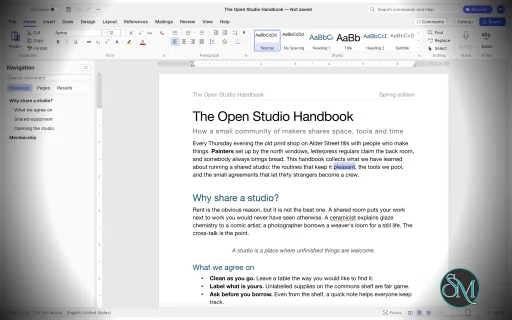
WordCraft is a free, open-source word processor designed as an alternative to Microsoft Word. Developed by the ArtCraft team, it is written in Rust and aims to reproduce familiar Word workflows while providing native applications for desktop operating systems and a browser-based version.
The application goes beyond basic text editing. It includes document formatting, styles, tables, page layout, references, comments, tracked changes, mail merge, and PDF export. It can open and save DOCX files, making it a potential option for users who regularly exchange documents with Microsoft Office users.
WordCraft also includes command-line tools and Model Context Protocol (MCP) integration, allowing compatible AI agents to create, inspect, edit, and export documents programmatically.
Although its feature set is extensive, WordCraft is still approaching maturity for everyday writing. Users who rely on complex Word documents or specialized publishing workflows should test compatibility before making it their primary word processor.
Features
Document Editing and Formatting
WordCraft provides a familiar ribbon-style interface with formatting controls for fonts, sizes, bold and italic text, underlining, colors, highlighting, superscript, and subscript.
It supports paragraph alignment, indentation, line spacing, tabs, borders, shading, and other layout options. The Format Painter lets users copy formatting between document elements, while built-in styles help maintain consistent formatting across longer documents.
The editor also includes AutoCorrect, smart quotes, automatic list formatting, find and replace with regular expressions, and standard undo and redo functionality.
These features make WordCraft suitable for writing reports, letters, essays, and other everyday documents.
DOCX Compatibility and File Formats
WordCraft supports reading and writing Microsoft Word's DOCX format. It also supports importing and exporting ODT, RTF, HTML, Markdown, and plain-text documents.
PDF export produces selectable text and supports links and bookmarks, making it useful for distributing reports and other finished documents.
The ability to work with common document formats is one of WordCraft's main advantages. However, opening a DOCX file does not guarantee that every element will render identically to Microsoft Word. Complex layouts, embedded objects, and less common formatting features should be checked after import.
Styles, Themes, and Page Layout
WordCraft includes paragraph and character styles, style sets, themes, and a live style gallery. Users can create or modify styles to maintain consistent formatting throughout a document.
Page-layout controls include margins, page size, orientation, columns, section breaks, page breaks, headers, footers, page numbers, watermarks, and page borders.
The application also supports automatic hyphenation, line numbering, drop caps, and text wrapping around pictures and shapes.
These capabilities are useful for creating structured reports, academic papers, business documents, and longer publications.
Tables, Images, and Graphics
WordCraft supports tables with merged and split cells, borders, shading, banded styles, sorting, and formulas. Rows can split across pages, and table headers can repeat on subsequent pages.
Images can be inserted, resized, cropped, rotated, recolored, and adjusted for brightness, contrast, and transparency. Additional features include picture styles, shapes, and text boxes with floating positioning and text wrapping.
The editor also supports converting text into tables and tables into text, helping users restructure information without recreating content manually.
References and Academic Writing
WordCraft provides a collection of tools for structured and academic documents, including:
Automatic tables of contents.
Footnotes and endnotes.
Citations and bibliographies in APA, MLA, Chicago, and IEEE styles.
Captions and tables of figures.
Cross-references and indexes.
Tables of authorities.
These tools make WordCraft particularly interesting for students, researchers, and professionals who work with long documents containing references and supporting material.
Users preparing formal academic submissions should verify that the generated references and formatting comply with their institution's requirements.
Comments, Track Changes, and Proofreading
WordCraft includes comments displayed in document margins or a dedicated pane. Track Changes allows users to review edits and accept or reject individual changes.
Document comparison, spelling and grammar suggestions, a thesaurus, word counting, and an accessibility checker provide additional support for reviewing and refining documents.
The application also includes document inspection and editing restrictions.
These features are valuable for collaborative editing and document review, although teams should test their specific review workflows before replacing established Microsoft Word processes.
Mail Merge
WordCraft supports mail merge using CSV data sources and document fields. Users can insert merge fields, configure address blocks and greeting lines, preview personalized documents, and generate merged output.
Envelope and label tools are also included.
This can help automate repetitive administrative tasks such as generating letters, notices, certificates, and personalized business documents.
AI and Command-Line Automation
WordCraft is designed to support both manual editing and programmatic document manipulation. Its editing engine exposes commands that are shared across the graphical interface, keyboard shortcuts, command search, CLI, JSON control channel, and MCP server.
The command-line interface supports document conversion, text extraction, structural inspection, rendering, and scripted editing.
For example, convert a Word document to PDF:
wordcraft-cli convert report.docx report.pdfExtract its text:
wordcraft-cli text report.docxInspect the document structure as JSON:
wordcraft-cli inspect report.docxThese capabilities make WordCraft useful for batch processing, document-generation pipelines, and AI-assisted workflows. Compatible agents can inspect documents and execute editing commands without relying exclusively on screenshots or mouse interaction.
Download WordCraft v0.7.0 - Software Mirrors |
|---|
WordCraft v0.7.0 for Windowswordcraft-0.7.0-windows-x86.msi | 74.6 MB wordcraft-0.7.0-windows-x86-portable.zip | 89.18 MB wordcraft-0.7.0-windows-x64.msi | 75.88 MB wordcraft-0.7.0-windows-x64-portable.zip | 91.86 MB |
WordCraft v0.7.0 for macOS |
WordCraft v0.7.0 for Linuxwordcraft-0.7.0-linux-x86_64.tar.gz | 92.8 MB wordcraft-0.7.0-linux-x86_64.rpm | 93.54 MB wordcraft-0.7.0-linux-x86_64.flatpak | 67 MB wordcraft-0.7.0-linux-x86_64.deb | 94.06 MB wordcraft-0.7.0-linux-x86_64.AppImage.zsync | 310.13 kB wordcraft-0.7.0-linux-x86_64.AppImage | 88.54 MB wordcraft-0.7.0-linux-riscv64.tar.gz | 91.84 MB wordcraft-0.7.0-linux-riscv64.rpm | 92.6 MB wordcraft-0.7.0-linux-riscv64.deb | 92.94 MB wordcraft-0.7.0-linux-aarch64.tar.gz | 90.3 MB wordcraft-0.7.0-linux-aarch64.rpm | 91.56 MB wordcraft-0.7.0-linux-aarch64.flatpak | 64.3 MB wordcraft-0.7.0-linux-aarch64.deb | 92.17 MB |
WordCraft v0.7.0 for BSD |
Others Download related to WordCraft v0.7.0 |
WordCraft v0.7.0 Source Code |
WordCraft v0.7.0 Release Notes:What's Changed
New Contributors
|
Performance and Compatibility
WordCraft is written in Rust and uses a modular architecture for document editing, typography, pagination, rendering, and file conversion. Its interface uses the native GPU-oriented egui framework rather than Electron or Tauri.
The project emphasizes responsive editing through cached paragraph layout and on-demand page rendering. Its developers report that typing in a 188-page document triggers layout recalculation in approximately 1.4 milliseconds. This is a project-reported benchmark rather than an independent performance test.
WordCraft supports macOS, Windows, Linux, BSD, and browsers through WebAssembly. It can read and write DOCX files and supports several additional document formats.
The main limitation is compatibility maturity. The project's roadmap identifies real-world DOCX testing, native printing, and signed application builds as remaining work. Charts, SmartArt, the equation editor, and the Draw tab are also listed as future development areas.
Consequently, WordCraft should not yet be assumed to offer complete feature parity with Microsoft Word, particularly for complex business documents and specialized workflows.
System Requirements
Operating systems: Windows, macOS, Linux, and BSD.
Browser support: WebAssembly build for compatible browsers.
Document formats: DOCX, ODT, RTF, HTML, Markdown, and plain text.
Export: PDF and page images, in addition to supported document formats.
Build requirements: Rust and the project's documented dependencies.
The project does not provide a comprehensive minimum hardware specification in the information reviewed. Actual performance will depend on document complexity, fonts, embedded images, and system resources.
Pros and Cons
Pros
Free and open-source under the MIT or Apache 2.0 license.
Familiar ribbon-style interface inspired by Microsoft Word.
DOCX reading and writing support.
Extensive formatting, styles, tables, and page-layout tools.
References, citations, footnotes, indexes, and tables of contents.
Comments, Track Changes, and proofreading tools.
Mail merge with CSV data sources.
PDF export with selectable text, links, and bookmarks.
Native desktop applications and a browser-based version.
CLI and MCP support for document automation.
Offline spelling and grammar features without requiring cloud processing.
Cons
Still approaching maturity for everyday writing and production use.
Complex DOCX compatibility needs more real-world validation.
Native printing and signed application builds remain development priorities.
Charts, SmartArt, and the equation editor are not yet complete features.
Does not provide full Microsoft Word feature parity.
Professional workflows may require additional testing and workarounds.
How to Install
The simplest option is to download a package from the project's GitHub Releases page, if a suitable build is available for your operating system.
To build and run WordCraft from source, install Rust and the required development dependencies, then execute:
git clone https://github.com/storytold/wordcraft
cd wordcraft
cargo run --release -p wordcraft -- --sample
To open an existing document:
cargo run --release -p wordcraft -- report.docxFor browser-based use, navigate to the web application directory and start the development server:
cd apps/wordcraft-web
trunk serve
The development server will provide a local address for opening WordCraft in a browser. Refer to the official repository for detailed build dependencies, release packages, and platform-specific instructions.
Final Verdict
WordCraft is an ambitious open-source word processor that combines familiar document editing with advanced formatting, references, review tools, mail merge, and automation. Its support for DOCX and PDF, together with additional formats and offline functionality, makes it a promising alternative for users who want more control over their document workflow.
Its command-line interface and MCP integration are especially interesting for developers and organizations that generate or process documents programmatically. The extensive feature set also makes it worth exploring for students, writers, and office users.
The biggest concern is maturity. WordCraft covers many of Microsoft Word's ribbon features, but feature coverage is not the same as complete behavioral compatibility. Users who depend on complex documents, advanced diagrams, equations, or established printing workflows should test their files carefully before switching.
For everyday writing and experimentation with open-source office software, WordCraft is worth trying. For mission-critical document production, it is better treated as a developing alternative until its compatibility and printing workflows have been validated against real-world requirements.
Post a Comment/Report Broken Link: