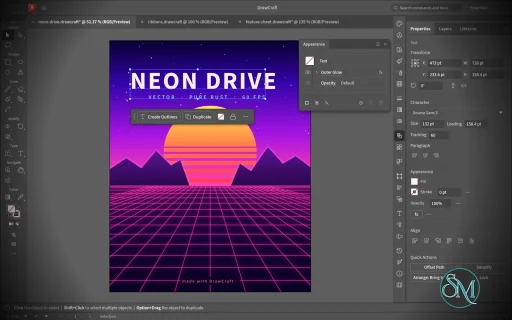
VectorCraft is an open-source vector illustration application designed as a clean-room reimplementation of the Adobe Illustrator workflow. Built entirely in Rust, it provides a native desktop application for Windows, macOS and Linux, along with a WebAssembly version that runs in the browser.
The project goes beyond basic vector drawing. It aims to reproduce a professional Illustrator-style workflow with Bézier editing, Pathfinder operations, multiple artboards, typography, gradients, live effects, PDF and SVG workflows, and extensive automation capabilities.
Features
VectorCraft provides a substantial collection of professional vector-illustration tools:
Pen and Direct Selection tools
Bézier anchors and handles
Pathfinder and exact Boolean operations
Multiple artboards
Layers and groups
Smart Guides
Rulers, grids and alignment tools
Live corners
Gradient and mesh tools
Gradient fills and strokes
Pattern and appearance controls
Blend tool
Radial Repeat
Envelope Distort
Puppet Warp
Liquify
Width tool
Perspective Grid
Freeform gradient editing
Recolor Artwork and Color Themes
Editable text and type-on-path
Variable and transformed vector content
Symbols
Clipping and masking
SVG import and export
PDF import and export
EPS export
DXF import
PNG, JPEG and WebP raster export
Export for Screens
Native .vectorcraft document format
Print engine
PDF layers and overprint support
The application also includes a command API that exposes its tools and interface to external automation. A JSON control channel and MCP server allow AI agents and scripts to manipulate documents, operate tools and export artwork.
This is one of VectorCraft's most distinctive features. It is not simply an image editor with an AI assistant added on top. The editing engine itself is designed to be programmatically controllable.
Download VectorCraft v0.13.1 - Software Mirrors |
|---|
VectorCraft v0.13.1 for Windowsvectorcraft-0.13.1-windows-x86.msi | 95.49 MB vectorcraft-0.13.1-windows-x86-portable.zip | 116.8 MB vectorcraft-0.13.1-windows-x64.msi | 98.25 MB vectorcraft-0.13.1-windows-x64-portable.zip | 121.61 MB vectorcraft-0.13.1-windows-arm64.msi | 92.69 MB vectorcraft-0.13.1-windows-arm64-portable.zip | 115.96 MB |
VectorCraft v0.13.1 for macOSvectorcraft-cli-0.13.1-macos-universal.zip | 103.38 MB vectorcraft-0.13.1-macos-universal.dmg | 132.65 MB |
VectorCraft v0.13.1 for Linuxvectorcraft-0.13.1-linux-x86_64.tar.gz | 118.84 MB vectorcraft-0.13.1-linux-x86_64.rpm | 119.82 MB vectorcraft-0.13.1-linux-x86_64.flatpak | 82.3 MB vectorcraft-0.13.1-linux-x86_64.deb | 120.62 MB vectorcraft-0.13.1-linux-x86_64.AppImage.zsync | 196.98 kB vectorcraft-0.13.1-linux-x86_64.AppImage | 112.42 MB vectorcraft-0.13.1-linux-riscv64.tar.gz | 116.97 MB vectorcraft-0.13.1-linux-riscv64.rpm | 118.03 MB vectorcraft-0.13.1-linux-riscv64.deb | 118.53 MB vectorcraft-0.13.1-linux-aarch64.tar.gz | 113.91 MB vectorcraft-0.13.1-linux-aarch64.rpm | 115.9 MB vectorcraft-0.13.1-linux-aarch64.flatpak | 77.32 MB vectorcraft-0.13.1-linux-aarch64.deb | 116.87 MB vectorcraft-0.13.1-linux-aarch64.AppImage.zsync | 189.14 kB vectorcraft-0.13.1-linux-aarch64.AppImage | 107.94 MB |
VectorCraft v0.13.1 for BSDvectorcraft-0.13.1-freebsd-x86_64.tar.gz | 118.66 MB |
Others Download related to VectorCraft v0.13.1vectorcraft-web-0.13.1.zip | 22.37 MB |
VectorCraft v0.13.1 Source Code
VectorCraft v0.13.1 Source code (zip)
VectorCraft v0.13.1 Source code (tar.gz)
|
VectorCraft v0.13.1 Release Notes: What's Changed- Fix #866: macOS save sheets have a Format menu again by @dotCooCoo in #2379
- i18n: add Dutch, Danish, Hindi and Indonesian interfaces by @pechnikov2026-star in #2393
- Cursors: 36 more tool states get cursors of their own, listed in cursors.toml by @bobtherobot in #2334
- Part of #394: Highlight Alternate Glyphs paints pink behind OpenType substitutions by @Messhias in #1365
- Layers: a .ai another app wrote opens with its top-level layers closed, as its groups by @marcoarnulfo in #1510
- Render: check an image's RGBA size before decoding it by @dotCooCoo in #2442
- Render: an export no longer warns about images another thread could not decode by @dotCooCoo in #2604
- Images: sampling and recoloring check an image's RGBA size without overflowing by @dotCooCoo in #2468
- Crop Image: trim checks the image's RGBA size before decoding it by @dotCooCoo in #2407
- PDF export: Add Around is clamped when a file opens, and art too large for f64 gets no effect image by @dotCooCoo in #2440
- Fix graph axis labels saturating beyond the i64 range by @Silvertree2010 in #2610
- Reject '+' and other non-hex characters in Color::from_hex by @Silvertree2010 in #2470
- Escape XML ID first characters that cannot start an XML name by @Silvertree2010 in #2447
- Lint: action_batch.rs compiles without an unused import on wasm32 by @dotCooCoo in #2463
- Tests: CLI tests do not fail on folders an earlier run left behind by @dotCooCoo in #2605
- Tests: a language one ui-egui test sets no longer translates the tests running beside it by @dotCooCoo in #2570
- Wayland: pointer returns over panels and menus after a tool cursor (#2450) by @vangel76 in #2502
- PNG export: an sRGB chunk marks the colours as sRGB (#2221) by @vangel76 in #2519
- Character: the Kerning field at a caret kerns the pair, not the whole text (#2217) by @vangel76 in #2518
- Type: selected overflowing type shows its red out port with any tool (#2323) by @vangel76 in #2517
- Color: Generic CMYK black round-trips through hex (#2493) by @vangel76 in #2503
- Overprint Preview: a colour overprinting itself stays that colour (#2415) by @vangel76 in #2514
- Layers: Merge Selected with a layer and its sublayer highlighted merges into the last top-level layer (#2383) by @vangel76 in #2498
- Panels: floating panel groups paint an opaque background (#2421) by @vangel76 in #2499
- Gradient chips: follow the angle and the gradient type (#2494) by @vangel76 in #2495
- Export: raster document.export takes a page rectangle (#2412) by @vangel76 in #2511
- Fix #2540: Object → Expand expands Intertwine groups by @odgrim in #2622
- Part of #2384: imported PDF text keeps its place after wide gaps between words by @dotCooCoo in #2620
- Libraries: a plain click sets where a Shift-click range starts by @dotCooCoo in #2618
- Graphic Styles: Shift-click selects a range of styles by @dotCooCoo in #2612
- Links: Shift-click selects a range of links by @dotCooCoo in #2613
- View: in Presentation Mode no key but ←, → and Escape acts, and no context menu opens by @dotCooCoo in #2583
- Rotate View: a Space+Shift drag rotates the view from any tool by @dotCooCoo in #2601
- Appearance: the inline effect editor's text fields keep what is typed by @dotCooCoo in #2599
- Document Raster Effects Settings: a file's resolution outside 1 to 2400 ppi opens in range by @dotCooCoo in #2579
- Quote graph data CSV labels so they round-trip through graph.setData by @Silvertree2010 in #2568
- Artboards: commands given an index that names no artboard fail instead of editing another one by @dotCooCoo in #2566
- docs: quick Image Trace presets trace at once; the Image Trace button opens the controls (#2585) by @bflatastic in #2640
- Effects: skip type tests when built without craft-fonts (#2476) by @vangel76 in #2477
- Effects: a Transform effect on a group paints each copy with its own gradient (#2451) by @vangel76 in #2486
- Effects: Zig Zag Smooth points draw a continuous wave (#2343) by @vangel76 in #2475
- Type: text.create and text.createInPath return the new type's bounds (#2413) by @vangel76 in #2478
- Type: a tab takes its width when area type breaks and justifies its lines (#2457) by @vangel76 in #2487
- Dimension tool: Shift preview, snap indicator, clicks snap onto lines and anchors (#2432, #2516) by @vangel76 in #2482
- Render: Inner Glow on a pattern fill draws along the edges, not at the top left (#2426) by @vangel76 in #2510
- Fix native font labels when only legacy names are localized by @EuanTop in #2237
- Live Corners: a corner rounds until its cut reaches its neighbours (#2332) by @vangel76 in #2484
- Fix Illustrator EPS import to preserve editable vector artwork by @theromis in #2571
- MCP: scope doc_inspect by ids, kind and page (#2167) by @vangel76 in #2543
- PDF export: report RGB colours and images in a CMYK document (#2162) by @vangel76 in #2522
- MCP: cancel long exports, answer while one runs, report progress (#2165, #2171) by @vangel76 in #2546
- Persistence: saved PDF presets and loaded ICC profiles survive a restart (#2168, #2174) by @vangel76 in #2547
- Accessibility: buttons, toggles, checkboxes and sliders have names for screen readers by @dotCooCoo in #2611
- Swatches: Alt-click on a swatch recolors the selected gradient stop by @dotCooCoo in #2623
- Print: Print, Print Preview and Print Setup take a print preset by name by @dotCooCoo in #2607
- Variables: Import Data Sets… reads tab-separated files and files without a name column by @dotCooCoo in #2608
- Type: a click in a Devanagari syllable goes to its nearer end, and shaping is tested by @dotCooCoo in #2602
- TIFF: planar grayscale files with extra channels, and planar CMYK files, open and place by @dotCooCoo in #2598
- Docs: type-parity and the roadmap list the Hyphenation options as done by @dotCooCoo in #2580
- i18n: Simplified Chinese translates status-bar and error messages by @dotCooCoo in #2578
- SVG export: justified and Mojikumi lines keep their letter spacing in live text by @dotCooCoo in #2574
- Type: a change of paint, baseline shift or rotation on one character keeps the font's kerning by @dotCooCoo in #2554
- .ai import: a Drop Shadow with Darkness comes in with its Darkness by @dotCooCoo in #2513
- Character: Small Caps, Superscript and Subscript buttons and menu items set the text by @dotCooCoo in #2508
- Actions: Batch keeps files named after data sets inside the destination folder by @dotCooCoo in #2504
- Type: redefining a text style back to a default updates the text that uses it by @dotCooCoo in #2501
- Render: every raster export warns about an undecodable image inside a pattern by @dotCooCoo in #2621
- Effects: effect.apply and effect.setParams refuse a color the effect can't draw by @dotCooCoo in #2617
- Templates: Save as Template always writes a file with a template extension by @dotCooCoo in #2597
- i18n: file filters, preset names and mark styles are translated in every complete language by @dotCooCoo in #2590
- Artboards: Duplicate Artboards, Copy and Cut take every selected artboard by @dotCooCoo in #2567
- Images: sampling and recoloring decode images past 512 MB, up to 2 GB by @dotCooCoo in #2507
- Transform panel: the menu's Flip Horizontal and Flip Vertical keep the reference point by @marcoarnulfo in #2400
- Transform: a percentage typed alone in W or H scales the size it shows by @marcoarnulfo in #2404
- i18n and docs: rows and ROADMAP entry for the community PRs landed on 2026-10-17 by @bflatastic in #2649
- View: Show Transparency Grid is saved with the document by @webdevtodayjason in #2488
- Layers: the panel menu's Save Selection submenu saves, lists and updates saved selections by @dotCooCoo in #2483
- Character: Reset Panel resets every attribute the panel shows except the font and size by @dotCooCoo in #2479
- Guides: a Cmd/Ctrl+Shift double-click releases the guide under the pointer by @dotCooCoo in #2467
- Type: emptying the text while editing keeps its character style by @marcoarnulfo in #2464
- File formats: PostScript (.ps) and .epsf files open and place by @dotCooCoo in #2461
- Missing Fonts: a folder the search refuses says why in the dialog, not "Not found" by @marcoarnulfo in #2458
- Gradient mesh: an opaque patch is backed by its outline, so patches that narrow to slivers leave no holes by @EricKuck in #2456
- Recolor Artwork: dragging a wheel handle of CMYK art keeps the linked handles in place by @marcoarnulfo in #2454
- PDF export: a CMYK image's own soft mask is written as its /SMask, not a luminosity mask by @marcoarnulfo in #2448
- EPS: images encoded with CCITTFaxDecode draw by @dotCooCoo in #2445
- AI import: a compound path whose subpaths' group is marked like a look keeps its holes by @marcoarnulfo in #2444
- Effects: Smart Blur's Radius widens the edge search in Edge Only and Overlay Edge by @dotCooCoo in #2443
- Paragraph: Reset Panel also resets the Hyphenation options by @dotCooCoo in #2438
- EPS import: an Illustrator 3 file without layers opens its paths on one layer (fixes storytold/photocraft#6036) by @marcoarnulfo in #2436
- Fields: Shift+Enter applies a panel field's value and keeps the field active by @dotCooCoo in #2431
- Paths: Shift keeps a reshaped segment's handles perpendicular and equal in length by @dotCooCoo in #2425
- .ai import: type keeps its own opacity and blend mode by @dotCooCoo in #2420
- #2405: an envelope's mesh in an .ai isn't read as art by @jmverges in #2410
- Color effects recolour the points of a freeform gradient by @marcoarnulfo in #2397
- Image Trace: six fixes from @andeecollard (#2589, #2584, #2387, #2586, #2587, #2588) by @bflatastic in #2658
- i18n: blend spine errors are translated in every complete language by @dotCooCoo in #2624
- Blend: Window › Blend opens a Blend panel with the blend's spacing, orientation and commands by @dotCooCoo in #2573
- Brushes: Shift-click and Ctrl/Cmd-click select several brushes, and Delete Brush deletes them by @dotCooCoo in #2562
- Place: RTF files place as area type with their formatting by @dotCooCoo in #2524
- Type: the Touch Type tool moves, scales and rotates single characters by @dotCooCoo in #2469
- PDF: colours are written in the profiles assigned to the document by @japbcoelho in #2536
- Save and Export ask before replacing a file that an added extension names by @dotCooCoo in #2619
- Expand: pattern fills expand into their tiles clipped by the shape by @dotCooCoo in #2616
- Type: Optical Margin Alignment hangs punctuation and letter edges outside the frame by @dotCooCoo in #2563
- Control bar: the Artboard tool shows the active artboard's preset, name, X, Y, W and H by @dotCooCoo in #2559
- Contextual Task Bar: the Artboard tool offers Resize, Duplicate, Rearrange All and Export by @dotCooCoo in #2556
- Artboards: Alt-click on New Artboard opens Artboard Options for the new artboard by @dotCooCoo in #2496
- Window: the SVG Interactivity panel attaches JavaScript events and files for SVG export by @dotCooCoo in #2437
- Live Paint: Gap Options find and close gaps in Live Paint groups by @dotCooCoo in #2424
- Graphs: Object › Graph › Column draws columns with graph designs by @dotCooCoo in #2406
- Move dialog opens remembers the last drag or move values by @danngreen in #2542
- Print: open printing preferences for the selected printer on Windows … by @dennismutuku2005 in #2577
- i18n and docs: rows and ROADMAP entry for the fifth 2026-10-17 batch by @bflatastic in #2666
- i18n(fi): review the machine-drafted Finnish rows by @Janiz-zzz in #2472
- G2: Effect › Artistic › Cutout, Neon Glow and Poster Edges by @VL420 in #2453
- Rotate View: resize and rotate cursors turn with the view by @dotCooCoo in #2594
- Appearance: the inline effect editor shows choice parameters as dropdowns with the dialog's labels by @dotCooCoo in #2582
- G7: View › Rulers › Change to Global / Artboard Rulers by @VL420 in #2416
- Symbols: Symbol Options › Enable Guides for 9-Slice Scaling (#2342) by @vangel76 in #2512
- Gradient mesh: Create Gradient Mesh on an embedded image (#1676) by @vangel76 in #2538
- .ai import: type from the layers opens without the PDF part's outlines warnings by @dotCooCoo in #2667
- Fix #2276: the Eyedropper and RGB input give color-managed CMYK values in a process document by @dotCooCoo in #2664
- Object Mosaic: columns and rows that are not whole numbers are refused by @dotCooCoo in #2659
- Escape quotes and backslashes in exported CSS font-family by @Silvertree2010 in #2657
- New Document and Document Setup: values out of range in a saved preset or a file are read in range by @dotCooCoo in #2656
- Part of #2422: a selected clip group shows its clipping path's outline, not its hidden art by @dotCooCoo in #2650
- Rasterize, Flatten Transparency: commands that replace art with a rendering warn about an undecodable image by @dotCooCoo in #2648
- Images: the too-large note counts the image's pixels as RGBA by @dotCooCoo in #2647
- Type: a huge selection of type on a path draws no per-object brackets by @dotCooCoo in #2645
- Rotate View: a two-finger rotation on a Mac trackpad turns the view about the pointer by @dotCooCoo in #2644
- Variables: a data set rewrites bound type on hidden layers by @dotCooCoo in #2641
- Blends, meshes and envelopes: an index or count that is not a whole number is refused by @dotCooCoo in #2638
- Artboards: Rearrange and Select All on Active Artboard measure a symbol instance by its art by @dotCooCoo in #2614
- Artboards: art centered on an artboard's right or bottom edge is on that artboard by @dotCooCoo in #2637
- Print: a Print Tiling origin on an artboard's right or bottom edge is measured from that artboard by @dotCooCoo in #2665
- Part of #2460: a huge selection of type, images, symbols or meshes shows its bounds by @dotCooCoo in #2635
- Save: save panels for files other than documents offer the file type they write by @dotCooCoo in #2633
- Layers panel: drop a layer under the last row to move it to the bottom (#2260) by @MarekSpodBiedry in #2632
- Variables: Lock Variables stops variables from being defined, deleted or renamed by @dotCooCoo in #2631
- Part of #2345: a marquee does not select a clip group by its hidden art by @dotCooCoo in #2630
- Guides: Lock Guides keeps guides deselected after Undo, Exit Isolation Mode and Paste by @dotCooCoo in #2629
- Export: PDF, EPS, SVG, EMF, WMF and image exports warn about type that doesn't fit its frame by @dotCooCoo in #2628
- Artboards: Shift-click in the Artboards panel selects a range of artboards by @dotCooCoo in #2626
- Background save: dropped Puppet Warp pins, ended Edit Text and font scans leave the document saved by @dotCooCoo in #2625
- Part of #2441: Group Selection picks and moves one path of a compound path; i18n and docs for the sixth batch by @bflatastic in #2686
- i18n: the History panel translates the undo step names the sources write as literals by @dotCooCoo in #2609
- Fix #2541: installed plug-ins stay installed after a restart by @bflatastic in #2695
- Part of #2572: clicking an area type's out port threads its text into a path or a new frame by @bflatastic in #2713
- Fix #2603: a panel per swatch library, with Persistent by @bflatastic in #2714
- Create Strokes: skeleton graph with junction merging by @andeecollard in #2705
- Image Trace: Raster::new returns an error for a buffer of the wrong length by @andeecollard in #2701
- Image Trace: large images trace with a warning; anchor limit 8,000,000 by @andeecollard in #2700
- Image Trace: Auto Color keeps rare but distinct colours by @andeecollard in #2702
- Character: variable fonts get a slider for each axis by @dotCooCoo in #2710
- Paths: Reshape Segment, Convert Anchor Point and the Pencil refuse values of 1e9 pt or more by @dotCooCoo in #2709
- Contextual Task Bar: direct-selected anchors offer Connect, Corner and Smooth by @dotCooCoo in #2697
- Import PDF 0 w strokes as hairlines instead of dropping them by @Silvertree2010 in #2696
- Effects: Effect › Rasterize draws an object as pixels while its paths stay editable by @dotCooCoo in #2409
- i18n and docs: Image Trace warnings in every complete language; ROADMAP for the evening's landings by @bflatastic in #2724
- G4: Paragraph panel menu › Roman Hanging Punctuation by @VL420 in #2775
- Fix #1876: Artboard Options has X and Y with a reference point by @guillehr2 in #2739
- Fonts: a variable font's default face is named and weighed by its default instance (#2521) by @vangel76 in #2733
- Fonts: fallback glyphs keep bold/italic, Bold Italic of a missing family keeps the bold, CJK prefers an installed sans (#2491) by @vangel76 in #2732
- i18n(nl): complete the Dutch catalog by @nvict-service in #2730
- Write legacy .ai layer names in Windows Latin-1 and warn when a character is replaced (#2693) by @MarekSpodBiedry in #2722
- Map the WMF window onto the placeable box (#2673) by @MarekSpodBiedry in #2721
- Magic Wand: only select objects inside the isolated group (#2655) by @MarekSpodBiedry in #2720
- Blend: edit spine points and handles with the Anchor Point tool (#2544) by @makesomethingshit in #2643
- Shadows and glows: each is of the art with the ones before it in the stack, and an Outer Glow blurs a solid silhouette by @EricKuck in #2395
- 3D effects: one to ten coloured lights (#2706) by @bflatastic in #2787
- G1: Contextual Task Bar: Join, Edit Path, Release and type conversion by selection by @VL420 in #2471
- Type: superscript, subscript and small caps proportions out of range in a file are read in range by @dotCooCoo in #2728
- Type: sizes, scales, leading, indents and spacing out of range in a file are read in range by @dotCooCoo in #2757
- Type: Optical Margin Alignment is a setting of the whole thread by @dotCooCoo in #2773
- Shaper: a marquee does not select a Shaper Group by the original shape of an erased face by @dotCooCoo in #2772
- TIFF: CCITT Group 3 compressed files open and place by @dotCooCoo in #2770
- Place: Word .docx files place as area type with their formatting by @dotCooCoo in #2766
- PDF presets: a rename that can't be written keeps the preset under its old name by @dotCooCoo in #2767
- History: the panel menu has Step Backward, Step Forward and Set History Limit… by @dotCooCoo in #2764
- Artboards: Ctrl/Cmd+A in the Artboards panel selects every artboard with the Artboard tool by @dotCooCoo in #2761
- .ai import: the warning that the layers differ from the page gives the art's share or names the type by @dotCooCoo in #2760
- Actions: Batch's Override Save and Export name files with the format's extension by @dotCooCoo in #2747
- Part of #2558: a drag draws zoomed-in raster effects at a lower resolution until it ends by @dotCooCoo in #2745
- Effects: vectorcraft-effects passes clippy on Rust 1.95, the minimum toolchain by @dotCooCoo in #2740
- Export: names typed into file names follow Windows' naming rules by @dotCooCoo in #2738
- Export for Screens: exports warn when an image couldn't be decoded or a font is missing by @dotCooCoo in #2737
- Export: Save for Office, CSS and Copy warn when an image couldn't be decoded or a font is missing by @dotCooCoo in #2762
- Variables: Import Data Sets… defines the variables a file's header names by @dotCooCoo in #2736
- Tests: five tests that wait on another thread pass on a loaded machine by @dotCooCoo in #2729
- Linux Display Server: XWayland when a pen is attached, where a drawing tablet's pen draws by @dotCooCoo in #2717
- Fix #2054: bounding-box resize handles snap to the grid, pixels, points and ruler guides by @dotCooCoo in #2715
- i18n: Edit › Undo and Redo name the step as the History panel does by @dotCooCoo in #2774
- Brushes, patterns and artboards: new and renamed items have their names trimmed by @dotCooCoo in #2746
- Tabs: Clear All Tabs, Delete Tab and Repeat Tab can be chosen from the panel menu by @dotCooCoo in #2742
- Character and Paragraph Styles: a new style's name is trimmed as a rename trims it by @dotCooCoo in #2726
- Save for Web: saving and Preview in Browser warn when an image couldn't be decoded by @dotCooCoo in #2684
- Docs: ROADMAP entry and parity-row cleanup for the 2026-10-18 community batch by @bflatastic in #2791
- Open originals and linked files only on this computer or the document's share by @skylartaylor in #2777
New Contributors- @pechnikov2026-star made their first contribution in #2393
- @vangel76 made their first contribution in #2502
- @odgrim made their first contribution in #2622
- @EuanTop made their first contribution in #2237
- @theromis made their first contribution in #2571
- @dennismutuku2005 made their first contribution in #2577
- @nvict-service made their first contribution in #2730
- @makesomethingshit made their first contribution in #2643
Full Changelog: v0.12.0...v0.13.1 |
Performance and Compatibility
VectorCraft is implemented in Rust and uses a multithreaded rendering architecture. The project reports that 20,000 shapes can be rendered in approximately 27 milliseconds at full Retina resolution while maintaining a responsive interface.
Its geometry engine is designed around exact curve operations, while structural sharing provides effectively unlimited undo without requiring every operation to duplicate the entire document.
The project also places considerable emphasis on automated testing. Property-based tests are used for document round trips, while rendering and geometry have dedicated test infrastructure.
File compatibility is another strength. SVG is a first-class format, while PDF import/export and PDF-compatible AI files provide useful interoperability with established design workflows. DXF import and EPS export further extend its usefulness for technical and print-oriented work.
However, compatibility should not be confused with complete Illustrator parity. VectorCraft is still under active development, and the project roadmap indicates that some areas remain under construction.
System Requirements
VectorCraft supports:
Windows
macOS
Linux
FreeBSD
WebAssembly/browser
Prebuilt Linux packages are available in several formats, including:
Both x86_64 and ARM64 Linux builds are provided.
macOS has a universal build supporting Intel and Apple Silicon, while Windows is distributed as a native desktop application.
Developers can also build the application directly from source using Rust.
Pros and Cons
Pros
Open-source
MIT or Apache-2.0 licensing
Native Rust application
Windows, macOS and Linux support
Browser/WebAssembly version
Strong Bézier and vector-editing tools
Exact Pathfinder Boolean operations
Multiple artboards
Advanced gradients and appearance controls
Envelope Distort, Puppet Warp and Liquify
SVG and PDF support
EPS export
DXF import
Native document format
Excellent automation potential
JSON control interface
MCP support for AI agents
Multithreaded rendering
Extensive automated testing
Cons
Still under active development
Not yet a complete Illustrator replacement
Some workflows will still lack the maturity of established commercial software
Font availability and typography coverage are still developing
Professional production workflows should be tested before full migration
The large feature set can make the application more complex for beginners
How to Install
The easiest method is to download the appropriate prebuilt package from the project's GitHub releases.
Linux users can choose between AppImage, DEB, RPM and tarball packages. macOS users can install the universal application, while Windows users can use the provided Windows package.
Developers can build the desktop application from source:
git clone https://github.com/storytold/vectorcraft
cd vectorcraft
cargo run --release -p vectorcraft
A VectorCraft document can also be opened directly:
cargo run --release -p vectorcraft -- examples/dusk-poster.vectorcraft
For headless processing and automation, the project provides a CLI:
cargo run --release -p vectorcraft-cli -- run \
  --in examples/ribbons.vectorcraft \
  --export out.pdf
The MCP server can be launched with:
cargo run --release -p vectorcraft-cli -- mcp
This makes VectorCraft particularly interesting for automated graphics generation and AI-assisted design workflows.
Final Verdict
VectorCraft is an unusually ambitious open-source Illustrator alternative. It is not merely a basic SVG editor with a familiar interface. The project is attempting to recreate a substantial portion of the professional Illustrator workflow while building its own modern Rust-based rendering and document architecture.
Its strongest areas are vector geometry, Pathfinder operations, Bézier editing, advanced effects, SVG/PDF interoperability and automation. The MCP and JSON control interfaces are especially interesting because they allow the same editing engine to be operated by scripts and AI agents.
Performance is another major strength. The native Rust architecture and multithreaded rendering approach give VectorCraft a solid technical foundation for handling complex vector documents.
The biggest limitation is maturity. Established applications such as Illustrator have decades of compatibility work, plugins, fonts, production workflows and ecosystem support behind them. VectorCraft is still developing and should not yet be treated as a drop-in replacement for every professional Illustrator workflow.
For designers, developers and open-source users looking for a modern vector graphics application, however, VectorCraft is one of the most interesting projects in this category. Its combination of native performance, open licensing and agent-native automation makes it particularly worth watching.
Post a Comment/Report Broken Link: