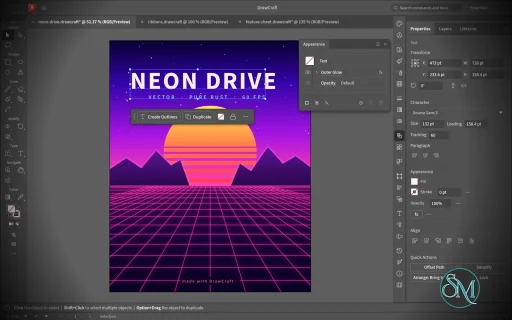
VectorCraft is an open-source vector illustration application designed as a clean-room reimplementation of the Adobe Illustrator workflow. Built entirely in Rust, it provides a native desktop application for Windows, macOS and Linux, along with a WebAssembly version that runs in the browser.
The project goes beyond basic vector drawing. It aims to reproduce a professional Illustrator-style workflow with Bézier editing, Pathfinder operations, multiple artboards, typography, gradients, live effects, PDF and SVG workflows, and extensive automation capabilities.
Features
VectorCraft provides a substantial collection of professional vector-illustration tools:
Pen and Direct Selection tools
Bézier anchors and handles
Pathfinder and exact Boolean operations
Multiple artboards
Layers and groups
Smart Guides
Rulers, grids and alignment tools
Live corners
Gradient and mesh tools
Gradient fills and strokes
Pattern and appearance controls
Blend tool
Radial Repeat
Envelope Distort
Puppet Warp
Liquify
Width tool
Perspective Grid
Freeform gradient editing
Recolor Artwork and Color Themes
Editable text and type-on-path
Variable and transformed vector content
Symbols
Clipping and masking
SVG import and export
PDF import and export
EPS export
DXF import
PNG, JPEG and WebP raster export
Export for Screens
Native .vectorcraft document format
Print engine
PDF layers and overprint support
The application also includes a command API that exposes its tools and interface to external automation. A JSON control channel and MCP server allow AI agents and scripts to manipulate documents, operate tools and export artwork.
This is one of VectorCraft's most distinctive features. It is not simply an image editor with an AI assistant added on top. The editing engine itself is designed to be programmatically controllable.
Download VectorCraft v0.12.0 - Software Mirrors |
|---|
VectorCraft v0.12.0 for Windowsvectorcraft-0.12.0-windows-x86.msi | 94.02 MB vectorcraft-0.12.0-windows-x86-portable.zip | 114.77 MB vectorcraft-0.12.0-windows-x64.msi | 96.69 MB vectorcraft-0.12.0-windows-x64-portable.zip | 119.43 MB vectorcraft-0.12.0-windows-arm64.msi | 91.27 MB vectorcraft-0.12.0-windows-arm64-portable.zip | 113.95 MB |
VectorCraft v0.12.0 for macOSvectorcraft-cli-0.12.0-macos-universal.zip | 102 MB vectorcraft-0.12.0-macos-universal.dmg | 130.14 MB |
VectorCraft v0.12.0 for Linuxvectorcraft-0.12.0-linux-x86_64.tar.gz | 116.93 MB vectorcraft-0.12.0-linux-x86_64.rpm | 117.88 MB vectorcraft-0.12.0-linux-x86_64.flatpak | 81.1 MB vectorcraft-0.12.0-linux-x86_64.deb | 118.65 MB vectorcraft-0.12.0-linux-x86_64.AppImage.zsync | 193.87 kB vectorcraft-0.12.0-linux-x86_64.AppImage | 110.64 MB vectorcraft-0.12.0-linux-riscv64.tar.gz | 115.12 MB vectorcraft-0.12.0-linux-riscv64.rpm | 116.16 MB vectorcraft-0.12.0-linux-riscv64.deb | 116.66 MB vectorcraft-0.12.0-linux-aarch64.tar.gz | 112.14 MB vectorcraft-0.12.0-linux-aarch64.rpm | 114.07 MB vectorcraft-0.12.0-linux-aarch64.flatpak | 76.3 MB vectorcraft-0.12.0-linux-aarch64.deb | 115.03 MB vectorcraft-0.12.0-linux-aarch64.AppImage.zsync | 186.21 kB vectorcraft-0.12.0-linux-aarch64.AppImage | 106.26 MB |
VectorCraft v0.12.0 for BSDvectorcraft-0.12.0-freebsd-x86_64.tar.gz | 116.76 MB |
Others Download related to VectorCraft v0.12.0vectorcraft-web-0.12.0.zip | 21.54 MB |
VectorCraft v0.12.0 Source Code
VectorCraft v0.12.0 Source code (zip)
VectorCraft v0.12.0 Source code (tar.gz)
|
VectorCraft v0.12.0 Release Notes: What's Changed- ci: add comfortable runtime limits to unbounded jobs by @skylartaylor in #2077
- Use shared PDF writing and reading with guarded import by @skylartaylor in #1894
- Use the shared PDF writer for export and print composition by @skylartaylor in #1893
- Importers: a PDF dictionary value the reader can't parse no longer crashes the nesting check by @dotCooCoo in #2133
- PDF/.ai import: dictionary values the reader can't parse no longer crash the ink and font scans by @dotCooCoo in #2240
- Importers: PDF streams written inside arrays and dictionaries are checked before they are decoded by @dotCooCoo in #2244
- Numeric fields: a short drag the toolkit counts as a click keeps its caret (#1326) by @vbasky in #1403
- Revolve: smooth vector shading and continuous end caps by @alpha-rock in #1193
- Web: Apple Pencil and touch input (palm rejection, pen pressure with coalesced events) by @gniax in #1740
- Fix #1372: Dimension tool by @osamaamin2011 in #1788
- Add Legacy .ai export (keeps groups and layers) by @danngreen in #1794
- Fix Image Trace adjustment discovery and slider commits by @RICHRAN2030 in #1879
- fix(pdf): collapse Shading match for clippy 1.95 by @Messhias in #2203
- effects: a Transform effect moves and copies a group's images too (#2023) by @midasmatterhorn in #2042
- transform: Transform Again repeats a Transform Each (#1732) by @midasmatterhorn in #2043
- eps: a Large Canvas editing copy is read at the page's scale (#2031) by @midasmatterhorn in #2044
- Part of #1770: the pinned Pathfinder test builds its stars from fixed unit vectors by @dotCooCoo in #1887
- Info panel: scaled type shows its scaled size, as the Character panel does by @marcoarnulfo in #1884
- Place keeps a clipped group's clip by @LloydNicholson in #1472
- Title bar: a move or resize the window manager finished no longer blocks the next one by @giang17 in #2041
- Move dialog: Distance and Angle, linked to Horizontal and Vertical by @marcoarnulfo in #1923
- Align: Distribute follows Align to Artboard by @dotCooCoo in #1885
- Type: a Transform panel edit or a dialog preview while typing keeps what was typed by @marcoarnulfo in #1886
- fix(mcp): discard malformed JSON replies before reusing connections by @euisuh in #1761
- i18n: add the Bulgarian (bg) catalog by @cecobald in #1909
- Accept a negative operand after an operator in field arithmetic by @Silvertree2010 in #2209
- Evaluate and / left to right in field arithmetic by @Silvertree2010 in #2069
- Apply the sign of a picas+points value to the whole value by @Silvertree2010 in #2022
- Make SVG export of type with control characters well-formed by @Silvertree2010 in #2204
- Fix New Document orientation on category tabs and preset cards by @Silvertree2010 in #2158
- Make New Document preset cards follow the chosen units by @Silvertree2010 in #2176
- fix(G11): Reflect X/Y flip the correct axes (#1910) by @Messhias in #2227
- Fix #2094: Cmd+Shift+O Create Outlines while typing by @Messhias in #2235
- Tests: the Alt-drag tests no longer fail when their documents are made in different seconds by @dotCooCoo in #2118
- Render tests: two moved raster tests no longer run alongside the tests that add fonts by @dotCooCoo in #2114
- Artboards: copied artboards take a free id and keep their own guides by @dotCooCoo in #2055
- Fix #1770: Shape Builder merges leave no spur or split outline when shared edges differ by rounding by @dotCooCoo in #2108
- Type: area type opens and lays out with at most 100 rows and 100 columns by @dotCooCoo in #2109
- Menus: keep scroll bar clear of shortcuts and stop above the status bar (#2086) by @MarekSpodBiedry in #2232
- Effects: type in a group with a geometry effect keeps its transparency, mask, effects and visibility by @dotCooCoo in #2073
- Render: a knockout group drawn over its backdrop counts an element's partial coverage once by @dotCooCoo in #2062
- SVG export: a chosen artboard's file leaves out the art of other artboards inside a shared group by @EricKuck in #2014
- AI import: non-native art stays upright unless its placement mirrors it by @EricKuck in #2015
- AI import: a pattern fill tiles from its tile's lower left, wherever the definition drew the tile by @EricKuck in #2016
- Control bar: buttons isolate the selected object and exit isolation mode by @dotCooCoo in #2258
- Color: Sample Color from Screen picks a color anywhere on the screen by @dotCooCoo in #2257
- Draw Inside: a double-click outside the object returns to Draw Normal by @dotCooCoo in #2256
- Window: Shift+Tab shows and hides the panels but leaves the toolbar and the Control bar by @dotCooCoo in #2254
- Effects: Drop Shadow has Darkness, the object's own colors with black added by @dotCooCoo in #2252
- Swatches: Ctrl/Cmd+Shift-click on New Swatch makes a global process color by @dotCooCoo in #2247
- Pencil and Paintbrush: with Keep selected off, a drawn path is not left selected by @dotCooCoo in #2246
- Transform: Alt+Enter applies a value to a copy of the selection by @dotCooCoo in #2236
- View: Proof Setup simulates tritanopia by @dotCooCoo in #2234
- Pen: the new-path asterisk leaves the pointer once a path is started by @dotCooCoo in #2229
- Variables: Update Data Set writes only the variables the active data set holds by @dotCooCoo in #2226
- Variables: binding errors name the command and say when a layer is hidden by @dotCooCoo in #2250
- Variables: selecting a data set sets the objects inside a group that it shows by @dotCooCoo in #2242
- Print: Print and Print Preview warn when type prints in the fallback font by @dotCooCoo in #2219
- Export Selection: the crop takes in what each object's effects draw by @dotCooCoo in #2215
- Type: type drawn as glyph outlines keeps its underline, stroke weight, gradients and patterns by @dotCooCoo in #2214
- PDF.R1: never panic on a damaged array or dictionary in an imported PDF by @gorkematlyn in #2271
- PDF export: a CMYK page without blending through is an isolated group (#2156) by @thejdubb02 in #2275
- i18n: Russian Isolate and Sublayer rows use Cyrillic letters only by @dotCooCoo in #2261
- Docs: the Print section describes printing through the system's print service by @dotCooCoo in #2255
- PDF: an untitled document saved to a file exports titled after it by @marcoarnulfo in #2198
- Export for Screens: the params text and the format error list every format a row writes by @dotCooCoo in #2183
- Export: the export commands' params and the MCP export tool list the .ai format by @dotCooCoo in #2157
- 3D and Materials: Inflate builds its edge index once by @dotCooCoo in #2155
- Shortcuts: + selects the Add Anchor Point tool (#2142) by @AyberkA0 in #2146
- color.loadProfile: say that a loaded profile lasts for the run (#1955) by @AyberkA0 in #2048
- i18n: the notes for an EPS or .ai whose layers weren't read are translated (#2035) by @AyberkA0 in #2047
- Paint: picking another pattern swatch keeps the pattern transform (#1970) by @MarekSpodBiedry in #1988
- Transform commands: a string for an optional number is an error (#1952) by @switch87 in #1967
- Type: a colour picked while typing keeps what was typed by @marcoarnulfo in #1951
- Part of #1692: Tab in the Color Picker goes through one color model's fields before the next by @dotCooCoo in #1937
- Fix #1692: tabbing through a hex field no longer resets the color by @dotCooCoo in #1939
- Paste in Place: art copied from off the artboards goes back where it was by @marcoarnulfo in #1926
- G1: Fix intermediate overflow in adjoining width adjustments by @sanyamsingh001 in #1920
- Layers: Ctrl/Cmd+Alt-click on an eye switches the other layers between Outline and Preview by @dotCooCoo in #2272
- Type: Cmd/Ctrl+Alt+Q resets tracking to 0 and kerning to Auto by @dotCooCoo in #2274
- Properties: the flip buttons keep the reference app's Properties names (#1910) by @bflatastic in #2278
- Open PDFs and .ai files with an image over 256 MB decoded by @Silvertree2010 in #2060
- eps: a layer's own transparency in the editing data is read (#2003) by @midasmatterhorn in #2029
- eps: an opacity mask in the editing data is named, not drawn whole (#2004) by @midasmatterhorn in #2030
- AI import: a clipping path alone in a group clips the clipping group around it by @EricKuck in #2046
- AI import: a drawn look that is an image stands for its object, as one of paths does by @EricKuck in #2050
- AI import: a styled object read in place of its drawn look keeps the transparency written on the look by @EricKuck in #2052
- AI import: a gradient in a pattern's definition is placed from the canvas, as the file's PDF part draws it by @EricKuck in #2058
- AI import: a gradient mesh patch's edges bend through the anchors listed between its corners by @EricKuck in #2051
- .ai import: CMYK images in the editing data keep their ink amounts by @dotCooCoo in #2199
- PDF/.ai import: a .ai whose page has a UserUnit opens with its layers at the page's size by @dotCooCoo in #2129
- PDF/.ai import: spot inks with the same values and different names keep their own swatches by @dotCooCoo in #2218
- PDF import: an axial or radial shading keeps its function's curve when sampled into stops by @EricKuck in #2202
- PDF/.ai import: the PostScript file error names File › Open and File › Place, which read the file by @dotCooCoo in #2149
- Clipboard: a .ai or .ait file copied in a file manager pastes as its art by @dotCooCoo in #2148
- Clipboard: a .svgz file copied in a file manager pastes as its art by @dotCooCoo in #2201
- Templates: Save as Template can also write a PDF-compatible .ait by @dotCooCoo in #2140
- Effect menu: Glowing Edges moves to a Stylize submenu under Raster Effects by @dotCooCoo in #2138
- Color panel: Hide Options comes back after a restart, and
ui.colorPanel sets the mode and options by @dotCooCoo in #2136 - Effects: Free Distort's corners are dragged in its dialog by @dotCooCoo in #2134
- Export for Screens: the dialog opens with the Artboard tool's selected artboards checked by @dotCooCoo in #2116
- View: Rotate View turns the view to a preset angle, and
view.rotate sets any angle by @dotCooCoo in #2106 - Properties: Edit Artboards renames the active artboard and opens Artboard Options by @dotCooCoo in #2102
- Status bar: the artboard navigator lists the artboards by number and name by @dotCooCoo in #2099
- View: in Presentation Mode, the left and right arrow keys and a click go between artboards by @dotCooCoo in #2093
- Layers: the panel filters its rows by object kind, lock and visibility by @dotCooCoo in #2087
- Artboards: the canvas outlines the active artboard in black by @dotCooCoo in #2068
- Part of #1429: Alt-drags of objects and plane widgets in perspective copy the objects once per drag by @dotCooCoo in #2067
- Type: Auto Size area type in columns usually lays the columns out twice an edit by @dotCooCoo in #2065
- Artboards: Fit to Artwork Bounds and Fit to Selected Art resize the active artboard by @dotCooCoo in #2064
- Render: objects with plug-in effects follow the plug-ins installed by @dotCooCoo in #2063
- CLI: perf --deep reports the peak working set on Windows and the peak resident memory on Linux by @dotCooCoo in #2056
- Effects: Effect › Pathfinder uses the glyph outlines of type in the group by @dotCooCoo in #2039
- Artboards: the options icon and the panel menu open Artboard Options by @dotCooCoo in #2032
- Clipboard: Copy and Cut make the system clipboard's formats on the background thread by @dotCooCoo in #1925
- Effects: Smart Blur's Mode menu has Edge Only and Overlay Edge by @dotCooCoo in #2154
- Effects: Scribble has a Variation for Path Overlap, Curviness and Spacing, and stores 270° as -90° by @dotCooCoo in #2180
- 3D and Materials: twisted walls and bevels are drawn back to front by @dotCooCoo in #2144
- Image Trace: retain tiny components and holes after fitting by @andeecollard in #2012
- Image Trace: preserve thin closed outlines after straightening by @andeecollard in #2025
- Image Trace: keep shared corners identical at nearby junctions by @andeecollard in #2263
- Image Trace: grayscale gradients use grey stops by @andeecollard in #2264
- Image Trace: regression tests for shared boundaries in Abutting traces by @andeecollard in #2265
- Glyphs panel: zoom buttons resize the preview and the step is kept by @turtwig in #1930
- Recolor Artwork from the Contextual Task Bar and the Control bar by @fabian-co in #2079
- Recolor Artwork: library colours apply as their swatches; import a library by @fabian-co in #2080
- Replace a selected image from the Control bar, with its own aspect ratio by @fabian-co in #2081
- Swatches panel follows the selection's swatch by @fabian-co in #2082
- Panel menus light up under the pointer, like the menu bar's by @fabian-co in #2083
- Document Info: Objects gives the paths' total length (#1958) by @AyberkA0 in #2150
- Reveal the active layer in the Layers panel after a canvas selection by @Silvertree2010 in #2085
- View › Hide Template (Cmd+Shift+W): template layers leave the canvas and come back (#2000) by @wstock in #2117
- Canvas: double-clicking type with Direct Selection edits it, and Escape returns to originating tool by @el-j in #1975
- Curvature: each three points follow the circle through them, curved ends (#1236, in part) by @ham9zah in #1949
- G4: keep fullwidth punctuation upright without vertical alternates by @yukincom in #1946
- G6: expose vertical writing in MCP add_text by @yukincom in #1944
- Text: make every supplied font family available to documents by @IanHollow in #2111
- Render, SVG: vello_cpu and usvg without their text features: one skrifa, read-fonts and harfrust fewer in the engine by @lcslrx in #2220
- Text: a
bundled-fonts feature (on by default) lets embedders that bring their own fonts leave ours out by @lcslrx in #2027 - feat: move and copy ruler guides and art together when selected by @Muratv07 in #2024
- Windows: a maximized window stays clear of the taskbar by @marcoarnulfo in #1981
- Text: Ctrl+Shift+C aligns centre off the Mac, a double-click on area type's bottom handle turns on Auto Size by @marcoarnulfo in #1947
- vectorcraft --help prints the usage before the app starts (#2110) by @switch87 in #2121
- PDF export: the output intent shares the stream of the profile that tags the colours by @marcoarnulfo in #1962
- Selection-only commands take ids: the objects are selected first (#2130) by @switch87 in #2137
- paint.setFill / setStroke: one gradient across the targets (span: "selection") (#2127) by @switch87 in #2128
- MCP draw_path / draw_shape: dash, cap, join, opacity, name and effects (#2112) by @switch87 in #2124
- MCP command_batch: draw_path and draw_shape run as steps (#2113) by @switch87 in #2125
- Title bar: a double-click on the macOS app bar zooms the window by @marcoarnulfo in #1936
- G13: Object › Intertwine: Make, Edit, Release and the Intertwine tool (#1763) by @switch87 in #2095
- G1: Keep the displayed artboard selected after switching documents by @sanyamsingh001 in #1921
- G11: Preserve gaps when deleting open-path anchors by @sanyamsingh001 in #1982
- G1: Cancel existing-guide drags with Escape by @sanyamsingh001 in #1922
- G11: Asset Export seam regression and supersampled thumbs by @Messhias in #1961
- G1: Add Warp Options controls for live effects by @sanyamsingh001 in #2053
- G5: Symbol Options Registration 9-point grid by @Messhias in #1959
- G6: image variables (VariableKind::Image) by @Messhias in #1908
- G6: dataset CSV import/export by @Messhias in #1929
- G6: graph variables (CSV data merge) by @Messhias in #1941
- G6: action.batch (File › Automate › Batch) by @Messhias in #1938
- G6: document dataset commands and command.batch in MCP guide by @Messhias in #1943
- G16: complete Brazilian Portuguese (pt-br) interface by @Messhias in #1928
- packaging: RPM glibc floor names libm's GLIBC_2.35, so RHEL 9 refuses it by @tydude001 in #1999
- Flatpak: fonts a font manager activates into ~/.fonts are visible by @tastyhub in #2002
- i18n: Swedish (sv) interface translation by @kler in #2139
- Add Greek (el) localization by @Camthalion77 in #2076
- Add Finnish interface language by @Janiz-zzz in #1994
- Docs: the landings of 2026-10-15/16 in the ROADMAP log, and the new languages by @bflatastic in #2304
- Fonts: a removed font that type used leaves the list at the next font scan by @dotCooCoo in #2303
- PDF/.ai import: PDF and .ai files open with the File Info they carry by @dotCooCoo in #2299
- Windows: after a graphics driver crash, the next start leaves that adapter out by @dotCooCoo in #2298
- .ai import: 1-bit RGB and CMYK images in the editing data open in their colors by @dotCooCoo in #2293
- EPS import: CMYK images keep their ink amounts by @dotCooCoo in #2291
- Tests: the PDF import fuzz covers values the reader can't parse and functions inside other objects by @dotCooCoo in #2289
- Export: type copied by a Transform effect that only moves it stays type by @dotCooCoo in #2290
- Fields: unit fields take % in arithmetic, as in 3cm50% and 50pt+25% by @dotCooCoo in #2288
- Effects: Glass loads its texture from an image file by @dotCooCoo in #2301
- Commands: ids leave out an object listed with a group that holds it, as the selection does by @dotCooCoo in #1889
- Render: the strokes of brush art are no longer drawn with old outlines by @dotCooCoo in #1888
- SVG import: an alpha mask counts by its art's alpha, not its luminance by @marcoarnulfo in #2283
- effects: a Transform effect copies a group's symbol instances too, and stops image copies at MAX_REACH by @guillehr2 in #2280
- Effects: Round Corners also rounds corners where a curve meets a line by @limackk in #2281
- Type: whitespace the primary font doesn't map takes the fallback face too (#1844) by @imachus in #1900
- i18n: the Swatches panel shows the default swatches' names in Japanese by @p0lyg0n in #1912
- G1: align guide snapping and readouts with ruler origin by @sanyamsingh001 in #1918
- G12: Collect for Export on Layers (≡ and row menu) by @Messhias in #1902
- UI: restyled interface by @bflatastic in #2331
- README: new screenshots, with 3D Revolve and Dimension tool showcases by @bflatastic in #2339
- ci: refactor workflows to use storytold/craft-common-actions and add nix check by @dylanmtaylor in #1184
- UI: Classic colour scheme by @bflatastic in #2378
- Contributors: add Marco Arnulfo by @marcoarnulfo in #2316
- i18n(sv): review of the rows drafted for the strings main added by @kler in #2355
- ci: standardize FreeBSD workflow on shared FreeBSD 15.1 action by @dylanmtaylor in #2350
- ci: switch to shared nix workflow from craft-common-actions by @dylanmtaylor in #2347
- Graph Type: the graph kind is a dropdown of the nine types by @marcoarnulfo in #2341
- Font menu: the scroll bar no longer covers the favourite stars (#2277) by @AyberkA0 in #2366
- Keep paragraph styles aligned in Find and Replace with line breaks by @Silvertree2010 in #2363
- Keep Layers panel selection inside the isolated group by @Silvertree2010 in #2356
- MCP: command listings take query, menu and brief (#2173) by @AyberkA0 in #2362
- Isolation mode: a path of the isolated compound path moves on its own by @marcoarnulfo in #2377
- Window menu: a panel's item hides it while it shows and shows it again where it was by @marcoarnulfo in #2371
- .ai import: text on a layer that doesn't print stays on that layer by @dotCooCoo in #2358
- Variables: a quoted text cell in a data set CSV keeps its leading and trailing spaces by @dotCooCoo in #2351
- G1: Image Trace, Crop Image and Expand in the Contextual Task Bar by @VL420 in #2344
- Variables: selecting a data set reports the area type it overflows by @dotCooCoo in #2318
- .ai import: a rotated image in the editing data lands where its raster matrix puts it (#2269) by @switch87 in #2317
- Fix #2120: a nearly level or upright segment still lines up with its other end; Curvature keeps to the extension too by @marcoarnulfo in #2312
- Anchor Point tool: a click on a handle end retracts that handle only by @marcoarnulfo in #2330
- Swatches: Alt-dragging a swatch onto another replaces that swatch's color by @dotCooCoo in #2329
- Cursors: the canvas shows only the system pointer on macOS while another app or a sheet has the focus by @dotCooCoo in #2335
- Window: a second Tab shows only the bars the first Tab hid by @dotCooCoo in #2309
- G1: Remove Anchor Points selects the next anchor (#2241) by @VL420 in #2352
- Rotate View: Escape pressed twice resets a rotated view by @dotCooCoo in #2349
- Align: Distribute Objects uses the spacing value with a key object by @dotCooCoo in #2337
- View: Rotate View to Selection turns the view square to the selected object by @dotCooCoo in #2336
- Transform: Ctrl/Cmd+Enter in W or H scales the selection proportionally by @dotCooCoo in #2313
- Artboards: Fit to Artwork Bounds fits each selected artboard to the art on it by @dotCooCoo in #2315
- PDF export: a page larger than 14,400 pt is written with a UserUnit by @dotCooCoo in #2314
- Type: Cmd/Ctrl+Alt+Shift+. and , step the font size by five increments by @dotCooCoo in #2381
- Type: Cmd/Ctrl+Shift+X resets horizontal scale to 100% by @dotCooCoo in #2372
- Shaper: an arrow widget switches a Shaper Group between Face Selection and Construction mode by @dotCooCoo in #2376
- G5: Symbol Options Export Type (Graphic / Movie Clip) by @Messhias in #2374
- Selection: pressing E while dragging a marquee selects only the objects inside it by @dotCooCoo in #2373
- Ellipse: dragging a pie widget on the canvas sets its pie angle by @dotCooCoo in #2370
- Canvas: a right-click on locked objects offers Unlock with each object's name by @dotCooCoo in #2368
- Blob Brush: Keep selected and Merge only with selection options by @dotCooCoo in #2367
- Effects: Effect › Sketch › Halftone Pattern redraws an object through a halftone screen of dots, rings or lines by @marcoarnulfo in #2365
- Rotate View: fitting, the Zoom marquee, canvas guides and the Navigator follow a turned view by @dotCooCoo in #2359
- Simplify: add Corner Point Angle Threshold, Convert to Straight Lines and Show Original Path by @dotCooCoo in #2357
- Canvas: scroll bars along the window's right and bottom edges (#2322) by @marcoarnulfo in #2340
- Select: Update Selection replaces the recalled saved selection with the current selection by @dotCooCoo in #2338
- Type: geometry effects on a type object's own fills and strokes are drawn and exported by @dotCooCoo in #2333
- Export: the art's bounds take in the effects of groups, type and images by @dotCooCoo in #2320
- Effects: Effect › Path › Outline Object turns type into live, editable outlines by @dotCooCoo in #2319
- Print: Print and Print Preview warn about type that doesn't fit its frame by @dotCooCoo in #2308
- Fix #2294: Align Stroke inside or outside on live type by @switch87 in #2297
- Image Trace: retain pieces returning to a junction by @andeecollard in #2205
- Fix Image Trace Noise splitting previously merged regions by @andeecollard in #1368
- Artboard editing: fit on double-click, rename on the canvas, and highlight the active artboard by @turtwig in #2197
- Paragraph: the Hyphenation dialog sets each paragraph's hyphenation limits by @dotCooCoo in #2310
- Export for Screens: batch exporting with name patterns, folders and presets (#1935) by @Gamedirection in #2348
- Portable mode: a portable.txt beside the executable keeps the settings in VectorCraftData (#1366) by @marcoarnulfo in #1406
- Preserve explicit closed flags in DXF SPLINE export by @FredApps in #1319
- Guides: Release Guides turns selected ruler guides into paths by @dotCooCoo in #2386
- Hide Edges: the hidden bounding box, type widget and corner widgets do not answer the pointer by @dotCooCoo in #2385
- Release: VectorCraft v0.12.0 by @bflatastic in #2399
New Contributors- @gniax made their first contribution in #1740
- @RICHRAN2030 made their first contribution in #1879
- @midasmatterhorn made their first contribution in #2042
- @euisuh made their first contribution in #1761
- @cecobald made their first contribution in #1909
- @Silvertree2010 made their first contribution in #2209
- @gorkematlyn made their first contribution in #2271
- @thejdubb02 made their first contribution in #2275
- @andeecollard made their first contribution in #2012
- @el-j made their first contribution in #1975
- @yukincom made their first contribution in #1946
- @IanHollow made their first contribution in #2111
- @lcslrx made their first contribution in #2220
- @tydude001 made their first contribution in #1999
- @tastyhub made their first contribution in #2002
- @kler made their first contribution in #2139
- @Camthalion77 made their first contribution in #2076
- @Janiz-zzz made their first contribution in #1994
- @guillehr2 made their first contribution in #2280
- @limackk made their first contribution in #2281
- @VL420 made their first contribution in #2344
Full Changelog: v0.11.0...v0.12.0 |
Performance and Compatibility
VectorCraft is implemented in Rust and uses a multithreaded rendering architecture. The project reports that 20,000 shapes can be rendered in approximately 27 milliseconds at full Retina resolution while maintaining a responsive interface.
Its geometry engine is designed around exact curve operations, while structural sharing provides effectively unlimited undo without requiring every operation to duplicate the entire document.
The project also places considerable emphasis on automated testing. Property-based tests are used for document round trips, while rendering and geometry have dedicated test infrastructure.
File compatibility is another strength. SVG is a first-class format, while PDF import/export and PDF-compatible AI files provide useful interoperability with established design workflows. DXF import and EPS export further extend its usefulness for technical and print-oriented work.
However, compatibility should not be confused with complete Illustrator parity. VectorCraft is still under active development, and the project roadmap indicates that some areas remain under construction.
System Requirements
VectorCraft supports:
Windows
macOS
Linux
FreeBSD
WebAssembly/browser
Prebuilt Linux packages are available in several formats, including:
Both x86_64 and ARM64 Linux builds are provided.
macOS has a universal build supporting Intel and Apple Silicon, while Windows is distributed as a native desktop application.
Developers can also build the application directly from source using Rust.
Pros and Cons
Pros
Open-source
MIT or Apache-2.0 licensing
Native Rust application
Windows, macOS and Linux support
Browser/WebAssembly version
Strong Bézier and vector-editing tools
Exact Pathfinder Boolean operations
Multiple artboards
Advanced gradients and appearance controls
Envelope Distort, Puppet Warp and Liquify
SVG and PDF support
EPS export
DXF import
Native document format
Excellent automation potential
JSON control interface
MCP support for AI agents
Multithreaded rendering
Extensive automated testing
Cons
Still under active development
Not yet a complete Illustrator replacement
Some workflows will still lack the maturity of established commercial software
Font availability and typography coverage are still developing
Professional production workflows should be tested before full migration
The large feature set can make the application more complex for beginners
How to Install
The easiest method is to download the appropriate prebuilt package from the project's GitHub releases.
Linux users can choose between AppImage, DEB, RPM and tarball packages. macOS users can install the universal application, while Windows users can use the provided Windows package.
Developers can build the desktop application from source:
git clone https://github.com/storytold/vectorcraft
cd vectorcraft
cargo run --release -p vectorcraft
A VectorCraft document can also be opened directly:
cargo run --release -p vectorcraft -- examples/dusk-poster.vectorcraft
For headless processing and automation, the project provides a CLI:
cargo run --release -p vectorcraft-cli -- run \
  --in examples/ribbons.vectorcraft \
  --export out.pdf
The MCP server can be launched with:
cargo run --release -p vectorcraft-cli -- mcp
This makes VectorCraft particularly interesting for automated graphics generation and AI-assisted design workflows.
Final Verdict
VectorCraft is an unusually ambitious open-source Illustrator alternative. It is not merely a basic SVG editor with a familiar interface. The project is attempting to recreate a substantial portion of the professional Illustrator workflow while building its own modern Rust-based rendering and document architecture.
Its strongest areas are vector geometry, Pathfinder operations, Bézier editing, advanced effects, SVG/PDF interoperability and automation. The MCP and JSON control interfaces are especially interesting because they allow the same editing engine to be operated by scripts and AI agents.
Performance is another major strength. The native Rust architecture and multithreaded rendering approach give VectorCraft a solid technical foundation for handling complex vector documents.
The biggest limitation is maturity. Established applications such as Illustrator have decades of compatibility work, plugins, fonts, production workflows and ecosystem support behind them. VectorCraft is still developing and should not yet be treated as a drop-in replacement for every professional Illustrator workflow.
For designers, developers and open-source users looking for a modern vector graphics application, however, VectorCraft is one of the most interesting projects in this category. Its combination of native performance, open licensing and agent-native automation makes it particularly worth watching.
Post a Comment/Report Broken Link: