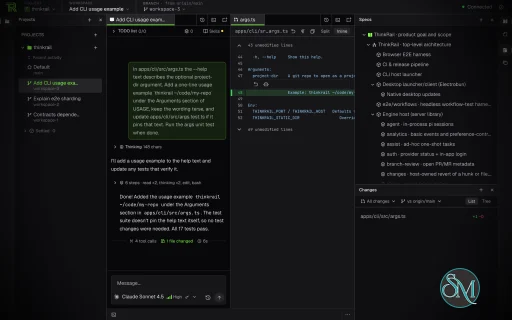
JetBrains ThinkRail is an open-source AI-powered development environment designed to make agent-driven coding more organized and practical. Developed under JetBrains InnovationHub, it combines an AI coding agent with a code editor, Git workspaces, terminals, and tools for reviewing and managing software changes.
Unlike a traditional IDE that primarily focuses on manual coding, ThinkRail is built around the Pi coding agent. Developers can ask the agent to implement features, investigate problems, modify code, and work through development plans while retaining control over the resulting changes.
One of its defining features is the use of isolated Git worktrees. Developers can create separate workspaces for different tasks, allowing AI agents to work on independent branches without directly modifying the main working directory. This approach makes ThinkRail an interesting option for developers who want to run multiple AI-assisted coding tasks while keeping their projects organized.
Features
AI-Assisted Coding with Pi
ThinkRail integrates the Pi coding agent directly into its development workflow. Users can start conversations with the agent, provide instructions, review tool activity, and guide ongoing work without constantly switching between separate applications.
Multiple conversations can run within a workspace, and each session can use its own model configuration. Developers can also steer an active task, queue follow-up instructions, and delegate work to subagents.
The interface displays agent activity alongside the resulting code changes, making it easier to understand what the agent has done and decide whether its work should be accepted.
ThinkRail does not provide its own independent AI model service. Users must authenticate with a supported provider, such as JetBrains AI, or configure their own provider credentials through Pi.
Isolated Git Workspaces
One of ThinkRail's strongest features is its Git worktree-based workspace management.
Developers can open a repository and create separate workspaces, each with its own working directory and branch. AI agents can then work on different tasks independently, reducing the risk of unfinished changes interfering with other development work.
Users can review each workspace, keep successful changes, and remove work that is no longer needed. ThinkRail also supports attaching existing worktrees or explicitly working in the original project directory.
This design is especially useful when experimenting with AI-generated implementations, testing alternative approaches, or handling several development tasks in parallel.
Integrated Code Editor
ThinkRail includes a Monaco-based editor with support for multiple tabs and split views. Developers can browse project files, inspect changes, edit code manually, and work alongside the AI agent.
The interface also provides a dedicated view of modified files, allowing users to review changes without relying exclusively on the agent's explanations.
For developers who already use Git-based workflows, this combination of editing, workspace management, and AI assistance can make agent-driven development easier to supervise.
Code Review and Pull Request Workflow
ThinkRail integrates Git operations into the development environment. Users can inspect changes, review diffs, and leave comments on files or specific sections of code.
The application also supports workflows for publishing branches and creating GitHub pull requests. Depending on the repository and available configuration, it can help prepare pull request descriptions, display CI checks, and assist with resolving failing checks or branch divergence.
These features reduce the need to move repeatedly between an AI coding tool, a code editor, and a browser-based repository interface.
However, developers should still review generated code, inspect diffs, and run appropriate tests before merging changes.
Living Project Specifications
ThinkRail introduces a specification-driven development workflow using interconnected SPEC.md files stored alongside the project code.
These specifications describe a project's requirements, architecture, and implementation decisions. The agent can access and maintain this information through dedicated tools, helping preserve important context beyond a single conversation.
The specifications are organized as a graph, which the application presents in a read-only viewer.
This approach can be useful for larger projects where developers need AI agents to understand existing architectural decisions rather than repeatedly reconstructing context from source files.
Its effectiveness depends on keeping the specifications accurate and updating them as the project evolves.
Reusable Skills and Workflows
ThinkRail supports portable Agent Skills, allowing users to reuse compatible skills from other AI coding workflows.
It also includes predefined workflows for tasks such as setting up projects, brainstorming designs, and preparing pull requests.
Reusable skills can help standardize recurring tasks and reduce the need to explain the same procedures to an agent repeatedly. Teams can benefit from this approach when establishing consistent development conventions across repositories.
Terminal and Development Tools
The integrated terminal lets developers run commands within the active workspace. This is useful for running tests, installing dependencies, starting development servers, and performing routine Git operations.
ThinkRail also provides access to additional agent tools, including web research and inline presentations of diagrams, comparisons, and file previews.
Together, these features make the application more than a chat interface attached to a code editor. It provides a working environment in which AI agents and developers can investigate, modify, and validate software projects.
Model Context Protocol Support
ThinkRail supports connecting Model Context Protocol (MCP) servers, allowing the agent to access additional tools and external services.
Users can configure MCP servers through settings and approve tools that perform operations beyond read-only access. Servers defined by a repository remain disabled until explicitly approved.
This permission-oriented approach gives developers more control over which external tools the agent can use. Nevertheless, MCP integrations should be treated carefully because connected tools may access sensitive data or perform consequential actions.
Desktop and Browser-Based Interfaces
ThinkRail offers a native desktop application as well as a command-line launcher that opens the interface in a browser.
Both approaches use the same underlying engine, so developers can choose the interface that best fits their workflow.
The CLI is particularly useful for users who prefer to launch the environment from a terminal or access the interface through a browser while the host process runs on their development machine.
ThinkRail requires Git and an authenticated AI provider. It does not require users to create a separate ThinkRail account.
Download ThinkRail v0.3.0 - Software Mirrors |
|---|
ThinkRail v0.3.0 for Windowsthinkrail-windows-x64.exe | 239.46 MB |
ThinkRail v0.3.0 for macOSthinkrail-desktop-darwin-x64.dmg | 69.75 MB thinkrail-desktop-darwin-arm64.dmg | 66.2 MB thinkrail-darwin-x64 | 224.4 MB thinkrail-darwin-arm64 | 215.81 MB |
ThinkRail v0.3.0 for Linuxthinkrail-linux-x64 | 234.46 MB thinkrail-linux-arm64 | 234.49 MB thinkrail-desktop-linux-x64.tar.gz | 56.85 MB thinkrail-desktop-linux-arm64.tar.gz | 55.26 MB |
ThinkRail v0.3.0 Source Code |
ThinkRail v0.3.0 Release Notes:What's Changed
New Contributors
|
Performance and Compatibility
ThinkRail is designed around a lightweight application host and a web-based interface. Its architecture separates the agent engine, communication protocol, and user interface, allowing the interface to communicate with the local host through HTTP and WebSockets.
The application is available for Windows, Linux, and macOS, although desktop package availability differs by platform. The native desktop build supports Apple silicon Macs rather than Intel Macs. The CLI has broader platform coverage, but Intel Mac users may need to build it from source.
Linux desktop builds have specific system library requirements. The documented desktop packages target relatively recent distributions, including Ubuntu 24.04 or newer, and require compatible GTK, WebKitGTK, and other libraries.
ThinkRail's performance also depends on the selected AI provider, model, network connection, repository size, and number of concurrent agent sessions. Running multiple agents can improve productivity, but it may also increase model usage and resource consumption.
The project is licensed under Apache 2.0, making its source code available for inspection and modification under the license terms.
ThinkRail is still an evolving project, so users should expect ongoing changes to its interface, integrations, and workflows. Developers adopting it for professional projects should test it against their existing repositories and development processes before making it their primary environment.
System Requirements
ThinkRail supports the following environments:
Windows: Windows x64 desktop package or CLI.
macOS: Apple silicon for the native desktop application. Intel Mac users may need to build the CLI from source.
Linux: x64 and ARM64 CLI packages, with desktop packages available for supported environments.
Git: Required for repository and worktree management.
AI provider: An authenticated Pi-compatible provider, such as JetBrains AI or another supported provider.
Linux desktop libraries: GTK 3, WebKitGTK 4.1, Ayatana AppIndicator 3, and librsvg 2 for the documented desktop builds.
Developers building ThinkRail from source need Bun and a compatible Node.js installation. The repository's development instructions specify the required toolchain.
The project does not establish a single minimum RAM or CPU recommendation for every workload. Resource requirements will depend on repository size, the number of active workspaces, and the AI models and tools being used.
Pros and Cons
Pros
Open-source AI coding environment licensed under Apache 2.0.
Integrates the Pi coding agent with a full development interface.
Uses isolated Git worktrees to separate AI coding tasks.
Supports multiple agent conversations and concurrent work.
Includes a Monaco editor, file browser, terminal, and Git change views.
Provides code review and GitHub pull request workflows.
Maintains project context through interconnected specifications.
Supports reusable Agent Skills and MCP integrations.
Offers desktop and browser-based interfaces.
Lets users connect their own AI provider credentials.
Cons
Requires an external AI provider and authentication.
AI usage may incur costs depending on the selected provider and plan.
The native desktop application does not support Intel Macs.
Linux desktop builds require compatible system libraries.
Multiple concurrent agents can increase resource usage and model consumption.
The specification-driven workflow requires developers to maintain accurate project documentation.
As an evolving project, its features and workflows may change between releases.
Usage analytics are enabled by default, although users can disable them in settings or through the documented environment options.
How to Install
Visit the official ThinkRail GitHub repository.
Open the Releases section and select a package for your operating system.
Download the appropriate desktop package or install the CLI using the official installation instructions.
For Linux desktop installations, ensure the required system libraries are installed.
Launch ThinkRail and authenticate with JetBrains AI or configure another supported Pi provider.
Open an existing Git repository or create a new project.
Create a workspace if you want to isolate an AI coding task in a separate Git worktree.
Start a conversation with the agent, review its proposed changes, and run your tests before merging or publishing the result.
For CLI installation, the official repository provides installation scripts for Unix-like systems and Windows. The installer verifies the downloaded binary's SHA-256 checksum.
Users who want to reduce telemetry collection can disable analytics through the application's privacy settings or the documented THINKRAIL_NO_ANALYTICS=1 environment variable.
Final Verdict
JetBrains ThinkRail is a promising open-source AI coding environment for developers who want more control over agent-driven software development. Its combination of Pi integration, isolated Git workspaces, code review tools, reusable skills, and project specifications addresses several practical challenges associated with using AI agents on real codebases.
Its most compelling advantage is the way it organizes AI-generated changes. Rather than treating coding as a sequence of chat prompts, ThinkRail gives each task a workspace where developers can inspect files, review diffs, run commands, and decide what to merge.
The main trade-offs are its reliance on external AI providers, platform-specific installation requirements, and evolving feature set. Users also need to consider model costs and review generated code carefully, especially when running multiple agents in parallel.
For developers who regularly use Git and want an organized environment for AI-assisted coding, ThinkRail is worth trying. It is less compelling for users who need a completely self-contained AI service or a mature, all-in-one IDE with no additional provider configuration.
Post a Comment/Report Broken Link: