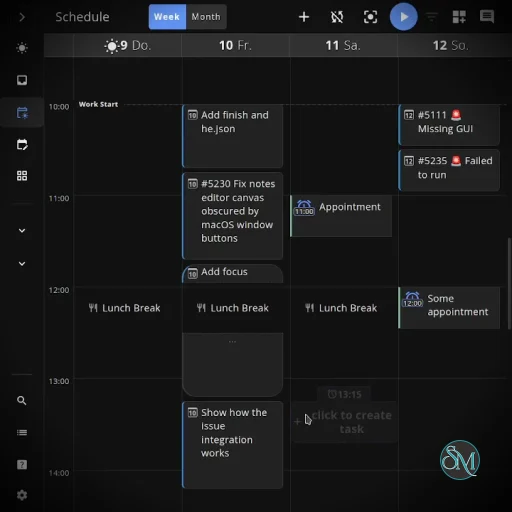
Super Productivity is a free and open-source productivity application that combines task management, timeboxing, time tracking, project organization, and integrations with popular development and project management services. It is designed for people who want more control over their daily work than a conventional to-do list provides.
The application can run as a desktop app, mobile app, or web app, while keeping data under the user's control. It does not require an account for basic use and supports local data storage, synchronization, and self-hosted options.
Features
Super Productivity packs a large number of productivity features into one application.
Task management with projects, subtasks, tags, and categories
Timeboxing for planning specific work periods
Built-in time tracking and work logs
Pomodoro timer and break reminders
Daily planning and scheduling
Work summaries and time-sheet exports
Personal productivity metrics
Notes and contextual information attached to tasks and projects
File attachments and project bookmarks
Calendar integration through CalDAV
Integrations with Jira, Trello, GitHub, GitLab, Gitea, OpenProject, Linear, ClickUp, and Azure DevOps
Automatic task importing from supported services
Work-log integration for supported project management platforms
Data synchronization through SuperSync, Dropbox, and WebDAV
Self-hosting support for SuperSync
Web application
Android and iOS applications
Keyboard shortcuts and quick task-entry syntax
Offline-oriented workflow with user-controlled data storage
The integrations are particularly useful for developers because tasks from issue trackers can be brought into the same workspace instead of maintaining a separate task list.
Download Super Productivity v19.2.0 - Software Mirrors |
|---|
Super Productivity v19.2.0 for WindowssuperProductivity.exe | 233.64 MB superProductivity-x64.exe | 233.64 MB superProductivity-arm64.exe | 233.64 MB Super-Productivity-Setup.exe | 233.87 MB |
Super Productivity v19.2.0 for macOSsuperProductivity-x64.dmg | 139.2 MB |
Super Productivity v19.2.0 for LinuxsuperProductivity-x86_64.rpm | 95.7 MB |
Super Productivity v19.2.0 for Android |
Others Download related to Super Productivity v19.2.0 |
Super Productivity v19.2.0 Source Code |
Super Productivity v19.2.0 Release Notes:For all current downloads, package links, and platform-specific notes: check the wiki.New features
Mobile and reminders
Sync and backups
Fixes and polish
Self-hosting
ContributorsThanks to everyone who contributed to this release: @ac9492 @anandghegde @artemis-mike @atomicdjt @axkoro @BigWebstas @costajohnt @cpalvis @davidvornholt @FadhilR12 @GabeSilvaDev @H1manshu01 @hdweiss @Hrushikesh-ramilla @irontaek @jaenyf @johannesjo @MaiwulanjiangMaiming @MannXo @mvanhorn @NICKSTER0506 @RuairidhWilliamson @siemieniuk @SilverGreen93 @steindvart @SulimanAbdulrazzaq @tiliakoos @zenoprax @ZoriotNew Contributors
|
Performance and Compatibility
Super Productivity is an Electron-based desktop application, so it is considerably heavier than a small native task manager. The benefit is a consistent interface across supported desktop platforms and access to a much broader feature set.
The project is actively maintained, with a large codebase and frequent releases. The latest release includes improvements to task, schedule, and worklog processing costs, along with additional synchronization, calendar, task, and mobile improvements.
The application is available for desktop platforms, Android, iOS, and the web. The web version is useful for browser-based access, although the developers explicitly document differences and limitations compared with the desktop version.
One of its biggest strengths is flexibility rather than raw simplicity. Users who only need a basic checklist may find the interface and number of options excessive. For users who want task management, time tracking, scheduling, integrations, and work logging together, the additional complexity is more justified.
System Requirements
Super Productivity does not publish a particularly demanding hardware requirement for normal use.
Supported platforms include:
Windows
Linux
macOS
Android
iOS
Web browsers
Desktop packages are provided for common architectures, including x64 and ARM64 on Windows, while Linux packages include DEB and Snap formats.
Because the desktop application uses Electron, having a reasonable amount of RAM is recommended when running it alongside development tools, browsers, IDEs, and other large applications.
Pros and Cons
Pros
Free and open source
No account required for basic use
Strong privacy and local-data focus
Excellent combination of tasks and time tracking
Powerful timeboxing and scheduling features
Extensive developer-oriented integrations
Supports Jira, GitHub, GitLab, Trello, Linear, and other services
Desktop, mobile, and web versions
Supports WebDAV and Dropbox synchronization
SuperSync supports end-to-end encrypted synchronization
SuperSync can be self-hosted
Extensive customization and automation capabilities
Active development
Cons
Feature-rich interface can take time to learn
Electron desktop application uses more resources than lightweight native task managers
Some functionality differs between the desktop and web versions
The large number of settings and integrations may be unnecessary for users who only need simple task management
How to Install
Windows
Download the Windows installer from the project's official release page. Separate installers are available for x64 and ARM64 systems.
macOS
Download the appropriate macOS package from the project's releases and install it like a normal macOS application.
Linux
Linux users can use the provided DEB or Snap packages. The project also provides other installation options through its documentation.
Web
Super Productivity can also be used directly through its web application without installing the desktop client. Keep in mind that the web version has some limitations compared with the desktop application.
Final Verdict
Super Productivity is much more than a conventional to-do list. Its combination of task management, timeboxing, time tracking, scheduling, work logs, productivity metrics, and integrations makes it suitable for users who want to manage both what they need to do and how they spend their working time.
The main trade-off is complexity. It takes more effort to learn than a minimalist task manager, and the Electron-based desktop application is not particularly lightweight. However, the feature set, open-source model, privacy-focused design, cross-platform support, and self-hosting options make those compromises reasonable for its intended audience.
Developer:
Super Productivity
Operating System:
Windows / macOS / Linux / Android
Date Added:
2026-10-11T19:04:17.462Z
Categories:
Post a Comment/Report Broken Link: