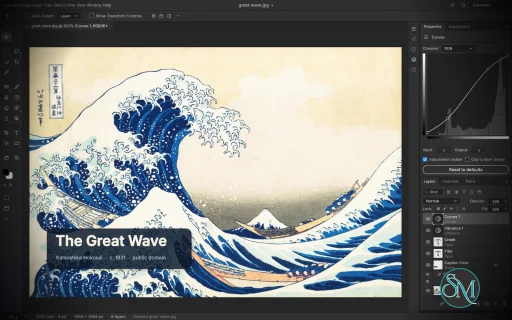
PhotoCraft is an open-source image editor designed as a clean-room reimplementation of Adobe Photoshop, built entirely in Rust. It provides a surprisingly broad set of professional image-editing features, including layers, masks, adjustment layers, filters, vector shapes, editable text, brushes, and native PSD support.
The project is particularly interesting for users who want a local, open-source Photoshop alternative without relying on Electron, cloud services, or proprietary software. However, PhotoCraft is still in early alpha, so it is better viewed as a promising alternative under active development than as a complete replacement for Photoshop.
Features
PhotoCraft offers a substantial collection of image-editing tools:
Layer groups, clipping masks, pixel and vector masks
Adjustment layers for Curves, Levels, Vibrance, Hue/Saturation, Black & White, Gradient Map, Selective Color and more
Layer styles including Drop Shadow, Inner Shadow, Glow, Bevel & Emboss, Stroke, and overlays
Brush, Pencil, Mixer Brush, Clone Stamp, Healing Brush and other painting tools
Marquee, Lasso, Magic Wand, Quick Selection, Object Selection and Select Subject
Editable point and paragraph text
Pen and vector shape tools
Smart objects and smart filters
Free Transform with scale, rotate, skew, distort and perspective
History and History Brush
Multiple blend modes, opacity, fill and layer controls
Color management with RGB, Grayscale, CMYK and Lab
8, 16 and 32-bit-per-channel documents
PSD and PSB support
PNG, JPEG, TIFF, WebP, GIF, BMP, TGA, ICO, OpenEXR, HDR, AVIF and other formats
Export preview with quality, transparency, scale and estimated file size
Command palette and recorded actions
Its PSD support is one of its strongest features. The project tests its implementation against real-world PSD files and reports very high rendering compatibility across its test corpora. Unsupported data is designed to be preserved rather than simply discarded when documents are saved.
Another unusual feature is its automation architecture. PhotoCraft exposes its editing engine through the desktop interface, CLI, JSON control channel and MCP, making the application suitable for scripted workflows and AI-agent automation.
Download PhotoCraft v0.7.0 - Software Mirrors |
|---|
PhotoCraft v0.7.0 for Windowsphotocraft-0.7.0-windows-x86.msi | 59.86 MB photocraft-0.7.0-windows-x86-portable.zip | 70.09 MB photocraft-0.7.0-windows-x64.msi | 61.63 MB photocraft-0.7.0-windows-x64-portable.zip | 73.27 MB photocraft-0.7.0-windows-arm64.msi | 57.87 MB photocraft-0.7.0-windows-arm64-portable.zip | 69.77 MB |
PhotoCraft v0.7.0 for macOSphotocraft-cli-0.7.0-macos-universal.zip | 61.7 MB photocraft-0.7.0-macos-universal.dmg | 80.22 MB |
PhotoCraft v0.7.0 for Linuxphotocraft-0.7.0-linux-x86_64.tar.gz | 72.73 MB photocraft-0.7.0-linux-x86_64.rpm | 73.33 MB photocraft-0.7.0-linux-x86_64.flatpak | 54.73 MB photocraft-0.7.0-linux-x86_64.deb | 73.8 MB photocraft-0.7.0-linux-x86_64.AppImage.zsync | 242.51 kB photocraft-0.7.0-linux-x86_64.AppImage | 69.22 MB photocraft-0.7.0-linux-riscv64.tar.gz | 71.15 MB photocraft-0.7.0-linux-aarch64.tar.gz | 69.39 MB photocraft-0.7.0-linux-aarch64.rpm | 70.7 MB photocraft-0.7.0-linux-aarch64.flatpak | 51.13 MB photocraft-0.7.0-linux-aarch64.deb | 71.3 MB photocraft-0.7.0-linux-aarch64.AppImage.zsync | 232.15 kB photocraft-0.7.0-linux-aarch64.AppImage | 66.26 MB |
PhotoCraft v0.7.0 for BSDphotocraft-0.7.0-freebsd-x86_64.tar.gz | 72.33 MB |
Others Download related to PhotoCraft v0.7.0photocraft-web-0.7.0.zip | 10.53 MB |
PhotoCraft v0.7.0 Source Code
PhotoCraft v0.7.0 Source code (zip)
PhotoCraft v0.7.0 Source code (tar.gz)
|
PhotoCraft v0.7.0 Release Notes: What's Changed- docs: register the MCP server from an installed release by @sawizzle in #2185
- docs(adjust): align Levels and Curves comments with evaluation order by @coygeek in #2212
- Preserve unchanged XMP translations in File Info by @Benziza in #2152
- Smudge: use the Brush Settings spacing for retouch strokes (#2140) by @davidmann4 in #2171
- Fix layer mask toggle action labels by @optimalbytee in #2156
- Fix hyperlink in credits panel by @crqch in #2146
- Layers: mask thumbnails update after Invert and other whole-mask edits (#2117) by @davidmann4 in #2164
- Keep the selection when smart selection finds nothing by @vbasky in #2235
- fix(layer style): wrap Make/Reset Default buttons by @kmnkv1 in #2209
- i18n(ru): translate layer style effects by @kmnkv1 in #2210
- Layers panel: Opacity and Fill share one right-aligned column (#2085) by @davidmann4 in #2173
- Ignore hidden RGB when Magic Wand selects transparency by @harrisonoconnorhover in #2273
- Canvas: clip the Free Transform preview to the canvas (#2027) by @davidmann4 in #2201
- fix(ui): avoid drawing panel borders twice by @tropicaaal in #2226
- Layers panel: press-drag-release picks a fill or adjustment layer (#2071) by @davidmann4 in #2172
- fix(engine): select neighbouring layer after deletion by @kotulsky in #2189
- Preferences: the dialog grows with the window by @luniiya in #2155
- scorecard: Marquee modifiers and brush resize drag are done (TOOL-214-2, TOOL-213-10) by @Duke242 in #2261
- Confirm layer deletion only from the Layers trash button by @kotulsky in #2197
- Soft brushes paint soft strokes and thin lines stay even: a Gaussian-like tip and area coverage for tiny tips by @tanish2k09 in #2167
- TGA: save the document's alpha channel as 32-bit alpha (#2124) by @davidmann4 in #2157
- Preserve quoted multiline variable CSV records by @harrisonoconnorhover in #2242
- Workspace: wire open_documents_as_tabs preference (#204) by @Hathor875 in #2177
- Expose Clone Stamp opacity and flow and apply them to strokes by @Ni-zav in #2256
- Masks: target a new layer mask and keep separate colour pairs for mask and pixels (#2166) by @davidmann4 in #2200
- Default layered edits of flat images to PSD on Save by @harrisonoconnorhover in #2234
- Selection cursors: badges for cutting, copying and dragging the selected pixels by @texjer in #2250
- Tools: double-clicking a layer mask launches Select and Mask with preference (#204) by @Hathor875 in #2161
- Add pixel mask density and feather controls to Properties by @harrisonoconnorhover in #2240
- Cmd held is the Move tool with the painting tools (Cmd+Alt duplicates) by @texjer in #2248
- Hand tool: an open hand and a fist as the pointer on Windows, and the fist while panning everywhere (#2196) by @Sir-Starch in #2221
- Move tool on a locked layer: Photoshop's message by @texjer in #2249
- fix(ui): remove the gap beneath Spectrum document tabs by @Ni-zav in #2265
- Web: leave the JPEG XL DNG decoder out of the wasm (25.1 MB -> 24.3 MB) by @echelon in #2233
- fix(ui): mode buttons respect two-column toolbar by @tropicaaal in #2241
- Layer › Rasterize acts on every selected layer; the Layers menu offers "Rasterize Layers" (#2243) by @Sir-Starch in #2253
- Fix SVG selection and import detection by @alex-ctms in #2224
- Pen pressure curve: Preferences › Tools shapes how pen pressure reaches every brush by @tanish2k09 in #2195
- feat(ui): allow toolbar to scroll by @tropicaaal in #2238
- GPU startup: CPU mode on Linux falls back to Vulkan to present the window (#1337) by @MrCloudy2 in #2206
- Layers menu and layer commands follow the selection, not the active layer (#2244) by @Sir-Starch in #2254
- Window edges: easier to grab, theme-safe cursors, and no lost hover after a resize (#1581) by @MrCloudy2 in #2205
- fix(engine): reject invalid core-filter parameters by @0x6Ason in #2228
- Keep duplicated Smart Objects linked to shared contents by @harrisonoconnorhover in #2222
- fix(ui): complete system appearance selection and styling by @coygeek in #2168
- Add the Remove tool with non-local patch completion by @JohnnYoru in #2193
- Regenerate docs/scorecard.md after #2193 by @echelon in #2404
- fix(engine): Image › Adjustments on a smart object records a smart filter (FILE-215-4); strokes honour the document CMYK profile by @kubuntugamer in #2229
- Expand arithmetic expressions across numeric inputs by @TheSeanLavery in #2252
- automation: accept absolute paths beneath the automation roots (#2176) by @SBaksa in #2216
- Filters: preview at the scale OK applies (#2063) by @davidmann4 in #2207
- Load Thai fallback fonts for native UI text by @harrisonoconnorhover in #2280
- Content-Aware tools: Photoshop's behaviour, measured by @Unemars in #2202
- Apply Type formatting to selected text layers by @harrisonoconnorhover in #2266
- Distance fields on threads: bevel size changes 2-3x cheaper (#2119) by @Sir-Starch in #2162
- EXR: Cryptomatte layers list, decode and hash to the specification by @Elvis33LE in #2180
- Expose native shape stroke controls with staged previews by @optimalbytee in #2218
- Select and Mask: 4x faster CPU refinement with exact octagonal morphology by @excited-raccoon in #2154
- Addition : Brush popup better UI by @siraxe in #2217
- kys import: first launch asks before importing; edit.keyboardShortcuts importKys (#1987 review) by @texjer in #2251
- OpenRaster (.ora) open and save by @scottcampbelldata in #2257
- automation: test root look-alike siblings and sub/../.. climbs (#2216 follow-up) by @echelon in #2528
- Canvas: UI Scale must not magnify the image (#2121) by @maxm11 in #2333
- Free Transform: the Hand tool no longer steals a resize drag (#2302) by @maxm11 in #2327
- Clip warp tiles at the inverse horizon so steep Distort commits keep every pixel (#2271) by @MarekSpodBiedry in #2500
- GPU canvas: re-upload a layer or mask texture when its default pixel changes (#2422) by @MarekSpodBiedry in #2446
- fix(selection): constrain Polygonal Lasso segments with Shift (#2352) by @Ni-zav in #2396
- fix(properties): expose equal-gap horizontal and vertical distribution (#2349) by @Ni-zav in #2398
- Fix snapping when drawing a new crop inside the default frame by @harrisonoconnorhover in #2549
- Capture marquee selection modifiers at mouse press by @harrisonoconnorhover in #2558
- Marquee: keep one-pixel rows and columns on release (#2391) by @vangel76 in #2562
- Move tool: outline follows the moved layer (#2413) by @vangel76 in #2565
- Move tool: Ctrl/Cmd+arrow nudges the layer from any tool (#2474) by @davidmann4 in #2556
- Move tool: Auto-Select picks a type layer inside its text bounds (#2370) by @vangel76 in #2591
- Tools: a tool key brings back its group's last-used tool (#2608) by @vangel76 in #2625
- Zoom tool: double-click zooms to 100% (#2508) by @vangel76 in #2527
- Canvas: right-click outside the image opens the pasteboard colour menu (#2462) by @vangel76 in #2633
- Spot Healing: the drag trail shows the dabs the heal covers (#2364) by @vangel76 in #2642
- Preserve the Zoom drag anchor in rotated views by @harrisonoconnorhover in #2583
- Selection feather: the radius is the Gaussian's sigma, as in Photoshop by @MrCloudy2 in #2529
- Select › Modify › Smooth: a hard threshold, as in Photoshop, not soft edges by @MrCloudy2 in #2557
- Select › Modify › Border: Photoshop's soft band, 2r wide, not a hard r-pixel ring by @MrCloudy2 in #2564
- Keep surrounding spaces when renaming a layer (#2459) by @MarekSpodBiedry in #2472
- Layer commands accept an explicit layer with none selected; Deselect Layers is a no-op when nothing is selected (#2457) by @MarekSpodBiedry in #2481
- fix(engine): list running jobs before ended ones in jobs.list (#2395) by @KausBoss in #2411
- fix(psd): an unedited save writes Photoshop's Txt2 back unchanged (#2374) by @vivekprojects-GIT in #2427
- Remove tool: an empty layer is a no-op instead of running the fill (#2435) by @MarekSpodBiedry in #2447
- fix(vector): Stroke Path refuses pixel-locked and fully locked layers (#2388) by @KausBoss in #2408
- fix: Preserve CMYK solid and gradient fills through PSD round trips by @reneleonhardt in #2628
- fix(codecs): exports drop the source's EXIF thumbnail (#2147, #2373) by @vivekprojects-GIT in #2450
- fix(vector): Fill Path stays inside the active selection (#2387) by @KausBoss in #2410
- Let Edit > Fill and the fill keys fill an adjustment layer's mask (#2456) by @MarekSpodBiedry in #2471
- fix(document): restore layer comps when duplicating documents by @Ni-zav in #2429
- Float the layer mask, not the layer, when the mask is targeted (#2468) by @MarekSpodBiedry in #2486
- Quit and Close All: answering No closes that document (#2547) by @itrycodinganditsbad in #2610
- Save As to a flat format keeps the layered original (#2550, #2579) by @itrycodinganditsbad in #2611
- OpenEXR/HDR export: linearize grayscale documents too (#2386) by @itsF4LCON in #2448
- TGA: a 32-bit Targa opens with its alpha as "Alpha 1", as in Photoshop (#2225) by @MrCloudy2 in #2482
- Keep Duotone ink colours when converting to RGB, CMYK or Lab (#2383) by @itrycodinganditsbad in #2614
- Reject colliding data-set export filenames before writing by @harrisonoconnorhover in #2433
- Save and export dialogs remember where each document was last saved (#1826) by @bitshiftza in #2421
- Open file pickers for Replace Contents, Export Contents and Convert to Linked by @fabianghe in #2438
- Fix current .af artboard recognition and preserve editable boards by @callmeBalloch in #2355
- fix(blend): keep 32-bit Hue/Saturation/Color/Luminosity above 1 by @hideoneric in #1735
- Render: Tree and Picture Frame accept whole numbers sent as floats (#2501) by @davidmann4 in #2521
- Extended filters: an unknown option is a bad-params error (#2228 follow-up) by @xsvm in #2548
- Legacy Brightness/Contrast: brightness first, then contrast around 128, as in Photoshop by @MrCloudy2 in #2615
- Bevel contour: drop the glow-style Range stretch by @juswus2000 in #2498
- Blend modes: Fill below 100% works inside the blend for Photoshop's special eight by @MrCloudy2 in #2552
- Issue #2326: Hue/Saturation Colorize at 0% saturation gives grey, not a 25% tint by @LloydNicholson in #2343
- cms: accept ICC DeviceLinks whose output isn't a 3-channel PCS by @kavishkashehan726-sudo in #2348
- fix(ui): keep menus responsive on documents with thousands of layers by @m6502 in #2454
- Shift-click New Group groups the selected layers (#2561) by @itrycodinganditsbad in #2613
- Fix/2361 scrub layer labels s20261010 t083444 z og3kyw by @Ni-zav in #2397
- Filters: full-resolution preview for Add Noise, Wind, Extrude, Tree, the Filter Gallery and more (#2063) by @davidmann4 in #2494
- Handle allocation failures in large pixel operations by @Elvis33LE in #2530
- fix(layers): preserve Background behavior across merge, duplication and canvas resize by @Ni-zav in #2419
- Fixed a bug where if you select a mask and hit the delete key, it deletes the image by @Lyraedan in #2635
- fix(ui-egui): ui.key with ctrl does not trigger shortcuts off the Mac by @Erica4fr in #2430
- Warp Text: the dialog opens with the layer's warp and previews it live (#218) by @skraus2 in #2539
- Text fields: copy, cut and paste through the Mac menu's key equivalents by @Trade-Mottoes in #2568
- Filter Gallery: preview at the scale OK applies (#2502) by @davidmann4 in #2524
- Paste: a web Ctrl/Cmd+V key press and its paste event are one paste (#2638) by @vangel76 in #2643
- Opening card: a long file name no longer pushes Cancel out of the card (#2423) by @bitshiftza in #2444
- Windows: keep the custom title bar's window borderless (#2246) by @roaldosulejmani in #2401
- Image Size and Canvas Size open on Width, selected (#2329) by @alexanderalber in #2357
- Close a document tab with a middle click (#2570) by @bitshiftza in #2637
- Dock splitters push the neighbouring groups instead of stopping (#2573) by @itrycodinganditsbad in #2624
- Dropdowns: open lists start at their widest option's width (#2607) by @vangel76 in #2634
- DNG: lossy compression 34892 (baseline JPEG tiles) by @Elvis33LE in #2021
- Command palette: don't list menu separators (#2479) by @itrycodinganditsbad in #2632
- fix(ui): restore muted text color for disabled Layer Style effects by @Ni-zav in #2321
- Number fields: centre digits vertically by @rosematcha in #1322
- Menus: Reveal in Finder names the platform file manager off macOS (#217) by @skraus2 in #2586
- Enable menu Cut for selected type text by @harrisonoconnorhover in #1448
- Create new documents by double-clicking presets by @harrisonoconnorhover in #2290
- Re-render shapes when an artboard move grows the canvas (#2389) by @itrycodinganditsbad in #2623
- Curved shapes no longer report bounds 1 px too wide (#2537) by @itrycodinganditsbad in #2641
- Crop tool: W x H x Resolution mode resamples the crop to a size and resolution (#2443) by @davidmann4 in #2483
- EXR parts: import parts, channel groups and an AOV precomp as layers by @Elvis33LE in #2338
- fix(ui): toggle color swatches when selecting or deselecting a layer mask by @buivanvu94 in #2560
- Skip distant TSL-off stroke layers during composition by @Elvis33LE in #2473
- Ctrl+Tab and Ctrl+Shift+Tab switch to the next and previous document (#2340) by @alexanderalber in #2353
- Keep plug-in menu rows under Filter › Plug-ins in every language (#2540) by @bitshiftza in #2627
- Color panel: the field and hue strip fill the panel height by @Jeremy8776 in #2455
- Speed up Iris Blur without changing output by @optimalbytee in #2578
- fix(ui): unify Spectrum menu spacing and hover contrast by @Ni-zav in #2323
- Colour swatches open PhotoCraft's Color Picker: filter dialogs, Preferences, Note, Count, artboard (part of #2144) by @kayrockscreenprinting in #2571
- Dialogs: Tab walks the text fields only; New Document opens with its name selected by @texjer in #1285
- Search: an exact name match ranks first by @luniiya in #2160
- Channels: tint single colour channel views on the canvas with Show Channels in Color (#2385) by @mroxso in #2574
- Pixelate: CMYK Facet 13.7x faster, Lab halftone 5.0x faster by @excited-raccoon in #2588
- Tests: line-tables-only dev debuginfo, nextest GPU group, faster loop docs (#2204) by @davidmann4 in #2414
- Free Transform: refuse a locked layer up front, with Photoshop's message (#2585) by @vangel76 in #2609
- Crop tool: Photoshop's default mode turns the image behind an upright box; Use Classic Mode (P), Auto Center Preview (#1919) by @davidmann4 in #2545
- Free Transform: keep the layer's place in the stack (#2439) by @Geljic in #2480
- Quick Selection: 3.5x faster CPU strokes with hybrid graph cuts by @excited-raccoon in #2436
- Image warp: grab anywhere on the grid, Ctrl-click to cut, Warp in the transform menu by @Jeremy8776 in #2621
- Layers panel: a dragged layer copies onto its own row and into the empty space below the stack (#1721) by @switch87 in #2525
- Properties ▸ Layer Mask: add Photoshop's Refine row (#2425) by @bitshiftza in #2639
- Ruler units keep their own decimal places (#2434) by @bitshiftza in #2476
- fix(docs): Linux build prerequisites only name Debian packages by @Erica4fr in #2437
- i18n(es): translate the Add Noise and Reduce Noise dialog controls by @Erica4fr in #2470
- Type: wire Use Smart Quotes for typed text (#204) by @reynold-hu in #2522
- Progress docs standard: ROADMAP, target-app parity, gaps, per-dimension parity docs by @echelon in #2696
- Keep As Is when reusing variable definitions by @Benziza in #2655
- File > Scripts > Browse: filter the picker to script files (#2452) by @MarekSpodBiedry in #2499
- PSD export: pad regenerated fill blocks to 4 bytes, as Photoshop does by @Sir-Starch in #2759
- PSD: warn on an unreadable Lr16/Lr32 layer block and save one layer list (#2700) by @vangel76 in #2709
- Channels: Delete with one channel targeted clears only that channel (#2720) by @vangel76 in #2730
- Fix Windows-only path expectation in save dialog test (#2745) by @itrycodinganditsbad in #2782
- Channels: Delete with an alpha channel targeted fills that channel (#2734) by @vangel76 in #2741
- Lasso: Free Transform drags work with the Lasso tool selected (#2153) by @vangel76 in #2766
- Copy and paste a single channel from the Channels panel (#2307) by @fabianghe in #2695
- Move tool: the drag's box and snapping follow the Auto-Selected layer (#2666) by @vangel76 in #2675
- Channels: Cut with one channel targeted clears only that channel (#2698) by @vangel76 in #2712
- Move tool: ⌘-drag temporary Move gets the drag box and snapping (#2681) by @vangel76 in #2684
- Smart Objects: converting several layers keeps them at the contents top level (#2648) by @vangel76 in #2651
- feat(prefs): add intermediate UI scale options from 80% to 95% by @Ni-zav in #2678
- Smart Objects: stacked layers sit at the contents top level (#2657) by @vangel76 in #2676
- Selection: moving a selection outline snaps its bounds, not the pointer (#2736) by @vangel76 in #2740
- Batch: a failed step inside a called action fails the file and the script (#2779) by @vangel76 in #2783
- fix(ui): make painting symmetry available across all themes by @Ni-zav in #2704
- Guides: ⌘-drag over a guide moves it with the selection tools too (#2690) by @vangel76 in #2699
- Keep the blend-mode preview between list rows (#2553) by @itrycodinganditsbad in #2612
- Lasso: ⌘-drag outside the selection moves the layer (#2725) by @vangel76 in #2737
- Esc deselects when no active operation needs cancelling by @mroxso in #2765
- Actions: record File › Save and Save As steps and replay them (#2032) by @vangel76 in #2746
- Batch: skip recorded view steps in batch and droplets (#2752) by @vangel76 in #2761
- fix(navigator): zoom the document with the mouse wheel over the preview by @Ni-zav in #2724
- Home screen: remove individual Recent entries (#2691) by @itsF4LCON in #2731
- Move tool: ⌘-drag with a painting tool floats the selected pixels from the control channel too (#2768) by @vangel76 in #2776
- Actions: double-click an action to rename it (#2032) by @vangel76 in #2769
- Brush cursor: Normal Brush Tip ring on the tip's real 50% contour (#2744) by @vangel76 in #2747
- fix(ui): prevent Layers opacity controls from overflowing narrow docks by @Ni-zav in #2325
- Image Size: Resample off keeps the pixel readouts honest (#2393) by @vangel76 in #2533
- Paint a pen tap at its own pressure, not full or zero (#1798) by @itrycodinganditsbad in #2757
- i18n: wrap remaining hardcoded UI strings for translation by @seldoms in #2467
- fix(compose, gpu): round dithered gradient fills to the document dept… by @kavishkashehan726-sudo in #2781
- Pencil/Eraser: round Pencil cursor and Eraser Pencil mode (#2662) by @vangel76 in #2694
- Linux: no false missing-library warning when the linker cache can't be read (#1144) by @MarekSpodBiedry in #2503
- Speed up large group merges (#1561) by @Elvis33LE in #2664
- Interface: wire Dynamic Color Sliders for the colour tracks (#204) by @reynold-hu in #2531
- Eraser: Block mode (#2770) by @vangel76 in #2778
- Smart filter edits: re-render from cached stages, in a background job by @twentymls in #2739
- Brush: Wet Edges acts on the whole stroke, not each dab (#2088) by @vangel76 in #2721
- Spot Healing: Create Texture keeps the film grain (#2104) by @vangel76 in #2762
- wasm: gate native-only constants so wasm32 builds without dead-code warnings (#2808) by @vangel76 in #2813
- Marquee hinting follows a rotated view like the release does (#2512) by @switch87 in #2732
- Place: wire Resize Image During Place into the implicit fit (#204) by @reynold-hu in #2538
- Free Transform frames the whole type layer; Distort/Perspective greyed for type (#2630) by @itrycodinganditsbad in #2701
- Tests: save-dialog expectations build their paths with Path::join, so they pass on Windows (#2745) by @mroxso in #2853
- docs: correct Photomerge roadmap status by @Elvis33LE in #2831
- Crop/marquee readout and Properties W/H/X/Y in the ruler unit (cm, mm, in…) by @llduyll10 in #2334
- Warp Text: Style and orientation come before Bend and the distortions (#2689) by @vangel76 in #2819
- Layers: Layer via Copy duplicates every selected layer (#2777) by @vangel76 in #2796
- Fix brush picker closing immediately on trackpad taps by @zi-ger in #2772
- Web: File › Open opens every selected file (#2802) by @vangel76 in #2807
- Status bar: show document dimensions in the ruler unit by @arthurdeka in #2618
- Workspaces: preserve the embedding host menu and rail flags by @arthurdeka in #2620
- Canvas honours Pixel Aspect Ratio Correction (#2594) by @itrycodinganditsbad in #2718
- Control: timeout errors name the likely causes (#2489) by @ahmedhosnypro in #2497
- Variables: applied text keeps the type layer's style (#2742) by @itrycodinganditsbad in #2785
- feat(prefs): add search across preference sections and settings by @Ni-zav in #2679
- ui-egui tests: drop the shadowing joined closure (fixes clippy on main) by @echelon in #2924
- Filter Gallery: an unknown option is a bad-params error (#2548 follow-up) by @xsvm in #2599
- Type: tabs advance to tab stops; Tab key types a tab (#1881) by @itrycodinganditsbad in #2733
- Smart Objects: Copy/Paste with no selection keeps the smart object (#2428) by @vangel76 in #2653
- Pencil: 1 px lines step pixel by pixel, no doubled corners (#2139) by @vangel76 in #2806
- ui-egui tests: restore the joined helper (fixes main) by @echelon in #2947
- Dock: drag a tab to reorder it within its group (#2272) by @itrycodinganditsbad in #2774
- Edit: Copy/Paste with no selection keeps type, shape and group layers (#2670) by @vangel76 in #2686
- feat(ui): hold Alt+Space to zoom out, as in Photoshop by @FinnNk in #2877
- Themes: add Breeze Light and Breeze Dark (#2276) by @Sir-Starch in #2335
- Move tool: highlight the layer Auto-Select would pick on rollover (#2834) by @vangel76 in #2843
- Font menus: show an Arabic sample for families that cover Arabic by @diax7 in #2535
- Layer > New > Background from Layer; the Background stays at the bottom (#2626) by @itrycodinganditsbad in #2663
- Tools: Single Row Marquee and Single Column Marquee (#2837) by @vangel76 in #2848
- feat(ui): live font preview on hover by @TssHack in #2431
- Fix Linux appearance changes lost during startup by @Sir-Starch in #2833
- Linux: a late first appearance reply repaints the idle window (#2798) by @itrycodinganditsbad in #2941
- Layer > Rasterize > Layer Style bakes effects; Rasterize Layer converts vector masks (#2245) by @itrycodinganditsbad in #2669
- Navigator preview fills its group; no scroll fade over dock panels (#2726) by @itrycodinganditsbad in #2818
- Release prep 0.7.0: Linux riscv64 tarball + version bump by @echelon in #2965
New Contributors- @sawizzle made their first contribution in #2185
- @Benziza made their first contribution in #2152
- @crqch made their first contribution in #2146
- @vbasky made their first contribution in #2235
- @kmnkv1 made their first contribution in #2209
- @tropicaaal made their first contribution in #2226
- @kotulsky made their first contribution in #2189
- @MrCloudy2 made their first contribution in #2206
- @JohnnYoru made their first contribution in #2193
- @scottcampbelldata made their first contribution in #2257
- @vangel76 made their first contribution in #2562
- @KausBoss made their first contribution in #2411
- @vivekprojects-GIT made their first contribution in #2427
- @reneleonhardt made their first contribution in #2628
- @itrycodinganditsbad made their first contribution in #2610
- @itsF4LCON made their first contribution in #2448
- @bitshiftza made their first contribution in #2421
- @fabianghe made their first contribution in #2438
- @callmeBalloch made their first contribution in #2355
- @juswus2000 made their first contribution in #2498
- @kavishkashehan726-sudo made their first contribution in #2348
- @m6502 made their first contribution in #2454
- @Lyraedan made their first contribution in #2635
- @Erica4fr made their first contribution in #2430
- @Trade-Mottoes made their first contribution in #2568
- @Geljic made their first contribution in #2480
- @seldoms made their first contribution in #2467
- @twentymls made their first contribution in #2739
- @zi-ger made their first contribution in #2772
- @arthurdeka made their first contribution in #2618
- @ahmedhosnypro made their first contribution in #2497
- @FinnNk made their first contribution in #2877
- @diax7 made their first contribution in #2535
- @TssHack made their first contribution in #2431
Full Changelog: v0.6.0...v0.7.0 |
Performance and Compatibility
PhotoCraft is built as a native Rust application rather than a web wrapper or Electron application. Its rendering architecture uses wgpu for GPU compositing with support for graphics APIs including Metal, Vulkan, DirectX 12 and WebGPU.
The application also uses multithreaded filters and copy-on-write sparse tiles. This design is intended to reduce unnecessary copying and make large layered documents more manageable.
The project reports extensive automated testing, including PSD round-trip tests, compositor comparisons and multi-depth testing. Its architecture also includes a CPU compositor used as a reference against the GPU compositor.
PhotoCraft can run natively on Windows, macOS, Linux and FreeBSD, with a WebAssembly build for browser use.
The main limitation is maturity. The developers explicitly describe the project as early alpha and acknowledge that it is not yet suitable as a complete replacement for Photoshop in professional daily workflows. Missing areas include AI and generative features, some tools, deeper typography and professional workflows, and plugin compatibility.
System Requirements
PhotoCraft supports:
Windows
macOS
Linux
FreeBSD
WebAssembly/browser
Linux distributions can use AppImage, DEB, RPM, tarball or Flatpak packages.
Hardware requirements are not presented as a simple minimum specification. Because PhotoCraft uses GPU acceleration, actual performance will depend heavily on the graphics hardware and the size and complexity of the documents being edited.
Pros and Cons
Pros
Open-source and available under permissive MIT or Apache-2.0 licensing
Native Rust application
No Electron or embedded web browser required
Excellent focus on PSD compatibility
Extensive layer and adjustment-layer support
GPU-accelerated rendering
Supports CMYK, Lab and high-bit-depth documents
Strong brush and vector capabilities
Windows, macOS, Linux and FreeBSD support
Can also run through WebAssembly
Powerful CLI and automation capabilities
MCP support makes it interesting for AI-assisted workflows
Offline-first approach
Cons
Still early alpha
Not yet a complete Photoshop replacement
Missing some tools and professional workflows
No Photoshop plugin compatibility
AI and generative editing features are limited or absent
Typography capabilities are not yet as mature as established professional editors
Some rough edges should be expected
How to Install
The easiest approach is to download the appropriate package from the project's GitHub releases.
Linux users have several packaging options, including AppImage, DEB, RPM, tarball and Flatpak. Windows has a portable package, while macOS has a universal disk image.
Developers can also build PhotoCraft directly from source using Rust:
git clone https://github.com/storytold/photocraft
cd photocraft
cargo run --release -p photocraft -- image.psd
The repository also provides CLI functionality for automated editing and batch processing.
Final Verdict
PhotoCraft is one of the more ambitious open-source Photoshop alternatives currently available. Its combination of native Rust performance, extensive layer support, serious PSD compatibility work and an unusually capable automation architecture makes it much more than a basic image editor.
The strongest reason to watch PhotoCraft is its engineering approach. The project is building a real image-editing engine rather than simply creating a Photoshop-like interface, and its extensive PSD testing provides a useful foundation for compatibility.
The biggest problem is maturity. The project itself acknowledges that it is still early alpha and lacks several areas required for professional Photoshop replacement workflows. Users who depend on plugins, advanced typography, AI features or highly polished production workflows should not switch completely yet.
For enthusiasts, developers, Linux users, open-source advocates and anyone interested in building automated image-processing workflows, however, PhotoCraft is particularly compelling.
Post a Comment/Report Broken Link: