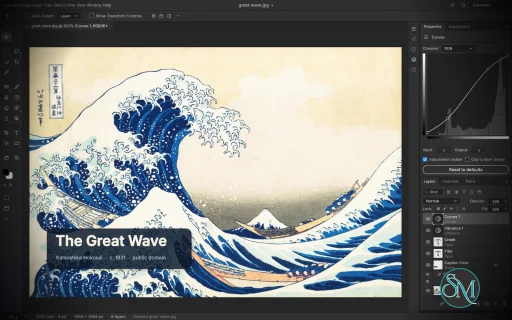
PhotoCraft is an open-source image editor designed as a clean-room reimplementation of Adobe Photoshop, built entirely in Rust. It provides a surprisingly broad set of professional image-editing features, including layers, masks, adjustment layers, filters, vector shapes, editable text, brushes, and native PSD support.
The project is particularly interesting for users who want a local, open-source Photoshop alternative without relying on Electron, cloud services, or proprietary software. However, PhotoCraft is still in early alpha, so it is better viewed as a promising alternative under active development than as a complete replacement for Photoshop.
Features
PhotoCraft offers a substantial collection of image-editing tools:
Layer groups, clipping masks, pixel and vector masks
Adjustment layers for Curves, Levels, Vibrance, Hue/Saturation, Black & White, Gradient Map, Selective Color and more
Layer styles including Drop Shadow, Inner Shadow, Glow, Bevel & Emboss, Stroke, and overlays
Brush, Pencil, Mixer Brush, Clone Stamp, Healing Brush and other painting tools
Marquee, Lasso, Magic Wand, Quick Selection, Object Selection and Select Subject
Editable point and paragraph text
Pen and vector shape tools
Smart objects and smart filters
Free Transform with scale, rotate, skew, distort and perspective
History and History Brush
Multiple blend modes, opacity, fill and layer controls
Color management with RGB, Grayscale, CMYK and Lab
8, 16 and 32-bit-per-channel documents
PSD and PSB support
PNG, JPEG, TIFF, WebP, GIF, BMP, TGA, ICO, OpenEXR, HDR, AVIF and other formats
Export preview with quality, transparency, scale and estimated file size
Command palette and recorded actions
Its PSD support is one of its strongest features. The project tests its implementation against real-world PSD files and reports very high rendering compatibility across its test corpora. Unsupported data is designed to be preserved rather than simply discarded when documents are saved.
Another unusual feature is its automation architecture. PhotoCraft exposes its editing engine through the desktop interface, CLI, JSON control channel and MCP, making the application suitable for scripted workflows and AI-agent automation.
Download PhotoCraft v0.12.0 - Software Mirrors |
|---|
PhotoCraft v0.12.0 for Windowsphotocraft-0.12.0-windows-x86.msi | 66.18 MB photocraft-0.12.0-windows-x86-portable.zip | 78.14 MB photocraft-0.12.0-windows-x64.msi | 68.53 MB photocraft-0.12.0-windows-x64-portable.zip | 82.3 MB photocraft-0.12.0-windows-arm64.msi | 63.66 MB photocraft-0.12.0-windows-arm64-portable.zip | 77.68 MB |
PhotoCraft v0.12.0 for macOSphotocraft-cli-0.12.0-macos-universal.zip | 66.76 MB photocraft-0.12.0-macos-universal.dmg | 89.6 MB |
PhotoCraft v0.12.0 for Linuxphotocraft-0.12.0-linux-x86_64.tar.gz | 80.41 MB photocraft-0.12.0-linux-x86_64.rpm | 81.11 MB photocraft-0.12.0-linux-x86_64.pkg.tar.zst | 63.69 MB photocraft-0.12.0-linux-x86_64.flatpak | 60.09 MB photocraft-0.12.0-linux-x86_64.deb | 81.65 MB photocraft-0.12.0-linux-x86_64.AppImage.zsync | 267.36 kB photocraft-0.12.0-linux-x86_64.AppImage | 76.32 MB photocraft-0.12.0-linux-riscv64.tar.gz | 78.25 MB photocraft-0.12.0-linux-riscv64.rpm | 79 MB photocraft-0.12.0-linux-riscv64.deb | 79.33 MB photocraft-0.12.0-linux-aarch64.tar.gz | 76.11 MB photocraft-0.12.0-linux-aarch64.rpm | 77.66 MB photocraft-0.12.0-linux-aarch64.pkg.tar.zst | 60.98 MB photocraft-0.12.0-linux-aarch64.flatpak | 55.55 MB photocraft-0.12.0-linux-aarch64.deb | 78.36 MB photocraft-0.12.0-linux-aarch64.AppImage.zsync | 253.79 kB photocraft-0.12.0-linux-aarch64.AppImage | 72.44 MB |
PhotoCraft v0.12.0 for BSDphotocraft-0.12.0-freebsd-x86_64.tar.gz | 79.86 MB |
Others Download related to PhotoCraft v0.12.0photocraft-web-0.12.0.zip | 11.17 MB |
PhotoCraft v0.12.0 Source Code
PhotoCraft v0.12.0 Source code (zip)
PhotoCraft v0.12.0 Source code (tar.gz)
|
PhotoCraft v0.12.0 Release Notes: Scorecard since v0.11.1
From docs/scorecard.md (done / partial / missing):
- Tools: 33 / 11 / 0 | 36 / 8 / 0
- File compatibility: 7 / 14 / 6 | 9 / 12 / 6
- Type: 4 / 3 / 2 | 5 / 3 / 1
- Workspace and UI: 13 / 6 / 4 | 13 / 7 / 3
- Open bugs: 29 / 2 / 1 | 31 / 1 / 0
- Now done: Content-Aware Move with a coarse-then-exact preview for large selections; shape Density/Feather and mask Density/Feather in Properties; Export As Nearest Neighbor resample; large-file fixtures (20 MP, 150 layers, 2 GB PSD, 4 GB PSB); Warp Text opens with the layer's warp and previews live; retouch-tool mask/channel targeting tests; selection modifiers pressed before the drag.
- Moved up: Alt+wheel zoom (missing → partial); live stroke preview now covers Pattern Stamp, Background Eraser and Color Replacement; Smart Filters map 41 filters to PSD (was 14); tool options and per-tool brushes persist across restarts.
- Settings that do nothing: 24 of 171 (was 25 of 169).
- Performance: no change to the 2026-10-05 baseline (3 within budget, 22 over). Added scenarios P20, P62 and P63 (2 GB PSD, 4–5 GB PSB, 3.1 GP New Document), not run yet.
- Corpus floors: unchanged.
FreeBSD aarch64 is not in this release: the shared release pipeline dropped it for every Craft app until it builds in time (storytold/craft-common-actions#40). FreeBSD x86_64 is included.
What's Changed- docs: add SonarCloud and CodeRabbit badges to README by @dylanmtaylor in #7429
- Skip CodeRabbit reviews on Dependabot PRs by @echelon in #7991
- Codecs: save DDS textures, uncompressed or BC1–BC3, with optional mipmaps (#1327) by @guillehr2 in #5993
- Integration batch: 26 PRs from the known-issues list (#7973) on main by @aiongg in #8094
- Group all selected layers from the Layers panel footer by @carterwsmith in #7225
- Web: start when the server already inflated the app's gzip part (Apache mod_mime_magic) (#7639) by @Korg1ch in #7683
- Give a new type layer a full Txt2 object and its own frame by @Silvertree2010 in #7773
- Choose the graphics adapter on multi-GPU Linux machines (#1885) by @readtedium in #7813
- Print: Portrait and Landscape in the Print dialog on Windows by @ToastyStoemp in #7847
- Indexed GIF opens in Indexed Color with its colour table, as in Photoshop (#7886) by @Korg1ch in #7892
- Preserve near-black ICC colors on the GPU canvas by @ha1des in #7964
- fix(ui): wire video menu pickers/dialogs and fix Timeline Stop playback by @onicafe in #3223
- Large documents: a gigapixel New Document draws without freezing (#4017) by @davidmann4 in #5111
- perf(retouch): row-parallel Blur/Sharpen dabs, 2.6-3.3x faster strokes (#5426) by @JuanAntonioRC in #5499
- Preserve editable clipboard contents when native reads fail by @jonathanwxh-cell in #5587
- Snap: View › Snap off also disables smart-guide snapping (#5782) by @nrq6993-a11y in #5803
- Batch: Format "Same" saves camera raws as PSD instead of failing (#5799) by @Higgs32584 in #5857
- fix(tablet): support stylus barrel button and brush resize on Windows (#5905, #5364) by @Anim86 in #6195
- Reveal newly created selections after hiding Extras by @jonathanwxh-cell in #6222
- Windows: PhotoCraft starts without Windows.Data.Pdf.dll (#5884) by @Higgs32584 in #6395
- macOS: list fonts activated outside the font folders (#6683) by @odgrim in #6693
- fix(ui): disable Batch without a recorded action by @Elements2720 in #6711
- Windows: maximized window lets an auto-hidden taskbar show (#4845) by @Higgs32584 in #6878
- Pen: a finished path keeps its anchor squares on screen (#6884) by @Higgs32584 in #6920
- Mixer Brush: Clean Brush empties the brush, and the automatic Load and Clean can be switched off by @dotCooCoo in #6939
- Brushes: accept .abr files up to 1 GiB by @dgliwa in #7180
- GPU startup: Auto on Windows leaves Vulkan out when an Intel adapter is present (#4) by @dotCooCoo in #7217
- fix(psd): an edited type layer keeps its Txt2 object instead of a bare stub (#6968) by @Higgs32584 in #7220
- Paragraph panel: grey the justify buttons on point text (#7713) by @hectorviov in #7728
- Integration batch: 9 PRs on main by @aiongg in #8095
- PSD: save Indexed Color, Bitmap and Duotone documents in their own mode by @switch87 in #4816
- PSD: render constant RGB noise gradient fills by @Elvis33LE in #6272
- perf(compose, gpu): many-layer composites, P60/P61 on the GPU 111 -> 28 ms by @ArintonAkos in #7566
- perf(compose): Reuse bounded scratch and tone tables by @reneleonhardt in #7693
- PSB save: 8-byte-length global blocks use the 8B64 signature, so Photoshop opens the file (#7937) by @Korg1ch in #7948
- Type: keep superscript and subscript when a text layer is re-rendered (#5645) by @vangel76 in #5807
- PSD: read split ("quilt") warps of placed layers, so Replace Contents keeps their curvature (#4398) by @thangnm93 in #6913
- ci: switch to shared nix workflow from craft-common-actions by @dylanmtaylor in #6448
- Integration batch: 86 PRs on main by @aiongg in #8271
- PSD: read colours stored as HSB (#6774) by @davidmann4 in #6775
- Apply Image: write into the targeted layer mask (#6780) by @davidmann4 in #6781
- Droplets: carry the actions that Conditional steps call (#6804) by @davidmann4 in #6805
- Guides: ruler guide snapping rebuilds its targets when snap options change (#6858) by @davidmann4 in #6859
- CLI batch: skip shell-only Save and view steps inside played action sets (#6860) by @davidmann4 in #6861
- Image Size: Resolution with Resample on keeps the print size in physical units (#6979) by @davidmann4 in #6980
- Control: ui.set rejects zoom, rotation, center and dockWidth beyond f32 range (#6988) by @davidmann4 in #6989
- Channels: Multichannel conversion keeps the targeted channel (#7002) by @davidmann4 in #7003
- Keyboard Shortcuts: switching sets keeps action function keys (#7004) by @davidmann4 in #7005
- Timeline: a longer duration moves a work area that reached the old end (#7006) by @davidmann4 in #7008
- Crop: Color Samplers scale with a W x H crop (#7012) by @davidmann4 in #7013
- Actions: deleting an action removes its function key (#7014) by @davidmann4 in #7015
- Automation: doc.save rejects a bad quality instead of ignoring or clamping it (#7023) by @davidmann4 in #7024
- Automation: place and layer/data-set export by index keep the active document (#7025) by @davidmann4 in #7026
- Transform Selection: an unknown reference point is an error (#7027) by @davidmann4 in #7028
- Lens Correction: smart filters keep the exact focal length (#7029) by @davidmann4 in #7030
- Match Zoom: matched views stay within each document's zoom range (#7036) by @davidmann4 in #7037
- Crop: the turn readout never shows -0.0° or -180.0° (#7040) by @davidmann4 in #7041
- Conditional Mode Change: "gray" as a single source mode matches Grayscale (#7042) by @davidmann4 in #7044
- Layer Style: gradient overlay and stroke scale stay within 10-150 % (#7047) by @davidmann4 in #7048
- Perspective Crop: a drag without area leaves no crop box (#7061) by @davidmann4 in #7062
- PSD: Hue/Saturation export writes each triplet in its own slot (#7065) by @davidmann4 in #7066
- Merge to HDR Pro and merged duplicates: the Background layer is a real Background (#7078) by @davidmann4 in #7079
- Actions: an imported Crop step in a unit other than pixels is not applied as pixels (#7084) by @davidmann4 in #7085
- Crop / Canvas Size: extending keeps the Background's hidden pixels (#7086) by @davidmann4 in #7087
- Crop: in default mode, box Undo/Redo keeps the box in place (#7088) by @davidmann4 in #7089
- Image Size: type keeps its pixel size when the resolution changes (#7124) by @davidmann4 in #7125
- Perspective Crop: switching documents drops the pending box (#7130) by @davidmann4 in #7131
- Crop: a refused crop keeps the frame for fixing (#7133) by @davidmann4 in #7134
- Perspective Crop: W and H follow the Point/Pica Size preference (#7135) by @davidmann4 in #7136
- Image: Trim and merged Duplicate report an error on documents over 2^30 px (#7223) by @davidmann4 in #7224
- Crop: a W x H crop on an Indexed Color document resamples with Nearest Neighbor (#7722) by @davidmann4 in #7723
- Crop: Undo/Redo grey out when the frame has no step left (#7730) by @davidmann4 in #7731
- Crop: a lost Straighten release no longer hijacks the next drag (#7745) by @davidmann4 in #7746
- Brush smoothing: catch-up compares the pose too, not only the position (#7747) by @davidmann4 in #7748
- Crop: a typed ratio fits from the frame the edit started with (#7752) by @davidmann4 in #7753
- Layer Style: a new Stroke is 1 px inside black, as in Photoshop (#7765) by @davidmann4 in #7766
- History: panel menu, Step Forward/Backward and Clear History (#2966) by @davidmann4 in #3534
- History: set the History Brush source from the panel (history.setSource) (#2966) by @davidmann4 in #3536
- Pattern Stamp and Background Eraser draw live; Spot Healing shows its heal area (TOOL-213-7, #3754) by @davidmann4 in #3759
- Performance: brush dab on a CMYK document within budget (#5108) by @davidmann4 in #5110
- Filters: Lens Correction, Adaptive Wide Angle and Camera Raw Filter respect locks on smart objects (#5621) by @davidmann4 in #5622
- Layer masks: From Transparency and Mask All Objects convert the Background and match the document depth (#5679) by @davidmann4 in #5680
- Fill layers: reject non-finite gradient angles and pattern angle/phase (#5752) by @davidmann4 in #5753
- Paint: Lock Transparency blends source-atop on semi-transparent pixels (#5783) by @davidmann4 in #5784
- PSD Multichannel: alpha channels are stored as-is, not as ink (#5790) by @davidmann4 in #5791
- Effects: Gradient Overlay transparency follows Smoothness, midpoints and method (#1954) by @davidmann4 in #5887
- PSD: Smart Sharpen and Dust & Scratches smart filters open and save like Photoshop (#6300) by @davidmann4 in #6301
- PSD: Wind, Extrude and Tiles smart filters open and save like Photoshop (#6314) by @davidmann4 in #6315
- Move tool: Ctrl-hover shows the distance to another layer (#4946) by @davidmann4 in #6357
- PSD: Hue/Saturation smart filters open and save like Photoshop (#6267) by @davidmann4 in #6398
- Layers: toggling a clipped adjustment damages only its base (#6535) by @davidmann4 in #6640
- Hue/Saturation: the Lightness track runs black, grey, white (#6539) by @davidmann4 in #6644
- Shortcuts: a command shortcut leaves the focused menu bar and runs (#6573) by @davidmann4 in #6707
- Paths: Delete Path on a shape layer's path row deletes the layer (#6552) by @davidmann4 in #6719
- Paths: drag a path row onto the Trash to delete it (#6553) by @davidmann4 in #6721
- PSD: open an adjustment layer of an unknown type as an unsupported adjustment (#6575) by @davidmann4 in #6722
- PSD: layered TIFF byte-order conversion reads the class of Idnt/indx references (#6764) by @davidmann4 in #6765
- Fit Image: a width or height of 0 leaves that side unconstrained (#6766) by @davidmann4 in #6767
- Actions: renaming an action updates the Conditional steps that call it (#6772) by @davidmann4 in #6773
- Auto-Align: warp layer masks as masks, keeping what lies outside revealed (#6776) by @davidmann4 in #6777
- PSD: layered TIFF byte-order conversion swaps every smart filter section (#6802) by @davidmann4 in #6803
- Type: paragraph box handles are picked at the unsnapped press (#6819) by @davidmann4 in #6822
- Stamp Down keeps the lower layer's clipping, label and link (#6999) by @davidmann4 in #7001
- Crop: W x H x Resolution follows the Point/Pica Size preference (#7038) by @davidmann4 in #7039
- Crop: Straighten is one box Undo step (#7127) by @davidmann4 in #7128
New Contributors- @guillehr2 made their first contribution in #5993
- @readtedium made their first contribution in #7813
- @ToastyStoemp made their first contribution in #7847
- @Anim86 made their first contribution in #6195
- @Elements2720 made their first contribution in #6711
- @ArintonAkos made their first contribution in #7566
- @thangnm93 made their first contribution in #6913
Full Changelog: v0.11.1...v0.12.0
|
Performance and Compatibility
PhotoCraft is built as a native Rust application rather than a web wrapper or Electron application. Its rendering architecture uses wgpu for GPU compositing with support for graphics APIs including Metal, Vulkan, DirectX 12 and WebGPU.
The application also uses multithreaded filters and copy-on-write sparse tiles. This design is intended to reduce unnecessary copying and make large layered documents more manageable.
The project reports extensive automated testing, including PSD round-trip tests, compositor comparisons and multi-depth testing. Its architecture also includes a CPU compositor used as a reference against the GPU compositor.
PhotoCraft can run natively on Windows, macOS, Linux and FreeBSD, with a WebAssembly build for browser use.
The main limitation is maturity. The developers explicitly describe the project as early alpha and acknowledge that it is not yet suitable as a complete replacement for Photoshop in professional daily workflows. Missing areas include AI and generative features, some tools, deeper typography and professional workflows, and plugin compatibility.
System Requirements
PhotoCraft supports:
Windows
macOS
Linux
FreeBSD
WebAssembly/browser
Linux distributions can use AppImage, DEB, RPM, tarball or Flatpak packages.
Hardware requirements are not presented as a simple minimum specification. Because PhotoCraft uses GPU acceleration, actual performance will depend heavily on the graphics hardware and the size and complexity of the documents being edited.
Pros and Cons
Pros
Open-source and available under permissive MIT or Apache-2.0 licensing
Native Rust application
No Electron or embedded web browser required
Excellent focus on PSD compatibility
Extensive layer and adjustment-layer support
GPU-accelerated rendering
Supports CMYK, Lab and high-bit-depth documents
Strong brush and vector capabilities
Windows, macOS, Linux and FreeBSD support
Can also run through WebAssembly
Powerful CLI and automation capabilities
MCP support makes it interesting for AI-assisted workflows
Offline-first approach
Cons
Still early alpha
Not yet a complete Photoshop replacement
Missing some tools and professional workflows
No Photoshop plugin compatibility
AI and generative editing features are limited or absent
Typography capabilities are not yet as mature as established professional editors
Some rough edges should be expected
How to Install
The easiest approach is to download the appropriate package from the project's GitHub releases.
Linux users have several packaging options, including AppImage, DEB, RPM, tarball and Flatpak. Windows has a portable package, while macOS has a universal disk image.
Developers can also build PhotoCraft directly from source using Rust:
git clone https://github.com/storytold/photocraft
cd photocraft
cargo run --release -p photocraft -- image.psd
The repository also provides CLI functionality for automated editing and batch processing.
Final Verdict
PhotoCraft is one of the more ambitious open-source Photoshop alternatives currently available. Its combination of native Rust performance, extensive layer support, serious PSD compatibility work and an unusually capable automation architecture makes it much more than a basic image editor.
The strongest reason to watch PhotoCraft is its engineering approach. The project is building a real image-editing engine rather than simply creating a Photoshop-like interface, and its extensive PSD testing provides a useful foundation for compatibility.
The biggest problem is maturity. The project itself acknowledges that it is still early alpha and lacks several areas required for professional Photoshop replacement workflows. Users who depend on plugins, advanced typography, AI features or highly polished production workflows should not switch completely yet.
For enthusiasts, developers, Linux users, open-source advocates and anyone interested in building automated image-processing workflows, however, PhotoCraft is particularly compelling.
Post a Comment/Report Broken Link: