PdfCraft is a free, open-source PDF application designed as an alternative to Adobe Acrobat. Built from scratch in Rust, it combines PDF viewing, document organization, page management, file merging, splitting, and encryption tools in a native desktop application.
Unlike cloud-based PDF services, PdfCraft is designed to process documents locally without requiring an account, telemetry, or cloud processing. It supports Windows, macOS, Linux, and FreeBSD, with a WebAssembly version that runs in a browser.
PdfCraft is particularly interesting for users who want a lightweight, privacy-focused PDF workbench without a subscription. However, it is still an early-stage project, and users who depend on advanced PDF editing, digital signatures, or OCR should consider its current limitations before adopting it.
Features
PDF Viewing and Search
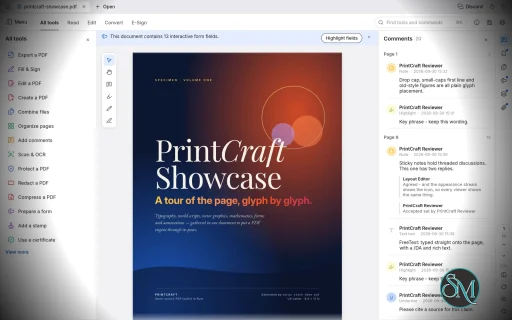
PdfCraft provides a document viewer with text selection, page navigation, and search-as-you-type functionality. Its text selection follows the document's reading order, making it easier to select and copy content from complex layouts.
The renderer is designed to handle international text, vertical Japanese writing, color emoji, and transparency. The application also includes a dark theme and two-page reading mode for a more comfortable reading experience.
A command palette provides quick access to tools and commands, reducing the need to navigate through multiple menus.
Organize and Rearrange Pages
PdfCraft includes a visual page organizer that makes managing PDF documents straightforward. Users can rotate, delete, insert, and reorder pages, with undo support for reversing changes.
These tools are useful for rearranging reports, removing unwanted pages, correcting scanned documents, and assembling documents in the desired order.
The application also supports incremental editing and atomic saves, alongside autosave and crash recovery features designed to reduce the risk of losing work.
Merge, Extract, and Split PDFs
PdfCraft allows users to combine multiple PDF files into a single document, extract selected pages, and split documents into smaller files.
Its document-processing engine aims to preserve important PDF structures during these operations, including links, form fields, layers, and bookmarks.
This makes it useful for administrative work, combining reports, preparing documents for submission, and separating large files into manageable sections.
However, complex documents should be checked after processing to ensure that their formatting and interactive elements remain intact.
PDF Security and Encryption
PdfCraft supports opening encrypted PDF files using older RC4 encryption and modern AES-256 encryption.
It also respects document permissions specified by the author. This is useful when working with protected documents that restrict certain operations.
Encryption support does not mean that PdfCraft provides every security feature available in professional PDF software. Users who require certificate-based digital signatures, advanced redaction, or specialized document-security workflows should verify those capabilities separately.
Forms, Layers, and Document Structure
PdfCraft is designed to preserve PDF features beyond ordinary page content. These include form fields, layers, links, and bookmarks when combining or splitting documents.
This is important because PDF files often contain interactive elements and structural information that can be lost when processed by simpler PDF utilities.
The project emphasizes document integrity, although its developers acknowledge that its rendering quality has not yet been comprehensively compared against Adobe Acrobat.
Command-Line Tools and AI Automation
PdfCraft includes a command-line interface for inspecting documents, extracting text, rendering pages, editing PDF files, combining documents, extracting pages, and splitting files.
For example, you can inspect a PDF's structure in JSON format:
pdfcraft-cli info document.pdfExtract text from a specific page:
pdfcraft-cli text document.pdf --page 3Rotate pages, delete a page, and update the document title:
pdfcraft-cli edit input.pdf \
  --rotate 1,2:90 \
  --delete 5 \
  --title "Q3" \
  --out output.pdf
These capabilities make PdfCraft useful for batch processing, scripts, and automated document workflows. Its agent-oriented architecture also makes it suitable for integration with compatible AI tools.
Download PdfCraft v0.8.0 - Software Mirrors |
|---|
PdfCraft v0.8.0 for Windowspdfcraft-0.8.0-windows-x86.msi | 66.08 MB pdfcraft-0.8.0-windows-x86-portable.zip | 77.79 MB pdfcraft-0.8.0-windows-x64.msi | 67.96 MB pdfcraft-0.8.0-windows-x64-portable.zip | 81.34 MB |
PdfCraft v0.8.0 for macOS |
PdfCraft v0.8.0 for Linuxpdfcraft-cli-0.8.0-linux-x86_64.tar.gz | 28.96 MB pdfcraft-cli-0.8.0-linux-aarch64.tar.gz | 27.54 MB pdfcraft-0.8.0-linux-x86_64.tar.gz | 80.94 MB pdfcraft-0.8.0-linux-x86_64.rpm | 81.57 MB pdfcraft-0.8.0-linux-x86_64.flatpak | 61.38 MB pdfcraft-0.8.0-linux-x86_64.deb | 81.98 MB pdfcraft-0.8.0-linux-x86_64.AppImage.zsync | 270.56 kB pdfcraft-0.8.0-linux-x86_64.AppImage | 77.23 MB pdfcraft-0.8.0-linux-riscv64.tar.gz | 78.72 MB pdfcraft-0.8.0-linux-riscv64.rpm | 79.36 MB pdfcraft-0.8.0-linux-riscv64.deb | 79.59 MB pdfcraft-0.8.0-linux-aarch64.tar.gz | 77.52 MB pdfcraft-0.8.0-linux-aarch64.rpm | 78.79 MB pdfcraft-0.8.0-linux-aarch64.flatpak | 57.78 MB pdfcraft-0.8.0-linux-aarch64.deb | 79.31 MB |
PdfCraft v0.8.0 for BSD |
Others Download related to PdfCraft v0.8.0 |
PdfCraft v0.8.0 Source Code |
PdfCraft v0.8.0 Release Notes:What's Changed
New Contributors
|
Performance and Compatibility
PdfCraft is written in Rust, with its PDF parsing, rendering, and editing logic organized into reusable libraries. The graphical interface is built on top of this underlying engine.
The project emphasizes faithful document rendering, reliable file operations, and local processing. Its developers report zero crashes across a test corpus of 983 PDF files, although this result should not be interpreted as a guarantee of compatibility with every PDF document.
Supported platforms include Windows, macOS, Linux, FreeBSD, and modern web browsers through WebAssembly. Available packages include Windows installers and portable archives, a universal macOS disk image, Linux AppImage packages, Debian packages, RPM packages, and other distribution formats.
PdfCraft is still in early development. Its roadmap identifies renderer improvements, stronger compatibility testing, editing existing PDF content, digital signatures, OCR, Office-related workflows, preflight tools, and XFA support as areas for further development.
Consequently, it is best viewed as a promising PDF workbench rather than a complete replacement for every Adobe Acrobat workflow.
System Requirements
Operating systems: Windows, macOS, Linux, and FreeBSD.
Browser support: WebAssembly build for modern browsers.
Windows architectures: x86, x64, and ARM64.
Linux architectures: x86-64 and ARM64.
macOS: Universal build for Intel and Apple silicon.
Build requirements: Rust 1.90 or newer, along with the project's documented development dependencies.
The project does not establish a comprehensive minimum RAM or processor specification in the information reviewed. Basic PDF viewing should be suitable for a broad range of modern computers, but performance will depend on document complexity and system resources.
Pros and Cons
Pros
Free and open-source under permissive licenses.
Native applications for major desktop operating systems.
Local document processing without mandatory accounts or cloud uploads.
PDF viewing with text search and selection.
Page rotation, deletion, insertion, and reordering.
PDF merging, extraction, and splitting.
Support for encrypted PDFs and document permissions.
Designed to preserve links, form fields, layers, and bookmarks.
Autosave, crash recovery, and undo support.
Command-line tools for scripting and batch processing.
WebAssembly version for browser-based use.
Cons
Still in early development, with some features planned rather than implemented.
PDF rendering quality has not yet been comprehensively benchmarked against Adobe Acrobat.
Advanced editing of existing PDF content remains a development priority.
Digital signatures, OCR, and specialized document workflows are not yet comprehensive.
Compatibility with complex forms and unusual PDF documents requires further testing.
Professional publishing and document-preflight capabilities are limited.
How to Install
The easiest way to install PdfCraft is to visit its official website and download the package for your operating system.
Windows users can choose an installer or portable archive. macOS users can download the universal disk image, while Linux users can select AppImage, DEB, RPM, or another available package.
To build PdfCraft from source, install Rust 1.90 or newer and run:
git clone https://github.com/storytold/pdfcraft.git
cd pdfcraft
cargo run --release -p pdfcraft
For command-line PDF processing, build or install the CLI package provided by the project. Consult the official documentation for supported commands, build dependencies, and platform-specific installation instructions.
Final Verdict
PdfCraft is a promising open-source PDF editor for users who want to read, organize, combine, split, and secure documents without relying on a cloud service or paid subscription.
Its strongest advantages are local processing, cross-platform availability, careful handling of PDF structure, and a command-line interface that supports automation. These features make it appealing to developers, privacy-conscious users, and anyone who regularly manages PDF documents.
The main limitation is maturity. PdfCraft does not yet cover every advanced capability offered by established PDF applications, particularly for editing existing content, digital signatures, OCR, and specialized document workflows.
For everyday PDF viewing and organization, PdfCraft is worth trying. Users who need a complete professional PDF solution should evaluate its current feature set against their specific requirements before replacing their existing software.
Post a Comment/Report Broken Link: