Multica is an open-source platform designed to manage and orchestrate AI agents within development workflows. Instead of running a single AI assistant, it allows multiple agents to collaborate, execute tasks, and share knowledge across projects.
It essentially acts like a control center where:
AI agents are assigned tasks
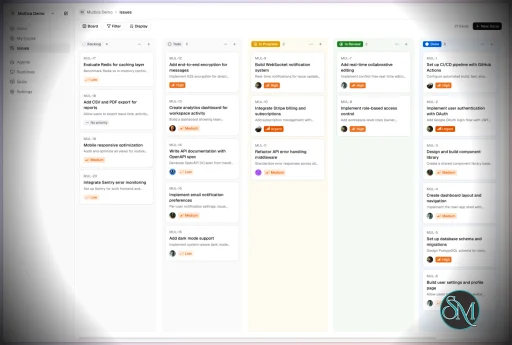
Progress is tracked in real time
Outputs and skills are reused across workflows
Multica currently supports Claude Code, Codex, OpenClaw, and OpenCode out of the box. The daemon auto-detects whichever CLIs you have installed. Since it’s open source, you can also add your own backends.
Download Multica v0.7.2 - Software Mirrors |
|---|
Multica v0.7.2 for Windowsmultica_windows_arm64.zip | 6.8 MB multica_windows_amd64.zip | 7.65 MB multica-desktop-0.7.2-windows-x64.exe | 187.93 MB multica-desktop-0.7.2-windows-arm64.exe | 187.37 MB multica-cli-0.7.2-windows-arm64.zip | 6.8 MB multica-cli-0.7.2-windows-amd64.zip | 7.65 MB |
Multica v0.7.2 for macOSmultica_darwin_arm64.tar.gz | 6.99 MB multica_darwin_amd64.tar.gz | 7.61 MB multica-desktop-0.7.2-mac-x64.zip | 235.89 MB multica-desktop-0.7.2-mac-x64.dmg | 246.06 MB multica-desktop-0.7.2-mac-arm64.zip | 228.02 MB multica-desktop-0.7.2-mac-arm64.dmg | 238.18 MB multica-cli-0.7.2-darwin-arm64.tar.gz | 6.99 MB multica-cli-0.7.2-darwin-amd64.tar.gz | 7.61 MB |
Multica v0.7.2 for Linuxmultica_linux_arm64.tar.gz | 6.68 MB multica_linux_amd64.tar.gz | 7.43 MB multica-desktop-0.7.2-linux-x86_64.rpm | 146.38 MB multica-desktop-0.7.2-linux-x86_64.AppImage | 237.27 MB multica-desktop-0.7.2-linux-arm64.deb | 167.09 MB multica-desktop-0.7.2-linux-arm64.AppImage | 237.13 MB multica-desktop-0.7.2-linux-amd64.deb | 172.6 MB multica-desktop-0.7.2-linux-aarch64.rpm | 141.06 MB multica-cli-0.7.2-linux-arm64.tar.gz | 6.68 MB multica-cli-0.7.2-linux-amd64.tar.gz | 7.43 MB |
Others Download related to Multica v0.7.2checksums.txt | 1.15 kB |
Multica v0.7.2 Source Code
Multica v0.7.2 Source code (zip)
Multica v0.7.2 Source code (tar.gz)
|
Multica v0.7.2 Release Notes: Changelog- 890628511e423864d21c694231277805ce9f113c MUL-7132: fix(issues): resolve comment trigger avatar URLs (#8137)
- f2a6398d6ea742cc10c96a8d460b4ecc8d95db2a MUL-7257: refactor(server): remove unused compatibility queries and capabilities (#9671)
- e7dfbe83bdee703e806214d46cd7dc85f90a7480 MUL-7995: fix(openclaw): report actionable state ownership lock error (#9222)
- 1eb4b5d1f8c9b8243808809c02f45f5f1403dab6 MUL-8203: record permission-blocked mentions as system replies (#9624)
- 84e56b6b00c4cf20894f56a5bd84658cc315a365 MUL-8256 fix(runtime): recover stalled HTTP/2 connections (#9551)
- a008d893ddd549f22f899790808f2afad45922be MUL-8292: refactor(brief): move Available Commands detail behind --help (#9596)
- ca593b31037c04e500513d178aa61ca3e329bf0d MUL-8302: fix(daemon): preserve task environment in Hermes tool shells (#9607)
- 002b2dcbcabf247b1e97d09198b79c883d2c1753 MUL-8308: feat(mobile): open historical run transcripts (#9613)
- 3e4dcef95f35fdc2d453ea14a5f7d6163e401adf MUL-8312: fix(i18n): unify Chinese review copy across clients (#9615)
- fb49f5592494d14e40f6351813cc97c01a96752b MUL-8340 feat(search): context-aware command bar with agent handoff (#9647)
- ec72a00ac35588d6a688281a155959d3068a3d50 MUL-8342 fix(daemon): reject legacy DSH profiles (ZIC-374) (#9649)
- 828e0c927eb64632bebe0f92e00fafc09b884587 MUL-8346: fix(agent): handle Claude Code session and weekly limits (#9652)
- 46d4e267129e606c7a8666bcfc1714dd19e93c1f MUL-8347: fix Hermes compatibility with gateway-backed and older ACP (#9666)
- 139b13a462c9a9757e18a17578a867eecd99851e MUL-8369: fix(mobile): preserve runs while stop requests are pending (#9670)
- 2083970b51c03c0773188636c24a96acd09ad4c3 MUL-8374: fix: keep private chat content to the session owner (realtime + REST) (#9677)
- a802ce2c6fad1534476fd0012ba221f9e0524199 MUL-8377: feat(workflows): one-line project usage and named handoffs in the workflow list (#9689)
- c066f7ea61eecdfc7c227b20a45330eacc7cf352 MUL-8382: fix(wecom): write the unreadable-message receipt in the sender's language (#9693)
- fe23bd1161498537d9b87ad93f22a26abff5cd0a MUL-8392: feat(properties): support up to 200 select options (#9712)
- cd768e9793953750fae57145cac8710844b50979 MUL-8397: fix(daemon): parse OpenCode 2.x nested MCP server config (#9713)
- f05a525ac8e82f5e9169ad078e44f166fad6d5c8 MUL-8399: chore(release): add 0.7.2 changelog (#9718)
- a8e75614212a277c89495ae29c68f9419f95185a [MUL-8300] fix(lark): resolve outbound references to workspace links (#9604)
- 07221fbc64708a31220c83a0d63175c34d8af306 docs(skills): keep theme text tokens off fixed light fills in html blocks (#9664)
- d7d1831fcf39b874911aae1e48b2fbf804bd068e feat(cli): add run-targeted retries with a fresh option (#9592)
- 87647b8ff47dd336838cf30aca33f2fc0cba2f97 feat(issues): MUL-8324 add Jump to latest button to issue timeline (#9627)
- 045fcdf19ab9b1dde767f417318dedbf6209e899 feat(issues): compact the sidebar execution log (MUL-8350) (#9659)
- 1223524b5e7b39e2b93bf309b3489853831e4e54 feat(issues): hide Jump to latest once the reader scrolls past the top fifth (MUL-8324) (#9634)
- c2471a9ba76c9446763639ee7a789968caf39953 feat(issues): open the full log straight from the agent run row (MUL-8335) (#9641)
- 9af15b1446f9d91f90ea97b65c504a7aa49da714 feat(issues): show Jump to latest on mobile only (MUL-8324) (#9638)
- f0c361ebca12ee8563c90adcf42356d71a375f69 feat(ui): Multica icons, roomier menus and typography pass (MUL-8334, MUL-8338) (#9640)
- 207a4bf4e9b46158cf01eadee1cdaec11b341e7d feat(ui): raise tooltip open delay to 500ms with instant hand-off (MUL-8313) (#9623)
- d51665feb6a94f3d62a503cc4711fb759de02fa5 feat(ui): show project picker name tooltip only when truncated (MUL-8313) (#9617)
- 3647fd22457609d7625a8a06e11ff324398833b6 feat(ui): use TruncatedTooltip for truncated labels across the app (MUL-8313) (#9618)
- bb3747186ed2950956268646c7343d6adc0b0fcf feat: let agents steer running turns they could start (MUL-8285) (#9630)
- 7d02596fc3626b8fab5d0a5e6fe2db090c8b02d9 fix(agent): MUL-8307 drive OpenCode over ACP so long tools and subagents are not force-stopped (#9619)
- 375b23247b2fb395043ed069f4edcda349591c1d fix(codex): price GPT-6.1 Terra and add it to the fallback catalog (#9668)
- 8ffcc88dbdf13d8b1c7f6c9779920d0bb04ea663 fix(desktop): show spelling suggestions in right-click menu (#9608)
- b20cea33ad1afd46b534f3ab9a29cf967ec2e134 fix(desktop): wait for daemon shutdown before quitting (MUL-8290) (#9590)
- 6388272a8a6faf82d9238a605e4bcf5e68e4808f fix(github): skip PR merge status move when the project workflow lacks the target (#9598)
- 4fae904f89aef478b5200c23dc4d4336a37fe1c3 fix(issues): give Jump to latest an opaque background in dark mode (MUL-8324) (#9631)
- 39d8a11970dd9bfc290c3c059325fdb85ec32571 fix(issues): restore an archived inbox notification from the issue page (#9653)
- 799f5614a7eda14333866df4aebff41f2fd9ea2a fix(lark): apply pong heartbeat updates and close failed sessions (MUL-8394) (#9708)
- e03dabdadedc1d60f01121ddc3135b5d957e6319 fix(projects): preserve resource cache across concurrent deletes (MUL-8332) (#9633)
- d9f5dee413ae31d1e0cd74fdc28bed24ce0d0ae6 fix(projects): reveal full project names in the picker (MUL-8291) (#9591)
- a6173f8ebc340fbc1044d59b9818703ab662d087 fix(runtimes): verify new computers before showing connection success (#9688)
- 4157f5b26e3acbbd53ae5abbb659c579dc7320eb fix(selfhost): pass MULTICA_WECOM_DEFAULT_LOCALE into the backend container (#9691)
- 7b6743a46fe566ba1e4a30b6daca5ff83fa2e078 fix(settings): keep property edit actions visible [ZIC-375] MUL-8331 (#9648)
- 4a0c147c5020db450fd24459a0da6014fbb9a3d2 fix(storage): support GCS S3 XML API signing (MUL-8232) (#9513)
- 55be334864e1f144ea2eae9456b7a69046deb2c8 fix(taskfailure): classify Kiro dispatch failure as retryable provider_network (MUL-8314) (#9621)
- ce565c1aa4bdc46e9656ff0fe1fd6f188ac74b30 fix(ui): Linear's menu geometry across dropdown, context, select and command menus (MUL-8344) (#9657)
- 9987874547fdbc724d094224969e2258e5637daa fix(ui): sharp-tipped directional icons, straight checks, sized icons, 14px menus (MUL-8344) (#9655)
- d5d1382b8fba067bb04d732e48503a8687247910 fix(ui): tint the active sidebar icon lightly instead of filling it solid (MUL-8351) (#9660)
- b2e58d0bf8a8e113b9c7bc895f4213f08442833a fix(views): move Create sub-issue below Rename issue in issue actions menu (#9661)
- 8305976793097a3d38e3a2f29bc1626abe76130d fix(views): show agent run row actions on touch devices (MUL-8341) (#9646)
- 48df97775559826cb4517f71068acda3a87e5399 fix(views): stop page-switch layout jumps and prefetch page data (MUL-8337) (#9643)
- bf8970aa33922f394c6ba69d07e42c3da7775f3d fix(wecom): ask again before a queued reply is written to a revoked installation (#9694)
- 0249e8609e6ae983dc0ae208c69af76199380881 fix(wecom): upload a file again when WeCom replaces the connection mid-upload (#9715)
- 374b6f3db45962b3be4f520e42e5b05de205a607 fix: respect omp profiles when discovering runtime skills (#9711)
|
Key Features
1. AI Agents as Teammates
Multica treats AI agents like real contributors. You can assign tasks, monitor progress, and manage their work similar to human developers.
2. Multi-Agent Orchestration
Instead of relying on a single AI model, Multica coordinates multiple agents working together on complex tasks, improving efficiency and scalability.
3. Skill Reuse and Compounding
One of its most innovative features is skill accumulation. Agents can reuse previously learned solutions, reducing redundancy and improving performance over time.
4. Real-Time Workflow Tracking
You get a unified dashboard where you can:
This makes it suitable for structured development environments.
5. CLI and Web Interface
Multica provides both:
It supports local and cloud-based environments, offering flexibility in deployment.
6. Open Source and Flexible
Being open source, Multica allows:
This makes it appealing for teams that want control over their AI infrastructure.
Performance and Use Cases
Multica is designed for advanced workflows rather than casual use. It performs best in environments where multiple AI agents are needed to collaborate.
Typical use cases include:
AI-assisted software development
Automation pipelines
Multi-step research and analysis
DevOps and engineering workflows
Its ability to coordinate agents makes it especially useful for complex tasks that go beyond simple prompts.
Quick Install
curl -fsSL https://raw.githubusercontent.com/multica-ai/multica/main/scripts/install.sh | bash
Installs the Multica CLI on macOS and Linux. Works with Homebrew or downloads the binary directly.
Windows (PowerShell):
irm https://raw.githubusercontent.com/multica-ai/multica/main/scripts/install.ps1 | iex
Then configure, authenticate, and start the daemon in one command:
multica setup # Connect to Multica Cloud, log in, start daemon
Self-hosting? Add --with-server to deploy a full Multica server on your machine:
curl -fsSL https://raw.githubusercontent.com/multica-ai/multica/main/scripts/install.sh | bash -s -- --with-server
multica setup self-host
Requires Docker. See the Self-Hosting Guide for details.
Getting Started
1. Set up and start the daemon
multica setup # Configure, authenticate, and start the daemon
The daemon runs in the background and auto-detects agent CLIs (claude, codex, openclaw, opencode) on your PATH.
2. Verify your runtime
Open your workspace in the Multica web app. Navigate to Settings → Runtimes — you should see your machine listed as an active Runtime.
What is a Runtime? A Runtime is a compute environment that can execute agent tasks. It can be your local machine (via the daemon) or a cloud instance. Each runtime reports which agent CLIs are available, so Multica knows where to route work.
3. Create an agent
Go to Settings → Agents and click New Agent. Pick the runtime you just connected and choose a provider (Claude Code, Codex, OpenClaw, or OpenCode). Give your agent a name — this is how it will appear on the board, in comments, and in assignments.
4. Assign your first task
Create an issue from the board (or via multica issue create), then assign it to your new agent. The agent will automatically pick up the task, execute it on your runtime, and report progress — just like a human teammate.
User Experience
The concept behind Multica is powerful, but it comes with complexity.
Requires understanding of AI agents and workflows
Setup may involve configuring runtimes and integrations
More suited for developers than beginners
However, once configured, it provides a highly structured and scalable system.
Pros and Cons
Pros
Open source and highly customizable
Supports multi-agent collaboration
Reusable skill system improves efficiency
Real-time workflow tracking
Flexible deployment options
Cons
Still early-stage and evolving
Setup complexity is high
Requires technical knowledge
Not suitable for simple AI tasks
Who Should Use Multica
Multica is ideal for:
Developers working with AI agents
Teams building automated workflows
Companies experimenting with agent-based systems
Advanced users exploring AI orchestration
It is not designed for casual users who just need a simple chatbot.
Final Verdict
Multica represents the next step in AI tooling, moving from single assistants to collaborative AI systems. While still evolving, it introduces a powerful concept that could shape how teams use AI in development.
Multica is a promising platform for advanced users who want to build scalable, multi-agent AI workflows with full control and flexibility.
If you are exploring multi-agent AI systems or building automated development workflows, Multica is an emerging tool worth paying attention to. It introduces a new way to treat AI agents not just as tools, but as collaborative team members working alongside developers.
Post a Comment/Report Broken Link: