Multica v0.7.1

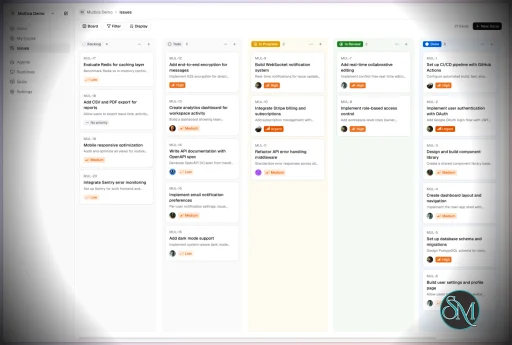
Multica is an open-source platform designed to manage and orchestrate AI agents within development workflows. Instead of running a single AI assistant, it allows multiple agents to collaborate, execute tasks, and share knowledge across projects.

It essentially acts like a control center where:

  • AI agents are assigned tasks

  • Progress is tracked in real time

  • Outputs and skills are reused across workflows

Multica currently supports Claude Code, Codex, OpenClaw, and OpenCode out of the box. The daemon auto-detects whichever CLIs you have installed. Since it’s open source, you can also add your own backends.

Download Multica v0.7.1 - Software Mirrors

Multica v0.7.1 for Windows

multica_windows_arm64.zip | 6.75 MB

multica_windows_amd64.zip | 7.59 MB

multica-desktop-0.7.1-windows-x64.exe | 188.6 MB

multica-desktop-0.7.1-windows-arm64.exe | 188.04 MB

multica-cli-0.7.1-windows-arm64.zip | 6.75 MB

multica-cli-0.7.1-windows-amd64.zip | 7.59 MB

Multica v0.7.1 for macOS

multica_darwin_arm64.tar.gz | 6.94 MB

multica_darwin_amd64.tar.gz | 7.55 MB

multica-desktop-0.7.1-mac-x64.zip | 236.64 MB

multica-desktop-0.7.1-mac-x64.dmg | 246.82 MB

multica-desktop-0.7.1-mac-arm64.zip | 228.79 MB

multica-desktop-0.7.1-mac-arm64.dmg | 238.97 MB

multica-cli-0.7.1-darwin-arm64.tar.gz | 6.94 MB

multica-cli-0.7.1-darwin-amd64.tar.gz | 7.55 MB

Multica v0.7.1 for Linux

multica_linux_arm64.tar.gz | 6.64 MB

multica_linux_amd64.tar.gz | 7.37 MB

multica-desktop-0.7.1-linux-x86_64.rpm | 146.8 MB

multica-desktop-0.7.1-linux-x86_64.AppImage | 238.07 MB

multica-desktop-0.7.1-linux-arm64.deb | 164.68 MB

multica-desktop-0.7.1-linux-arm64.AppImage | 237.94 MB

multica-desktop-0.7.1-linux-amd64.deb | 170.78 MB

multica-desktop-0.7.1-linux-aarch64.rpm | 141.44 MB

multica-cli-0.7.1-linux-arm64.tar.gz | 6.64 MB

multica-cli-0.7.1-linux-amd64.tar.gz | 7.37 MB

Others Download related to Multica v0.7.1

checksums.txt | 1.15 kB

Multica v0.7.1 Source Code

Multica v0.7.1 Source code (zip)

Multica v0.7.1 Source code (tar.gz)

Multica v0.7.1 Release Notes:

Changelog

  • 9543a0c65aad9b2783dfcde174458786050174db MUL-6546 fix(util): ignore mentions inside markdown code blocks and inline code (#7397)
  • e8fdcfd226d238e6f1f22d5d95245936a795d9fd MUL-6623 feat(agent): add host-local Devin CLI over ACP (#7485)
  • b8306f975c47be0743e6ee16bdbe4ec67eb440c1 MUL-7130: feat(issues): add overview and sub-issues to the outline (#8135)
  • b5477490e4f69a4a5ccf6b8f12ec674fd7d712f2 MUL-7376: fix(openclaw): preserve agent identity with persistent model overrides (#9223)
  • ac673fbf19237cf37903b45c0fa30e87de7ae4d1 MUL-7384: fix(onboarding): require confirmed daemon setup targets (#8907)
  • 984d9db74b573098ff19427f089ba1e1ae1bca03 MUL-7695: fix(desktop): stop daemon before Windows update install (#9582)
  • ac963e9b08814799f6052a0f800414168502655d MUL-7981: fix(execenv): fork past a re-dispatched task's fallback branch (#9547)
  • 7c50af7b66e7707e5eb069fb71fd48e169e8ced6 MUL-8094: feat(wakeups): accept blocked in --until-issue-state (#9553)
  • b51f42c54be498256da134efc4bc7c70b1adf885 MUL-8200: fix(autopilot): don't fail create_issue runs on issue blocked (#9472)
  • 8a95f0d3b95bf9dada3f8a04c39d8345129d6c6a MUL-8205 feat(lark): deliver reply images and files (#9477)
  • f4250e4298fd10b947a8943dfd1421e77efbf023 MUL-8215: fix(runtimes): show Qoder Cloud Agents without encryption setup
  • 3de79cbeaf181283765f850327e9d82a3b2af6b0 MUL-8216: docs(changelog): add workflow GA to 0.7.0 title (#9490)
  • 4fa40c502eec6a59eb1d0e7a13592b3867be6b58 MUL-8218: fix(daemon): flag edited trigger comments on resumed runs (#9526)
  • e13a902f59bf26143578ff2a6407e3f9d650b79b MUL-8220: docs: interactive demos, structured pages and docs for undocumented features (#9498)
  • 25086ae73b2c1bca2cc3bad42b79ed14b9b2fb51 MUL-8220: fix(issues): stop repeating "wake" in time wakeup entries; remove unused KEEP_ENV setting (#9497)
  • 21e72997076dcbe2c052aaaa2b3e813696779f79 MUL-8230: feat(i18n): add Traditional Chinese (zh-Hant) locale (#9507)
  • bcf40040e0e3ca45511075327231c5f1bcef48b3 MUL-8233: fix Pi cancellation and guard unconfirmed cleanup (#9557)
  • bcf44eed37dfa6b33c5bce59983fd56cf0e4a58c MUL-8238: fix(skills): preserve complete bundles when source fetching fails (#9518)
  • a47a1ced0c71bdb113a43facce4675442acb9001 MUL-8240: fix(agent): keep Codex commentary out of output on empty final answer (#9521)
  • 8981630a878a06534477886e4c05d40affadb781 MUL-8243: feat(selfhost): wire feature flags through Compose and Helm (#9523)
  • 2de89ff46e87ec42171e2273e1adb75178654887 MUL-8244: fix(agent): preserve recovered Antigravity stream responses (#9534)
  • b18ed90235c6b5338f8768428d31feaddfdce6a2 MUL-8246: fix(issues): smaller sidebar headings, trailing arrow (#9579)
  • f805e0f223af20f34697e2c32c47f556dbfcf343 MUL-8249: enable Workflow for all users (#9535)
  • 2213734215f847a0e1046ae95e81cfeea05ea035 MUL-8253 feat(web): opt-in Google Analytics via GOOGLE_ANALYTICS_ID (#9544)
  • a097f592be73067d56908ca50ece557fa2af1293 MUL-8260 feat(web): fit the mobile web app to iPhone Duo (#9558)
  • 73f5664ca483666a9ed7dc6f4b029e11ef9e9d43 MUL-8263 fix(agents): reject reserved custom arguments on save (#9560)
  • c11b3375f50682ce497ea0851aeeb10a5bf997a0 MUL-8269: fix(runtimes): price Bedrock-served Anthropic ids and DeepSeek-V4.1-Flash (#9561)
  • 16a067f30ab2dc4f88e966055f2f446fafaeba58 MUL-8270: fix(db): keep lease claims within query limits (#9563)
  • fa37dcef3fe22e9d866efedd7821a43cf5e01ba4 MUL-8277 fix(issues): load every Gantt page when the server caps page size (#9573)
  • e3f265ae5ae23b3608cac66694947f47e418adbd MUL-8280: refactor(issues): trim issue sidebar header actions (#9580)
  • 0a83848c0d024a7cb3543e5142555a6031dacfa3 MUL-8284: docs(agents): require buy-in for speculative edge cases; trim duplicated rules (#9585)
  • aec9b0b1699939a6d993da9ca2ebd2c62900a8e0 MUL-8287: docs(changelog): release 0.7.1 (#9593)
  • 317e17f12322e3c22403e32ca59e17bb91404d7e MUL-8287: fix(web): stop sending workspace titles to Google Analytics (#9595)
  • cf1b841a881b664a2d1459ddeece40c484dfd436 Revert "MUL-8243: feat(selfhost): wire feature flags through Compose and Helm…" (#9533)
  • 56d9e98f172d9a32b99f75c7e4a44514347d588c docs(skill): state workflow step scope and handler-less steps in projects reference (MUL-8231) (#9543)
  • 9b78e3c309e32d1b6467e177a90a99433a3e51cc feat(agents): show model column by default and keep list search across navigation (MUL-8224) (#9550)
  • fae0a9060c6e399c48f931c5546e4a4d95cd6fb5 feat(issues): unify sidebar layout and execution summaries (#9532)
  • ff6d3207c83fad7fede12118d5c1c2d507a5a7fd fix(agent): keep per-run usage when Claude resume baseline capture fails (#9567)
  • 90a88519df5300545434d66689fd61c7b2eee705 fix(daemon): defer issue status rules to project workflow (MUL-8145) (#9415)
  • 5b72b8cd4e296a63aa3075aa28d9fd827d6718a5 fix(editor): clamp html block layout at the collapse point in the same render its height arrives (#9271)
  • 23f6bb907b3fe96f59d3b73d01ae3046500169d5 fix(editor): refresh open slash menus when quick actions load (#9517)
  • f9b3065ae1ae0ebfbd214acec3bd6bc5b7583a89 fix(handler): serialize project resource read-modify-write with a row lock (#9240)
  • 0a17a5b9fb8a4b0aaa494e082a2a476db03cadfd fix(i18n): add zh-Hant strings missing after concurrent merges (MUL-8031) (#9548)
  • 8aead14ab8419fe9a1654fef2a4e43929c68726e fix(issues): resolve local directory hint from assigned agent daemon (#8948)
  • 1ad7fa1f94a368cdfafe0ddf552285bd370baf70 fix(lark): preserve rich-text post file attachments (#9302)
  • 188971168d0e2a6fa7796f8825e2ed096ccc5fe3 fix(runtimes): spell out Qoder Cloud Agents instead of QCA (MUL-8282) (#9581)
  • e30ae35301cb1324a87642c1b122b86e6c50af45 fix(search): treat out-of-range issue numbers as text (#9501)
  • 601786123b7e6db6d988f7948d0df731832dda09 fix(server): preserve workflow assignees on description updates (MUL-8229) (#9506)
  • 2a1f393ad2fbc447bcaa9e37141ef02721def73c fix(skills): enforce portable supporting-file paths (#7743)
  • 346f441b3b6421a284e0c7398cbbf9d5285c408c fix(views): keep the step inspector reachable on phones (#9484)
  • a53cbab942b3c3a809870be7ece138a5acdd98b5 fix(workflow): brief handler-less steps as one span (MUL-8231) (#9546)
  • 802f0894e04610bb451aea8d287aa851ad115d0e refactor(attachments): generate text preview whitelist (MUL-8248) (#9527)


Key Features

1. AI Agents as Teammates

Multica treats AI agents like real contributors. You can assign tasks, monitor progress, and manage their work similar to human developers.


2. Multi-Agent Orchestration

Instead of relying on a single AI model, Multica coordinates multiple agents working together on complex tasks, improving efficiency and scalability.


3. Skill Reuse and Compounding

One of its most innovative features is skill accumulation. Agents can reuse previously learned solutions, reducing redundancy and improving performance over time.


4. Real-Time Workflow Tracking

You get a unified dashboard where you can:

  • Track task progress

  • Monitor agent activity

  • Identify blockers and results

This makes it suitable for structured development environments.


5. CLI and Web Interface

Multica provides both:

  • A command-line interface for developers

  • A web UI for managing workflows and agents

It supports local and cloud-based environments, offering flexibility in deployment.


6. Open Source and Flexible

Being open source, Multica allows:

  • Full customization

  • Self-hosting

  • Integration with different AI models and tools

This makes it appealing for teams that want control over their AI infrastructure.


Performance and Use Cases

Multica is designed for advanced workflows rather than casual use. It performs best in environments where multiple AI agents are needed to collaborate.

Typical use cases include:

  • AI-assisted software development

  • Automation pipelines

  • Multi-step research and analysis

  • DevOps and engineering workflows

Its ability to coordinate agents makes it especially useful for complex tasks that go beyond simple prompts.

Quick Install

curl -fsSL https://raw.githubusercontent.com/multica-ai/multica/main/scripts/install.sh | bash

Installs the Multica CLI on macOS and Linux. Works with Homebrew or downloads the binary directly.

Windows (PowerShell):

irm https://raw.githubusercontent.com/multica-ai/multica/main/scripts/install.ps1 | iex

Then configure, authenticate, and start the daemon in one command:

multica setup          # Connect to Multica Cloud, log in, start daemon

Self-hosting? Add --with-server to deploy a full Multica server on your machine:

curl -fsSL https://raw.githubusercontent.com/multica-ai/multica/main/scripts/install.sh | bash -s -- --with-server
multica setup self-host

Requires Docker. See the Self-Hosting Guide for details.


Getting Started

1. Set up and start the daemon

multica setup           # Configure, authenticate, and start the daemon

The daemon runs in the background and auto-detects agent CLIs (claude, codex, openclaw, opencode) on your PATH.

2. Verify your runtime

Open your workspace in the Multica web app. Navigate to Settings → Runtimes — you should see your machine listed as an active Runtime.

What is a Runtime? A Runtime is a compute environment that can execute agent tasks. It can be your local machine (via the daemon) or a cloud instance. Each runtime reports which agent CLIs are available, so Multica knows where to route work.

3. Create an agent

Go to Settings → Agents and click New Agent. Pick the runtime you just connected and choose a provider (Claude Code, Codex, OpenClaw, or OpenCode). Give your agent a name — this is how it will appear on the board, in comments, and in assignments.

4. Assign your first task

Create an issue from the board (or via multica issue create), then assign it to your new agent. The agent will automatically pick up the task, execute it on your runtime, and report progress — just like a human teammate.


User Experience

The concept behind Multica is powerful, but it comes with complexity.

  • Requires understanding of AI agents and workflows

  • Setup may involve configuring runtimes and integrations

  • More suited for developers than beginners

However, once configured, it provides a highly structured and scalable system.


Pros and Cons

Pros

  • Open source and highly customizable

  • Supports multi-agent collaboration

  • Reusable skill system improves efficiency

  • Real-time workflow tracking

  • Flexible deployment options

Cons

  • Still early-stage and evolving

  • Setup complexity is high

  • Requires technical knowledge

  • Not suitable for simple AI tasks


Who Should Use Multica

Multica is ideal for:

  • Developers working with AI agents

  • Teams building automated workflows

  • Companies experimenting with agent-based systems

  • Advanced users exploring AI orchestration

It is not designed for casual users who just need a simple chatbot.


Final Verdict

Multica represents the next step in AI tooling, moving from single assistants to collaborative AI systems. While still evolving, it introduces a powerful concept that could shape how teams use AI in development.

Multica is a promising platform for advanced users who want to build scalable, multi-agent AI workflows with full control and flexibility.

If you are exploring multi-agent AI systems or building automated development workflows, Multica is an emerging tool worth paying attention to. It introduces a new way to treat AI agents not just as tools, but as collaborative team members working alongside developers.
Multica v0.7.1
Free
Software Informations:
Developer:

Operating System:
Windows / macOS / Linux
Date Added:
2026-10-27T10:21:33.856Z
Categories:

Post a Comment/Report Broken Link: