Multica v0.6.2

Multica is an open-source platform designed to manage and orchestrate AI agents within development workflows. Instead of running a single AI assistant, it allows multiple agents to collaborate, execute tasks, and share knowledge across projects.

It essentially acts like a control center where:

  • AI agents are assigned tasks

  • Progress is tracked in real time

  • Outputs and skills are reused across workflows

Multica currently supports Claude Code, Codex, OpenClaw, and OpenCode out of the box. The daemon auto-detects whichever CLIs you have installed. Since it’s open source, you can also add your own backends.

Download Multica v0.6.2 - Software Mirrors

Multica v0.6.2 for Windows

multica_windows_arm64.zip | 6.39 MB

multica_windows_amd64.zip | 7.19 MB

multica-desktop-0.6.2-windows-x64.exe | 169.35 MB

multica-desktop-0.6.2-windows-arm64.exe | 170.6 MB

multica-cli-0.6.2-windows-arm64.zip | 6.39 MB

multica-cli-0.6.2-windows-amd64.zip | 7.19 MB

Multica v0.6.2 for macOS

multica_darwin_arm64.tar.gz | 6.57 MB

multica_darwin_amd64.tar.gz | 7.13 MB

multica-desktop-0.6.2-mac-x64.zip | 220 MB

multica-desktop-0.6.2-mac-x64.dmg | 229.89 MB

multica-desktop-0.6.2-mac-arm64.zip | 210.86 MB

multica-desktop-0.6.2-mac-arm64.dmg | 220.71 MB

multica-cli-0.6.2-darwin-arm64.tar.gz | 6.57 MB

multica-cli-0.6.2-darwin-amd64.tar.gz | 7.13 MB

Multica v0.6.2 for Linux

multica_linux_arm64.tar.gz | 6.28 MB

multica_linux_amd64.tar.gz | 6.97 MB

multica-desktop-0.6.2-linux-x86_64.rpm | 137.25 MB

multica-desktop-0.6.2-linux-x86_64.AppImage | 226.86 MB

multica-desktop-0.6.2-linux-arm64.deb | 154.48 MB

multica-desktop-0.6.2-linux-arm64.AppImage | 226.32 MB

multica-desktop-0.6.2-linux-amd64.deb | 160.63 MB

multica-desktop-0.6.2-linux-aarch64.rpm | 131.38 MB

multica-cli-0.6.2-linux-arm64.tar.gz | 6.28 MB

multica-cli-0.6.2-linux-amd64.tar.gz | 6.97 MB

Others Download related to Multica v0.6.2

checksums.txt | 1.15 kB

Multica v0.6.2 Source Code

Multica v0.6.2 Source code (zip)

Multica v0.6.2 Source code (tar.gz)

Multica v0.6.2 Release Notes:

Changelog

  • 3bacc41f848870b165ddf2cdc83ca8ad76377615 MUL-7573 fix(lark): clear the Typing reaction without trusting in-process state (#8656)
  • 3647ec9a9cc7c198b65b5497038fc3dc07ac2825 MUL-7687 fix(wecom): push an issue notification through the acting agent's bot (#8803)
  • 3d021489f4cacc362f411fb46dd7dc32153d2ca9 MUL-7697: fix(daemon): keep host TMP/TEMP for every Windows task (#9197)
  • e7742b052be2b2340609b9d7dbd32aabcb3e9fb7 MUL-7776: fix(api): stop returning raw error text in 500 responses (#8905)
  • 756cdd915c85e7b0192e3134eec4939b56d005d2 MUL-7794 fix(wakeups): surface recoverable PR condition diagnostics [ZIC-302] (#9066)
  • 10a7e519da96e8e1819934c24f89bc55a71f88b5 MUL-7797 fix(daemon): detect the Codex CLI nested in ChatGPT.app (#8944)
  • 92d0b6666d51926b56864969bc7c5a942f71c577 MUL-7812: fix(agent): deliver MCP servers to Pi tasks (#9063)
  • cf6a8cad11117cd3ed18a56796ee57ab8cb4a086 MUL-7842 fix: patch Next.js GHSA-vcvr-r3jv-pc5j (#9007)
  • b115ec80f1748d8d2766481706b0ecb830389286 MUL-7851: fix(daemon): don't count host sleep as idle-watchdog silence (#9201)
  • a5b2c361a9d0813509f5f6307eeb9fbb8cd48b89 MUL-7855 fix(pi): fail a run whose agent_end reports an error (#9028)
  • 5063fc90794f94a2b117cdf6db29ca2b96d9b5f9 MUL-7869: fix(agent): fail kimi runs whose wire log records a failed turn (#9057)
  • fbd3470eacc1a643f101d703875fb59a019facf7 MUL-7875 fix(daemon): preserve Hermes sessions across worktrees (ZIC-301) (#9065)
  • c8d6a1fad03d20a020ca90d1e50257d9f060ee87 MUL-7923: fix(test): isolate test home on Windows so tests stop overwriting ~/.multica/config.json (#9128)
  • 9310690e0a6d13337894c344a867df1de001b1ba MUL-7933: fix(wakeups): drain inputs and due checks in one pass (#9202)
  • c76a012dc70da037372159bbd19a4f69f0120783 MUL-7936 fix(onboarding): replace archived Kimi CLI with Kimi Code CLI in zh template (#9142)
  • 804646324eea3d6f5f4f51635f2a615fbdc43c5e MUL-7937 fix(realtime): guard client send channel teardown (#9145)
  • bd046606048b2533c57022ee346478c7b1368828 MUL-7978: feat(search): switch workspaces from the Mod+K palette (#9195)
  • 55c40d5db9cd23076195a47b624eb6a5810ae6c6 MUL-7982: resume Codex across continued local worktrees (#9218)
  • 74ff8aabd7f8eb25aeb669245811e2a097e58de2 MUL-7983: fix(agent): handle CodeBuddy startup errors without aborting active runs (#9214)
  • 191c782d60f8ddfb044bf0ed39b114158369028f MUL-7988: recover daemon when profile health port is unavailable (#9217)
  • c73ea81ed12c098c205f213107d2149b6dd24436 MUL-7994: send chat conversation starters on click (#9220)
  • 7ab92d7622ecd81d179a8d83ae2dea74835a5069 docs(changelog): add v0.6.2 release entry (2026-10-13) (MUL-7998) (#9225)
  • 53b1baba0af441c921c2395cddfbccd23d763139 feat(cli): add opt-in daemon autostart (MUL-7731) (#8864)
  • d6956ede15a198e59b17446d98fbbfbb609860aa feat(daemon): report full CLI build commit in local identity (MUL-7951) (#9164)
  • bb14e8763ced1cfd7a640375563e0daa6fc31153 feat(issues): add multi_text and multi_url custom property types (MUL-7496) (#8559)
  • 8a2f518d5409c98d7265b203c2c320ea686b607d fix(agent): MUL-7781 / MUL-7793 interrupt Codex turns after repeated Guardian 429s (#8934)
  • 00e24a8eded8d79809d877325dcaaa2e4a3aebb7 fix(agent): create fresh OMP sessions without resume (#9131)
  • c4fea18618f9f4373edb23c598269b233fed654b fix(agent): keep an Antigravity answer a trailing transport error cut off (#8983)
  • dd0d605bd79f345b96cf7d85ea119d04ead1b6c8 fix(chat): preserve follow-ups while the active head loads (#9134)
  • e5d4acfaefa4205ae3e89ba7262336e7612054aa fix(ci): require Go 1.26.9 security patches (#9143)
  • 0f3993e417f8b58fc2eaa2a23c19851c5aa31d17 fix(cli): classify interrupted upload responses as network errors (#9181)
  • 13520a0d131f9992f83345b230972fd8a57aca22 fix(cli): keep member names off free-form property lists (#9093)
  • b2561aad61055dd9937fc08f6497846b1458d018 fix(codex): exclude historical turns from resume responses (#9020)
  • eb59a69722ce2bf273e074f1a28298985f248779 fix(daemon): preserve host temp for Windows Claude Git Bash (#8985)
  • 765267e123098e209e7fbcd004afe7213c46ce1b fix(deploy): retain pnpm patches in Vercel and web Docker builds (MUL-7999) (#9229)
  • 8db6cfe19ae6fd5c35ec71bd8fea42a3ef3861ec fix(desktop): align navigation and tab toolbar content (#9127)
  • e0f84dda47d42f1826af6b8f596de0b38c3d90a6 fix(docs): use stable self-host upgrade references (MUL-7897) (#9091)
  • a3ff0f504b529d4e28161a56029440147a1daf8e fix(mobile): adopt iOS scene lifecycle with Expo SDK 57 (MUL-7852, ZIC-294) (#9033)
  • 41c9bbafec3e3bdb013bc1c8297c1509ef713470 fix(projects): preserve omitted fields in concurrent updates (#9111)
  • 5436c0c5b684734bfef5ff3852c04e36ec95d61b fix(scheduler): stop a dense-cron autopilot trigger going permanently silent (MUL-7973) (#9191)
  • 0a979b1f9c562a173884a4ec5382ff48bc91b658 fix(search): classify client cancellation separately from server errors (MUL-7989) (#9209)
  • 647b18b18a878a68929731c7df7cdaf4057258d2 fix(search): recognize digit-containing issue prefixes across search paths (#9101)
  • 432eb8eda79c991368187e64ef343ed74c28f6ed fix(skills): restore legacy issue skill redirect for pre-merge daemons (MUL-7985) (#9213)
  • a820c9a0efe680993f48b7f8b1410c58afbfdcec fix(task): preserve autopilot attribution after run completion (#9158)
  • 5acefb6dcc6819060cd6f91342fed5cb886d7697 fix(views): label text steps correctly in run details (#9153)
  • c6b451c9c16516547c59d3b9bc459f48cdba6d87 fix(views): route plain attachment download links through the re-sign path (MUL-7991) (#9211)
  • 4d526f51402c05e430b5059ce83224693ee5668d perf(issues): fetch the issue list's first page in one request (#9088)
  • b4ca5b4a23e68b26292a680dca7689a952bb1cd5 refactor(skills): retire legacy issue skill redirect (#9046)
  • b3011786bcc955a876e23ea1ab267a118cc980b7 test(billing): make date assertions time-zone independent (#9178)
  • 691e5b48c06e95d058f94426e8b5e1b6bc952be5 test(wakeup): cover cross-issue conditions through scheduler (#9179)


Key Features

1. AI Agents as Teammates

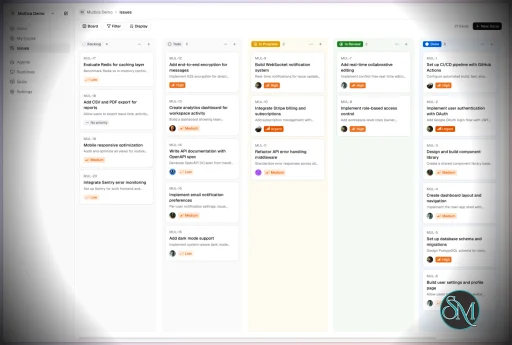
Multica treats AI agents like real contributors. You can assign tasks, monitor progress, and manage their work similar to human developers.


2. Multi-Agent Orchestration

Instead of relying on a single AI model, Multica coordinates multiple agents working together on complex tasks, improving efficiency and scalability.


3. Skill Reuse and Compounding

One of its most innovative features is skill accumulation. Agents can reuse previously learned solutions, reducing redundancy and improving performance over time.


4. Real-Time Workflow Tracking

You get a unified dashboard where you can:

  • Track task progress

  • Monitor agent activity

  • Identify blockers and results

This makes it suitable for structured development environments.


5. CLI and Web Interface

Multica provides both:

  • A command-line interface for developers

  • A web UI for managing workflows and agents

It supports local and cloud-based environments, offering flexibility in deployment.


6. Open Source and Flexible

Being open source, Multica allows:

  • Full customization

  • Self-hosting

  • Integration with different AI models and tools

This makes it appealing for teams that want control over their AI infrastructure.


Performance and Use Cases

Multica is designed for advanced workflows rather than casual use. It performs best in environments where multiple AI agents are needed to collaborate.

Typical use cases include:

  • AI-assisted software development

  • Automation pipelines

  • Multi-step research and analysis

  • DevOps and engineering workflows

Its ability to coordinate agents makes it especially useful for complex tasks that go beyond simple prompts.

Quick Install

curl -fsSL https://raw.githubusercontent.com/multica-ai/multica/main/scripts/install.sh | bash

Installs the Multica CLI on macOS and Linux. Works with Homebrew or downloads the binary directly.

Windows (PowerShell):

irm https://raw.githubusercontent.com/multica-ai/multica/main/scripts/install.ps1 | iex

Then configure, authenticate, and start the daemon in one command:

multica setup          # Connect to Multica Cloud, log in, start daemon

Self-hosting? Add --with-server to deploy a full Multica server on your machine:

curl -fsSL https://raw.githubusercontent.com/multica-ai/multica/main/scripts/install.sh | bash -s -- --with-server
multica setup self-host

Requires Docker. See the Self-Hosting Guide for details.


Getting Started

1. Set up and start the daemon

multica setup           # Configure, authenticate, and start the daemon

The daemon runs in the background and auto-detects agent CLIs (claude, codex, openclaw, opencode) on your PATH.

2. Verify your runtime

Open your workspace in the Multica web app. Navigate to Settings → Runtimes — you should see your machine listed as an active Runtime.

What is a Runtime? A Runtime is a compute environment that can execute agent tasks. It can be your local machine (via the daemon) or a cloud instance. Each runtime reports which agent CLIs are available, so Multica knows where to route work.

3. Create an agent

Go to Settings → Agents and click New Agent. Pick the runtime you just connected and choose a provider (Claude Code, Codex, OpenClaw, or OpenCode). Give your agent a name — this is how it will appear on the board, in comments, and in assignments.

4. Assign your first task

Create an issue from the board (or via multica issue create), then assign it to your new agent. The agent will automatically pick up the task, execute it on your runtime, and report progress — just like a human teammate.


User Experience

The concept behind Multica is powerful, but it comes with complexity.

  • Requires understanding of AI agents and workflows

  • Setup may involve configuring runtimes and integrations

  • More suited for developers than beginners

However, once configured, it provides a highly structured and scalable system.


Pros and Cons

Pros

  • Open source and highly customizable

  • Supports multi-agent collaboration

  • Reusable skill system improves efficiency

  • Real-time workflow tracking

  • Flexible deployment options

Cons

  • Still early-stage and evolving

  • Setup complexity is high

  • Requires technical knowledge

  • Not suitable for simple AI tasks


Who Should Use Multica

Multica is ideal for:

  • Developers working with AI agents

  • Teams building automated workflows

  • Companies experimenting with agent-based systems

  • Advanced users exploring AI orchestration

It is not designed for casual users who just need a simple chatbot.


Final Verdict

Multica represents the next step in AI tooling, moving from single assistants to collaborative AI systems. While still evolving, it introduces a powerful concept that could shape how teams use AI in development.

Multica is a promising platform for advanced users who want to build scalable, multi-agent AI workflows with full control and flexibility.

If you are exploring multi-agent AI systems or building automated development workflows, Multica is an emerging tool worth paying attention to. It introduces a new way to treat AI agents not just as tools, but as collaborative team members working alongside developers.
Multica v0.6.2
Free
Software Informations:
Developer:

Operating System:
Windows / macOS / Linux
Date Added:
2026-10-13T11:16:48.614Z
Categories:

Post a Comment/Report Broken Link: