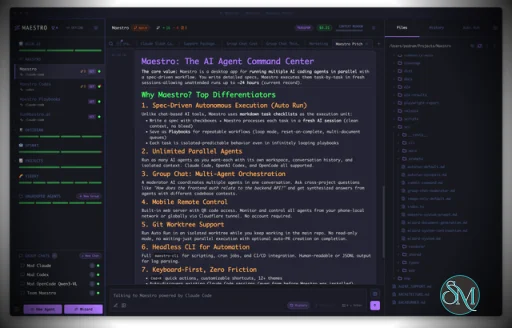
Maestro is a cross platform desktop application built to orchestrate multiple AI agents with isolated contexts. Each agent operates independently while still being managed under a unified command center. This allows users to execute complex workflows, parallel tasks, and long running processes efficiently.
The tool is open source and actively developed, targeting users who work with AI assisted development, research, automation, and experimentation.
Download Maestro v1.0.2 - AI Agent Command Center - Software Mirrors |
|---|
Maestro v1.0.2 - AI Agent Command Center for Windows |
Maestro v1.0.2 - AI Agent Command Center for macOSmaestro-1.0.2-x64-mac.zip | 246.83 MB maestro-1.0.2-x64-mac.dmg | 248.74 MB |
Maestro v1.0.2 - AI Agent Command Center for Linuxmaestro-1.0.2-x86_64.rpm | 142.77 MB maestro-1.0.2-x86_64.AppImage | 246.95 MB maestro-1.0.2-arm64.deb | 176.04 MB maestro-1.0.2-arm64.AppImage | 247.22 MB |
Maestro v1.0.2 - AI Agent Command Center Source CodeMaestro v1.0.2 - AI Agent Command Center Source code (zip) Maestro v1.0.2 - AI Agent Command Center Source code (tar.gz) |
Maestro v1.0.2 - AI Agent Command Center Release Notes:1.0.2 Highlights▶️ Shell blocks in an agent's reply have a Run button. When an agent answers with abash, sh, zsh, or console block, click Run beside the copy button and the command runs exactly as if you had typed it after !, with the same card, working directory, and recall history. Alt-click drops it into the composer in command mode so you can edit it first, and hovering the button shows the full command line. A block written as a terminal session runs only its $ lines, so sample output is never executed.
📊 Re-reading your usage history no longer freezes the app. When an update changes how tokens or cost are counted, Maestro reads your session history again once, and that work now happens off the window's thread. A progress window shows transcripts done, data left, and time remaining. Continue in background shrinks it to a corner card, progress is saved as it goes so a quit picks up where it stopped, Show Usage Data Scan Progress in the command palette brings it back, and maestro-cli stats-indexing --wait follows it from a terminal.
🗺️ The Cue Pipeline Graph groups pipelines by agent. All Pipelines files each pipeline under the agent that owns it and draws a labeled box around each agent's cards, and Arrange packs every agent's cards into one tidy cluster. The pipeline picker is one filterable list with Pipelines and Agents sections: pick an agent to see only the pipelines it belongs to, with a back crumb when you open one of them. Escape in the picker clears the filter first instead of closing the whole Cue window.
🧙 Both wizards draw everything the chat draws. Mermaid diagrams, SVG, images, and math in a wizard reply render the same way they do in an agent's tab, so asking the wizard for a mockup or a flow diagram gets you a picture instead of raw source.
Also in 1.0.2
|
Key Features
Maestro allows users to run multiple AI agents in parallel while keeping their context, state, and execution separated. This enables large tasks to be broken down and handled simultaneously.
The Auto Run and Playbook system lets users define workflows that execute steps automatically. These workflows can loop, batch tasks, or run unattended, making them suitable for long or repetitive operations.
Maestro supports group chat coordination where multiple agents collaborate within a single task. The tool handles routing and coordination to produce unified results.
Remote monitoring and control features allow users to observe and manage agent activity even when away from the main workstation.
A built in command line interface enables headless execution and scripting, allowing Maestro to integrate into broader automation workflows.
Ease of Use
Maestro is designed for users with technical experience. While it is not a beginner focused tool, its interface is structured for efficiency, especially for users familiar with development tools and multitasking environments.
Once configured, workflows are repeatable and easy to manage.
Performance and Compatibility
Maestro runs on Windows, macOS, and Linux. Performance scales based on system resources and the number of agents running concurrently. The application remains responsive even during complex orchestration tasks when used on modern hardware.
Because Maestro coordinates agents rather than performing heavy computation itself, overall performance largely depends on external AI services and configurations.
Pros and Cons
Advantages include powerful multi agent orchestration, parallel execution, automation through playbooks, command line support, and open source flexibility.
Limitations include a learning curve for new users, reliance on external AI models for functionality, and a focus on advanced workflows rather than simple chat usage.
Final Verdict
Maestro is a capable and thoughtfully designed orchestration tool for managing AI agents at scale. Its focus on parallel workflows, automation, and centralized control makes it a strong choice for advanced users working with AI assisted tasks.
For those who need structured AI agent orchestration rather than simple interaction, Maestro delivers a reliable and efficient solution.
Maestro is an open source agent orchestration tool that provides a centralized desktop environment for managing and running multiple AI agents and workflows simultaneously. It is designed for developers and advanced users who need structured coordination, parallel execution, and automation across AI driven tasks.
Maestro focuses on improving productivity when working with multiple agents by offering orchestration, monitoring, and workflow control from a single interface.
Developer:
Pedram Amini
Operating System:
Windows / macOS / Linux
Date Added:
2026-10-21T05:07:16.718Z
Categories:
Post a Comment/Report Broken Link: