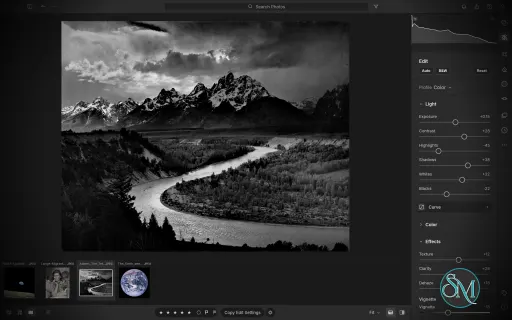
LightCraft is a free, open-source photo management and RAW development application designed as an alternative to Adobe Lightroom. Built in Rust, it combines photo library organization with a comprehensive set of image editing tools, allowing photographers to adjust exposure, refine colors, apply local corrections, and prepare images for export without modifying their original files.
LightCraft is designed for desktop use on Windows, macOS, and Linux, with a WebAssembly version that runs in a browser. It also supports automation through a command-line interface and the Model Context Protocol (MCP), making it an interesting option for photographers who want local control over their workflow.
Features
Non-Destructive Photo Editing
LightCraft keeps original images intact and stores editing operations separately. You can experiment with different adjustments without permanently changing the source files.
Its editing tools include exposure, contrast, highlights, shadows, whites, blacks, tone curves, white balance, vibrance, and saturation. The application uses a wide-gamut, 32-bit floating-point processing pipeline designed to preserve tonal and color information throughout editing.
Color Grading and Presets
The color tools include an eight-band Color Mixer, RGB tone curves, and separate color grading controls for shadows, midtones, and highlights. These features provide flexibility for natural photo correction as well as creative color treatments.
LightCraft also includes built-in presets and lets users save custom looks. You can copy, paste, or synchronize selected adjustments across multiple photos, which is useful when editing a collection of images from the same shoot.
Local Masking and Adjustments
LightCraft supports brush masks, linear gradients, and radial gradients, along with selection tools for luminance, color, sky, subject, and background. Masks can be combined, subtracted, intersected, and inverted.
Local adjustments let you change exposure, contrast, color, texture, sharpness, and other properties in specific parts of an image. This helps users refine skies, brighten subjects, or create more controlled lighting effects without applying every adjustment globally.
Crop, Geometry, and Black-and-White Editing
The cropping tools support common aspect ratios, straightening, rotation, flipping, and manual geometric transformations. Composition overlays help photographers align images and refine framing.
For monochrome photography, LightCraft includes black-and-white conversion, an eight-band monochrome mixer, and additional color grading controls for creating tinted or split-tone results.
Photo Library Management
LightCraft includes tools for organizing photo collections, including folders, albums, smart albums, stacks, virtual copies, ratings, flags, labels, filtering, searching, and sorting.
Its local-first approach avoids requiring an online account or cloud catalog. The project describes its catalog as a human-readable log of editing operations, making it easier to inspect, back up, and replay changes.
Command-Line and AI Automation
In addition to its graphical interface, LightCraft provides a command-line application for rendering images and applying adjustments. MCP support allows compatible AI agents to interact with the application through an automation interface.
These capabilities are useful for repeatable editing tasks, scripted workflows, and experimentation with AI-assisted photo processing.
Download LightCraft v0.9.1 - Software Mirrors |
|---|
LightCraft v0.9.1 for Windowslightcraft-0.9.1-windows-x86.msi | 84.8 MB lightcraft-0.9.1-windows-x86-portable.zip | 100.81 MB lightcraft-0.9.1-windows-x64.msi | 85.79 MB lightcraft-0.9.1-windows-x64-portable.zip | 104.51 MB lightcraft-0.9.1-windows-arm64.msi | 82.26 MB lightcraft-0.9.1-windows-arm64-portable.zip | 100.26 MB |
LightCraft v0.9.1 for macOSlightcraft-cli-0.9.1-macos-universal.zip | 102.7 MB lightcraft-0.9.1-macos-universal.dmg | 107.74 MB |
LightCraft v0.9.1 for Linuxlightcraft-0.9.1-linux-x86_64.tar.gz | 103.89 MB lightcraft-0.9.1-linux-x86_64.rpm | 104.75 MB lightcraft-0.9.1-linux-x86_64.flatpak | 75.38 MB lightcraft-0.9.1-linux-x86_64.deb | 105.35 MB lightcraft-0.9.1-linux-x86_64.AppImage.zsync | 172.7 kB lightcraft-0.9.1-linux-x86_64.AppImage | 98.55 MB lightcraft-0.9.1-linux-riscv64.tar.gz | 101.21 MB lightcraft-0.9.1-linux-riscv64.rpm | 102.11 MB lightcraft-0.9.1-linux-riscv64.deb | 102.51 MB lightcraft-0.9.1-linux-aarch64.tar.gz | 99.36 MB lightcraft-0.9.1-linux-aarch64.rpm | 101.02 MB lightcraft-0.9.1-linux-aarch64.flatpak | 71.25 MB lightcraft-0.9.1-linux-aarch64.deb | 101.74 MB lightcraft-0.9.1-linux-aarch64.AppImage.zsync | 330.84 kB lightcraft-0.9.1-linux-aarch64.AppImage | 94.46 MB |
LightCraft v0.9.1 for BSDlightcraft-0.9.1-freebsd-x86_64.tar.gz | 103.42 MB |
Others Download related to LightCraft v0.9.1lightcraft-web-0.9.1.zip | 21.33 MB |
LightCraft v0.9.1 Source Code
LightCraft v0.9.1 Source code (zip)
LightCraft v0.9.1 Source code (tar.gz)
|
LightCraft v0.9.1 Release Notes: What's Changed- Fix Lightroom catalog import results and reduce CPU and memory use by @skylartaylor in #1406
- ci: add comfortable runtime limits to unbounded jobs by @skylartaylor in #1836
- Integration batch 36: 110 reviewed community PRs (slideshow, camera verification, translations, never-crash, UI) by @echelon in #1843
- DNG export and Convert / Copy as DNG write the colour a raw without matrices opens with by @marcoarnulfo in #1750
- Edit panel: the Reset tooltip shows the platform's shortcut, Ctrl+Shift+R on Windows and Linux by @marcoarnulfo in #1753
- LR-META-XMP: Retry automatic XMP sidecar writes that failed by @endthestart in #1772
- Never crash: Check raw data size before allocating in PEF, TIFF tiles and ARW6 (#1512) by @endthestart in #1776
- Catalog and downloads: Don't write through a link at a temp file's name (#1502) by @endthestart in #1779
- Faces: Drop faces made from a photo's old file when it is replaced (#1524) by @endthestart in #1780
- LR-PREF-GENERAL: Keep the Settings window in place when switching tabs by @endthestart in #1782
- fix(ui): prevent search text selection from dragging the window by @Ni-zav in #1784
- cli: refuse non-object snapshot params instead of panicking by @midasmatterhorn in #1791
- Packaging: advertise HEIF images and repair the AppStream screenshot by @IanHollow in #1795
- codecs: decode lossless (SOF3) JPEGs correctly by @midasmatterhorn in #1796
- Open the active grid photo with Enter by @FredApps in #1797
- LRC-DEV-LOUPEOVERLAY: a layout image over the loupe (View ▸ Loupe Overlay) by @BuonBreda in #1798
- LR-CROP-STRAIGHTEN: turning a crop shrinks it about its centre instead of swapping it for the largest crop (#1794) by @guillehr2 in #1804
- ui: render the Show All Masks overlay in zoom windows by @midasmatterhorn in #1808
- Fix crop.rotateAspect turning a zero-size crop into a NaN rect by @Silvertree2010 in #1813
- Keep crop finite when crop.set gets a huge rect by @Silvertree2010 in #1816
- LR-META-XMP: radial masks keep their inside/outside from Lightroom (fixes #1815) by @bitshiftza in #1817
- LR-LIB-REMOVE-ALBUM: removing a photo from an album keeps it in its folder (fixes #1805) by @bitshiftza in #1818
- LR-IMP-LOCAL: browsing a Local folder keeps or picks the active photo (fixes #1447) by @bitshiftza in #1820
- Detail: snap the 100% view to whole screen pixels by @john01px2022 in #1831
- LR-VIEW-BEFOREAFTER: both panes animate together during click zoom (stacked on #1747) by @AlexChambers in #1832
- CI-RUST195: keep strict Clippy clean on Rust 1.95 by @Myrarc in #1835
- Keywords panel: sections fold, Add keyword offers the library's keywords, and removals say what they touched by @nledford in #1166
- i18n: add Czech (cs) interface language by @Losminek in #1190
- Nix: nix build and nix develop work again on NixOS by @dev-null-undefined in #1211
- KEY-SLIDER-NUDGE: scrolling sideways over a slider adjusts it by @PiMinusMax in #1465
- LR-RAW-NEF: Coolpix P7000 NRW files decode without stripes and with their white balance by @radialmonster in #1467
- build: automatically include CJK fonts and fix Windows packaging compatibility by @draco892 in #1479
- LR-VIEW-PHOTOGRID: a mouse-wheel notch scrolls a third of the grid or filmstrip by @MarkusFriedel in #1482
- LR-EDIT-DETAIL-NR: noise reduction works in the original's pixels, so previews match the full-size render scaled down (fixes #960) by @atmikshetty in #1489
- KEYC-RATING: backtick cycles the flag; Cmd+Up / Cmd+Down raise / lower it by @atmikshetty in #1490
- LR-LIB-PEOPLE: rename a person across the library (#1444) by @Hossamvs in #1510
- LR-EDIT-EFFECTS-DEHAZE: raster::morph square min / max filters (split from #1286) by @mattsivak in #1521
- Fix range-mask handle drags and color sampling settings by @nevicia2010-hub in #1538
- LR-IMP-LOCAL: Forget untouched records of deleted files when browsing a folder again (#1392) by @endthestart in #1547
- LR-BEHAV-GPU: Turn GPU rendering off after the GPU is lost while running (#1337) by @endthestart in #1548
- LR-MERGE-PANO: Keep panoramas at full resolution when memory allows (#1455) by @endthestart in #1549
- Library grids: Home/End and Shift+Left/Right selection keys; Cmd+O opens a library, Shift+H visualizes HDR by @eliets2 in #1555
- LR-LIB-STACK: deleting a stacked photo drops it from the stack so i/n badges update (fixes #1493) by @squareSphere29 in #1556
- LR-META-INFO: Show the lens for Nikon DSLR raws by @endthestart in #1590
- LR-IMP-DEVICE: Show the import review when a card is connected by @endthestart in #1601
- LR-MERGE-HDR: merged DNGs declare the white balance their source shows (follow-up to #1123) by @alvarohn in #1613
- LR-BEHAV-WINDOW: the window opens at the size it was left at, zoomed if it was by @nledford in #1625
- Protect originals and preserve existing files when exporting presets by @SarimSyed in #1637
- LR-LIB-SMARTALBUM: a view can hold its photos until it is refreshed by @nledford in #1656
- PERF-EDIT: an edit is followed from what it touched, not worked out from every photo (stacked on #1656) by @nledford in #1660
- PERF-EDIT: a smart album's count follows an edit, asking only the photos it touched (stacked on #1660) by @nledford in #1662
- LRC-LIB-PEOPLE: a double click on an unnamed face opens its photo in the loupe by @marcoarnulfo in #1665
- Import: find sidecars whose photo extension or .xmp differs in case by @emmertex in #1686
- fix(mcp): stop stdio cleanly after output failure by @euisuh in #1688
- Loupe: the info overlay's shadow is dark, not a second white copy of the text by @marcoarnulfo in #1693
- LR-IMP-FORMATS: decode EOS R6 Mark II C-RAW with adaptive QP up to 175 by @cookingwithsimon in #1694
- Metadata: read the Panasonic lens name from maker note tag 0x0051 (#1671) by @switch87 in #1703
- LR-PROF-BROWSER: long profile names are cut short in a narrow panel by @marcoarnulfo in #1710
- LR-MERGE-HDR: moving clipped highlights stay, less memory, and HDR for Each Bracket Set by @dev-null-undefined in #1715
- Colour grading wheels: vivid sRGB rim fading evenly to neutral by @emmertex in #1719
- MCP-CONTROL: validate remote reply framing and IDs (#1716) by @G6bill in #1722
- Perf: DNG Deflate tiles at level 1, 4.8–7× faster writes for 3–12 % more bytes by @dev-null-undefined in #1731
- render --settings applies the preset in a .lcpreset, and refuses files it can't read by @marcoarnulfo in #1733
- Lightroom import: raise catalog/WAL size limit from 1 GiB to 4 GiB by @vpjl in #1738
- catalog: slice captured dates on char boundaries so non-ASCII dates don't panic by @midasmatterhorn in #1741
- packaging: RPM requires library sonames, so openSUSE can install it by @tydude001 in #1744
- Before/After: a click on the Before view zooms in on the point clicked by @marcoarnulfo in #1747
- gpu: init-marker tests use their own scope counter so parallel device tests cannot join them (#1721) by @MarekSpodBiedry in #1758
- Top bar: in full screen the left buttons move into the traffic lights' space by @marcoarnulfo in #1767
- Widen offline reverse-geocoding longitude search at high latitudes by @Silvertree2010 in #1769
- Never crash: Write preview cache files from one bounded writer (#1522) by @endthestart in #1777
- raw: check maker-note crop bounds with checked_add by @midasmatterhorn in #1792
- engine: refuse negative indices instead of targeting element 0 by @midasmatterhorn in #1793
- LRC-SS-PLAYBACK: slideshow playback: fades, random order, repeat, previews prepared in advance, playback controls by @bitshiftza in #796
- Use consistent arrows throughout the app and clarify histogram controls by @shurkanTwo in #806
- Slideshow layout, options and backdrop: composed slides in playback and a live preview (LRC-SS-LAYOUT/OPTIONS/BACKDROP, stacked on #796) by @bitshiftza in #808
- Slideshow overlays: identity plate, rating stars, text with tokens, watermark (LRC-SS-OVERLAYS, stacked on #808) by @bitshiftza in #821
- LR-EDIT-OPTICS-PROFILE: Sony ILCE-7RM6 embedded lens corrections (distortion applied; CA and vignetting parsed) by @dev-null-undefined in #824
- Slideshow intro and ending screens (LRC-SS-TITLES, stacked on #821) by @bitshiftza in #904
- Slideshow templates: built-ins of our own, user templates, browser with hover preview (LRC-SS-TEMPLATES, stacked on #904) by @bitshiftza in #912
- Slideshow export to PDF, JPEG sequence and AV1 video (LRC-SS-EXPORT, stacked on #912) by @bitshiftza in #929
- Rotate left/right turns the crop with the image instead of cutting it (#962) by @MarekSpodBiedry in #966
- LR-IMP-FORMATS: recheck stale preview-only raws when a library opens (#662) by @valenfys in #974
- Export: "Same folder as original photo" destination (#956) by @itrycodinganditsbad in #996
- LR-VIEW-ZOOM: slider drags stay sharp where the GPU keeps up (#330) by @mattsivak in #1009
- LR-EXP-DNGOPT: lossy DNG export by @emmertex in #1010
- LR-IMP-FORMATS: verify 22 more CR3 bodies; EOS R6 Mark III white balance by @emmertex in #1029
- LR-MASK-BRUSH: pen pressure scales brush size and flow by @emmertex in #1033
- LR-BEHAV-ACCESS: canvas tools by keyboard (stacked on #1023) by @emmertex in #1038
- LR-IMP-CAMERA-COVERAGE: verify 117 Nikon and Fujifilm bodies on CC0 files by @emmertex in #1045
- LR-IMP-CAMERA-COVERAGE: measured image area for Nikon bodies without CropArea by @robmdunn in #1053
- LR-MASK-EFFECTS: local adjustment presets with Lightroom Classic import by @OneSlips in #1062
- LR-IMP-CAMERA-COVERAGE: verify 97 Canon CR2, Pentax and Ricoh models on CC0 files by @emmertex in #1081
- LR-IMP-FORMATS: decode Epson ERF by @emmertex in #1087
- LR-IMP-CAMERA-COVERAGE: verify 21 Sony and Leica models on CC0 files by @emmertex in #1096
- Add complete Polish (pl) localization by @neronek22 in #1100
- UI: align Local folder rows, paint dock gaps, bottom-align the tool strip (#1097, #1098, #1099) by @mattsivak in #1102
- LR-IMP-FORMATS: import and decode Mamiya MEF (stacked on #1087) by @emmertex in #1105
- Preview cache: cached thumbnails are no longer taken for the person's photos (#610, #1066) by @nledford in #1106
- LR-IMP-CAMERA-COVERAGE: verify 17 uncompressed Olympus and Samsung models on CC0 files by @emmertex in #1108
- L10N: fill the de, es, fr, ja and uk catalogs (gap 21) by @emmertex in #1111
- docs: add user docs in docs/user by @itrycodinganditsbad in #1180
- LR-EDIT-SECTION-SOLO: Solo Mode for Edit sections by @mattsivak in #1308
- Fonts: finish Thai fallback delivery for desktop and web releases by @LabDennis in #1311
- LR-IMP-FORMATS: property tests for the CRX decoder by @eliets2 in #1461
- LR-IMP-FORMATS: CI-enforce the unsupported CRX variants listed in docs/cr3.md by @eliets2 in #1462
- LR-PROF-CAMERACOLOR: Canon EOS R7 / R6 Mark II calibrate measurements by @cookingwithsimon in #1466
- KEY-HIDEPINS: Tool Overlay modes (Auto / Always / Selected / Never) for spot and mask pins, Shift+H cycles them (fixes #224) by @atmikshetty in #1473
- KEYC-COMPARE: = and - make the grid thumbnails larger and smaller by @atmikshetty in #1491
- People: confirm suggested faces above a chosen score (#1442) by @Th4nat0s in #1495
- LR-EXP-QUALITY: Use optimized Huffman tables for JPEG exports (#1373) by @endthestart in #1540
- fix(rawinfo): report failed validation batches through exit status by @FooVoo in #1696
- LR-PROF-CAMERACOLOR: bundled Sony ILCA-99M2 camera profile by @PiMinusMax in #1019
- Integration batch 37: 20 rebased community PRs (print module, decode speed-ups, camera coverage, Italian) by @echelon in #1852
- feat(xtask): #1037 ci reports the machine, GPU adapters and skipped tests by @THEtheChad in #1135
- perf(catalog): #1136 index stacks and album membership; no per-photo list scans at 100k by @THEtheChad in #1138
- LR-EDIT-OPTICS-PROFILE: decode Sony shading, CA and distortion tables (nothing new applied), plus a BigTIFF overflow fix by @AlexChambers in #1176
- i18n: translate dialog notes, toasts and tooltips by @emmertex in #1298
- DNG: fit tone and chroma curves to the embedded preview (#1277) by @radialmonster in #1316
- Perf: 64 MP raws decode faster (AHD 1.7×, ARW6 decode, camera-look colour 1.9×, no full-size copy), same pixels by @dev-null-undefined in #1320
- LR-IMP-CAMERA-COVERAGE: verify 30 more camera models on public raw files by @AlexChambers in #1327
- LR-IMP-PROFILES: Presets apply the imported profile they name (#1001) by @cookingwithsimon in #1469
- LR-RAW-NEF: stretch non-square pixels (Nikon D1X/D1H) to square by @radialmonster in #1475
- fix(export): a metadata/sharpen/conflict value that passes validation is the one exported by @sperea in #1705
- Edit panel: the histogram clipping buttons stay clear of the hovered scroll bar by @marcoarnulfo in #1708
- LRC-LIB-KEYWORDS: the Keyword List holds its place as the Keywords box above it changes by @nledford in #1755
- LR-BEHAV-EMPTY-STATES: an empty library leads to Import by @nledford in #1761
- LR-PROF-DROPDOWN: a long profile name no longer widens the Edit panel by @marcoarnulfo in #1762
- Commands: Refuse malformed photo ids instead of using the selection (#1506) by @endthestart in #1773
- Dialogs: the confirm button is on the right, filled when it is the next step by @nledford in #1802
- Buttons: one component with kinds, sizes and icons (stacked on #1802) by @nledford in #1810
- Add Italian interface translation by @GabrielePecchioli in #1198
- Print module: picture and custom packages, printer colour management, colour-managed PDF (gap 15) by @atmikshetty in #1215
- LR-MERGE-PANO: a panorama or HDR merge of raws keeps the as-shot white balance of its frames by @eliets2 in #1471
- Integration batch 38: 6 rebased community PRs (Nikon camera profiles, lens-corrected colour, HDR frame order, focus points) by @echelon in #1857
- LR-PROF-CAMERACOLOR: Match the camera look against lens-corrected JPEGs by @endthestart in #1586
- LR-PROF-CAMERACOLOR: Add a bundled Nikon Z 6II camera profile by @endthestart in #1592
- LR-MERGE-HDR: frame-order independent merges, and no magenta bias next to clipped pixels by @alvarohn in #1614
- LRC-LIB-LIBFOLDERS: drag photos from the grid onto a Folders row to move them there by @nledford in #1834
- Show the camera's focus point (Sony α1, A7S III) and zoom to it (#1480) by @bitshiftza in #1487
- LR-PROF-CAMERACOLOR: Add bundled Nikon Z 8 and D5300 camera profiles by @endthestart in #1595
- Integration batch 39: 4 rebased community PRs (Georgian, slider scrub and reset hints, straight brush lines) and the Windows ARM64 font pin by @echelon in #1865
- LR-MASK-BRUSH: Shift-click draws a straight brush stroke from the last one by @endthestart in #1829
- KEY-SLIDER-RESET: a slider's name and thumb say a double-click resets it (fixes #1436) by @atmikshetty in #1474
- KEY-SLIDER-SCRUB: drag a slider's value sideways to scrub it by @good-news-everyone in #1604
- i18n: Georgian (ka) interface language by @devius in #1823
- Integration batch 40: 3 rebased community PRs (GPU face detection, soft-proof zoom windows, faster folder sync) and restored tracker rows by @echelon in #1867
- LR-VIEW-ZOOM: soft proofing gets zoom windows; 1:1 tested equal to export by @emmertex in #1027
- PERF-SYNC: a Synchronize Folder scan reads off the folder's listing whether a photo and its sidecar are there by @nledford in #1602
- Faces: GPU (wgpu) path for detection and recognition convolutions by @emmertex in #1663
- ci: refactor workflows to use storytold/craft-common-actions by @dylanmtaylor in #967
- Follow catalog paths only on this computer or the catalog's share by @skylartaylor in #2175
- Open Original: only file types LightCraft reads reach the system opener by @skylartaylor in #2199
- Fix offline reverse geocoding for cities at longitude exactly 180 by @Silvertree2010 in #2061
- Fix Assisted Culling bursts that cross midnight at month end by @Silvertree2010 in #2095
- Search words with an unknown field prefix as plain text by @Silvertree2010 in #2099
- Keep the zone when shifting a capture time without seconds by @Silvertree2010 in #2146
- Codecs: clip positive-infinity float samples to white (#1952, item 6) by @AlexChambers in #2071
New Contributors- @midasmatterhorn made their first contribution in #1791
- @IanHollow made their first contribution in #1795
- @FredApps made their first contribution in #1797
- @guillehr2 made their first contribution in #1804
- @Silvertree2010 made their first contribution in #1813
- @Myrarc made their first contribution in #1835
- @Losminek made their first contribution in #1190
- @draco892 made their first contribution in #1479
- @Hossamvs made their first contribution in #1510
- @nevicia2010-hub made their first contribution in #1538
- @squareSphere29 made their first contribution in #1556
- @SarimSyed made their first contribution in #1637
- @euisuh made their first contribution in #1688
- @G6bill made their first contribution in #1722
- @vpjl made their first contribution in #1738
- @tydude001 made their first contribution in #1744
- @valenfys made their first contribution in #974
- @neronek22 made their first contribution in #1100
- @LabDennis made their first contribution in #1311
- @Th4nat0s made their first contribution in #1495
- @FooVoo made their first contribution in #1696
- @sperea made their first contribution in #1705
- @GabrielePecchioli made their first contribution in #1198
- @good-news-everyone made their first contribution in #1604
- @devius made their first contribution in #1823
Full Changelog: v0.8.0...v0.9.1 |
Performance and Compatibility
LightCraft is written in Rust and uses background rendering to keep the interface responsive during common editing operations. The project reports that it can display embedded camera previews or cached renders quickly while preparing full-resolution images in the background.
The application supports Windows, macOS, and Linux, as well as a browser-based WebAssembly build. Available Linux packages include AppImage, DEB, and RPM formats, with builds for x86-64 and ARM64 systems.
However, LightCraft is still a developing project. Its feature list should not be interpreted as proof of complete Adobe Lightroom compatibility. Photographers with established Lightroom workflows should verify RAW camera support, editing results, and catalog migration before moving their primary library.
System Requirements
Operating systems: Windows, macOS, and Linux.
Browser support: A WebAssembly build is available.
Processor architectures: Linux releases include x86-64 and ARM64 builds.
Build requirements: Rust and the project's documented dependencies are needed to compile from source.
The project does not establish a comprehensive minimum hardware specification in the information reviewed. Actual performance will depend on image resolution, RAW processing requirements, and available system resources.
Pros and Cons
Pros
Free and open-source under the MIT and Apache 2.0 licenses.
Non-destructive editing preserves original photos.
Extensive controls for exposure, tone curves, color grading, and local adjustments.
Photo library organization tools for managing larger collections.
Native applications for major desktop operating systems.
Browser-based build for experimentation without a traditional desktop installation.
Command-line and MCP support for automation.
Local-first workflow without a mandatory cloud account or subscription.
Cons
Still under active development, so feature completeness and reliability may vary.
Compatibility with existing Lightroom catalogs and established workflows needs verification.
RAW format support may not cover every camera model or file variation.
Users accustomed to Lightroom may encounter differences in editing behavior and output.
Advanced automation and browser workflows may require additional setup.
Published minimum hardware requirements are limited.
How to Install
The simplest option is to download a suitable package from the project's GitHub Releases page. Linux users can choose the available AppImage, DEB, or RPM package, while macOS and Windows packages are also provided.
For users who prefer to build from source, install Rust and the required development tools, then run:
git clone https://github.com/storytold/lightcraft
cd lightcraft
cargo run --release -p lightcraft
To open a specific photo folder, pass its path when launching the application:
cargo run --release -p lightcraft -- ~/Pictures/trip
To try the browser-based build, follow the project's WebAssembly setup instructions and run:
cargo xtask web --serve
The project also provides a command-line renderer for scripted workflows. Consult the official documentation for supported formats, available adjustment parameters, and platform-specific installation details.
Final Verdict
LightCraft is a promising open-source alternative for photographers who want a local photo library and RAW editing workflow without relying on a commercial subscription. Its combination of non-destructive editing, color grading, masking, presets, and catalog management makes it more ambitious than a basic image editor.
Its strongest differentiators are its Rust-based architecture, local-first design, and automation support. These features may appeal to technical users and photographers interested in building repeatable editing workflows.
The main reservation is maturity. Before switching from Lightroom, users should test their own camera RAW files, compare exported images, and confirm that the library features they depend on are available and reliable. LightCraft is worth trying, but photographers with demanding production workflows should evaluate it alongside their existing tools rather than assume full feature parity.
Post a Comment/Report Broken Link: