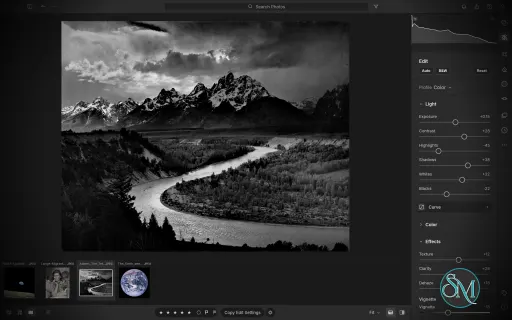
LightCraft is a free, open-source photo management and RAW development application designed as an alternative to Adobe Lightroom. Built in Rust, it combines photo library organization with a comprehensive set of image editing tools, allowing photographers to adjust exposure, refine colors, apply local corrections, and prepare images for export without modifying their original files.
LightCraft is designed for desktop use on Windows, macOS, and Linux, with a WebAssembly version that runs in a browser. It also supports automation through a command-line interface and the Model Context Protocol (MCP), making it an interesting option for photographers who want local control over their workflow.
Features
Non-Destructive Photo Editing
LightCraft keeps original images intact and stores editing operations separately. You can experiment with different adjustments without permanently changing the source files.
Its editing tools include exposure, contrast, highlights, shadows, whites, blacks, tone curves, white balance, vibrance, and saturation. The application uses a wide-gamut, 32-bit floating-point processing pipeline designed to preserve tonal and color information throughout editing.
Color Grading and Presets
The color tools include an eight-band Color Mixer, RGB tone curves, and separate color grading controls for shadows, midtones, and highlights. These features provide flexibility for natural photo correction as well as creative color treatments.
LightCraft also includes built-in presets and lets users save custom looks. You can copy, paste, or synchronize selected adjustments across multiple photos, which is useful when editing a collection of images from the same shoot.
Local Masking and Adjustments
LightCraft supports brush masks, linear gradients, and radial gradients, along with selection tools for luminance, color, sky, subject, and background. Masks can be combined, subtracted, intersected, and inverted.
Local adjustments let you change exposure, contrast, color, texture, sharpness, and other properties in specific parts of an image. This helps users refine skies, brighten subjects, or create more controlled lighting effects without applying every adjustment globally.
Crop, Geometry, and Black-and-White Editing
The cropping tools support common aspect ratios, straightening, rotation, flipping, and manual geometric transformations. Composition overlays help photographers align images and refine framing.
For monochrome photography, LightCraft includes black-and-white conversion, an eight-band monochrome mixer, and additional color grading controls for creating tinted or split-tone results.
Photo Library Management
LightCraft includes tools for organizing photo collections, including folders, albums, smart albums, stacks, virtual copies, ratings, flags, labels, filtering, searching, and sorting.
Its local-first approach avoids requiring an online account or cloud catalog. The project describes its catalog as a human-readable log of editing operations, making it easier to inspect, back up, and replay changes.
Command-Line and AI Automation
In addition to its graphical interface, LightCraft provides a command-line application for rendering images and applying adjustments. MCP support allows compatible AI agents to interact with the application through an automation interface.
These capabilities are useful for repeatable editing tasks, scripted workflows, and experimentation with AI-assisted photo processing.
Download LightCraft v0.8.0 - Software Mirrors |
|---|
LightCraft v0.8.0 for Windowslightcraft-0.8.0-windows-x86.msi | 81.56 MB lightcraft-0.8.0-windows-x86-portable.zip | 96.44 MB lightcraft-0.8.0-windows-x64.msi | 83.24 MB lightcraft-0.8.0-windows-x64-portable.zip | 99.64 MB lightcraft-0.8.0-windows-arm64.msi | 79.36 MB lightcraft-0.8.0-windows-arm64-portable.zip | 95.69 MB |
LightCraft v0.8.0 for macOSlightcraft-cli-0.8.0-macos-universal.zip | 97.92 MB lightcraft-0.8.0-macos-universal.dmg | 102.96 MB |
LightCraft v0.8.0 for Linuxlightcraft-0.8.0-linux-x86_64.tar.gz | 99.45 MB lightcraft-0.8.0-linux-x86_64.rpm | 100.29 MB lightcraft-0.8.0-linux-x86_64.flatpak | 73.25 MB lightcraft-0.8.0-linux-x86_64.deb | 100.86 MB lightcraft-0.8.0-linux-x86_64.AppImage.zsync | 330.79 kB lightcraft-0.8.0-linux-x86_64.AppImage | 94.44 MB lightcraft-0.8.0-linux-riscv64.tar.gz | 97.04 MB lightcraft-0.8.0-linux-aarch64.tar.gz | 95.29 MB lightcraft-0.8.0-linux-aarch64.rpm | 96.87 MB lightcraft-0.8.0-linux-aarch64.flatpak | 69.18 MB lightcraft-0.8.0-linux-aarch64.deb | 97.54 MB lightcraft-0.8.0-linux-aarch64.AppImage.zsync | 317.66 kB lightcraft-0.8.0-linux-aarch64.AppImage | 90.69 MB |
LightCraft v0.8.0 for BSDlightcraft-0.8.0-freebsd-x86_64.tar.gz | 98.96 MB |
Others Download related to LightCraft v0.8.0lightcraft-web-0.8.0.zip | 63.57 MB |
LightCraft v0.8.0 Source Code
LightCraft v0.8.0 Source code (zip)
LightCraft v0.8.0 Source code (tar.gz)
|
LightCraft v0.8.0 Release Notes: What's Changed- Integration batch 32a: 8 reviewed contributor PRs by @echelon in #1426
- Issue #989: clippy 1.99, fill_box reads its buffer with as_chunks::<3>() (item 4) by @snofla in #997
- LR-LIB-ALBUM: "Include selected photos" option in New Album by @MarkusFriedel in #1250
- Scroll the filmstrip when the same photo is opened in another source. by @vbasky in #1253
- Import HEIC, HEIF, and NRW files from a folder. by @vbasky in #1254
- Accept a bare port for --connect. by @vbasky in #1255
- Composite straight alpha onto white in the working space. by @vbasky in #1257
- Raise the deep-zoom preview margin cap. by @vbasky in #1260
- fix(toast): draw the toast as widgets so the message can be selected by @switch87 in #1262
- Integration batch 33: main green again, 85 reviewed contributor PRs by @bflatastic in #1431
- fix(i18n): translate Photo Merge projection choices and merge toasts by @emmertex in #1270
- LR-IMP-FORMATS: CR2 white level from the active area, not the saturated masked rows above it by @marcoarnulfo in #1280
- Adds “Locate Missing Files…” to folder and disk context menus. by @csidirop in #1282
- LR-EDIT-COLOR-TEMP: Lightroom's non-linear scale for the Kelvin Temp slider (#1295) by @MarkusFriedel in #1296
- ORF: as-shot white balance from maker-note 0x1017/0x1018 on the Olympus E-10 (part of #1273) by @marcoarnulfo in #1297
- M5.6: a view slot renders one job at a time, so a drag's renders don't pile up by @mattsivak in #1302
- Nix: fix the flake at HEAD (git dependency) and load libdbus/libEGL on NixOS by @untypequicode in #1314
- LR-IMP-FORMATS: uncompressed Leaf MOS is a raw, the Hasselblad Lunar decodes as an ARW by @AlexChambers in #1324
- M-export: a resized export keeps the edge it was asked for by @marcoarnulfo in #1338
- GH-251: document controller polling and edit interactions by @sanyamsingh001 in #1341
- LR-EDIT-COLOR-TEMP: Kelvin white balance from Sony's white-balance presets by @PiMinusMax in #1344
- macOS: closing the window ends the process in on_exit, as menu Quit does by @marcoarnulfo in #1353
- CR2: as-shot white balance of the PowerShot G9 from its WBInfo preset rows (part of #1273) by @marcoarnulfo in #1357
- Before/After wipe: the line stays in the middle of the view when zoomed in by @marcoarnulfo in #1358
- LR-IMP-CAMERA-COVERAGE: Nikon D90 NEFs drop their filler columns (no pink band) by @menno-zeilstra in #1361
- LR-EDIT-LIGHT-CURVE-POINT: ⌥-drag moves a curve point a tenth as far, for fine adjustment by @marcoarnulfo in #1367
- KEY-SLIDER-TYPE: a typed slider value keeps editing after the click is released by @marcoarnulfo in #1368
- LR-IMP-CAMERA-COVERAGE: Nikon D7100 NEFs develop at Lightroom's frame, so its crops line up by @marcoarnulfo in #1387
- AI Denoise: Install from file says why a model file is refused by @marcoarnulfo in #1389
- LR-CROP-STRAIGHTEN: a crop shrunk to fit by Straighten grows back as the angle returns by @marcoarnulfo in #1394
- LR-BEHAV-LOCALIZE: strong text is heavier in scripts whose fallback face is a variable font (Arabic) by @nledford in #1397
- LR-BEHAV-GPU: say once when no GPU is found, instead of quietly rendering on the CPU by @dev-null-undefined in #1411
- M5.6: a slider drag no longer decodes the edited raw again for its filmstrip thumbnail by @dev-null-undefined in #1412
- M5.6: with a GPU, a slider drag's preview is drawn in the frame of the drag tick by @dev-null-undefined in #1413
- LR-PROF-CAMERACOLOR: ILCE-7RM6 camera-JPEG colour fit on full-frame files by @dev-null-undefined in #805
- fix(geom): reject non-finite perspective and affine transforms by @Ni-zav in #985
- Issue #989: the lock test finds true on the PATH by @nledford in #990
- LR-IMP-CAMERA-COVERAGE: Leica Q3 verified by a recorded check of 38 private DNGs by @snofla in #992
- Issue #989: odd_folders_never_fail_the_check skips non-UTF-8 names on APFS (item 3, one of eleven) by @snofla in #1003
- Issue #989: the ten sidecar repair tests also pass on a case-insensitive volume (item 3, ten of eleven) by @snofla in #1007
- LR-HDR-EXPORT: HLG HDR AVIF export and a tested SDR/HDR display decision by @emmertex in #1017
- LR-IMP-PREVIEW-READ: a CR3 or a TIFF raw's preview is read from the plan's ranges by @lzjtugjc in #1020
- LR-BEHAV-ACCESS: AccessKit tree audit test and fixes by @emmertex in #1023
- Show progress and allow cancel while a large Lightroom catalog import reads its photos by @rwoldberg in #1024
- LR-VIEW-DETAIL: the loupe says "Rendering…" while what it shows is not the render yet by @dev-null-undefined in #1032
- LR-PREF-DISPLAY: Monitor profiles: keep zoomed views sharp by @kelanna in #1036
- LR-EXP-RENDERDNG: Render to DNG export format by @emmertex in #1047
- LR-PREF-DISPLAY: on Linux, previews use the display profile from colord by @emmertex in #1051
- Windows: case-insensitive sidecar/rename fixes; Windows test and toolchain fixes by @OneSlips in #1052
- UI: targeted adjustment says how to leave it; wheel notch scrolls 100 points by @OneSlips in #1064
- Control channel: give up requests a hidden Wayland window can't answer, never run them late (#718) by @emmertex in #1070
- LR-IMP-FORMATS: EOS R6 Mark III as-shot white balance (ColorData version 66) by @josenbobby in #1071
- fix(preview): avoid double-counting overwritten thumbnail files by @Ni-zav in #1076
- feat(shortcuts): add Lightroom Classic F6/F7 panel toggles by @Ni-zav in #1078
- fix(i18n): translate masking context menu actions by @Ni-zav in #1090
- feat(curve): overlay the current histogram behind tone curves by @Ni-zav in #1091
- fix(i18n): translate library context and zoom menu labels by @Ni-zav in #1092
- fix: a folder listed twice in Local can't be collapsed (#1093) by @mattsivak in #1101
- fix: left panel slow with a large keyword list (#1011) by @mattsivak in #1114
- LR-MERGE-HDR: merges of raws without colour matrices keep their colour (#965) by @LloydNicholson in #1123
- LR-EDIT-OPTICS-PROFILE: in-camera crop modes get the frame's crop factor, not the body's by @Madcat71 in #1125
- LR-IMP-FORMATS: a float raw with NaN or infinite samples no longer panics the demosaic by @dev-null-undefined in #1139
- LR-BEHAV-BG-TASKS: a render job that panics fails instead of never answering by @dev-null-undefined in #1149
- LR-VIEW-DETAIL: the loupe says when the render behind a stand-in fails by @dev-null-undefined in #1150
- LR-VIEW-COMPARE: Compare and Reference panes say "Rendering…" as the loupe does by @dev-null-undefined in #1151
- GH-104: finish initial layout before offline frame timing by @sanyamsingh001 in #1154
- LR-EXP-PSD: Photo ▸ Edit In ▸ Open Original in Other Editor (RAW, no copy) by @ChippedW in #1174
- LR-IMP-FORMATS: DNG CFAPattern is anchored at the ActiveArea, not the sensor (#1086) by @radialmonster in #1177
- i18n(es): face recognition and AI Denoise in Spanish, style-guide fixes by @diegozpy in #1179
- fix(cli): --connect 7980 takes a bare port as loopback (#1178) by @rollroyces in #1182
- fix(i18n): translate navigation, editing, and Presets tooltips by @Ni-zav in #1186
- fix(presets): prevent Amount slider from undoing unrelated edits by @Ni-zav in #1187
- LR-EDIT-COLOR-GRADING: Cmd/Ctrl-drag keeps the saturation, Alt/Option fine-adjusts the colour wheels (#1160) by @atmikshetty in #1189
- LR-META-XMP: Read Metadata from File no longer auto-writes the sidecar it has just read by @AlexChambers in #1193
- Fix: import of metadata-less exports (Unknown Date, phantom 'already in the library', Grid Info) by @emmertex in #1216
- LR-IMP-FORMATS: transparent areas develop on white instead of black (#1212) by @marcoarnulfo in #1222
- M5.6: zoomed 64 MP raws stay decoded and on the GPU (every 1:1 pan re-decoded the raw) by @dev-null-undefined in #1235
- HDR: the HDR histogram follows slider drags live by @JordyUSA in #1238
- fix: deleting a photo asks first, also from the right-click menu (#1239) by @mattsivak in #1242
- LRC-DEV-HISTORY: History cursor — going to a step adds no step by @emmertex in #1246
- Up / Down move through the grid's rows by @emmertex in #1264
- MENU-CTX-ALBUM: Import ▸ submenu on an album opens the review with that album chosen by @MarkusFriedel in #1268
- PEF: masked rows and columns at the black level are trimmed without crop tags by @marcoarnulfo in #1288
- fix(i18n): translate Compare and Reference view captions by @emmertex in #1291
- fix(i18n): translate the curve right-click menu by @emmertex in #1292
- fix(i18n): translate Remove panel spot mode and dust toast by @emmertex in #1293
- fix(i18n): translate Keep in Local / Add to Local by @emmertex in #1294
- LR-LIB-DELETE: a file in Recently Deleted can be checked by hand in the import review by @marcoarnulfo in #1301
- LR-PROF-CAMERACOLOR: fit the camera-look toe from dark JPEG tones by @AlexChambers in #1340
- #618: profiles.list includes imported LUT profiles by @srikrishna-00 in #661
- Sort ties by file name, then id by @itrycodinganditsbad in #978
- pt-BR: translate face recognition and album sorting strings by @WladmirJunior in #982
- fix(meta): reject impossible EXIF and XMP capture dates by @Ni-zav in #984
- fix(meta): reject truncated and mismatched GPX files by @Ni-zav in #986
- Issue #989: the Export dialog height test expects the macOS row (Add to Apple Photos, 876 pt) by @snofla in #1018
- Gap 27: CPU-GPU equivalence verified on an AMD Radeon 8060S (Vulkan, Linux) by @emmertex in #1094
- CLI --import uses the engine's import extensions (#1080) by @itrycodinganditsbad in #1119
- Integration batch 32-2: 7 reviewed contributor PRs by @echelon in #1438
- smart previews: store proxies at JPEG quality 97 and version the encoding (#709) by @eliets2 in #850
- Add Ctrl+Shift+O / Cmd+Shift+O to show all mask overlay regions at once by @csy2006 in #919
- PERF-PRESETS: libraries with thousands of presets stay responsive by @OneSlips in #1056
- fix(import): exclude symlinked library folders from recursive scans by @Ni-zav in #1077
- HEIF: move the heic-rs pin from 0.1.1 to 0.1.4 by @s17sh70x2jfl031ag in #1113
- perf(gpu): LR-BEHAV-GPU: horizontal box blur reads adjacent pixels (Windows Radeon export 3.7 s → 1.9 s) by @THEtheChad in #1126
- fix(ui): explain Nikon High Efficiency NEF preview-only support by @Ni-zav in #1185
- Integration batch 35: 61 reviewed community PRs (never-crash, raw decode, imports, UI fixes) by @echelon in #1682
- Never crash: Repair damaged catalog snapshots on open by @endthestart in #1565
- Reject a LeakyRelu alpha that is not a single float instead of reading it as 0 (#1530) by @MarekSpodBiedry in #1572
- Check the SAM weight shape against the header before reading the tensor (#1529) by @MarekSpodBiedry in #1573
- MCP: do not resend a request whose reply was lost, report an unknown outcome (#1526) by @MarekSpodBiedry in #1574
- Reject RAW TIFFs with missing or undecodable image chunks (#1513) by @MarekSpodBiedry in #1577
- Preview disk cache: ignore symlinked shard directories (#1504) by @MarekSpodBiedry in #1579
- Reserve the name with an exclusive create when hard links are unavailable (#1503) by @MarekSpodBiedry in #1580
- Recheck file contents before deleting a moved original (#1500) by @MarekSpodBiedry in #1581
- PERF-IMPORT: a scan, an import and a sidecar write no longer make a table of the whole library first by @nledford in #1583
- Before/After button: Show Original (\) does not light it (fixes #1497) by @PiMinusMax in #1597
- fix(ui): report find-missing failures and timeouts correctly by @NavidZamanKhan in #1598
- Search: clearing the filters empties the search field too by @marcoarnulfo in #1652
- Fix zero-feather spot boundaries producing black pixels by @eliets2 in #1653
- Reject non-finite denoise inputs and tile overflow by @eliets2 in #1655
- Loupe: the filter pill sits as far from the left edge as from the top by @marcoarnulfo in #1661
- Avoid duplicated camera make in exported DNG identity by @skybluu in #1666
- Document command-local release build overrides for low-memory builders by @skybluu in #1667
- fix(ui-egui): #1046 decide on typed error kinds, not error message text by @THEtheChad in #1132
- LR-IMP-PREVIEW-READ: raw thumbnails and stand-ins decode the smallest embedded JPEG that is big enough by @dev-null-undefined in #1410
- LR-MERGE-HDR: keep the reference frame's lens corrections in HDR merges by @alvarohn in #1423
- LR-MASK-OBJECTS: open the configured model folder and preserve retry by @sanyamsingh001 in #1427
- LR-SIDEBAR-LOCAL-SYNC: Synchronize Folder in the Local folder menu by @radialmonster in #1429
- Recently Deleted shows deleted Local (browsed) photos (Fixes #1430) by @Claudio911015 in #1432
- Test: the 1:1 window is drawn with the screen's profile (#1365) by @marcoarnulfo in #1434
- Issue #1200: portable mode, a portable.txt beside the executable keeps settings in LightCraftData by @ArekatlaNishanthchowdary in #1439
- People view: faces cut from the embedded preview, not the raw (#1440) by @bitshiftza in #1443
- i18n(pt-br): fix plurals and inconsistencies, translate AI Denoise by @s17sh70x2jfl031ag in #1445
- LR-IMP-PREVIEW-READ: a raw whose embedded preview can't be read still gets a thumbnail by @marcoarnulfo in #1451
- LR-IMP-ADD-DIALOG: an import ends showing its first photo, in All Photos when the view doesn't hold it, unless another photo was chosen meanwhile by @marcoarnulfo in #1452
- LR-IMP-CAMERA-COVERAGE: verify Canon EOS RP CR3 pixel for pixel by @smposara in #1453
- LR-VIEW-COMPARE: ⌘/Ctrl- and Shift-clicks on the filmstrip select in Compare (#187 follow-up) by @wstock in #1454
- Visualize: the all-masks overlay shows the union of the masks, not the last one by @wstock in #1456
- LR-RAW-DNG: DNGs exported by earlier LightCraft versions render with the right colours again (follow-up to #1177) by @radialmonster in #1459
- LRC-LIB-CATALOG-IMPORT: an ARW6 is described from the whole file, not a partial read by @dev-null-undefined in #1477
- Raw source: no second copy of a full-size picture after the colour model by @PiMinusMax in #1483
- Never crash: Fix overflow in mask.move with a huge delta by @endthestart in #1533
- Never crash: Fix i32 overflow in the NEF and PEF Huffman predictors (#1515) by @endthestart in #1535
- LRC-LIB-CATALOG-IMPORT: Open catalogs whose tables are all still in the WAL by @endthestart in #1536
- xtask parity: Fail when docs/gaps.md lists a gap more than once by @endthestart in #1537
- Never crash: Fix demosaic panic on a NaN black level by @endthestart in #1539
- Never crash: Refuse raw data with two samples per pixel (#1511) by @endthestart in #1541
- Never crash: Fix export size panic for very long strips by @endthestart in #1542
- Never crash: Cap enlarged exports at 512 MP and check memory first by @endthestart in #1543
- Never crash: Fix overflow on a BigTIFF IFD with a huge entry count (#1516) by @endthestart in #1544
- Never crash: Cap the spot radius so huge spot sizes render (#1519) by @endthestart in #1546
- Never crash: Fix panic dragging a tone curve point between close neighbours by @endthestart in #1550
- Never crash: Render demo scenes at most at their own size by @endthestart in #1557
- Never crash: Fix defringe radius overflow for amounts past the sliders by @endthestart in #1558
- Never crash: Limit how much a preset zip can unpack by @endthestart in #1559
- Never crash: Give the loupe a finite aspect for a zero-size crop by @endthestart in #1560
- Never crash: Fix blur overflow and hangs on sliver crops by @endthestart in #1561
- Never crash: Read the edge pixel for bilinear samples outside the picture by @endthestart in #1562
- Edit: Select Only Active Photo (Cmd+Shift+D) by @eliets2 in #1563
- fix(develop): reject invalid settings groups before mutation by @NavidZamanKhan in #1567
- Packaging: confirm a successful uninstall with the completion dialog (fixes #892) by @notdezzi in #1569
- LR-EDIT-OPTICS-PROFILE: Apply Nikon's in-file distortion correction for the Z 6II, Z 8 and Z f by @endthestart in #1570
- Fetch: refuse a redirect from https to http (#1531) by @MarekSpodBiedry in #1571
- Reject PEF streams that end before the pixels do instead of decoding zero padding (#1514) by @MarekSpodBiedry in #1576
- Refuse Open/New Library while an import is running (#1509) by @MarekSpodBiedry in #1578
- M5.6: Dehaze while zoomed no longer resamples the whole original on every pan and slider step by @dev-null-undefined in #1419
- M5.7: perf harnesses for slider latency, zoom windows and photo loading (examples only) by @dev-null-undefined in #1421
New Contributors- @snofla made their first contribution in #997
- @MarkusFriedel made their first contribution in #1250
- @marcoarnulfo made their first contribution in #1280
- @csidirop made their first contribution in #1282
- @mattsivak made their first contribution in #1302
- @untypequicode made their first contribution in #1314
- @menno-zeilstra made their first contribution in #1361
- @rwoldberg made their first contribution in #1024
- @OneSlips made their first contribution in #1052
- @josenbobby made their first contribution in #1071
- @Madcat71 made their first contribution in #1125
- @ChippedW made their first contribution in #1174
- @diegozpy made their first contribution in #1179
- @rollroyces made their first contribution in #1182
- @atmikshetty made their first contribution in #1189
- @srikrishna-00 made their first contribution in #661
- @WladmirJunior made their first contribution in #982
- @csy2006 made their first contribution in #919
- @s17sh70x2jfl031ag made their first contribution in #1113
- @endthestart made their first contribution in #1565
- @NavidZamanKhan made their first contribution in #1598
- @skybluu made their first contribution in #1666
- @alvarohn made their first contribution in #1423
- @Claudio911015 made their first contribution in #1432
- @ArekatlaNishanthchowdary made their first contribution in #1439
- @smposara made their first contribution in #1453
- @notdezzi made their first contribution in #1569
Full Changelog: v0.7.1...v0.8.0 |
Performance and Compatibility
LightCraft is written in Rust and uses background rendering to keep the interface responsive during common editing operations. The project reports that it can display embedded camera previews or cached renders quickly while preparing full-resolution images in the background.
The application supports Windows, macOS, and Linux, as well as a browser-based WebAssembly build. Available Linux packages include AppImage, DEB, and RPM formats, with builds for x86-64 and ARM64 systems.
However, LightCraft is still a developing project. Its feature list should not be interpreted as proof of complete Adobe Lightroom compatibility. Photographers with established Lightroom workflows should verify RAW camera support, editing results, and catalog migration before moving their primary library.
System Requirements
Operating systems: Windows, macOS, and Linux.
Browser support: A WebAssembly build is available.
Processor architectures: Linux releases include x86-64 and ARM64 builds.
Build requirements: Rust and the project's documented dependencies are needed to compile from source.
The project does not establish a comprehensive minimum hardware specification in the information reviewed. Actual performance will depend on image resolution, RAW processing requirements, and available system resources.
Pros and Cons
Pros
Free and open-source under the MIT and Apache 2.0 licenses.
Non-destructive editing preserves original photos.
Extensive controls for exposure, tone curves, color grading, and local adjustments.
Photo library organization tools for managing larger collections.
Native applications for major desktop operating systems.
Browser-based build for experimentation without a traditional desktop installation.
Command-line and MCP support for automation.
Local-first workflow without a mandatory cloud account or subscription.
Cons
Still under active development, so feature completeness and reliability may vary.
Compatibility with existing Lightroom catalogs and established workflows needs verification.
RAW format support may not cover every camera model or file variation.
Users accustomed to Lightroom may encounter differences in editing behavior and output.
Advanced automation and browser workflows may require additional setup.
Published minimum hardware requirements are limited.
How to Install
The simplest option is to download a suitable package from the project's GitHub Releases page. Linux users can choose the available AppImage, DEB, or RPM package, while macOS and Windows packages are also provided.
For users who prefer to build from source, install Rust and the required development tools, then run:
git clone https://github.com/storytold/lightcraft
cd lightcraft
cargo run --release -p lightcraft
To open a specific photo folder, pass its path when launching the application:
cargo run --release -p lightcraft -- ~/Pictures/trip
To try the browser-based build, follow the project's WebAssembly setup instructions and run:
cargo xtask web --serve
The project also provides a command-line renderer for scripted workflows. Consult the official documentation for supported formats, available adjustment parameters, and platform-specific installation details.
Final Verdict
LightCraft is a promising open-source alternative for photographers who want a local photo library and RAW editing workflow without relying on a commercial subscription. Its combination of non-destructive editing, color grading, masking, presets, and catalog management makes it more ambitious than a basic image editor.
Its strongest differentiators are its Rust-based architecture, local-first design, and automation support. These features may appeal to technical users and photographers interested in building repeatable editing workflows.
The main reservation is maturity. Before switching from Lightroom, users should test their own camera RAW files, compare exported images, and confirm that the library features they depend on are available and reliable. LightCraft is worth trying, but photographers with demanding production workflows should evaluate it alongside their existing tools rather than assume full feature parity.
Post a Comment/Report Broken Link: