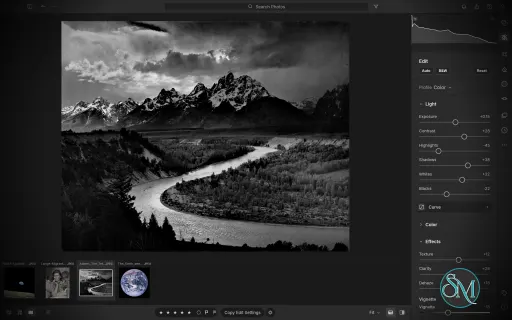
LightCraft is a free, open-source photo management and RAW development application designed as an alternative to Adobe Lightroom. Built in Rust, it combines photo library organization with a comprehensive set of image editing tools, allowing photographers to adjust exposure, refine colors, apply local corrections, and prepare images for export without modifying their original files.
LightCraft is designed for desktop use on Windows, macOS, and Linux, with a WebAssembly version that runs in a browser. It also supports automation through a command-line interface and the Model Context Protocol (MCP), making it an interesting option for photographers who want local control over their workflow.
Features
Non-Destructive Photo Editing
LightCraft keeps original images intact and stores editing operations separately. You can experiment with different adjustments without permanently changing the source files.
Its editing tools include exposure, contrast, highlights, shadows, whites, blacks, tone curves, white balance, vibrance, and saturation. The application uses a wide-gamut, 32-bit floating-point processing pipeline designed to preserve tonal and color information throughout editing.
Color Grading and Presets
The color tools include an eight-band Color Mixer, RGB tone curves, and separate color grading controls for shadows, midtones, and highlights. These features provide flexibility for natural photo correction as well as creative color treatments.
LightCraft also includes built-in presets and lets users save custom looks. You can copy, paste, or synchronize selected adjustments across multiple photos, which is useful when editing a collection of images from the same shoot.
Local Masking and Adjustments
LightCraft supports brush masks, linear gradients, and radial gradients, along with selection tools for luminance, color, sky, subject, and background. Masks can be combined, subtracted, intersected, and inverted.
Local adjustments let you change exposure, contrast, color, texture, sharpness, and other properties in specific parts of an image. This helps users refine skies, brighten subjects, or create more controlled lighting effects without applying every adjustment globally.
Crop, Geometry, and Black-and-White Editing
The cropping tools support common aspect ratios, straightening, rotation, flipping, and manual geometric transformations. Composition overlays help photographers align images and refine framing.
For monochrome photography, LightCraft includes black-and-white conversion, an eight-band monochrome mixer, and additional color grading controls for creating tinted or split-tone results.
Photo Library Management
LightCraft includes tools for organizing photo collections, including folders, albums, smart albums, stacks, virtual copies, ratings, flags, labels, filtering, searching, and sorting.
Its local-first approach avoids requiring an online account or cloud catalog. The project describes its catalog as a human-readable log of editing operations, making it easier to inspect, back up, and replay changes.
Command-Line and AI Automation
In addition to its graphical interface, LightCraft provides a command-line application for rendering images and applying adjustments. MCP support allows compatible AI agents to interact with the application through an automation interface.
These capabilities are useful for repeatable editing tasks, scripted workflows, and experimentation with AI-assisted photo processing.
Download LightCraft v0.7.1 - Software Mirrors |
|---|
LightCraft v0.7.1 for Windowslightcraft-0.7.1-windows-x86.msi | 81.48 MB lightcraft-0.7.1-windows-x86-portable.zip | 95.99 MB lightcraft-0.7.1-windows-x64.msi | 82.71 MB lightcraft-0.7.1-windows-x64-portable.zip | 99.2 MB lightcraft-0.7.1-windows-arm64.msi | 78.92 MB lightcraft-0.7.1-windows-arm64-portable.zip | 95.3 MB |
LightCraft v0.7.1 for macOSlightcraft-cli-0.7.1-macos-universal.zip | 97.6 MB lightcraft-0.7.1-macos-universal.dmg | 102.62 MB |
LightCraft v0.7.1 for Linuxlightcraft-0.7.1-linux-x86_64.tar.gz | 99.01 MB lightcraft-0.7.1-linux-x86_64.rpm | 99.84 MB lightcraft-0.7.1-linux-x86_64.flatpak | 72.82 MB lightcraft-0.7.1-linux-x86_64.deb | 100.42 MB lightcraft-0.7.1-linux-x86_64.AppImage.zsync | 329.46 kB lightcraft-0.7.1-linux-x86_64.AppImage | 94.06 MB lightcraft-0.7.1-linux-riscv64.tar.gz | 96.57 MB lightcraft-0.7.1-linux-aarch64.tar.gz | 94.91 MB lightcraft-0.7.1-linux-aarch64.rpm | 96.47 MB lightcraft-0.7.1-linux-aarch64.flatpak | 68.78 MB lightcraft-0.7.1-linux-aarch64.deb | 97.14 MB lightcraft-0.7.1-linux-aarch64.AppImage.zsync | 316.2 kB lightcraft-0.7.1-linux-aarch64.AppImage | 90.27 MB |
LightCraft v0.7.1 for BSDlightcraft-0.7.1-freebsd-x86_64.tar.gz | 98.55 MB |
Others Download related to LightCraft v0.7.1lightcraft-web-0.7.1.zip | 63.33 MB |
LightCraft v0.7.1 Source Code
LightCraft v0.7.1 Source code (zip)
LightCraft v0.7.1 Source code (tar.gz)
|
LightCraft v0.7.1 Release Notes: What's Changed- Add shared docking while preserving photo tools and catalog drops by @skylartaylor in #869
- Integration batch 26: 31 reviewed contributor PRs by @bflatastic in #975
- Brush mask: holding the brush still adds no coverage; flow builds up by passes (#518) by @bitshiftza in #767
- KEY-ESC: Esc leaves the crop tool before leaving Detail by @PiMinusMax in #772
- LR-CROP-FLIP: Flip H / Flip V show in the crop tool by @PiMinusMax in #773
- LR-IMP-CAMERA-COVERAGE: SRF and DSLR-A100 raws open again (#702) by @AlexChambers in #774
- LR-BEHAV-GPU: no indirect-call validation pipeline, which Intel Metal fails to compile (issue #250) by @radialmonster in #779
- System Info, All Metadata and What's New end with one Close button, like About (#782) by @bitshiftza in #785
- LR-EDIT-RESET: Reset Edits returns a raw to its import defaults, sharpening and colour NR included by @radialmonster in #792
- Fix #714: mouse wheel zooms the loupe around the pointer by @PierrunoYT in #799
- Fix reject flag spacing in the bottom toolbar by @shurkanTwo in #803
- Block background interaction while dialogs are open by @shurkanTwo in #809
- LR-VIEW-BEFOREAFTER: zoomed side by side / stacked views stay in their panes by @PiMinusMax in #817
- CR3: decode CRX quantisation step 44 (QP 168), Canon EOS R50 C-RAW by @radialmonster in #829
- LR-META-EXIF-FULL: All Metadata shows the raw image's Compression by @radialmonster in #831
- web: stop the release zip shipping Cargo build artifacts (#793) by @eliets2 in #848
- LR-CROP-STRAIGHTEN: the rotate pointer faces away from its side of the crop box by @john01px2022 in #855
- LR-PROF-CAMERACOLOR: near-black pixels no longer turn white in the camera look by @PiMinusMax in #858
- test(engine): cover mixed Windows path separators in folder synchronization by @THEtheChad in #873
- LR-HDR-EXPORT: HDR renders keep the camera tone curve in the midtones by @robmdunn in #877
- fix(ui): show completion feedback for library maintenance and Auto Sync by @Ni-zav in #883
- fix(query): prevent catalog pagination overflow on 32-bit web builds by @Ni-zav in #885
- Tests: hold the MCP export-cancel test's export after its first photo until cancelled (#674) by @ingolfteetz in #935
- Dropping photos with XMP sidecars no longer imports the sidecars as presets (#936) by @MarekSpodBiedry in #943
- Masking: Color Range "Pick" button samples the photo by @emmertex in #957
- LR-VIEW-BEFOREAFTER: click tools work in the Before view of side by side / top-bottom by @PiMinusMax in #746
- LR-VIEW-COMPARE: a filmstrip click shows the photo in Compare by @PiMinusMax in #747
- LR-EDIT-COLOR-WB-PICKER: the selector button does what W does by @PiMinusMax in #748
- raw: find the saturation plateau despite stray samples above it (CR2 white level) by @TicT4x in #753
- LR-IMP-FORMATS: EOS R5 Mark II crop-mode CR3s develop without a black band by @radialmonster in #754
- LR-IMP-CAMERA-COVERAGE: Nikon D4 image area and white level, measured against its camera JPEG by @Unemars in #759
- Return applies the Copy Settings and Paste Selected Settings dialogs (#735) by @bitshiftza in #760
- Integration batches 27–30: 80 reviewed contributor PRs by @bflatastic in #981
- Fix immediate slider value entry and Reset precedence by @sanyamsingh001 in #952
- fix(macos): validate signed app in final DMG (#863) by @xristosmoug in #959
- LRC-LIB-CATALOG-IMPORT: describe raws from their headers without reading pixel data (step 1 of #832) by @ingolfteetz in #961
- LR-IMP-PROFILES: .cube-only imports report their profiles and failures (#942) by @bflatastic in #970
- LR-EDIT-DETAIL-DENOISE: dismissing the model setup turns AI Denoise back off (#922) by @bflatastic in #971
- UI: star rating previews the hovered rating, Info tab and bottom bar (#647) by @MarekSpodBiedry in #665
- Headless sessions honour LIGHTCRAFT_SAM3_DIR for the SAM 3 model folder (#619) by @MarekSpodBiedry in #666
- Issue #99: lock tests: keep the child-process test from overlapping the others by @AlexChambers in #679
- Right-click ▸ Add to Album offers New Album…, also with no album yet (#676) by @bitshiftza in #685
- DNG bad-pixel opcodes: cap the pixels they repair by @haranishi in #686
- XMP merge: keep refusing repeated attributes, in linear time by @haranishi in #687
- LR-IMP-CAMERA-COVERAGE: Sony DSC-R1 reads its SR2SubIFD (black, white balance, crop): seed derived from the key by @radialmonster in #689
- LR-PREF-PERFORMANCE: cover every GPU kernel build with the crash marker, catch internal compile errors (#250) by @radialmonster in #694
- LR-EDIT-OPTICS-PROFILE: keep Sony aspect crops outside validated corrections by @QuirkyTurtle94 in #695
- In-window menus: a scrolled menu draws no scrollbar over its shortcut text (#691) by @bitshiftza in #696
- LR-IMP-FORMATS: decode Kodak DCS520C raw TIFF (two-component lossless JPEG with response curve) by @radialmonster in #700
- Read Lightroom spot removal (crs:RetouchAreas, RetouchInfo) from sidecars and presets by @aayusharora in #703
- spot.findBlemishes: heal small blemishes on detected faces (classical, no new model) by @aayusharora in #704
- Catalog lock: release the library lock explicitly on drop, not by closing the handle (#680) by @bitshiftza in #710
- GPU fallback reason per render; the export fallback test no longer reads process-wide state (#675) by @bitshiftza in #712
- docs: point to the two Olympus patents as a clean-room base for compressed ORF by @feffef in #716
- Hold Shift while dragging a crop handle to keep proportions by @itrycodinganditsbad in #720
- Linux/FreeBSD: file dialogs are children of the app window (Wayland portal parent) by @jazzautomations in #721
- Upper-case extensions: #705 is #342, fixed in 0.5.0; import/browse/sidecar coverage for .JPG, .Jpg, .NEF, .XMP by @bitshiftza in #723
- Importing a deleted photo's file again brings it back from Recently Deleted (#706) by @bitshiftza in #726
- Web: a failed render worker start no longer shifts the other workers' slots (#229) by @MarekSpodBiedry in #728
- Denoise: a running job's picture is Ready only when the job reports, not when its file appears (#719) by @bitshiftza in #729
- LR-EDIT-OPTICS-PROFILE: apply embedded Fujifilm RAF distortion and vignetting tables by @radialmonster in #734
- Linux: default to XWayland for file drag-and-drop on Wayland desktops by @dylanmtaylor in #738
- README: add a Simplified Chinese translation (zh-hans) by @lzjtugjc in #749
- LR-BEHAV-LOCALIZE: craft-fonts faces of other scripts are UI fallbacks (#736) by @radialmonster in #750
- LR-PREF-DISPLAY: macOS previews follow the screen's profile, so they match exports (#787) by @LloydNicholson in #791
- LR-EDIT-OPTICS-PROFILE: apply DNG WarpRectilinear2 lens corrections (Pixel DNGs, #635) by @radialmonster in #794
- Color Grading: Shift-drag saturation lock, range tabs, per-wheel eye (#737, #559) by @sajibsrs in #825
- fix(export): expose all nine watermark positions and adjustable inset by @Ni-zav in #833
- fix(previews): shard new smart previews while retaining legacy files by @Ni-zav in #834
- LR-EXP-WATERMARK: preview the watermark in the Export dialog (#827) by @john01px2022 in #843
- LR-EXP-WATERMARK: separate horizontal and vertical watermark insets (#827, stacked on #833) by @john01px2022 in #845
- LR-EXP-WATERMARK: rotate the watermark in quarter turns (#827, stacked on #845) by @john01px2022 in #847
- LR-PROF-CAMERACOLOR: read an untagged camera JPEG in the colour space the raw's EXIF states (#778) by @radialmonster in #854
- LR-BEHAV-UNDO: keep file history consistent after failed renames by @sanyamsingh001 in #874
- fix(sliders): nudge selected sliders with the wheel and arrow keys by @Ni-zav in #884
- Progress docs: gaps.md reviewed after 0.6.0 by @cookingwithsimon in #887
- README: point the font-standard note at craft-fonts (#826) by @vbasky in #890
- LR-VIEW-ZOOM: sharp 1:1 in Compare and Reference (zoom windows per pane) by @cookingwithsimon in #900
- Open Library recognises a Lightroom catalog and offers to import it (#891) by @bitshiftza in #907
- Drafts keep the wide planes across a noise-reduction change (CPU NR drag) by @emmertex in #923
- Export: Remove location info also covers Original and DNG formats by @emmertex in #925
- Content-aware Remove: inpaint crate (PatchMatch) and a Fill spot mode by @emmertex in #926
- Perf: parallel preview builds and faster hue/saturation tables by @emmertex in #927
- Soft proofing against printer ICC profiles: intent, Simulate Paper & Ink, device gamut warning by @emmertex in #928
- View: Lights Out (Shift+L), like Lightroom Classic by @emmertex in #945
- Library switching: New Library…, Open Recent Library, library name in the title by @emmertex in #946
- Library: create folders on disk and move photos between folders by @emmertex in #947
- Reverse geocoding: fill City / State / Country from GPS (offline GeoNames) by @emmertex in #948
- UI: favorite themes and appearance shortcuts by @luniiya in #950
- Fix #812: the window's renderer can't kill the start-up (DX12 shader errors) by @emmertex in #951
- LR-EXP-PSD: Edit in PhotoCraft (right-click Edit In, flat PSD hand-off) by @cookingwithsimon in #953
- masking: keep zoom and pan while masking; improve sky mask edges by @David-T-Campos in #547
- Remember the last crop aspect as the default by @danielspruce in #617
- LR-IMP-FORMATS: Sony ARW6 (Compressed RAW 2) decoder for the ILCE-7RM6 by @dev-null-undefined in #625
- LR-EDIT-LIGHT-HIGHLIGHTS: keep local contrast under Highlights and Shadows by @radialmonster in #645
- HDR: read crs:HDREditMode from XMP into hdr.enabled by @JordyUSA in #663
- HDR: PNG export as 16-bit Rec. 2020 PQ (cICP, cLLI) by @JordyUSA in #664
- LRC-LIB-CATALOG-IMPORT: find moved root folders relative to the catalog by @mrpdaemon in #667
- UI: Add system appearance and light themes by @luniiya in #683
- HDR: HDR button next to B&W in the Edit panel header (as Lightroom) by @JordyUSA in #688
- Settings ▸ Faces: Recognise faces stays off until a recognition model is chosen (#678) by @bitshiftza in #698
- AI Denoise: run tiles on another computer's graphics card (remote offload) by @akvaithi in #813
- Integration batch 31: translations, raw header previews, XMP import warnings, Apple Photos, HDR histogram, JPEG XL, Edit In for many photos by @bflatastic in #998
- Report unsupported XMP profiles & geometry during photo import by @bogusyogi in #434
- LR-EXP-PHOTOS: add exported files to Apple Photos (macOS, #236) by @AlexChambers in #643
- HDR: HDR histogram for HDR edits (fixed 5-stop scale, Lightroom layout) by @JordyUSA in #677
- Complete Simplified Chinese (zh-hans) catalog by @Twdhsi-666 in #725
- LR-IMP-PREVIEW-READ: a preview reads the raw's header, not the raw (56.5 MB → 5.9 MB, 10 s → 1 s over SMB) by @lzjtugjc in #755
- Updated Russian translation (again) by @wondarkus in #822
- fix(windows): preserve legacy MSI install folders via App Paths by @THEtheChad in #879
New Contributors- @skylartaylor made their first contribution in #869
- @PiMinusMax made their first contribution in #772
- @PierrunoYT made their first contribution in #799
- @shurkanTwo made their first contribution in #803
- @eliets2 made their first contribution in #848
- @john01px2022 made their first contribution in #855
- @THEtheChad made their first contribution in #873
- @robmdunn made their first contribution in #877
- @Ni-zav made their first contribution in #883
- @ingolfteetz made their first contribution in #935
- @emmertex made their first contribution in #957
- @TicT4x made their first contribution in #753
- @Unemars made their first contribution in #759
- @xristosmoug made their first contribution in #959
- @haranishi made their first contribution in #686
- @aayusharora made their first contribution in #703
- @feffef made their first contribution in #716
- @itrycodinganditsbad made their first contribution in #720
- @jazzautomations made their first contribution in #721
- @LloydNicholson made their first contribution in #791
- @sajibsrs made their first contribution in #825
- @luniiya made their first contribution in #950
- @David-T-Campos made their first contribution in #547
- @danielspruce made their first contribution in #617
- @dev-null-undefined made their first contribution in #625
- @JordyUSA made their first contribution in #663
- @mrpdaemon made their first contribution in #667
- @Twdhsi-666 made their first contribution in #725
Full Changelog: v0.6.0...v0.7.1 |
Performance and Compatibility
LightCraft is written in Rust and uses background rendering to keep the interface responsive during common editing operations. The project reports that it can display embedded camera previews or cached renders quickly while preparing full-resolution images in the background.
The application supports Windows, macOS, and Linux, as well as a browser-based WebAssembly build. Available Linux packages include AppImage, DEB, and RPM formats, with builds for x86-64 and ARM64 systems.
However, LightCraft is still a developing project. Its feature list should not be interpreted as proof of complete Adobe Lightroom compatibility. Photographers with established Lightroom workflows should verify RAW camera support, editing results, and catalog migration before moving their primary library.
System Requirements
Operating systems: Windows, macOS, and Linux.
Browser support: A WebAssembly build is available.
Processor architectures: Linux releases include x86-64 and ARM64 builds.
Build requirements: Rust and the project's documented dependencies are needed to compile from source.
The project does not establish a comprehensive minimum hardware specification in the information reviewed. Actual performance will depend on image resolution, RAW processing requirements, and available system resources.
Pros and Cons
Pros
Free and open-source under the MIT and Apache 2.0 licenses.
Non-destructive editing preserves original photos.
Extensive controls for exposure, tone curves, color grading, and local adjustments.
Photo library organization tools for managing larger collections.
Native applications for major desktop operating systems.
Browser-based build for experimentation without a traditional desktop installation.
Command-line and MCP support for automation.
Local-first workflow without a mandatory cloud account or subscription.
Cons
Still under active development, so feature completeness and reliability may vary.
Compatibility with existing Lightroom catalogs and established workflows needs verification.
RAW format support may not cover every camera model or file variation.
Users accustomed to Lightroom may encounter differences in editing behavior and output.
Advanced automation and browser workflows may require additional setup.
Published minimum hardware requirements are limited.
How to Install
The simplest option is to download a suitable package from the project's GitHub Releases page. Linux users can choose the available AppImage, DEB, or RPM package, while macOS and Windows packages are also provided.
For users who prefer to build from source, install Rust and the required development tools, then run:
git clone https://github.com/storytold/lightcraft
cd lightcraft
cargo run --release -p lightcraft
To open a specific photo folder, pass its path when launching the application:
cargo run --release -p lightcraft -- ~/Pictures/trip
To try the browser-based build, follow the project's WebAssembly setup instructions and run:
cargo xtask web --serve
The project also provides a command-line renderer for scripted workflows. Consult the official documentation for supported formats, available adjustment parameters, and platform-specific installation details.
Final Verdict
LightCraft is a promising open-source alternative for photographers who want a local photo library and RAW editing workflow without relying on a commercial subscription. Its combination of non-destructive editing, color grading, masking, presets, and catalog management makes it more ambitious than a basic image editor.
Its strongest differentiators are its Rust-based architecture, local-first design, and automation support. These features may appeal to technical users and photographers interested in building repeatable editing workflows.
The main reservation is maturity. Before switching from Lightroom, users should test their own camera RAW files, compare exported images, and confirm that the library features they depend on are available and reliable. LightCraft is worth trying, but photographers with demanding production workflows should evaluate it alongside their existing tools rather than assume full feature parity.
Post a Comment/Report Broken Link: