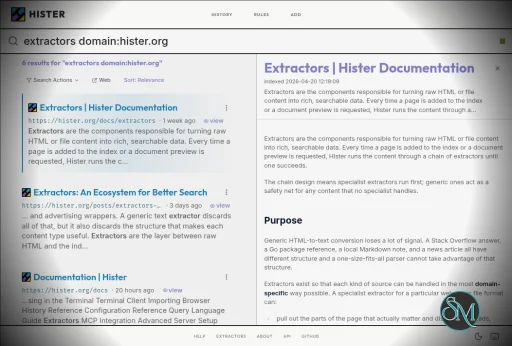
Hister is a free and open-source personal search engine that indexes the contents of web pages and local files so they can be searched later. It runs on infrastructure you control, provides a web interface and terminal search, and can also connect to AI assistants through MCP.
Features
Hister performs full-text indexing rather than searching only page titles and URLs. It can index pages visited through its Firefox and Chrome browser extensions and can also index local directories and imported browser history.
Its search system supports phrases, wildcards, field filters, negation, aliases, and result priorities. This provides more control than a basic keyword search when working with a large personal archive.
Hister also supports optional semantic search through a configurable embeddings endpoint. This allows searches based on meaning rather than exact words, although using a remote embeddings service means document text may be sent to that service.
The software can crawl websites recursively and import existing content. Recent releases have also added unified imports for browser history, local files, bookmarks, and archived content from services such as Linkwarden, Karakeep, and Shaarli.
Hister can be accessed through its web interface, terminal interface, TUI, command line, or an AI assistant using MCP. Multi-user support allows separate documents and search results to be maintained on a shared server.
Download Hister v0.21.0 - Software Mirrors |
|---|
Hister v0.21.0 for Windows |
Hister v0.21.0 for macOS |
Hister v0.21.0 for Linux |
Others Download related to Hister v0.21.0 |
Hister v0.21.0 Source Code |
Hister v0.21.0 Release Notes:New FeaturesConfiguration Reloadhister reload applies configuration, rules, and logging changes without a
manual server restart. It waits for completion and rejects invalid settings.
Expect a brief interruption and refresh open web pages afterward. Client
configuration changes still require restarting the affected clients.
More Expressive SearchCombine nested groups, phrases, and field filters withAND, OR, and NOT.
For example, (site:github.com OR site:gitlab.com) NOT title:archived searches
both sites while excluding archived titles. The new site: filter includes
subdomains, and has: finds documents with a populated field or metadata value,
such as has:label or has:metadata.author.
Invalid queries now explain what needs fixing and where. URL regular expression
searches are faster when a pattern has a specific starting prefix.
Kiwix, Sitemap, and Readwise Reader Importshister import zim collection.zim makes HTML and plain text from Kiwix archives
searchable without downloading each original page. It recovers original URLs
and article links, with --base-url as a fallback when archive paths match the
source website. Entries without an identifiable original URL are skipped with
a warning. Embedded images and other assets are not imported, and large
archives can require substantial memory.
hister import sitemap FILE_OR_URL indexes pages listed in XML sitemaps,
including sitemap indexes, gzip compressed files, and standard input. Duplicate
URLs are queued once, and the page crawl can be interrupted and resumed using
its job ID. Existing documents are skipped unless --force is supplied.
hister import readwise imports Readwise Reader documents with saved content,
notes, summaries, tags, and source metadata. It uses Reader's stored HTML when
available and otherwise tries the original page. Separate highlight and note
records are skipped, and original PDF and EPUB attachments are not downloaded.
Language Controls and Persistent CorrectionsLimit automatic language detection withindexer.languages, or choose between
the default low memory mode and high accuracy mode with
indexer.language_detection_accuracy. Short web pages can use their titles to
help identify the language, and matching page declarations can supply regional
labels.
hister update QUERY --language en now pins the language across reindexing,
imports, and document updates. Use --language auto to clear a pin or
--language unknown to keep a document without an identified language.
language:en includes regional variants such as en-US, while a regional filter
narrows the results. Existing documents remain searchable when automatic
detection is disabled.
Expanded MCP Tools for AI AssistantsAssistants can page through search results, use the newget_facets tool to
explore document counts, and filter history by text and date. Search limits now
apply to the combined history, keyword, and semantic results.
Preview requests can select text, HTML, or metadata and read long documents in
smaller portions, reducing how much content an assistant needs to retrieve at
once.
Remote User Management and Proxy AuthenticationThe newhister user create, show, update, and delete commands manage
accounts on the configured running server using an administrator's token.
Account changes are applied together, conflicting updates are rejected, and
the last administrator cannot be deleted or demoted. Use
hister user create USERNAME --offline --admin with the server stopped to create
the first administrator or recover access.
server.proxy_auth_header enables sign in through a trusted authentication
proxy. The proxy must verify users, replace client supplied identity headers,
and prevent direct access to Hister. New proxy users receive ordinary accounts
without passwords. OIDC providers can also select a stable account identity
with identity_claim, including providers that do not supply email addresses.
Enhancements
app.snippet_length to control the returned context and use
Always expand snippets to remember a browser preference. Suggestions are
hidden by default and can be enabled through Actions → Show suggestions.
indexer.pdf_parser to use an external parser such as pdftotext
for browser uploads, watched files, and file imports.
.pdf suffix.
Bug Fixes
Backward Compatibility NotesThe following changes require attention when upgrading from v0.20.0:
identity_claim also requires relinking existing accounts.
Leaving it unset preserves the existing email based identity.
update-user, and delete-user names remain deprecated aliases, but account
operations now target the running server and require an administrator's
personal token. Use user create --offline for local account creation with
the server stopped. Replace the old token display flag with --show-token;
--token now supplies authentication credentials.
AND,
then OR; use parentheses to make grouping explicit. Malformed queries are
rejected by search, update, and delete operations.
#+INCLUDE or #+SETUPFILE must contain the needed text directly.
Opening a watched local file downloads it; use its preview to read it in
Hister.
server.max_batch_body_size. HTTP HTML downloads and extracted text have
a 32 MiB ceiling. Favicon and robots files have an 8 MiB limit; an oversized
robots file causes the site's URLs to be skipped. Raising the upload limit
does not raise extraction limits.
server.base_url to the public URL when using a reverse proxy. Clients
paging opened history should pass both last_id and last_updated_at from
the previous response.
|
Performance and Compatibility
Hister is written in Go and can run locally or on infrastructure controlled by the user. It supports SQLite and PostgreSQL as database backends, with PostgreSQL support added in version 0.12.0.
The application is designed for continuous personal indexing. Once the server is running, the browser extension can automatically send visited page content to the configured Hister server for indexing.
Hister does not require a cloud service or account for a local personal setup. The project states that it has no telemetry or mandatory cloud synchronization. Indexed documents and search indexes remain on the Hister server.
The current release series also includes features for public search deployments, documentation datasets, and additional import sources. Version 0.17.0 introduced a unified import interface and support for importing content from Linkwarden, Karakeep, and Shaarli.
System Requirements
Hister provides prebuilt binaries for supported platforms, including Windows, Linux, and macOS. The Windows version can be started directly from PowerShell using the hister.exe binary.
For normal use:
Windows, Linux, or macOS
Firefox or Chrome if browser history indexing is required
Storage for indexed documents and search indexes
A local or server environment where Hister can remain running
For building from source:
Go 1.26
npm
C compiler for CGO dependencies
Hardware requirements are not specified as a fixed minimum because resource usage depends on the amount of content being indexed and the selected database and search configuration.
Pros and Cons
Pros
Free and open source
Full-text personal search
Indexes web pages and local files
Firefox and Chrome integration
Browser history import
Website crawler
Powerful search operators
Optional semantic search
Web interface
Terminal and TUI access
MCP support for AI assistants
Multi-user support
No telemetry by default
No mandatory cloud service
Supports SQLite and PostgreSQL
Docker and Nix installation options
AGPLv3 licensed
Cons
Requires running and maintaining your own server
Initial indexing can consume significant storage and processing resources
Semantic search requires an embeddings endpoint
Browser integration requires an extension
More complex to configure than conventional desktop search tools
The AGPLv3 license may require consideration for organizations modifying and redistributing the software
How to Install
Download the Hister binary for your operating system from the project's releases. On Windows, rename the executable to hister.exe if necessary and start it from PowerShell with:
.\hister.exe listenOn Linux or macOS, make the binary executable and start it with:
chmod +x hister
./hister listen
Then open the local Hister web interface at http://127.0.0.1:4433 and install the Firefox or Chrome browser extension. After visiting pages with the extension enabled, their content can be indexed and searched through Hister.
Hister can also be installed using Homebrew, Docker, or Nix. Existing browser history, local directories, and files can be imported after installation.
Final Verdict
Hister is a useful personal search engine for users who want to build their own searchable archive of web pages and files. Its full-text indexing, browser integration, local deployment, advanced queries, semantic search option, and MCP support make it more than a simple browser history search tool.
The main tradeoff is that Hister is self-hosted software. Users need to keep the server running and manage the storage and indexing environment themselves. For users who want a private search index under their own control, that approach provides considerably more control over their data.
Developer:
Adam Tauber
Operating System:
Windows / macOS / Linux
Date Added:
2026-10-27T10:22:11.412Z
Categories:
Post a Comment/Report Broken Link: