GDevelop is an open source, cross-platform game engine that makes game development accessible without requiring traditional programming skills. It supports 2D, 3D, and multiplayer games and can export projects to the web, desktop, Android, iOS, Steam, and other platforms. Its event-based visual programming system, ready-made behaviors, extensive asset library, and optional AI assistance make it one of the most approachable game development tools available today.
GDevelop takes a different approach from traditional engines such as Unity or Unreal Engine. Instead of requiring developers to write large amounts of code, its event system lets users construct game logic using conditions and actions.
For example, a game rule can be expressed as a simple sequence of "If" and "Then" events. This makes the engine particularly approachable for beginners, educators, artists, and designers who want to create games without first learning a programming language.
At the same time, GDevelop is not limited to simple projects. JavaScript can be added when more advanced functionality is needed, while extensions and behaviors allow developers to expand the engine considerably.
Key Features of GDevelop
No-Code Game Development
The event system is the heart of GDevelop. Users can create gameplay mechanics visually by combining conditions and actions rather than writing traditional code.
This makes common tasks such as player movement, collisions, enemy behavior, scoring, menus, and object interactions considerably easier for beginners.
2D and 3D Game Development
GDevelop has expanded significantly beyond its original 2D focus. The current engine supports both 2D and 3D game development, with 3D rendering powered by Three.js alongside PixiJS for 2D graphics.
The newer 3D workflow includes an editor where developers can place objects and work with their game world more directly, making 3D development much more accessible than it was in earlier versions.
Ready-Made Behaviors
GDevelop includes a large collection of behaviors and extensions that provide common game functionality without requiring developers to build everything from scratch.
These can handle things such as platformer movement, physics, pathfinding, cameras, tweens, and other gameplay systems. The official website currently advertises more than 130 ready-made behaviors and extensions.
JavaScript Support
Although GDevelop is designed around no-code development, experienced developers are not restricted to the visual event system.
JavaScript can be used to extend gameplay logic, interact with APIs, access external data, and create functionality that is difficult to express entirely through events.
Multiplayer
GDevelop includes multiplayer capabilities and online services for games that require features such as player accounts, lobbies, and leaderboards.
This gives developers the ability to build more connected games without having to construct every backend service from scratch.
AI-Assisted Development
AI assistance has become part of the GDevelop workflow. The AI agent can help users create game logic, answer development questions, and accelerate prototyping.
The important part is that AI remains optional. Users can continue creating games entirely through the traditional GDevelop editor and event system.
Asset Store
GDevelop includes access to a large collection of ready-made assets and templates. The official platform currently lists more than 2,000 assets, including free resources and premium packs.
This is particularly useful for beginners who want to build a playable prototype without creating every visual asset themselves.
Cross-Platform Export
Games can be exported to multiple platforms, including:
Windows
macOS
Linux
Android
iOS
HTML5
Steam
Epic Games Store
Microsoft Store
This makes GDevelop useful for developers who want to release the same project across several platforms without maintaining completely separate codebases.
Download GDevelop v5.6.284 - Software Mirrors |
|---|
GDevelop v5.6.284 for Windows |
GDevelop v5.6.284 for macOS |
GDevelop v5.6.284 for LinuxGDevelop-5-5.6.284.AppImage | 200.36 MB |
GDevelop v5.6.284 Source Code |
GDevelop v5.6.284 Release Notes:🏔️ New 3D terrain, grass and water objects!The 3D terrain with grass and 3D water A new experimental 3D terrain object is now available. Try it in this new example. Read the full documentation here.
ℹ️ These objects are new and provided, like many other features of GDevelop like 3D lights and 3D particles, through reusable extensions. Be sure to regularly check if there are new versions available. 🎇 Upgraded 3D rendering with improved shadows and new effects (ambient occlusion...)!Depth of Field, Ambient Occlusion, Bloom, used on an example with the new terrain The 3D rendering (based on Three.js) was upgraded with:
⚠️ Existing games must upgrade the Light3D extension to v2.0. You must then adapt the intensity and decay of the point and spot lights, usually by increasing the light intensity by at least 10. This is because lights are now using a realistic, physics based formula for their rendering. Note that you can upgrade Light3D to v2.0 and it will still work in previous GDevelop versions. ⚠️ Any game using extensions using Three.js/3D rendering should upgrade them to the latest version. If you are the author of such an extension, see here how to upgrade. 🏂 Custom easings for Tweens!Editing a custom easing function Custom "cubic-bezier" easing, as well as custom "easing functions" with a name that can be reused in the project, are now available for the Tween extension (thanks @ViktorVovk!).
🎮 New starters and examples gamesNew starters have been added, including a good basis to build your own FNAF-like game. |FNAF | Minimalist GTA-like | GTA-like with a map | |---|---|---|💝 Improvements
⚙️ Extensions
🎨 Assets
🕹 Premium Game Templates
🐛 Bug fixes
🛠 Internal changes (for developers)
|
Performance and User Experience
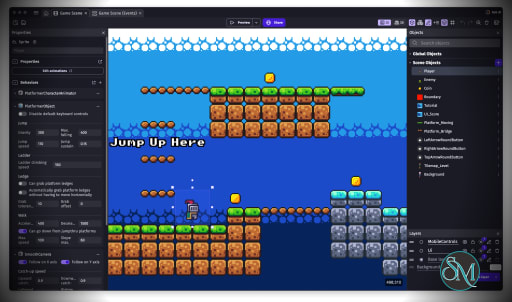
GDevelop is one of the easier game engines to approach for someone without previous programming experience. The visual event system is intuitive, while the editor provides enough depth to support considerably more sophisticated projects.
The interface also benefits from ready-made behaviors and extensions. Instead of spending hours implementing basic systems, developers can attach existing functionality to game objects and focus more heavily on gameplay design.
Performance is another area where GDevelop has matured. Its engine uses technologies such as PixiJS and Three.js for rendering, while physics extensions include Box2D and Jolt Physics.
There are still limitations compared with highly specialized engines. Developers building extremely complex 3D games may eventually encounter areas where Unity, Unreal Engine, or Godot provide greater depth and control. However, that is not really GDevelop's primary goal.
Its strength is the balance between accessibility and capability.
Pros
Free and open source.
Excellent for beginners.
Supports 2D and 3D development.
Visual event-based programming.
JavaScript support for advanced users.
Large collection of behaviors and extensions.
AI-assisted development.
Multiplayer capabilities.
Large asset and template ecosystem.
Cross-platform export.
Can be used locally or through cloud-based workflows.
Games created with the engine can be distributed commercially without being forced to open source the game.
Cons
Advanced 3D development is not as mature as leading professional engines.
Visual event systems can become complicated in large projects.
Some cloud, publishing, and AI features are tied to paid plans.
Developers who prefer conventional programming may find the event system restrictive.
The ecosystem is smaller than Unity or Unreal.
Who Should Use GDevelop?
GDevelop is an excellent choice for beginners, indie developers, educators, students, artists, designers, and small teams.
It is especially useful when the goal is to turn a game idea into a working prototype quickly. Teachers can also use it to introduce game development without requiring students to learn a programming language first.
Experienced developers can benefit from the combination of visual events and JavaScript, making GDevelop more flexible than a typical no-code game maker.
Final Verdict
GDevelop has evolved into much more than a simple no-code game maker. Its combination of 2D and 3D capabilities, visual programming, JavaScript support, ready-made behaviors, multiplayer services, AI assistance, and broad export options makes it a surprisingly capable game development platform.
The biggest reason to choose GDevelop is its accessibility. You can start building a playable game without spending weeks learning programming or a complicated engine interface. As your project becomes more advanced, JavaScript and extensions provide an escape hatch when visual events are no longer enough.
For beginners and indie developers, GDevelop is one of the strongest open source game engines available. For experienced developers working on technically demanding 3D productions, more specialized engines may still be a better fit.
Post a Comment/Report Broken Link: