FilmCraft is a free, open-source video editor designed as an alternative to Adobe Premiere Pro. Built from scratch in Rust, it combines timeline-based editing, color correction, audio mixing, visual effects, titles, captions, and video export in a desktop application.
FilmCraft aims to provide a familiar editing experience for users accustomed to professional non-linear video editors. It supports Windows, macOS, and Linux, with a WebAssembly version for browsers. Its command-line interface and Model Context Protocol (MCP) server also make it possible to automate editing tasks using scripts and compatible AI agents.
The project is ambitious, but it remains under active development. Although its feature checklist covers a substantial portion of Premiere Pro's functionality, the developers estimate that it is only around 50% to 60% ready to replace Premiere in real-world production workflows.
Features
Multitrack Timeline Editing
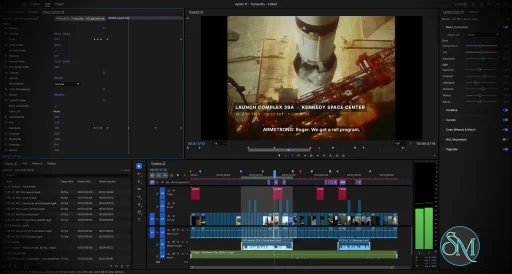
FilmCraft provides a traditional video editing workspace with source and program monitors, media bins, thumbnails, and a multitrack timeline. Its interface includes familiar editing workspaces for assembly, color correction, effects, and audio.
The editor supports three-point editing, trimming, clip insertion, overwriting, transitions, keyframes, and synchronized audio and video. It also includes multicamera editing and tools for organizing media and sequences.
These capabilities make FilmCraft suitable for assembling footage, creating documentaries, editing promotional videos, and working on other timeline-based projects.
Color Grading and Video Effects
FilmCraft includes color correction tools, tone adjustments, and a GPU-based compositor that processes images in linear light. Users can adjust footage and apply effects without relying on Adobe's proprietary editing engine.
The project includes a broad selection of video effects and transitions, with many familiar editing operations represented in its command and interface systems.
However, feature availability does not guarantee identical results to Premiere Pro. Some advanced effects are approximations, and certain processing tasks still rely on the CPU. Performance can vary depending on the footage, effects, and export settings.
Audio Editing and Mixing
FilmCraft includes audio tracks, mixing controls, clip volume adjustments, keyframes, and audio transitions. Its audio tools support common post-production tasks such as balancing dialogue, music, and sound effects.
The application can decode several audio formats, including AAC, Opus, MP3, FLAC, ALAC, and Vorbis. It can also export audio as WAV.
A significant limitation is the lack of VST3 and Audio Units plugin hosting. Users who depend on third-party audio effects or established professional mixing workflows should account for this before switching.
Titles, Graphics, and Captions
The text engine supports typography features such as kerning, ligatures, bidirectional text, line breaking, tracking, and leading.
Users can create text and graphic clips containing shapes, paths, fills, strokes, backgrounds, and shadows. These elements can be animated using keyframes.
FilmCraft also supports subtitle and caption workflows, including SRT, WebVTT, and SCC import and export. Caption tracks can use formats such as Subtitle, CEA-608, CEA-708, and Teletext.
These tools are useful for adding opening titles, lower thirds, subtitles, and other graphics directly within an editing project.
Video Formats and Export
FilmCraft implements several codecs and containers in Rust rather than bundling FFmpeg as its video-processing engine. The project uses FFmpeg externally for testing and comparing codec behavior.
Supported formats include H.264, HEVC, Apple ProRes, VP9, AV1, Avid DNxHD/DNxHR, Motion JPEG, and common still-image formats. Support differs between decoding and encoding.
For export, FilmCraft offers H.264 MP4 with AAC audio, ProRes 422 HQ, Motion JPEG in QuickTime containers, DNxHR, image sequences, animated GIF, and WAV audio.
Background rendering jobs provide progress reporting and cancellation. Cached render previews help avoid recalculating unchanged sections of a timeline.
There are important limitations. H.264 is the primary delivery-codec export option, while HEVC and AV1 export are not generally available as equivalent delivery options. Hardware encoding support also depends on the operating system and hardware.
Project Interchange
FilmCraft supports several formats for exchanging timelines with other editing and audio-production applications.
These include Final Cut Pro XML, FCPXML, OpenTimelineIO, CMX 3600 EDL, AAF, and OMF. Depending on the format, projects can transfer sequences, tracks, transitions, keyframes, markers, source timecode, and audio information.
This interoperability is particularly useful when collaborating with editors who use different applications. Nevertheless, complex projects should be tested after import because interchange formats and individual applications do not always represent every editing feature identically.
AI-Agent Automation
One of FilmCraft's most distinctive features is its command-oriented editing engine. The graphical interface, command-line tools, JSON control interface, and MCP server use the same underlying command system.
Compatible AI agents can execute editing commands, inspect project state, manipulate timeline elements, adjust effects, and initiate exports. The application also provides automation identifiers that allow tools to interact with its interface.
This makes FilmCraft interesting for developers experimenting with programmatic video editing and repeatable post-production workflows.
Download FilmCraft v0.8.0 - Software Mirrors |
|---|
FilmCraft v0.8.0 for Windowsfilmcraft-0.8.0-windows-x86.msi | 54.61 MB filmcraft-0.8.0-windows-x86-portable.zip | 66.39 MB filmcraft-0.8.0-windows-x64.msi | 54.57 MB filmcraft-0.8.0-windows-x64-portable.zip | 67.36 MB |
FilmCraft v0.8.0 for macOS |
FilmCraft v0.8.0 for Linuxfilmcraft-0.8.0-linux-x86_64.tar.gz | 66.46 MB filmcraft-0.8.0-linux-x86_64.rpm | 66.99 MB filmcraft-0.8.0-linux-x86_64.flatpak | 48.51 MB filmcraft-0.8.0-linux-x86_64.deb | 67.37 MB filmcraft-0.8.0-linux-x86_64.AppImage.zsync | 220.37 kB filmcraft-0.8.0-linux-x86_64.AppImage | 62.89 MB filmcraft-0.8.0-linux-riscv64.tar.gz | 65.16 MB filmcraft-0.8.0-linux-riscv64.rpm | 65.76 MB filmcraft-0.8.0-linux-riscv64.deb | 66.01 MB filmcraft-0.8.0-linux-aarch64.tar.gz | 63.69 MB filmcraft-0.8.0-linux-aarch64.rpm | 64.95 MB filmcraft-0.8.0-linux-aarch64.flatpak | 45.39 MB filmcraft-0.8.0-linux-aarch64.deb | 65.48 MB |
FilmCraft v0.8.0 for BSD |
Others Download related to FilmCraft v0.8.0 |
FilmCraft v0.8.0 Source Code |
FilmCraft v0.8.0 Release Notes:What's Changed
New Contributors
|
Performance and Compatibility
FilmCraft is written in Rust and uses a modular architecture that separates its editing engine from the graphical interface. The project emphasizes frame-accurate timing, background rendering, codec testing, and GPU compositing.
Native applications are available for Windows, macOS, and Linux. A WebAssembly build also allows the application to run in a browser.
Despite these strengths, FilmCraft is not yet a complete replacement for Premiere Pro. The developers identify performance with large footage, incomplete hardware acceleration on Linux, limited plugin support, and real-world media compatibility as areas that still need work.
The project's automated codec tests are useful evidence of implementation progress, but they do not establish compatibility with every camera, phone, or professional media workflow.
System Requirements
Operating systems: Windows, macOS, and Linux.
Browser support: A WebAssembly version is available.
Linux architectures: x86-64 and ARM64 packages are available.
Development requirements: Rust and the project's documented dependencies are required to build from source.
Hardware acceleration: Availability depends on the operating system, graphics hardware, and the specific decoding or encoding task.
The project does not provide a comprehensive minimum hardware specification in the information reviewed. Users working with high-resolution footage should test performance on their own systems before adopting FilmCraft for demanding projects.
Pros and Cons
Pros
Free and open-source under the MIT or Apache 2.0 license.
Native applications for Windows, macOS, and Linux.
Multitrack editing, trimming, keyframes, transitions, and color grading.
Built-in title, graphics, and caption tools.
Broad codec and media interchange support.
Background rendering with cached previews.
Command-line and MCP support for AI-assisted editing.
Rust-based implementation without bundling FFmpeg as its processing engine.
No mandatory commercial subscription.
Cons
Still under active development and not yet ready to replace Premiere Pro in every production workflow.
Performance with large projects and demanding footage needs further validation.
No VST3 or Audio Units plugin hosting.
HEVC and AV1 export are not available as general delivery-codec options.
Hardware acceleration varies by operating system and task.
Compatibility with real-world camera and phone footage requires further testing.
Some effects and transitions are approximations rather than exact equivalents of Premiere Pro features.
How to Install
The easiest option is to download the appropriate package from the project's GitHub Releases page. Available packages include Linux AppImage, DEB, and RPM files, a universal macOS disk image, and a portable Windows archive.
To build and run FilmCraft from source, install Rust and the required development tools, then execute:
git clone https://github.com/storytold/filmcraft
cd filmcraft
cargo run --release -p filmcraft
To start the application with its JSON control server, run:
cargo run --release -p filmcraft -- --control 9876To list the available editing commands:
cargo run --release -p filmcraft-cli -- commandsTo launch the headless MCP server:
cargo run --release -p filmcraft-cli -- mcpConsult the official documentation for detailed build dependencies, automation configuration, and platform-specific instructions.
Final Verdict
FilmCraft is an ambitious open-source video editor that combines professional-style timeline editing, color correction, audio tools, captions, codec support, and project interchange in a single Rust-based application. Its command-oriented architecture and MCP integration are particularly interesting for developers who want to automate video editing with scripts or AI agents.
Its broad feature set makes it worth exploring, especially for users who want a free alternative to commercial video editors. However, the number of implemented features should not be confused with production readiness. Plugin compatibility, performance with demanding footage, hardware acceleration, and support for real-world media remain important considerations.
FilmCraft is best suited to experimentation, development, and projects that can tolerate an evolving editing environment. Professionals who rely on mature plugin ecosystems and predictable performance should continue using their established editor until FilmCraft has been tested against their specific workflows.
Post a Comment/Report Broken Link: