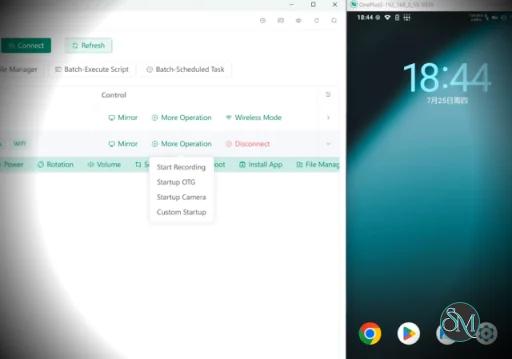
Escrcpy is a graphical interface for scrcpy that makes it easier to display and control Android devices from a desktop computer. Built with Electron, it adds a visual management layer around scrcpy with features such as multi-device management, automatic connections, wireless setup, custom configurations, and automation.
For users who like scrcpy's performance but do not want to work with command-line options, Escrcpy provides a more accessible way to configure and manage Android devices.
Features
Escrcpy provides a graphical interface for common scrcpy operations and adds several management features that are not part of the standard command-line workflow.
Key features include:
Android screen mirroring and control
USB and wireless device connections
Multi-device management
Automatic device connection
Automatic mirroring
Custom scripts
Scheduled tasks
Independent configurations for different devices
Configuration import and export
Custom device notes
Wireless connection using QR codes
Reverse tethering through Gnirehtet
Light, dark, and system themes
Support for the core scrcpy performance and control features
No Android application installation required
No account or internet connection required for normal scrcpy operation
Download Escrcpy v3.3.1 - Software Mirrors |
|---|
Escrcpy v3.3.1 for WindowsEscrcpy-3.3.1-win-x64.zip | 162.24 MB Escrcpy-3.3.1-win-setup.exe | 225.06 MB Escrcpy-3.3.1-win-setup-x64.exe | 116.45 MB Escrcpy-3.3.1-win-setup-arm64.exe | 109.48 MB Escrcpy-3.3.1-win-portable.exe | 224.73 MB Escrcpy-3.3.1-win-portable-x64.exe | 116.12 MB |
Escrcpy v3.3.1 for macOSEscrcpy-3.3.1-mac-x64.zip | 147.24 MB Escrcpy-3.3.1-mac-x64.dmg | 148.04 MB |
Escrcpy v3.3.1 for LinuxEscrcpy-3.3.1-linux-x86_64.flatpak | 108.02 MB Escrcpy-3.3.1-linux-x86_64.AppImage | 149.47 MB Escrcpy-3.3.1-linux-arm64.deb | 107.84 MB Escrcpy-3.3.1-linux-arm64.AppImage | 145.02 MB |
Escrcpy v3.3.1 Source Code |
Escrcpy v3.3.1 Release Notes:🚀 Escrcpy 3.3.1 — Unlock Existing Features, Embrace a New ChapterEscrcpy 3.3.1 is a transitional release that bridges the gap between the existing version and the new billing and licensing system planned for Escrcpy 4.0.0 and later. To ensure a smooth transition, all existing features in Escrcpy 3.3.1 are available for free, with no purchase, activation, or license verification required. This is a long-term policy for the existing version, not a limited-time promotion. This release also improves the stability of embedded mirroring and application startup workflows.✨ What's New🔓 All Existing Features UnlockedDue to adjustments to our billing platform and subscription system, all existing features in Escrcpy 3.3.1 are now available for free. This policy is intended to help existing users transition smoothly to the new version strategy. You can continue using all features available in Escrcpy 3.3.1 without additional payment.🖥️ Embedded Mirroring & Virtual Displays
🤖 Copilot ConfigurationCopilot now requires users to configure a supported AI model provider, including the relevant API key, endpoint, and model settings. If no provider is configured, the interface prompts users to complete the setup instead of automatically using the previous built-in service. Please note that third-party AI model providers may charge for API usage according to their own pricing policies.⚠️ Important Upgrade NoticeDue to adjustments to the billing and subscription system, users running Escrcpy 3.2.0 or earlier may encounter license verification issues or find that certain features no longer work correctly. We recommend upgrading to Escrcpy 3.3.1 as soon as possible. All existing features in this release are unlocked and can be used without additional payment.🔮 Looking Ahead: Escrcpy 4.0.0+Escrcpy 4.0.0 and later versions are planned to introduce a new billing and licensing system, along with new features and services.
🙏 Thank YouThank you for your continued support and feedback. We hope Escrcpy 3.3.1 provides a more stable experience and helps make this transition smooth as we prepare for the next chapter of Escrcpy. |
The biggest advantage of Escrcpy is its graphical approach to scrcpy. Standard scrcpy is extremely capable, but many of its options are controlled through command-line arguments. Escrcpy provides a graphical interface that makes those options easier to configure.
This is particularly useful when working with multiple Android devices. Instead of repeatedly entering commands with different parameters, you can maintain separate configurations and device settings.
The automation features are another useful addition. Escrcpy can automatically connect devices, start mirroring, execute custom scripts, and perform scheduled tasks. These features make it more practical for testing and repetitive workflows.
Wireless connectivity is also convenient. Escrcpy supports quick wireless connections using QR codes, reducing the amount of manual network configuration required.
Underneath the interface, Escrcpy relies on scrcpy, which is known for low latency, high frame rates, and relatively low resource usage. The underlying scrcpy project supports USB and TCP/IP connections, video and audio forwarding, recording, keyboard and mouse control, and several other advanced functions.
The main drawback is that Escrcpy adds another software layer on top of scrcpy. Users who already know the scrcpy command-line interface may find direct scrcpy commands faster for highly customized setups.
Performance and Compatibility
Escrcpy benefits from the underlying scrcpy engine. The scrcpy project targets 30 to 120 FPS depending on the device, supports resolutions of 1920×1080 and above, and is designed for low latency. Startup time can be around one second before the first image is displayed under suitable conditions.
scrcpy supports Linux, Windows, and macOS. Android devices require at least Android 5.0, while audio forwarding requires Android 11 or newer. Camera mirroring requires Android 12 or newer.
Actual performance depends on the Android device, connection type, resolution, frame rate, bitrate, and host computer.
System Requirements
Escrcpy is an Electron-based desktop application and relies on scrcpy and related components to communicate with Android devices. Its project documentation provides released packages for supported desktop platforms.
For the Android device, the underlying scrcpy engine requires:
Android 5.0 or newer for basic functionality
Android 11 or newer for audio forwarding
Android 12 or newer for camera mirroring
USB debugging enabled for normal USB debugging connections
The Android device does not need root access, and scrcpy does not leave a permanent application installed on the device.
Pros and Cons
Pros
Easy graphical interface for scrcpy
Supports multiple Android devices
USB and wireless connectivity
Automatic device connection
Configuration management
Custom scripts and scheduled tasks
QR code wireless connection
Reverse tethering support
Light, dark, and system themes
Free and open source
No account required
No Android application installation required
Cons
Adds an additional interface layer compared with using scrcpy directly
Advanced users may prefer scrcpy's command-line interface
Requires scrcpy and related Android debugging functionality
Project documentation notes that updates can be irregular and support is limited
How to Install
Escrcpy provides released packages through its project repository. Download the appropriate package for your desktop platform and follow the installation instructions provided with the release.
After installing Escrcpy, prepare the Android device by enabling Developer Options and USB debugging. Connect the device through USB or configure a supported wireless connection.
Once the device is detected, Escrcpy can be used to configure mirroring, device-specific settings, automation, and other scrcpy options.
For macOS, the project also documents installation through Homebrew.
Frequently Asked Questions
What is Escrcpy?
Escrcpy is a graphical interface for scrcpy that allows users to display and control Android devices from a computer.
Is Escrcpy free?
Yes. Escrcpy is an open-source project.
Does Escrcpy require root access?
No. The underlying scrcpy software does not require root access.
Does Escrcpy install an app on Android?
No. scrcpy works without permanently installing an application on the Android device.
Can Escrcpy connect Android devices wirelessly?
Yes. Escrcpy provides wireless connection functionality, including QR code-based connection.
Can I control multiple Android devices?
Yes. Multi-device management is one of the features provided by Escrcpy.
Does Escrcpy support dark mode?
Yes. Escrcpy supports light mode, dark mode, and following the system theme.
Post a Comment/Report Broken Link: