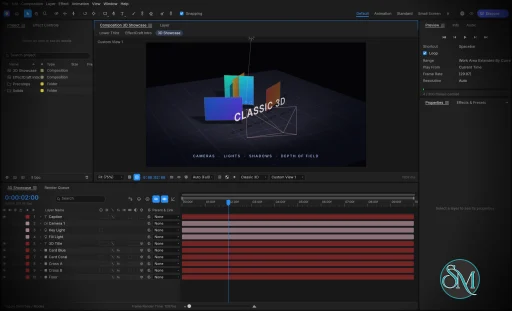
EffectCraft v0.9.2

EffectCraft is an open-source motion graphics and visual effects application designed as a clean-room reimplementation of Adobe After Effects. Written in Rust, it provides a native desktop editor for Windows, macOS, and Linux, alongside a browser-based version.

The application focuses on professional animation and compositing workflows, including keyframes, animated text, masks, visual effects, 3D cameras, lights, and a render queue. Its interface follows familiar After Effects conventions, making it easier for experienced motion designers to understand its workflow.

EffectCraft also stands out for its automation capabilities. Projects use a readable JSON-based format, and the application exposes its editing engine through a command-line interface, a JSON control channel, and an MCP server for AI agents.

Features

EffectCraft includes a broad collection of tools for motion graphics and visual effects.

  • Timeline and keyframes: Animate layer properties with linear, Bezier, hold, and eased interpolation. The Graph Editor provides value and speed graphs for adjusting animation curves.

  • Layer compositing: Combine text, shapes, footage, nested compositions, adjustment layers, solids, cameras, and lights. Parenting, track mattes, blend modes, and motion blur are supported.

  • Shape animation: Create shape layers with trim paths, repeaters, rounded corners, gradient strokes, and other procedural shape operators.

  • Masks and selection: Draw and edit masks with feathering, expansion, and different compositing modes.

  • Text animation: Work with point text, paragraph text, text animators, range selectors, and text-on-path workflows.

  • Expressions: Use JavaScript expressions with familiar After Effects-style objects and functions, including wiggle, loopOut, and layer references.

  • Puppet tools: Animate character and object deformations with pins, mesh controls, rigging, and follow-through.

  • Visual effects: Apply blur, sharpening, color correction, distortion, keying, noise, stylization, transitions, simulation, and audio effects.

  • Layer styles: Apply effects such as Drop Shadow, Inner Glow, Outer Glow, Bevel and Emboss, Satin, Stroke, and color overlays.

  • 3D scenes: Work with 3D layers, cameras, lights, depth of field, and shadows.

  • Motion tracking: Use tracking and analysis tools for motion-related workflows.

  • Audio support: Preview animations with synchronized audio, waveforms, meters, and audio effects.

  • Lottie integration: Import and export supported animations for use in websites and applications.

  • Render queue: Export animations and compositions to video, audio, image sequences, and animated formats.

  • Automation: Control editing operations through the CLI, JSON interface, and MCP server.

The effects library is particularly ambitious, covering hundreds of effects inspired by familiar After Effects categories. It includes tools for color correction, distortion, keying, simulation, perspective, time manipulation, audio processing, and stylization.

Lottie import and export is another practical advantage. It allows compatible animations to move between EffectCraft and web or application workflows without requiring a separate export plugin.

Download EffectCraft v0.9.2 - Software Mirrors

EffectCraft v0.9.2 for Windows

effectcraft-0.9.2-windows-x86.msi | 46.32 MB

effectcraft-0.9.2-windows-x86-portable.zip | 59.62 MB

effectcraft-0.9.2-windows-x64.msi | 47.54 MB

effectcraft-0.9.2-windows-x64-portable.zip | 62.69 MB

effectcraft-0.9.2-windows-arm64.msi | 42.35 MB

effectcraft-0.9.2-windows-arm64-portable.zip | 58.05 MB

EffectCraft v0.9.2 for macOS

effectcraft-cli-0.9.2-macos-universal.zip | 56.3 MB

effectcraft-0.9.2-macos-universal.dmg | 60.37 MB

EffectCraft v0.9.2 for Linux

effectcraft-0.9.2-linux-x86_64.tar.gz | 59.76 MB

effectcraft-0.9.2-linux-x86_64.rpm | 60.79 MB

effectcraft-0.9.2-linux-x86_64.flatpak | 38.77 MB

effectcraft-0.9.2-linux-x86_64.deb | 61.17 MB

effectcraft-0.9.2-linux-x86_64.AppImage.zsync | 193.96 kB

effectcraft-0.9.2-linux-x86_64.AppImage | 55.35 MB

effectcraft-0.9.2-linux-riscv64.tar.gz | 58.29 MB

effectcraft-0.9.2-linux-riscv64.rpm | 59.4 MB

effectcraft-0.9.2-linux-riscv64.deb | 59.52 MB

effectcraft-0.9.2-linux-aarch64.tar.gz | 55.77 MB

effectcraft-0.9.2-linux-aarch64.rpm | 57.83 MB

effectcraft-0.9.2-linux-aarch64.flatpak | 34.19 MB

effectcraft-0.9.2-linux-aarch64.deb | 58.41 MB

effectcraft-0.9.2-linux-aarch64.AppImage.zsync | 181.03 kB

effectcraft-0.9.2-linux-aarch64.AppImage | 51.65 MB

EffectCraft v0.9.2 for BSD

effectcraft-0.9.2-freebsd-x86_64.tar.gz | 59.47 MB

Others Download related to EffectCraft v0.9.2

effectcraft-web-0.9.2.zip | 17.93 MB

EffectCraft v0.9.2 Source Code

EffectCraft v0.9.2 Source code (zip)

EffectCraft v0.9.2 Source code (tar.gz)

EffectCraft v0.9.2 Release Notes:

What's Changed

  • Share docking transactions and preserve viewer lifecycle by @skylartaylor in #689
  • ci: refactor workflows to use storytold/craft-common-actions by @dylanmtaylor in #801
  • #678: dropped Photoshop files show the Import Photoshop File dialog by @vangel76 in #734
  • #729: import STL 3D models (binary and ASCII) by @vangel76 in #735
  • #730: Composition ▸ Copy Frame to Clipboard by @vangel76 in #737
  • #738: Edit ▸ Paste pastes SVG markup as a shape layer by @vangel76 in #739
  • #303: Mesh Warp's grid can be dragged in the Composition viewer by @vangel76 in #740
  • Graph Editor: Shift constrains Bezier handle drags to one axis (#723) by @MarekSpodBiedry in #743
  • #732: toolbar Fill/Stroke Options change the selected shape layers' kind by @vangel76 in #744
  • #474: decoding a multi-layer EXR no longer holds the file's samples twice by @vangel76 in #746
  • #750: float footage follows Working Gamma and is encoded once by @vangel76 in #752
  • #741: font menu filters to variable fonts by @vangel76 in #761
  • #758: layers, property groups and properties are callable by @vangel76 in #763
  • #757: Transitions animation presets in Effects & Presets by @vangel76 in #764
  • #759: #include / //@include / #includepath in scripts by @vangel76 in #771
  • #776: Project panel arrow-key navigation and accessible names by @vangel76 in #780
  • #773: run repeating app.scheduleTask tasks until cancelTask by @vangel76 in #781
  • Text: the variable-font test picks an axis that moves the advance by @FeiLiuEM in #399
  • Shapes: edit gradient color and opacity stops (#612) by @tylerjenningsw in #694
  • Pixel Motion Blur: synthesize from motion vectors, honour Vector Detail (#535) by @vbasky in #695
  • #596: GPU Information names the adapter, or why the GPU compositor is off by @didpublishing in #699
  • Match After Effects non-legacy Brightness & Contrast by @vbasky in #702
  • Tests: six engine tests no longer assume the working directory's drive on Windows by @didpublishing in #703
  • Settings: allow custom UI scale percentages (#682) by @tylerjenningsw in #705
  • fix(viewer): create a composition when dropping footage onto an empty viewer by @Ni-zav in #709
  • fix(effects): add XYZ rotation to CC Cylinder on CPU and GPU by @Ni-zav in #711
  • fix(gpu): cap GPU readback staging buffers to prevent memory exhaustion by @mjohnson7cd in #713
  • CI: FreeBSD and Windows ARM64 nightly and on release, not per PR by @echelon in #716
  • Contributors: add vangel76 (Valentin Klein) by @vangel76 in #728
  • #710: Timeline ruler labels frames when Time Display is Frames by @vangel76 in #731
  • #473: Cryptomatte Selection keeps quoted names with commas whole by @vangel76 in #733
  • Tests: an imported animated GIF plays its frames (#651) by @vbasky in #677
  • #736: import FBX 3D models (binary and ASCII) by @vangel76 in #742
  • #315: Front / Bevel / Side / Back Color for extruded shapes and text by @vangel76 in #754
  • #745: import Targa (.tga) and Radiance HDR (.hdr) stills and sequences by @vangel76 in #755
  • #756: import DPX and Cineon stills and sequences by @vangel76 in #765
  • #767: import MXF (OP1a / OP-Atom) footage by @vangel76 in #769
  • #760: $.evalFile and a minimal BridgeTalk host identification by @vangel76 in #772
  • #770: Proportional Scrubbing of Timeline values (Ctrl+Alt / Cmd+Opt) by @vangel76 in #774
  • #766: ScriptUI mouse events reach script listeners by @vangel76 in #775
  • #372: uncompressed QuickTime (raw RGB / ARGB) output module format by @vangel76 in #778
  • Layer panel: zoom and pan; View zoom acts on the focused viewer; Roto Brush hint (#753) by @redonion23 in #824
  • UI: wrap the Footage panel's empty hint in a narrow panel by @pravdomil in #825
  • UI: favorite themes and appearance shortcuts by @luniiya in #826
  • Window: remember the window's size and position between launches by @pravdomil in #829
  • pt-BR: translate the panels below the menu bar by @WladmirJunior in #830
  • Shortcuts: Cmd+Left / Cmd+Right Arrow step a frame by @pravdomil in #835
  • fix(script): preserve raw bytes in BINARY File reads, writes, and copies by @Ni-zav in #842
  • fix(script): keep Undo command ID 16 stable for scripts by @Ni-zav in #843
  • fix(script): preserve atomic undo groups beyond the history limit by @Ni-zav in #844
  • feat(script): delete keyframe ranges in one undoable command by @Ni-zav in #845
  • fix(script): persist layer comments and unnamed marker parameters by @Ni-zav in #846
  • fix(script): expose AVLayer transform property shortcuts by @Ni-zav in #847
  • fix(script): respect ImportOptions.importAs for layered PSD files by @Ni-zav in #850
  • fix(script): preserve item and layer wrapper identity by @Ni-zav in #851
  • fix(script): expose After Effects text Path Options matchNames by @Ni-zav in #852
  • UI: leave no gap between the rows of a menu by @pravdomil in #854
  • Timeline: U and UU reveal Time Remap by @pravdomil in #857
  • #762: import animated WebP as footage with its frames by @vangel76 in #768
  • Translate the 95 panel rows Ukrainian was missing by @MishynMykhailo in #782
  • #329: scrubbing a long movie: superseded viewer frames call off their decodes by @vangel76 in #784
  • #779: fuzz File > Open; refuse deeply nested XML projects by @vangel76 in #785
  • #486: move a panel into its own native window (multiple monitors) by @vangel76 in #787
  • #788: hold opened projects and size commands to the 30,000 px limits by @vangel76 in #789
  • #595: RAM preview prefetches nearest the playhead and keeps the frames just ahead by @vangel76 in #793
  • #794: open movies in place instead of reading them whole by @vangel76 in #796
  • Keep footage dropped on the timeline at its full length (#795) by @MarekSpodBiedry in #798
  • Automation: a layer or comp id sent as a string resolves as an id (#749) by @MarekSpodBiedry in #799
  • #786: fuzz expressions; fix the overflows, hangs and panic it found by @vangel76 in #806
  • Performance: reduce UI stalls while dragging layers by @cdinhoo in #807
  • Import: stills and movies respect their orientation by @pravdomil in #827
  • fix(script): implement ExtendScript String.substr compatibility by @Ni-zav in #849
  • Fix full-screen shortcut shown on Windows by @nanox333 in #934
  • Open Essential Graphics from blank Timeline context menu by @nanox333 in #936
  • Timeline: trim all selected layers together by @Themolx in #950
  • Effects: Fractal and Turbulent Noise stay inside the layer's alpha (#939) by @HEOJUNFO in #951
  • Fix: rename expression control by @Ni-zav in #953
  • engine: build well-formed file:// URLs for Edit Original, Reveal and File.execute by @SteamSmith in #954
  • SVG: percentages inside a nested resolve against its own viewport by @webdevtodayjason in #969
  • Fix #958: add vector conversion to layer context menus by @nanox333 in #979
  • Fix #978: widen Project Settings dialog by @nanox333 in #980
  • Control: ui.click / ui.drag hold their modifiers for the whole gesture by @echelon in #130
  • Viewer: each composition keeps its Resolution in the project, as in After Effects (#417) by @bflatastic in #462
  • Effects: text and shape layers run their stack over the whole layer region (#659, #658) by @vbasky in #686
  • Window menu: show check marks next to visible panels [skip ci] by @pravdomil in #861
  • Shapes: drag gradient start and end points in the Composition viewer (#612) by @tylerjenningsw in #862
  • Save the active comp and open comp tabs in project files (#748) by @itrycodinganditsbad in #863
  • UI: draw the ▸ menu-path separator instead of a missing-glyph box by @pravdomil in #865
  • Timeline: UU reveals modified options and layer styles, without false positives by @pravdomil in #867
  • #866: Layer ▸ New ▸ Text starts typing into Source Text by @vangel76 in #868
  • Track Matte: picking a mode without a matte layer takes the layer above (#864) by @vangel76 in #869
  • i18n: add Russian, French and German menu catalogs by @pechnikov2026-star in #873
  • #874: scan Flatpak host, XDG and fontconfig font folders on Linux by @vangel76 in #876
  • #875: layout views draw camera and light wireframes by @vangel76 in #877
  • #880: motion paths with overflowing or NaN arc length evaluate without panicking by @vangel76 in #883
  • #881: Tab in the Project panel's rename field commits and keeps the keyboard by @vangel76 in #884
  • #886: say why footage the decoders can't read shows no picture by @vangel76 in #887
  • #882: pixel-exact Composition viewer at 100 % and above by @vangel76 in #888
  • #890: Timeline time field round-trips its timecode at 29.97/59.94 fps by @vangel76 in #891
  • Text: stop capturing keyboard input after clicking away (#831) by @tylerjenningsw in #892
  • #878: context menus act on the whole selection by @vangel76 in #893
  • Scripting: text range selectors resolve by match name and limit the animator (#837) by @MarekSpodBiedry in #895
  • #670: each pane of a 2- or 4-view layout chooses its own view by @vangel76 in #899
  • #903: downmix 5.1 and other multichannel audio to stereo by @vangel76 in #904
  • Shape layers: always rasterise at the on-screen scale (#751) by @itrycodinganditsbad in #906
  • Shapes: the toolbar's gradient swatches open the Gradient Editor (#612) by @tylerjenningsw in #907
  • UI: draw concave icons as convex pieces (fixes Selection arrow, Speaker, Sparkle glyphs) by @pravdomil in #913
  • Viewer: Fit up to 100% follows the panel size by @pravdomil in #916
  • UI: keyboard shortcuts for dialog answers by @pravdomil in #919
  • Timeline: Alt-click an A/V feature switches the other layers by @pravdomil in #921
  • UI: dialogs open with their first text field focused and selected by @pravdomil in #922
  • Desktop: write log records to standard error and a rotating log file by @itrycodinganditsbad in #923
  • Resume an open mask path when the Pen clicks its last vertex (#912) by @MarekSpodBiedry in #924
  • Interpret Footage: apply the Loop (times) value sent as a float (#909) by @MarekSpodBiedry in #925
  • Cap text animator range selector Start, End and Offset (#908) by @MarekSpodBiedry in #926
  • fix: View > Go to Time accepts the dialog's float frame [skip ci] by @pravdomil in #927
  • Release workflow: pass the Azure signing secrets by @echelon in #928
  • #637: double-clicking a layer's bar acts like its name; text layers edit their text by @aniliashenko in #930
  • Composition Settings: save and delete your own presets by @aniliashenko in #935
  • Keep GPU Information dialog layout steady by @nanox333 in #937
  • Scale the timeline waveform by the layer's Audio Levels (#974) by @MarekSpodBiedry in #983
  • Show the Continuously Rasterize switch on vector footage layers (#957) by @MarekSpodBiedry in #984
  • i18n: add Czech (cs) interface language by @Losminek in #987

New Contributors

  • @skylartaylor made their first contribution in #689
  • @vangel76 made their first contribution in #734
  • @didpublishing made their first contribution in #699
  • @redonion23 made their first contribution in #824
  • @pravdomil made their first contribution in #825
  • @WladmirJunior made their first contribution in #830
  • @MishynMykhailo made their first contribution in #782
  • @nanox333 made their first contribution in #934
  • @Themolx made their first contribution in #950
  • @SteamSmith made their first contribution in #954
  • @webdevtodayjason made their first contribution in #969
  • @pechnikov2026-star made their first contribution in #873
  • @aniliashenko made their first contribution in #930
  • @Losminek made their first contribution in #987
Full Changelog: v0.8.0...v0.9.2

Performance and Compatibility

EffectCraft is written in Rust and uses a modular architecture intended to keep the editing engine independent of the graphical interface. Its rendering system supports GPU acceleration, while CPU-based processing remains available for relevant operations.

The project is designed to run on Windows, macOS, and Linux. A WebAssembly build also allows the editor to run in a browser, with browser storage used for projects and related data.

Its rendering pipeline supports H.264, ProRes, HEVC, AV1, VP9, and Opus, alongside image sequences and other export formats. The project emphasizes Rust-based media processing rather than depending on FFmpeg as its internal encoding and decoding foundation.

EffectCraft also offers a useful approach to project files. Its native .ecproj format uses versioned JSON, making projects easier to inspect, compare, and manage in version control than opaque binary documents.

However, EffectCraft cannot open native After Effects .aep or .aepx project files, and third-party After Effects plugins cannot run in it. Compatibility with individual effects and workflows should therefore be tested before considering a complete migration.

The project is also relatively young. Although its feature list is extensive, the developers acknowledge that real-world workflow reliability and output fidelity still need further validation. Having an equivalent tool does not necessarily mean that it behaves identically to its After Effects counterpart.

System Requirements

EffectCraft supports:

  • Windows

  • macOS

  • Linux

  • WebAssembly-compatible browsers

Prebuilt desktop packages are available for supported platforms. Linux distributions have access to AppImage, DEB, RPM, and tarball packages, including x86_64 and ARM64 builds.

Building from source requires Rust and the appropriate platform dependencies. The browser version requires a WebAssembly-compatible browser and suitable graphics support.

Because EffectCraft can process complex compositions, performance will depend on the GPU, available memory, footage resolution, effect complexity, and output settings. The project does not yet provide sufficient real-world benchmarking to establish reliable performance expectations for every workload.

Pros and Cons

Pros

  • Free and open-source

  • Native Rust architecture

  • Windows, macOS, and Linux support

  • Browser-based WebAssembly version

  • Extensive keyframe and animation controls

  • Graph Editor with value and speed graphs

  • Large collection of visual effects

  • Masks, shape layers, and text animation

  • Expressions and puppet tools

  • 3D cameras, lights, and depth of field

  • GPU-accelerated rendering

  • Broad video and audio export support

  • Lottie import and export

  • Readable JSON-based project format

  • CLI and MCP automation

  • No telemetry by default

  • Designed to work offline

Cons

  • Still a young project

  • Cannot open native After Effects project files

  • No compatibility with third-party After Effects plugins

  • Output fidelity against After Effects has not been comprehensively measured

  • Some platform-specific workflows still need refinement

  • Performance on complex projects requires more independent benchmarking

  • Certain advanced features remain under development

  • Professional production workflows may require workarounds

How to Install

The easiest way to install EffectCraft is to download a prebuilt package from the project's GitHub releases.

Windows users can use the portable ZIP package. macOS users can install the universal disk image, while Linux users can choose from AppImage, DEB, RPM, or tarball packages.

Developers can build the application from source with Rust:

git clone https://github.com/storytold/effectcraft
cd effectcraft
cargo run --release -p effectcraft

To render a composition from the command line, use the companion CLI:

cargo run --release -p effectcraft-cli -- render --out intro.mp4

For AI-agent integration, launch the MCP server:

cargo run --release -p effectcraft-cli -- mcp

These capabilities make EffectCraft particularly interesting for developers building automated animation pipelines or integrating motion graphics into AI-assisted workflows.

Final Verdict

EffectCraft is an ambitious open-source After Effects alternative that combines a familiar animation workflow with a modern Rust-based engine. Its extensive effects library, keyframe controls, expressions, compositing tools, 3D features, and broad export support make it much more than a basic animation editor.

Its most distinctive advantage is automation. The CLI, JSON control channel, readable project files, and MCP server make it possible to integrate motion graphics into scripted and AI-assisted workflows. Lottie support also provides a practical bridge between desktop animation and web development.

The biggest limitation is compatibility and maturity. EffectCraft cannot open native After Effects projects or use its third-party plugins, and its own documentation acknowledges that feature coverage does not yet guarantee production-level reliability or equivalent output quality.

For motion designers, developers, and open-source enthusiasts looking for a capable alternative to proprietary animation software, EffectCraft is a promising project. It is particularly attractive for new projects that can use its native format and automation tools without depending on an existing After Effects workflow.

EffectCraft v0.9.2
Free
Software Informations:
Developer:

Operating System:
Windows / macOS / Linux / BSD
Date Added:
2026-10-13T04:03:57.607Z
Categories:

Post a Comment/Report Broken Link: