EffectCraft is an open-source motion graphics and visual effects application designed as a clean-room reimplementation of Adobe After Effects. Written in Rust, it provides a native desktop editor for Windows, macOS, and Linux, alongside a browser-based version.
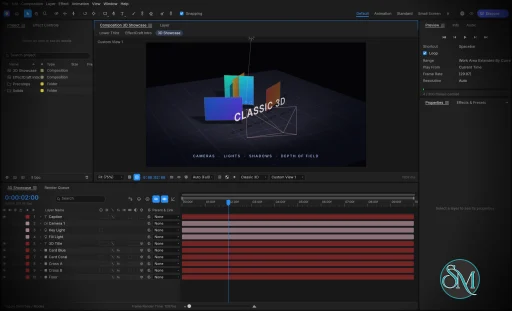
The application focuses on professional animation and compositing workflows, including keyframes, animated text, masks, visual effects, 3D cameras, lights, and a render queue. Its interface follows familiar After Effects conventions, making it easier for experienced motion designers to understand its workflow.
EffectCraft also stands out for its automation capabilities. Projects use a readable JSON-based format, and the application exposes its editing engine through a command-line interface, a JSON control channel, and an MCP server for AI agents.
Features
EffectCraft includes a broad collection of tools for motion graphics and visual effects.
Timeline and keyframes: Animate layer properties with linear, Bezier, hold, and eased interpolation. The Graph Editor provides value and speed graphs for adjusting animation curves.
Layer compositing: Combine text, shapes, footage, nested compositions, adjustment layers, solids, cameras, and lights. Parenting, track mattes, blend modes, and motion blur are supported.
Shape animation: Create shape layers with trim paths, repeaters, rounded corners, gradient strokes, and other procedural shape operators.
Masks and selection: Draw and edit masks with feathering, expansion, and different compositing modes.
Text animation: Work with point text, paragraph text, text animators, range selectors, and text-on-path workflows.
Expressions: Use JavaScript expressions with familiar After Effects-style objects and functions, including
wiggle,loopOut, and layer references.Puppet tools: Animate character and object deformations with pins, mesh controls, rigging, and follow-through.
Visual effects: Apply blur, sharpening, color correction, distortion, keying, noise, stylization, transitions, simulation, and audio effects.
Layer styles: Apply effects such as Drop Shadow, Inner Glow, Outer Glow, Bevel and Emboss, Satin, Stroke, and color overlays.
3D scenes: Work with 3D layers, cameras, lights, depth of field, and shadows.
Motion tracking: Use tracking and analysis tools for motion-related workflows.
Audio support: Preview animations with synchronized audio, waveforms, meters, and audio effects.
Lottie integration: Import and export supported animations for use in websites and applications.
Render queue: Export animations and compositions to video, audio, image sequences, and animated formats.
Automation: Control editing operations through the CLI, JSON interface, and MCP server.
The effects library is particularly ambitious, covering hundreds of effects inspired by familiar After Effects categories. It includes tools for color correction, distortion, keying, simulation, perspective, time manipulation, audio processing, and stylization.
Lottie import and export is another practical advantage. It allows compatible animations to move between EffectCraft and web or application workflows without requiring a separate export plugin.
Download EffectCraft v0.11.1 - Software Mirrors |
|---|
EffectCraft v0.11.1 for Windowseffectcraft-0.11.1-windows-x86.msi | 47.35 MB effectcraft-0.11.1-windows-x86-portable.zip | 60.95 MB effectcraft-0.11.1-windows-x64.msi | 48.66 MB effectcraft-0.11.1-windows-x64-portable.zip | 64.18 MB |
EffectCraft v0.11.1 for macOS |
EffectCraft v0.11.1 for Linuxeffectcraft-0.11.1-linux-x86_64.tar.gz | 61.07 MB effectcraft-0.11.1-linux-x86_64.rpm | 62.12 MB effectcraft-0.11.1-linux-x86_64.flatpak | 39.64 MB effectcraft-0.11.1-linux-x86_64.deb | 62.51 MB effectcraft-0.11.1-linux-x86_64.AppImage.zsync | 198.15 kB effectcraft-0.11.1-linux-x86_64.AppImage | 56.54 MB effectcraft-0.11.1-linux-riscv64.tar.gz | 59.6 MB effectcraft-0.11.1-linux-riscv64.rpm | 60.72 MB effectcraft-0.11.1-linux-riscv64.deb | 60.87 MB effectcraft-0.11.1-linux-aarch64.tar.gz | 57.01 MB effectcraft-0.11.1-linux-aarch64.rpm | 59.1 MB effectcraft-0.11.1-linux-aarch64.flatpak | 34.97 MB effectcraft-0.11.1-linux-aarch64.deb | 59.7 MB |
EffectCraft v0.11.1 for BSD |
Others Download related to EffectCraft v0.11.1 |
EffectCraft v0.11.1 Source Code |
EffectCraft v0.11.1 Release Notes:What's Changed
New Contributors
|
Performance and Compatibility
EffectCraft is written in Rust and uses a modular architecture intended to keep the editing engine independent of the graphical interface. Its rendering system supports GPU acceleration, while CPU-based processing remains available for relevant operations.
The project is designed to run on Windows, macOS, and Linux. A WebAssembly build also allows the editor to run in a browser, with browser storage used for projects and related data.
Its rendering pipeline supports H.264, ProRes, HEVC, AV1, VP9, and Opus, alongside image sequences and other export formats. The project emphasizes Rust-based media processing rather than depending on FFmpeg as its internal encoding and decoding foundation.
EffectCraft also offers a useful approach to project files. Its native .ecproj format uses versioned JSON, making projects easier to inspect, compare, and manage in version control than opaque binary documents.
However, EffectCraft cannot open native After Effects .aep or .aepx project files, and third-party After Effects plugins cannot run in it. Compatibility with individual effects and workflows should therefore be tested before considering a complete migration.
The project is also relatively young. Although its feature list is extensive, the developers acknowledge that real-world workflow reliability and output fidelity still need further validation. Having an equivalent tool does not necessarily mean that it behaves identically to its After Effects counterpart.
System Requirements
EffectCraft supports:
Windows
macOS
Linux
WebAssembly-compatible browsers
Prebuilt desktop packages are available for supported platforms. Linux distributions have access to AppImage, DEB, RPM, and tarball packages, including x86_64 and ARM64 builds.
Building from source requires Rust and the appropriate platform dependencies. The browser version requires a WebAssembly-compatible browser and suitable graphics support.
Because EffectCraft can process complex compositions, performance will depend on the GPU, available memory, footage resolution, effect complexity, and output settings. The project does not yet provide sufficient real-world benchmarking to establish reliable performance expectations for every workload.
Pros and Cons
Pros
Free and open-source
Native Rust architecture
Windows, macOS, and Linux support
Browser-based WebAssembly version
Extensive keyframe and animation controls
Graph Editor with value and speed graphs
Large collection of visual effects
Masks, shape layers, and text animation
Expressions and puppet tools
3D cameras, lights, and depth of field
GPU-accelerated rendering
Broad video and audio export support
Lottie import and export
Readable JSON-based project format
CLI and MCP automation
No telemetry by default
Designed to work offline
Cons
Still a young project
Cannot open native After Effects project files
No compatibility with third-party After Effects plugins
Output fidelity against After Effects has not been comprehensively measured
Some platform-specific workflows still need refinement
Performance on complex projects requires more independent benchmarking
Certain advanced features remain under development
Professional production workflows may require workarounds
How to Install
The easiest way to install EffectCraft is to download a prebuilt package from the project's GitHub releases.
Windows users can use the portable ZIP package. macOS users can install the universal disk image, while Linux users can choose from AppImage, DEB, RPM, or tarball packages.
Developers can build the application from source with Rust:
git clone https://github.com/storytold/effectcraft
cd effectcraft
cargo run --release -p effectcraft
To render a composition from the command line, use the companion CLI:
cargo run --release -p effectcraft-cli -- render --out intro.mp4For AI-agent integration, launch the MCP server:
cargo run --release -p effectcraft-cli -- mcpThese capabilities make EffectCraft particularly interesting for developers building automated animation pipelines or integrating motion graphics into AI-assisted workflows.
Final Verdict
EffectCraft is an ambitious open-source After Effects alternative that combines a familiar animation workflow with a modern Rust-based engine. Its extensive effects library, keyframe controls, expressions, compositing tools, 3D features, and broad export support make it much more than a basic animation editor.
Its most distinctive advantage is automation. The CLI, JSON control channel, readable project files, and MCP server make it possible to integrate motion graphics into scripted and AI-assisted workflows. Lottie support also provides a practical bridge between desktop animation and web development.
The biggest limitation is compatibility and maturity. EffectCraft cannot open native After Effects projects or use its third-party plugins, and its own documentation acknowledges that feature coverage does not yet guarantee production-level reliability or equivalent output quality.
For motion designers, developers, and open-source enthusiasts looking for a capable alternative to proprietary animation software, EffectCraft is a promising project. It is particularly attractive for new projects that can use its native format and automation tools without depending on an existing After Effects workflow.
Post a Comment/Report Broken Link: