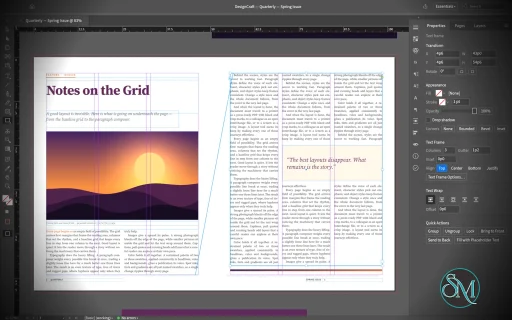
DesignCraft is a free, open-source desktop publishing application designed as an alternative to Adobe InDesign. Built in Rust by the ArtCraft team, it focuses on page layout, typography, multi-page documents, and print-oriented design. Its interface follows familiar desktop publishing conventions, making it approachable for users who already understand professional layout software.
The application supports Windows, macOS, and Linux, with a WebAssembly version for browsers. It also provides command-line tools and automation interfaces that allow compatible AI agents to interact with documents and design controls.
DesignCraft is an interesting option for creating magazines, brochures, newsletters, and other page-based publications without a commercial subscription. However, it is still an early-stage project, so users should carefully evaluate its export options and compatibility with existing publishing workflows before adopting it for production.
Features
Page Layout and Multi-Page Documents
DesignCraft provides a page-layout workspace with spreads, parent pages, layers, frames, and text stories. Its interface is inspired by familiar professional publishing applications, including conventional tools, panels, menus, and keyboard shortcuts.
Users can arrange text and graphics across multiple pages, build consistent layouts, and organize document elements into layers. Parent pages help maintain recurring elements across a publication, while spreads support designs that span facing pages.
These capabilities make DesignCraft suitable for experimenting with magazine layouts, newsletters, brochures, and other editorial projects.
Advanced Typography
Typography is one of DesignCraft's main strengths. Its text engine uses paragraph composition techniques designed to produce consistent line breaks and balanced text blocks.
Features include paragraph and character styles, multiple columns, threaded text stories, baseline grids, tabs, hyphenation, and text wrapping around objects. The engine also supports justification controls, optical margin alignment, and paragraph rules and shading.
These tools give designers greater control over text-heavy publications than a basic drawing application typically provides.
DesignCraft also supports international typography, including Japanese text handling. Its release builds bundle additional fonts to improve Japanese text rendering, while development builds can use the separate font collection or fall back to system fonts.
Frames, Layers, and Text Wrapping
DesignCraft uses frames to position text and graphics within a page. Threaded text frames allow a story to continue across multiple columns or pages, helping manage longer documents.
Layers provide a way to organize complex layouts and separate related elements. Text wrapping allows content to flow around objects such as images and decorative shapes.
These features are particularly useful when designing editorial spreads with headlines, captions, pull quotes, and multi-column body text.
Color and Design Tools
The application includes color management primitives for RGB, CMYK, and Lab color spaces, along with swatches, tints, and gradients.
These capabilities provide a foundation for creating consistent color palettes and designing layouts for different publishing needs. The project also includes tools for working with paths, geometry, measurements, and corner styles.
However, the presence of CMYK support does not automatically make DesignCraft a complete prepress solution. Designers preparing commercial print jobs should verify color output, embedded fonts, bleed settings, and print-production requirements before relying on it for final delivery.
Import, Export, and Document Formats
DesignCraft supports its own documented native document format and can import and export InDesign Markup Language (IDML). This provides a potential migration path for users who want to experiment with existing InDesign documents.
The application also supports PNG export, making it possible to render page layouts as images.
PDF export is listed on the project's roadmap rather than being a fully established production feature. This is a significant limitation for users who need print-ready PDFs as their primary deliverable.
Complex IDML documents should also be tested after import because advanced formatting and application-specific features may not transfer perfectly.
AI and Workflow Automation
DesignCraft includes a JSON control channel and a Model Context Protocol (MCP) server. These interfaces allow compatible automation tools and AI agents to interact with the application.
The control system is designed to expose interface operations, tools, panels, dialogs, and document commands, making it possible to automate layout work rather than relying entirely on manual mouse interactions.
A command-line application can also render documents in headless workflows. For example, the project provides a command for rendering every page of its sample document to PNG files.
This architecture makes DesignCraft particularly interesting for developers exploring automated publishing, template generation, and AI-assisted document creation.
EPUB Export and Digital Publishing
DesignCraft can export documents as EPUB files, extending its usefulness beyond printed publications. This provides an option for creating digital editions of magazines and other text-based layouts.
The export workflow is still evolving, so users should inspect the resulting EPUB in their intended reading applications, particularly when documents contain complex typography, columns, or custom layouts.
Download DesignCraft v0.9.0 - Software Mirrors |
|---|
DesignCraft v0.9.0 for Windowsdesigncraft-0.9.0-windows-x86.msi | 59.39 MB designcraft-0.9.0-windows-x86-portable.zip | 74.58 MB designcraft-0.9.0-windows-x64.msi | 60.71 MB designcraft-0.9.0-windows-x64-portable.zip | 77.53 MB designcraft-0.9.0-windows-arm64.msi | 56.82 MB designcraft-0.9.0-windows-arm64-portable.zip | 73.66 MB |
DesignCraft v0.9.0 for macOSdesigncraft-cli-0.9.0-macos-universal.zip | 67.82 MB designcraft-0.9.0-macos-universal.dmg | 86.63 MB |
DesignCraft v0.9.0 for Linuxdesigncraft-0.9.0-linux-x86_64.tar.gz | 77.64 MB designcraft-0.9.0-linux-x86_64.rpm | 78.4 MB designcraft-0.9.0-linux-x86_64.pkg.tar.zst | 74.4 MB designcraft-0.9.0-linux-x86_64.flatpak | 53.6 MB designcraft-0.9.0-linux-x86_64.deb | 78.78 MB designcraft-0.9.0-linux-x86_64.AppImage.zsync | 255.87 kB designcraft-0.9.0-linux-x86_64.AppImage | 73.03 MB designcraft-0.9.0-linux-riscv64.tar.gz | 76.22 MB designcraft-0.9.0-linux-riscv64.rpm | 77.02 MB designcraft-0.9.0-linux-riscv64.deb | 77.2 MB designcraft-0.9.0-linux-aarch64.tar.gz | 74.19 MB designcraft-0.9.0-linux-aarch64.rpm | 75.65 MB designcraft-0.9.0-linux-aarch64.pkg.tar.zst | 71.15 MB designcraft-0.9.0-linux-aarch64.flatpak | 49.97 MB designcraft-0.9.0-linux-aarch64.deb | 76.14 MB designcraft-0.9.0-linux-aarch64.AppImage.zsync | 244.34 kB designcraft-0.9.0-linux-aarch64.AppImage | 69.74 MB |
DesignCraft v0.9.0 for BSDdesigncraft-0.9.0-freebsd-x86_64.tar.gz | 77.51 MB |
Others Download related to DesignCraft v0.9.0designcraft-web-0.9.0.zip | 18.36 MB |
DesignCraft v0.9.0 Source Code
DesignCraft v0.9.0 Source code (zip)
DesignCraft v0.9.0 Source code (tar.gz)
|
DesignCraft v0.9.0 Release Notes: What's Changed- Swatches panel header like InDesign's (Fill/Stroke proxy, container/text, Tint); swatches go to the fill or stroke in front (blocked by #592) by @moppeeer in #838
- Object › Fitting with InDesign's shortcuts (Fill Frame Proportionally Ctrl+Alt+Shift+C, …) by @moppeeer in #840
- Respect Find/Change scope and first-match limits by @sanyamsingh001 in #845
- fix: repaint canvas when entering and leaving parent editing by @harrisonoconnorhover in #855
- Page tool: click selects a page; its handles preview the liquid rule, Alt-drag resizes, Shift keeps proportions by @moppeeer in #862
- Control panel for the Page tool (W/H, preset, orientation, Liquid Page Rule); Controlled by Parent; Show Parent Page Overlay (blocked by #862) by @moppeeer in #864
- Page tool: liquid pins and resize locks on the canvas for object-based pages (blocked by #862, #864) by @moppeeer in #866
- Liquid Layout panel in InDesign's layout (Auto-Fit, Object Constraints); Create Alternate Layout in the Layout menu (blocked by #864) by @moppeeer in #867
- Pages panel: Alt-drag copies a page, drop a page on Create new page, Edit page size; duplicates keep their size by @moppeeer in #869
- Pages panel menu in InDesign's order (blocked by #869) by @moppeeer in #870
- Gradients between process colours blend as inks (C 50 M 50 halfway), as InDesign shows them by @moppeeer in #836
- Page tool draws liquid guides from the rulers (dashed), as in InDesign by @moppeeer in #868
- Layout: Table of Contents dialog, entry options and IDML TOC styles by @aiongg in #850
- Control: bound click and drag input before queuing events by @MMexicann in #859
- refactor(pdf): use guarded shared writing by @skylartaylor in #875
- Path edits respect locked layers; Properties links open panels when docking is on by @aiongg in #795
- Images: reject EPS bounding boxes with nonfinite corners or size (#740) by @MarekSpodBiedry in #810
- Fix overset preflight page for frames inside translated groups (#738) by @MarekSpodBiedry in #812
- fix(pdf): leave form fields and media out of PDF/A-2b exports (#743) by @MarekSpodBiedry in #815
- fix(cli): reject --pdf-options that is not a JSON object instead of panicking (#731) by @MarekSpodBiedry in #817
- Keep a missing graphic missing when it is pasted into another document (#720) by @MarekSpodBiedry in #819
- fix(geom): decompose of a flattened transform reports 0 shear instead of NaN by @saadkhantareen in #820
- Window menu in InDesign's order; Window › Workspace with Essentials Classic by @moppeeer in #832
- Typography panel by @andrestelex in #881
- Facing pages take their side from their section's page numbers (odd on the right), as InDesign shuffles them by @moppeeer in #889
- Type menu in InDesign's order; Character ⌘T, Paragraph ⌥⌘T, Current Page Number ⌥⇧⌘N by @moppeeer in #894
- ui_shot: render every script line so long scripts don't time out on the GPU by @moppeeer in #895
- Linux: build an Arch package (.pkg.tar.zst) by @ujo4eva in #903
- Render: wide effect blurs are drawn at a lower resolution by @noah1400 in #912
- Color parsing: bare CMYK is always 0..100, so C 1 is a 1 % tint by @marcoarnulfo in #913
- Package: a missing link stays missing, with no empty file in Links/ by @marcoarnulfo in #914
- PDF: a placed PDF 1.7 with /Version /1.7 in its catalog goes into PDF/X-4 exports by @marcoarnulfo in #917
- packaging: RPM requires library sonames, so openSUSE can install it by @tydude001 in #928
- Images: indexed-colour TIFFs decode through their palette by @marcoarnulfo in #930
- Type tool: a press over a locked empty frame draws a new text frame instead of converting it by @moppeeer in #933
- Show 100% black as rich black on screen by default, as InDesign does by @moppeeer in #940
- Type: let a blank line's hidden paragraph mark take leading immediately by @zydvc26s67-web in #949
- Fix overflow in layout.pages.insert when
after is u64::MAX by @Silvertree2010 in #951 - Keep viewBox-only placed SVGs at viewBox size on IDML import by @Silvertree2010 in #952
- math: cap LaTeX expression nesting depth so hostile input can't overflow the stack by @midasmatterhorn in #954
- Fix the AppStream screenshot URL and caption by @IanHollow in #957
- Pathfinder keeps the frontmost object, as InDesign does (a photo intersected with shapes shows through them) by @moppeeer in #958
- layout.section: keep the settings the command does not name by @midasmatterhorn in #964
- script.run: roll a failed script back instead of stranding its edits by @midasmatterhorn in #966
- guard: restore the whole command transaction on a panic by @midasmatterhorn in #967
- Color panel: the Tint field keeps typed text and applies it on Enter or leaving the field by @guillehr2 in #968
- IDML: import and export ruler guides by @moppeeer in #974
- Find Font: a style that differs only in spacing isn't reported missing by @moppeeer in #978
- i18n: Georgian (ka) interface language by @devius in #979
- UI: CJK interface text from installed fonts, on the Latin baseline by @con3code in #394
- UI: Alt + wheel zooms the view at the pointer by @noah1400 in #491
- pt-BR: complete the interface translation by @WladmirJunior in #495
- Selection tool: Alt and Shift resize around the centre and keep side-handle drags centred by @aiongg in #497
- UI: show Tamil, Indic, Southeast Asian and other scripts from installed fonts by @aiongg in #504
- feat: Add UI checkbox for Optical Margin Alignment (#494) by @mjohnson7cd in #509
- SVG text: find fonts by PostScript name (#430) by @itrycodinganditsbad in #548
- Sections: the section marker shows the section's marker text by @aiongg in #559
- fix(compose): enable Norwegian hyphenation patterns by @AkashBhat14 in #565
- Swatches: Load Swatches refuses .ase files over 100,000 colors and merges in linear time by @dotCooCoo in #567
- Blend modes don't blend with the paper by @moppeeer in #570
- Gradient feather on a group: fade it on screen, and don't hide it in PDF by @moppeeer in #577
- Footnotes: notes stack baseline to baseline by @aiongg in #584
- (fix)Small frame wrap for overset small text boxes by @seanth in #589
- Place: with no frame selected, the graphic loads into the place cursor by @aiongg in #599
- MCP: confine file access with --automation-read-root and --automation-write-root by @isaac-levine in #604
- Styles: selection capture accepts deleted-swatch fills by @KnottyDyes in #606
- Complete the Arabic (العربية) catalog: every missing key translated by @hasan-sdaif in #629
- fix(index): keep level 3 and 4 topics in a run-in index by @webdevtodayjason in #637
- Eyedropper: a sampled colour goes to the stroke when the Stroke box is in front by @moppeeer in #648
- Text: stroke behind fill by @aiongg in #657
- Word import: bullets and numbering from numbering.xml by @aiongg in #658
- macOS: open the window on Intel Metal by skipping indirect-call validation by @fabian-co in #664
- Copy a selected placed graphic on its own, so Paste Into puts the whole image in place by @moppeeer in #691
- test: make the MCP reconnect test socket blocking on macOS by @haranishi in #692
- Effects apply to frames with pasted-in content (Inner Glow, Basic Feather, shadows…) by @moppeeer in #698
- fix: show source paths in the Links panel by @haranishi in #703
- fix(tables): keep each table anchor in its own paragraph by @noah1400 in #704
- Text Wrap panel: four offsets with the link button, and Invert by @moppeeer in #751
- Dialogs: drag the title to move the window by @aiongg in #759
- Scripts: GREP replacements like
$1 stay literal by @aiongg in #760 - Radial gradients stretch with the object's box (an ellipse), as InDesign draws them by @moppeeer in #765
- EPUB/HTML: anchored objects are exported where they are anchored by @switch87 in #779
- Recovery: an explicit recovery folder never overwrites another instance's checkpoints by @aiongg in #793
- IDML export keeps overridden parent items by @aiongg in #799
- macOS: menu-bar commands run at once by @aiongg in #801
- MCP: render_page and screenshot are not read-only because they can write to path (#733) by @MarekSpodBiedry in #813
- fix(render): cap the failed-image cache at 64 entries (#728) by @MarekSpodBiedry in #814
- fix: eyedropper ignores inactive states of a multi-state object (#737) by @MarekSpodBiedry in #816
- Layers panel: the selection shows in it, images are listed by file name, double-click renames an object by @govindaroyaiub in #936
- dtd: cap parameter-entity expansion instead of trusting a pass count by @midasmatterhorn in #965
- Text recomposes when the baseline grid, a wrap layer's visibility or section numbering changes by @aiongg in #796
- #21: opening or dropping an InDesign file says how to bring it over by @Nmarello in #824
- Compose: spaces at the end of a paragraph take no room on the line by @govindaroyaiub in #828
- Text: kerning takes a typed value, and the Character panel has it by @govindaroyaiub in #901
- Tools panel as InDesign's: Gradient Feather its own tool, two-column layout, View Options, Apply Color (,) and Apply Gradient (.) by @moppeeer in #925
- A line of text is set when its baseline fits in the frame, as in InDesign (descenders may hang below) by @moppeeer in #976
- An empty last paragraph isn't overset text, as in InDesign by @moppeeer in #977
- Gradient swatches on text, laid across the text frame as in InDesign by @moppeeer in #825
- idml: cap IDML package part size on import instead of reading unbounded by @midasmatterhorn in #921
- fix: find optical-size fonts named by their WWS family and style (#911) by @MarekSpodBiedry in #935
- Margins and Columns and Create Guides laid out as InDesign's: link button, Preview, arithmetic on leaving a field (blocked by #468) by @moppeeer in #937
- Fill with Placeholder Text in paragraphs, as InDesign does by @moppeeer in #959
- Pathfinder panel laid out as InDesign's: Paths, Pathfinder, Convert Shape, Convert Point (with Join Path and Convert Point commands) by @moppeeer in #960
- idml: read PDFAttribute PageNumber so placed PDFs show their page by @midasmatterhorn in #963
- Preserve stored IDML page liquid rules by @sanyamsingh001 in #972
- Flex Layout (InDesign 2026): containers that lay out their objects, the Flex Layout panel and Object › Flex Layout by @moppeeer in #973
- IDML: InDesign's default CJK leading model only with a Japanese composer (Western text spaced as InDesign) by @moppeeer in #975
- Layout: parent-page margins and guides, Create Guides on the current page, ruler-unit-aware Margins and Columns by @soro-82 in #468
- CMYK blend space: blend modes blend in CMYK on screen by @moppeeer in #588
- Bump quick-xml to 0.41: linear-time attribute check on .docx/.xlsx import (RUSTSEC-2026-0194, -0195) by @natocool2 in #687
- Create Outlines makes one compound path per line, so Ungroup separates the lines by @moppeeer in #688
- Ctrl/Cmd + the + key zooms the canvas, not the whole window by @PiMinusMax in #757
- Swatches: dropping an .ase file on the window loads its swatches by @dotCooCoo in #764
- EPUB/HTML: list paragraphs share one ul/ol, and pre lines one block by @switch87 in #780
- EPUB: the navigation lists the headings, with a title in the book's language by @switch87 in #782
- EPUB: real modified time, a stable unique identifier, and a cover image file by @switch87 in #783
- EPUB/HTML: generic font fallback from the font's class, and optional font embedding by @switch87 in #787
- Styles: name the attributes in the params docs, and a wrong one in the command's error by @switch87 in #789
- EPUB: one content file per chapter, split before each h1 by @switch87 in #791
- Word import: table cells skip deleted text and field codes; Normal style formatting is kept by @aiongg in #797
- EPUB export includes tables, footnotes and endnotes by @aiongg in #798
- Gradient strokes: on screen, in PDF, in IDML and the Gradient panel by @moppeeer in #823
- Footnotes: Span Footnotes Across Columns sets notes across the frame by @marcoarnulfo in #918
- Canvas & Tools panel: Selection is filled arrow, Direct Selection hollow arrow (fixes #437, #438) by @el-j in #929
- Type tool: dead keys and input-method composition on the canvas by @andrestelex in #887
- feat(pptx): export documents as editable PowerPoint presentations by @PhilippKrueger in #170
- Paragraph and Character Styles: wire save and delete into the UI (#169) by @zydvc26s67-web in #171
- Warichu: hostile line spacing and break minimums can't break layout by @aiongg in #302
- IDML: text in a paragraph-level cross-reference source keeps its formatting by @aiongg in #304
- fix(geom): prevent invalid zoom values from breaking ruler ticks by @Ni-zav in #306
- fix(layout): reject invalid spread rotation angles by @Ni-zav in #307
- fix(geom): correct pica and cicero rounding at unit boundaries by @Ni-zav in #308
- i18n: translate the whole interface into German by @dwetscher in #311
- Text: combining marks that start a run are shaped with their base letter by @aiongg in #317
- Fix help buttons disabled when on homepage by @crqch in #329
- fix(ui): Highlight swatch list rows and keep panels clear of scroll bars by @moppeeer in #344
- Route macOS text clipboard commands through egui by @ironinthesoul in #349
- Compose: No Break runs and nonbreaking spaces stretch on justified lines by @aiongg in #372
- UI: no crash on textures past the GPU limit by @con3code in #393
- UI: the welcome screen's Discord button clears the text beside it by @con3code in #396
- Fonts: a pan-CJK font's family name decides its font menu group by @con3code in #413
- Preserve endnote and editorial payloads in text slices by @sanyamsingh001 in #458
- Docs: explain hyphenation defaults and image fitting modes to agents by @KnottyDyes in #463
- Fonts: discover Linux user fonts in XDG_DATA_HOME by @KnottyDyes in #464
- Recover document copies after browser graphics loss by @sanyamsingh001 in #471
- Moving a sheared, rotated text frame leaves no text trails by @moppeeer in #472
- Show the first parent page behind single-sided pages (#429) by @MarekSpodBiedry in #474
- Fix needless horizontal scrollbar in the app bar at 115% scale (#481) by @MarekSpodBiedry in #488
- Skip .ase swatches with NaN or infinite colour components by @Silvertree2010 in #982
- UI: document views have scrollbars, and Alt pans while editing text by @aiongg in #446
- Keep '-' after an RTF control word when no digit follows by @Silvertree2010 in #1042
- fix(export): reject oversized page selections by @skylartaylor in #1089
- ci: add nix check workflow by @dylanmtaylor in #1101
- feat(installer): unify Windows setup and completion screens by @skylartaylor in #1103
- Integration batch: 197 PRs on main by @aiongg in #1139
- fix: IDML links in a subfolder beside the package load on another machine by @Kerrrunchhh in #1015
- Window > Paragraph Styles opens the floating Character Styles | Paragraph Styles group, as InDesign does by @moppeeer in #1022
- idml: one unusable CJK metric no longer refuses the whole file by @midasmatterhorn in #1027
- Objects snap to the bleed guide by @pepen11 in #1034
- The status bar's error count opens the Preflight panel by @pepen11 in #1035
- Overset marks for text frames inside groups (ports when selected; the red mark always) by @pepen11 in #1036
- Layout: First/Previous/Next/Last Page and Next/Previous Spread, with InDesign's shortcuts by @moppeeer in #1043
- View: Presentation shows one spread fitted to the screen; arrow keys and clicks go through the spreads by @moppeeer in #1044
- Keep text of inline content controls in DOCX import by @Silvertree2010 in #1054
- Canvas: pages show their paper while their render is on its way, not black by @moppeeer in #1056
- Pages: deleting pages that contain objects asks first, with Don't show again by @moppeeer in #1058
- Properties: Edit Page takes the Page tool to the page and sets that page's size, as InDesign's by @moppeeer in #1059
- Styles: show paragraph overrides and clear them from the row menu by @moppeeer in #1060
- Styles: captured text follows later style edits by @moppeeer in #1061
- Styles: preview paragraph and character style edits before applying them by @moppeeer in #1062
- UI: Typography opens with its named panel groups and a clear page by @moppeeer in #1063
- Styles: redefine paragraph and character styles from local formatting by @moppeeer in #1064
- Styles: show captured color and spacing in Paragraph Style Settings by @moppeeer in #1065
- Pages panel: Panel Options (sizes, thumbnails, parents side by side, pages on top, resize), as InDesign's by @moppeeer in #1067
- Table › Convert Rows › To Header, To Body and To Footer, as in InDesign by @marcoarnulfo in #1068
- Units: inches show four decimals, as InDesign's fields (0.1667 in, 8.2677 in) by @moppeeer in #1073
- Rulers: the corner where they meet sets both rulers' units; ruler menus as InDesign's by @moppeeer in #1074
- Thread the loaded text cursor into a text frame inside a group by @Hamza0101 in #1075
- Tools: a tool group's flyout closes on Esc and on a click outside it, as InDesign's by @moppeeer in #1076
- Hyphenate Greek by @Hamza0101 in #1077
- Color Theme: extract a placed image palette and add it to Swatches by @moppeeer in #1079
- Fill and stroke with nothing selected set the colours of new shapes, as InDesign's document defaults by @moppeeer in #1081
- Canvas: Enter and Tab in a panel field no longer reach the selected text by @marcoarnulfo in #1090
- Contributors: add Marco Arnulfo by @marcoarnulfo in #1098
- Add A0, A1 and A2 poster page presets by @harrisonoconnorhover in #1099
- New Swatch names a gradient "New Gradient Swatch"; gradient swatches from colour swatches by @moppeeer in #763
- Story Editor stays with its document; Undo restores the selection from before the command by @aiongg in #794
- PDF export leaves out form fields, buttons and media that aren't shown by @aiongg in #800
- Open .indd and .indt files through indd-utils by @aiongg in #808
- fix: drop the background render when a display option changes (#730) by @MarekSpodBiedry in #818
- End the RTF \uN fallback skip at the end of its group by @Silvertree2010 in #985
- Flatten deleted text variables in table cells and notes by @Silvertree2010 in #986
- Type menu: Define Lists path matches the menu by @aiongg in #989
- Toolbar: Apply Gradient on the stroke is one undo step by @aiongg in #991
- Sections: consecutive right pages get separate spreads by @aiongg in #992
- Effects: wide feathers and inner effects stay sharp at high zoom by @aiongg in #994
- Typography panel: every OpenType toggle, exported figure styles, working Standard Ligatures by @aiongg in #995
- Paths: Join and Convert Point respect locked layers and groups by @aiongg in #996
- Kerning: a value at the caret kerns the pair at the caret by @aiongg in #997
- Type tool: a drag after several clicks extends the selection by words, lines or paragraphs (#981) by @wstock in #1000
- Importers: XML element nesting and DTD group nesting are bounded (#712) by @wstock in #1001
- Tools: Cmd held with another tool borrows the Selection tool for one gesture (#919) by @wstock in #1002
- IDML: preserve liquid guides on document and parent pages by @keynepekar in #1010
- Text: Digits setting in the Character panel and character styles; page numbers and list numbers follow it by @soro-82 in #1012
- i18n(de): clearer terms, missing strings, six hard-coded dialog labels by @danielwbittner-hub in #1013
- Panel tabs: InDesign's Close, Close Tab Group, Minimize and Collapse to Icons by @moppeeer in #1021
- New Workspace: Capture Panel Locations and Menu Customization, as InDesign's by @moppeeer in #1024
- docx: an explicit off imports as off by @midasmatterhorn in #1029
- Fix \rightarrow closing a \left fence early in math expressions by @Silvertree2010 in #1038
- Reject threading that would create linked-story ancestor cycles by @sanyamsingh001 in #1040
- UI: Tab, Shift+Tab and Presentation hide the flyout and floating panels too by @moppeeer in #1045
- UI: double-clicking the status bar's preflight count shows the Preflight panel (builds on #1035) by @moppeeer in #1046
- Pages panel: parents and pages scroll on their own, a divider resizes them, the footer stays at the bottom by @moppeeer in #1066
- Table of Contents: page number and separator character styles, Sort Entries in Alphabetical Order by @switch87 in #1070
- Layers: a slow double-click renames an object, a quick one only selects, as InDesign's by @moppeeer in #1083
- Placed greyscale and bitmap images take the swatch applied to them, as in InDesign (IDML, screen, PDF) by @marcoarnulfo in #1100
- Honor IDML SameParaStyleSpacing between same-style paragraphs (#449) by @MarekSpodBiedry in #473
- UI: make the application bar's search field find and run commands by @aiongg in #499
- IDML: import and wrap around custom text-wrap boundaries by @aiongg in #500
- View: leave Presentation mode with Esc or Shift+W by @aiongg in #503
- Tint and Apply To in the Properties Fill and Stroke menus by @moppeeer in #525
- IDML: a spread's view rotation is read and written by @aiongg in #529
- View: draw the document grid by @aiongg in #532
- Type: a Justification dialog for the selected paragraphs by @aiongg in #533
- Transform values act on a selected placed graphic, not its frame by @moppeeer in #550
- docs: add user docs in docs/user by @itrycodinganditsbad in #553
- IDML: font family names keep their spaces; FontStyle "Nothing" inherits by @aiongg in #560
- Text wrap: anchored objects wrap text by @aiongg in #563
- Styles: Load Styles from another document or IDML file by @noah1400 in #571
- IDML: tracked deleted text takes no room in the layout by @aiongg in #583
- Double-click a frame handle to fit the frame to its content; Fit Frame to Content fits text frames by @moppeeer in #591
- Canvas: arrow keys and Tab keep keyboard focus on the canvas by @aiongg in #598
- Tables: drag row and column borders with the Type tool by @aiongg in #601
- UI: spring-loaded zoom (Cmd+Space / Cmd+Alt+Space) by @rasnoland in #608
- Add a Nix flake (NixOS, GNOME and Hyprland) by @untypequicode in #611
- Windows: dragging across monitors with different scales doesn't grow or crash the window by @aiongg in #631
- Text frames: auto-size grows and shrinks frames to fit their text by @aiongg in #632
- Text frames: Balance Columns evens out the last frame's columns by @aiongg in #633
- Pages panel: double-clicking a parent shows that parent; parent thumbnails by @aiongg in #635
- The Effects dialog: Object › Effects and the panel's fx button, with Preview by @moppeeer in #643
- feat(i18n): translate the French interface by @Atalantis in #645
- Autoflow: one frame per column, as the page's columns are set by @aiongg in #655
- Type: Alt+Left/Right kerns at the caret and tracks a selection by @aiongg in #656
- Images: CMYK and profiled photos show in their colours by @aiongg in #659
- Color Picker and Color panel: typed values stay; colours are read on a fixed scale by @aiongg in #660
- Text frames: lines follow an oval or polygon frame's shape by @aiongg in #661
- fix(import): preserve XLSX numeric and cached text values by @storybored379 in #673
- Parents: a parent can be based on another parent by @aiongg in #674
- Styles: object styles carry effects by @aiongg in #675
- New Document: Preview by @aiongg in #683
- Ungroup leaves frames with pasted-in content whole; name them by their shape by @moppeeer in #689
- Resize a selected placed graphic by its own handles (blocked by #415, #550) by @moppeeer in #699
- docs: fix the README font integration link by @haranishi in #701
- fix: use group transforms for HTML and EPUB reading order by @haranishi in #702
- Text Frame Options laid out as InDesign's: columns type and width, inset link, Ignore Text Wrap, Baseline Options by @moppeeer in #753
- Save: delegate atomic writes to craft-atomic by @aiongg in #758
- Colour management on craft-cms by @aiongg in #761
- Saving: an error never leaves an empty file or a document marked saved by @aiongg in #792
- File › Open Recent, and recent files with previews on the start screen by @PiMinusMax in #802
- Refuse command params the description doesn't name (#776) by @switch87 in #803
- Preferences: OK without vertical units keeps them by @noah1400 in #807
- Eyedropper: with text selected, pick up the clicked text's formatting, as InDesign does by @moppeeer in #983
- Swatches: Load Swatches numbers repeated .ase names and names unnamed colors by value by @dotCooCoo in #988
- Layers: Enter in the rename field keeps an unnamed object's automatic label by @aiongg in #990
- Type: formatting set on a blank line applies to the text typed there by @aiongg in #993
- docs: add public font integration guidance to README by @haranishi in #998
- Scaling a text frame scales its text, as InDesign's When Scaling: Apply to Content by @moppeeer in #1007
- fix(text): Character panel: VF sliders preview live implementation by @andrestelex in #1011
- UI: Paragraph Style Options gains the remaining sections by @aiongg in #359
- Paragraph borders, shading, span space and list levels: every setting from model to dialog by @aiongg in #360
- Paste: copied objects land on the spread in view by @noah1400 in #369
- UI: a context menu on the canvas for objects, text and the page by @aiongg in #373
- feat(i18n): apply russian language by @wondarkus in #374
- Layers: drag layers and objects to reorder them by @aiongg in #378
- Startup: pick the GPU that drives the display, fall back across adapters and backends, and log startup errors by @aiongg in #380
- Layout: text wrap set on a placed graphic wraps text by @aiongg in #381
- Layout: right-to-left binding puts parent page items on the right side by @aiongg in #382
- Sections: Kanji page numbers by @aiongg in #383
- macOS: the menu bar follows the interface language at once by @con3code in #397
- Undo: a command that runs another is one undo step by @noah1400 in #411
- Tools: move a placed graphic inside its frame by @aiongg in #415
- Swatches and layers: Swatch Options and Layer Options dialogs rename them by @aiongg in #416
- Documents: Save adds .designcraft, and the OS opens DesignCraft and IDML files by @aiongg in #417
- IDML: frames take corners, effects and text wrap from their object style by @aiongg in #418
- IDML: gradient and directional feathers import and export by @aiongg in #419
- PDF: right-to-left text extracts in reading order by @aiongg in #421
- PDF: generated text keeps its characters under small caps by @aiongg in #422
- CJK: smaller runs align to the line's em box centre by @aiongg in #423
- CJK: custom mojikumi tables without a base set apply their rules by @aiongg in #424
- Text: Optical kerning spaces pairs from their outlines by @MaridWSH in #427
- PDF: items with soft effects keep their text wrap by @aiongg in #433
- Objects: group siblings inside a group; refuse mixed levels and spreads by @aiongg in #434
- macOS: the window buttons sit centred in the title bar by @aiongg in #442
- Fonts: macOS fonts that font services and managers activate are listed by @aiongg in #443
- Tools: live corners round a frame's corners by dragging by @aiongg in #444
- macOS: Settings… is in the app menu by @aiongg in #445
- i18n: translate print, import and table controls by @haranishi in #454
- Wrap saved story revision increments consistently by @sanyamsingh001 in #456
- feat(ui): Lay out the font menu like InDesign's by @moppeeer in #466
- feat(ui): Lay out Document Setup like InDesign's by @moppeeer in #469
- CLI: --export writes the file type its extension names by @noah1400 in #475
- Tools panel: Selection is the filled arrow, Direct Selection the hollow one by @aiongg in #486
- Pen: a click does what the cursor shows over an open path's end point by @aiongg in #487
- i18n: Czech interface language by @Losminek in #490
- Text: copied text keeps its endnotes and editorial notes by @aiongg in #498
- Layout: parent pages pass margins and guides to their pages by @aiongg in #501
- UI: set the interface language in Preferences by @aiongg in #502
- Images: clipping paths from IDML clip the image on screen and in PDF by @aiongg in #561
- IDML: anchored objects take unset settings from their object style; left-aligned X offsets read in the layout's direction by @aiongg in #562
- feat(desktop): portable mode, portable.txt next to the executable (#574) by @marcoarnulfo in #580
- Paste vector art from Illustrator, VectorCraft or Figma as editable paths by @moppeeer in #618
- Gradient panel in InDesign's layout; drop swatches from the Swatches panel onto its stops by @moppeeer in #826
- i18n: add Polish interface language by @lewandowskit in #829
- Text: kerning survives a colour change (#29) by @aiongg in #81
- Layout: first baselines, Jump Object wrap, drop caps, IDML defaults by @aiongg in #83
- Compose: an empty paragraph takes its mark's character format by @denizkoekden in #96
- Compose: fit horizontal text frames by the last baseline by @skylartaylor in #106
- README: install on Gentoo from the ::snakebyte overlay by @switch87 in #121
- IDML: preserve anchored text frames and footnote artwork by @ShaoWenbinSaleh in #124
- Fix composite font resolution, missing-glyph diagnostics, and document-wide font replacement by @ShaoWenbinSaleh in #126
- Fix IDML Mojikumi spacing, kinsoku composition, and nested text preflight by @ShaoWenbinSaleh in #129
- Memory: release retired layouts and reserve text growth exactly by @skylartaylor in #177
- fix(ui): Integrate Windows window controls into the menu bar by @moppeeer in #253
- fix(ui): Compact the Advanced object Control panel into aligned rows by @moppeeer in #255
- IDML: text variables keep their text by @aiongg in #301
- Preserve explicit nullable text defaults when reopening documents by @sanyamsingh001 in #305
- Snap: smart guides beat the baseline grid; a box centres between two others by @noah1400 in #309
- Justification: tight word spacing doesn't isolate a word; fixed-width spaces don't stretch by @aiongg in #310
- Retry missing font fallbacks after a font rescan by @sanyamsingh001 in #315
- GREP: the dialect's classes and metacharacters (\l \u \h, ~ codes, lookaround) in GREP styles and Find/Change by @aiongg in #316
- DTD: bound parameter-entity expansion, nesting and sequence matching by @haranishi in #319
- feat(ui): Lay out the New Document window like InDesign's by @moppeeer in #325
- Compose: page numbers take the Digits setting of their text by @aiongg in #331
- UI: CJK features behind a preference that follows the interface language by @aiongg in #336
- feat(engine): Document chapter numbering and section prefix rules by @moppeeer in #341
- feat(ui): Lay out Numbering & Section Options like InDesign's by @moppeeer in #342
- Tabs: commands, Tabs panel and a Tabs section in Paragraph Style Options by @aiongg in #343
- Layout: section start numbers are bounded and page numbering can't overflow by @aiongg in #346
- Text: the paragraph mark's size counts in its line's auto leading by @aiongg in #357
- Rulers: a document zero point, a ruler origin, and guides from the ruler corner by @aiongg in #358
- IDML:
$ID/ font names, placed PDF page and crop, package IDML without embedded images by @aiongg in #362 - CJK: ruby, kenten, shatai, auto tate-chu-yoko, grid references and the leading model by @aiongg in #363
- UI: CJK sections in Paragraph and Character Style Options by @aiongg in #364
- UI: every CJK section in the style dialogs, and the full Ruby dialog by @aiongg in #365
- Text: input method (IME) composition in the Type tool by @aiongg in #366
- Tables: cell edge strokes in the Stroke panel and Cell Options, with gap colour and tint by @aiongg in #379
- Layout: wrap both sides of an object and around its contour by @aiongg in #384
- Align panel: add objdistribute- icons, reuse upstream objalign- by @vxkj1211 in #408
- Compose: the CJK leading model and character alignment apply only under the Japanese composers by @aiongg in #330
- fix(ui): Show the Pencil stroke while drawing by @moppeeer in #388
- Graphics: keep a failed OpenGL out of the instance by @Hamza0101 in #1164
- Fix relink atomicity and EPS source retention by @skylartaylor in #150
- Follow paths stored in documents only on this computer or the document's share by @skylartaylor in #1236
New Contributors- @harrisonoconnorhover made their first contribution in #855
- @MMexicann made their first contribution in #859
- @MarekSpodBiedry made their first contribution in #810
- @saadkhantareen made their first contribution in #820
- @andrestelex made their first contribution in #881
- @ujo4eva made their first contribution in #903
- @tydude001 made their first contribution in #928
- @zydvc26s67-web made their first contribution in #949
- @Silvertree2010 made their first contribution in #951
- @midasmatterhorn made their first contribution in #954
- @IanHollow made their first contribution in #957
- @guillehr2 made their first contribution in #968
- @devius made their first contribution in #979
- @con3code made their first contribution in #394
- @WladmirJunior made their first contribution in #495
- @mjohnson7cd made their first contribution in #509
- @itrycodinganditsbad made their first contribution in #548
- @AkashBhat14 made their first contribution in #565
- @isaac-levine made their first contribution in #604
- @hasan-sdaif made their first contribution in #629
- @fabian-co made their first contribution in #664
- @Nmarello made their first contribution in #824
- @soro-82 made their first contribution in #468
- @natocool2 made their first contribution in #687
- @PiMinusMax made their first contribution in #757
- @el-j made their first contribution in #929
- @PhilippKrueger made their first contribution in #170
- @Ni-zav made their first contribution in #306
- @dwetscher made their first contribution in #311
- @crqch made their first contribution in #329
- @ironinthesoul made their first contribution in #349
- @Kerrrunchhh made their first contribution in #1015
- @pepen11 made their first contribution in #1034
- @Hamza0101 made their first contribution in #1075
- @wstock made their first contribution in #1000
- @keynepekar made their first contribution in #1010
- @danielwbittner-hub made their first contribution in #1013
- @rasnoland made their first contribution in #608
- @untypequicode made their first contribution in #611
- @Atalantis made their first contribution in #645
- @wondarkus made their first contribution in #374
- @MaridWSH made their first contribution in #427
- @Losminek made their first contribution in #490
- @lewandowskit made their first contribution in #829
- @vxkj1211 made their first contribution in #408
Full Changelog: v0.8.0...v0.9.0 |
Performance and Compatibility
DesignCraft is written in Rust and uses a modular architecture that separates document handling, typography, rendering, and the user interface. Its rendering engine supports multithreaded processing and cached text composition, while copy-on-write document snapshots help make undo operations efficient.
The application runs on Windows, macOS, Linux, and FreeBSD. A WebAssembly build also runs in modern browsers, using WebGPU when available and WebGL2 as a fallback.
For document interchange, DesignCraft supports IDML import and export. It also exports PNG, PDF, and EPUB files, although complex documents should be checked carefully before being used in professional production workflows. PDF export includes selectable text and embedded font subsets, with color and print-layout features such as bleed boxes and crop marks.
The main limitation is maturity. DesignCraft is an actively developed project, and compatibility with complex InDesign documents, advanced publishing features, and professional print requirements should not be assumed. Its own documentation identifies further work on publishing workflows and PDF/X-4 output.
System Requirements
Operating systems: Windows, macOS, Linux, and FreeBSD.
Browser support: WebAssembly build for modern browsers.
Windows architectures: x86, x64, and ARM64.
Linux architectures: x86-64 and ARM64.
macOS: Universal build for Intel and Apple silicon.
Build requirements: Rust 1.90 or newer, plus the documented development dependencies.
Browser rendering: WebGPU or WebGL2.
The project does not specify a comprehensive minimum RAM or processor requirement. Performance will depend on document complexity, font usage, image content, and the system's available resources.
Pros and Cons
Pros
Free and open-source under the MIT or Apache 2.0 license.
Available for major desktop operating systems and the web.
Familiar page-layout interface inspired by professional publishing software.
Advanced typography, paragraph composition, and text wrapping.
Supports spreads, parent pages, layers, and threaded text.
Imports and exports IDML documents.
Supports PNG, PDF, and EPUB export.
Includes CMYK, RGB, and Lab color tools.
Command-line tools enable headless rendering and automation.
JSON control channel and MCP support for AI-assisted design.
No mandatory subscription, license server, or telemetry.
Cons
Still under active development.
Complex InDesign documents may not transfer perfectly.
Professional print workflows require careful output validation.
PDF/X-4 output support is still a development priority.
Some advanced publishing and document-management capabilities remain incomplete.
Users may need to learn project-specific workflows and work around missing features.
How to Install
The easiest option is to download the appropriate package from the official DesignCraft website or its GitHub Releases page.
Windows users can choose an installer or portable archive. macOS users can download the universal disk image, while Linux users can choose AppImage, Flatpak, DEB, RPM, or a tarball. A browser-based build is also available.
To build and launch DesignCraft from source, install Rust 1.90 or newer and run:
git clone https://github.com/storytold/designcraft.git
cd designcraft
cargo run --release -p designcraft
To open the sample magazine:
cargo run --release -p designcraft -- --sample
To render every page of the sample document to PNG files without opening the graphical interface:
cargo run --release -p designcraft-cli -- run --sample --all-pages out/
To build the web version, install Trunk and the wasm32-unknown-unknown Rust target, then run:
cd apps/designcraft-web
trunk build --release
The resulting static files can be served using a web server. Refer to the official repository for additional build instructions and platform-specific details.
Final Verdict
DesignCraft is a promising open-source desktop publishing application that combines sophisticated typography, multi-page layout tools, color management, document interchange, and automation in a single Rust-based project.
Its typography engine and support for IDML, PDF, and EPUB make it more compelling than a simple page-layout prototype. The ability to automate document operations through a command-line interface and MCP also gives it an advantage for developers exploring template-driven publishing and AI-assisted design.
The biggest concern is production readiness. Although DesignCraft supports important publishing workflows, users who depend on complex InDesign documents, specialized print requirements, or established professional production processes should test it thoroughly before switching.
For hobbyists, independent publishers, developers, and users interested in open-source design software, DesignCraft is worth exploring. For professional publishing, it is best treated as a developing alternative rather than a drop-in replacement for Adobe InDesign.
Post a Comment/Report Broken Link: