AdGuard for Mac is a system-wide ad and tracker blocker designed specifically for macOS. Rather than limiting filtering to a single browser, it can protect browsers and other applications, while also providing DNS filtering, privacy protection, HTTPS filtering, custom rules, and additional security features.
For Mac users who want more control than a conventional browser extension provides, AdGuard is one of the strongest options available.
Browser extensions are effective, but their protection generally ends when you leave the browser. AdGuard for Mac takes a broader approach by filtering network traffic at the system level.
This means it can block advertisements and trackers in supported browsers as well as applications that communicate over the network. It also provides DNS protection and configurable filtering rules, making it possible to customize exactly what should and should not be blocked.
AdGuard supports both Apple Silicon and Intel Macs, making it suitable for a wide range of current and older macOS systems.
Key Features of AdGuard Ad Blocker for Mac
System-Wide Ad Blocking
The main advantage of AdGuard for Mac is that it operates beyond the browser.
It can filter advertisements in browsers and compatible applications, including banners, pop-ups, video ads, and other unwanted content.
This makes it more comprehensive than simply installing an ad-blocking extension in Safari or another browser.
Safari Protection
AdGuard integrates particularly well with Safari.
It provides dedicated Safari filtering capabilities and can block advertisements, trackers, and annoyances while allowing users to manage filtering rules from the application.
For Mac users who primarily use Safari, this provides significantly more control than Safari's built-in privacy protections alone.
HTTPS Filtering
AdGuard can inspect HTTPS traffic locally in order to apply content-filtering rules to encrypted connections.
This allows it to identify advertising and tracking requests that would otherwise be hidden inside encrypted traffic.
The inspection takes place locally rather than sending decrypted browsing content to an external AdGuard server. However, HTTPS filtering requires the application to install a local certificate, so users should understand the implications before enabling it.
DNS Protection
AdGuard includes a full DNS filtering component.
It can block requests to advertising, tracking, and malicious domains before the connection is established. Users can also configure custom DNS servers and encrypted DNS protocols.
This provides another layer of protection that complements normal content filtering.
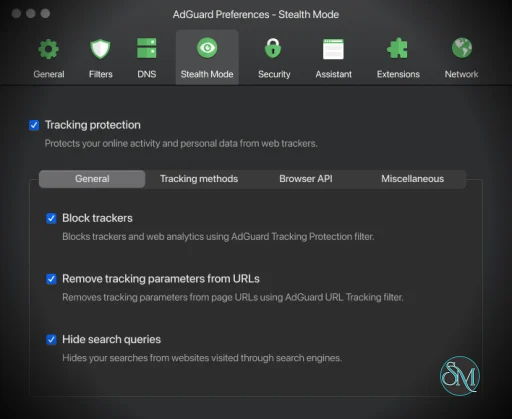
Tracker Blocking
AdGuard maintains filtering lists designed to block known tracking systems and analytics services.
This can reduce the amount of browsing and application activity that is sent to third-party tracking infrastructure.
Users can also add their own filter lists and custom rules for more precise control.
Phishing and Malicious Website Protection
AdGuard can block connections to known malicious and phishing domains.
This adds a security layer on top of advertisement and tracker blocking, although it should not be treated as a replacement for macOS security software or a dedicated endpoint-security solution.
Custom Filtering
Advanced users can create custom rules or install additional filter lists.
This is particularly useful when a website behaves incorrectly after filtering or when you want to block a specific domain, script, advertisement, or tracking mechanism.
The ability to temporarily disable filtering for individual websites also makes troubleshooting relatively straightforward.
Application Filtering
Because AdGuard operates at the system level, filtering can apply to applications other than browsers.
This is one of the biggest reasons to choose the Mac application instead of a browser-only ad blocker.
Users can also configure exclusions when a particular application does not work correctly with filtering.
Download AdGuard Ad Blocker for Windows Latest Version
Download AdGuard Ad Blocker for Mac Latest Version
Download AdGuard Ad Blocker for Android Latest Version
Download AdGuard Ad Blocker for Android TV Latest Version
Download AdGuard Ad Blocker for iOS Latest Version
Download AdGuard Ad Blocker v2.20.1 - Software Mirrors |
|---|
AdGuard Ad Blocker v2.20.1 for macOS |
AdGuard Ad Blocker v2.20.1 Source Code |
AdGuard Ad Blocker v2.20.1 Release Notes:Disclaimer Adguard for Mac is not an open-source project. We use GitHub as an open bug tracker for users to see what developers are working on.We fixed an issue reported by users and updated our libraries while we were at it. Now, nothing will interfere with ad blocking. How to install AdGuard for MAC |
Performance and User Experience
AdGuard for Mac generally operates quietly in the background once configured.
The main application provides a dashboard showing filtering activity and gives users access to filtering, DNS, privacy, and network settings.
For ordinary users, the default configuration is generally sufficient. Advanced users can go much further by configuring DNS servers, custom filters, exclusions, and individual filtering rules.
The system-wide architecture does introduce some additional complexity compared with a browser extension. Network filtering can occasionally interfere with applications or websites, particularly when aggressive filtering or HTTPS inspection is enabled.
Fortunately, AdGuard provides controls for disabling protection temporarily or excluding specific traffic.
Pros
System-wide ad blocking.
Works beyond the browser.
Excellent Safari integration.
Blocks advertisements and trackers.
DNS filtering.
HTTPS filtering.
Custom filtering rules.
Custom filter lists.
Phishing protection.
Application-specific exclusions.
Detailed configuration options.
Supports Apple Silicon and Intel Macs.
Regular filter updates.
Cons
More complex than a browser extension.
Some advanced features require a paid license.
HTTPS filtering requires a local certificate.
System-level filtering can occasionally cause compatibility problems.
More resource usage than a browser-only blocker.
Users who only need basic Safari filtering may not need the full application.
Who Should Use AdGuard for Mac?
AdGuard for Mac is particularly well suited to users who want comprehensive privacy and ad blocking across their Mac, rather than protection limited to a particular browser.
It is also a good choice for users who regularly use ad-supported applications, want DNS-level filtering, or prefer having detailed control over which network requests are permitted.
For someone who only wants to block advertisements in Safari, a Safari content blocker is simpler. For users who want a single filtering solution covering the wider macOS environment, AdGuard is much more compelling.
Final Verdict
AdGuard for Mac is a mature and comprehensive ad-blocking solution that goes considerably further than a conventional browser extension.
Its combination of system-wide content filtering, DNS protection, tracker blocking, HTTPS filtering, custom rules, and application controls makes it one of the most capable privacy-focused filtering tools available for macOS.
The main trade-off is complexity. The more deeply AdGuard integrates with macOS networking, the more opportunities there are for configuration issues or compatibility problems. But for users who want that level of control, the additional functionality is well worth it.
For Mac users who want to block advertisements and trackers across the entire system, AdGuard for Mac is an excellent choice.
Developer:
Adguard Software Ltd.
Operating System:
macOS
Date Added:
2026-10-20T04:07:17.765Z
Categories:
Post a Comment/Report Broken Link: