AdGuard for Android is one of the most capable ad-blocking applications available for Android. Unlike browser-only blockers, it can filter traffic from browsers and other applications, while also providing tracker blocking, DNS filtering, annoyance blocking, browsing security, and per-app network controls.
The APK version is particularly important because AdGuard cannot be distributed through Google Play due to Google's restrictions on apps that block advertisements in other applications. Instead, AdGuard distributes the Android application directly as an APK.
AdGuard uses Android's local VPN mechanism to filter network traffic without requiring root access. The VPN is local to the device rather than connecting your traffic to an external VPN server.
This allows AdGuard to sit between applications and the network and determine which requests should be allowed or blocked.
That gives it a significant advantage over ordinary browser extensions. An advertisement inside an Android application can potentially be filtered just like an advertisement on a website.
The current Android release shown on AdGuard's official website is version 4.12, with a 14-day trial period.
Key Features of AdGuard Ad Blocker for Android
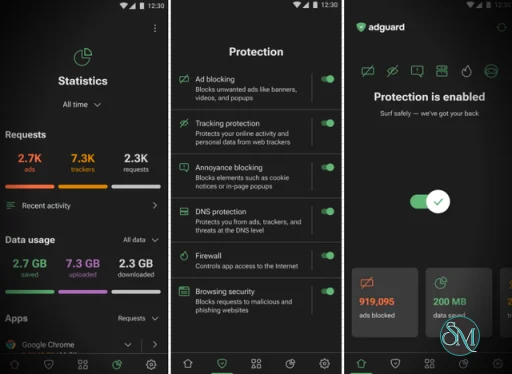
System-Wide Ad Blocking
AdGuard can block advertisements across the device, including:
Websites
Browsers
Games
Android applications
Pop-ups
Banners
Video advertisements
Its filtering engine uses regularly updated filter lists to identify advertising requests and unwanted page elements.
This is the feature that separates AdGuard from most browser-based Android ad blockers.
No Root Required
You don't need to root your Android phone.
AdGuard uses a local VPN to intercept network traffic and apply its filtering rules.
This makes it accessible to ordinary Android users while still providing fairly deep network-level filtering.
Tracker Protection
AdGuard can block known tracking and analytics systems used by websites and applications.
This goes beyond simply removing visible advertisements and can reduce unwanted third-party connections made by applications.
Annoyance Blocking
AdGuard can also target elements that aren't technically advertisements but make websites unpleasant to use.
Examples include:
Cookie notices
Pop-ups
Other intrusive page elements
This is useful when you want a cleaner browsing experience rather than simply fewer advertisements.
DNS Protection
The application can filter DNS requests and block known advertising, tracking, and malicious domains.
It also supports encrypted DNS and configurable DNS servers, giving advanced users considerably more control over how their device resolves domains.
HTTPS Filtering
On supported configurations, AdGuard can inspect encrypted HTTPS traffic locally.
It uses a locally installed certificate to decrypt traffic, apply its filtering rules, and encrypt the connection again. AdGuard states that the decrypted content does not leave the device.
This allows considerably more detailed filtering than DNS blocking alone.
However, HTTPS filtering is also a feature that technically advanced users should understand before enabling, because certificate-based interception can affect application compatibility.
Per-App Management
AdGuard lets you configure traffic filtering for individual applications.
This is extremely useful when one application doesn't work correctly with filtering or when you want different filtering behavior for different apps.
You can also use the application's firewall functionality to control which apps are allowed to access the Internet.
Browsing Security
AdGuard includes protection against phishing and malicious websites.
It can warn or block requests to known dangerous destinations, providing an additional security layer alongside its normal advertisement and tracker filtering.
Custom Filters
Advanced users can enable additional language-specific filters, add custom filter lists, create their own rules, and maintain allowlists for websites that should bypass filtering.
This makes AdGuard suitable for users who want very precise control rather than a simple on/off ad blocker.
Download AdGuard Ad Blocker for Windows Latest Version
Download AdGuard Ad Blocker for Mac Latest Version
Download AdGuard Ad Blocker for Android Latest Version
Download AdGuard Ad Blocker for Android TV Latest Version
Download AdGuard Ad Blocker for iOS Latest Version
Download AdGuard Ad Blocker APK v4.15 - Software Mirrors |
|---|
AdGuard Ad Blocker APK v4.15 for Android |
AdGuard Ad Blocker APK v4.15 Source Code |
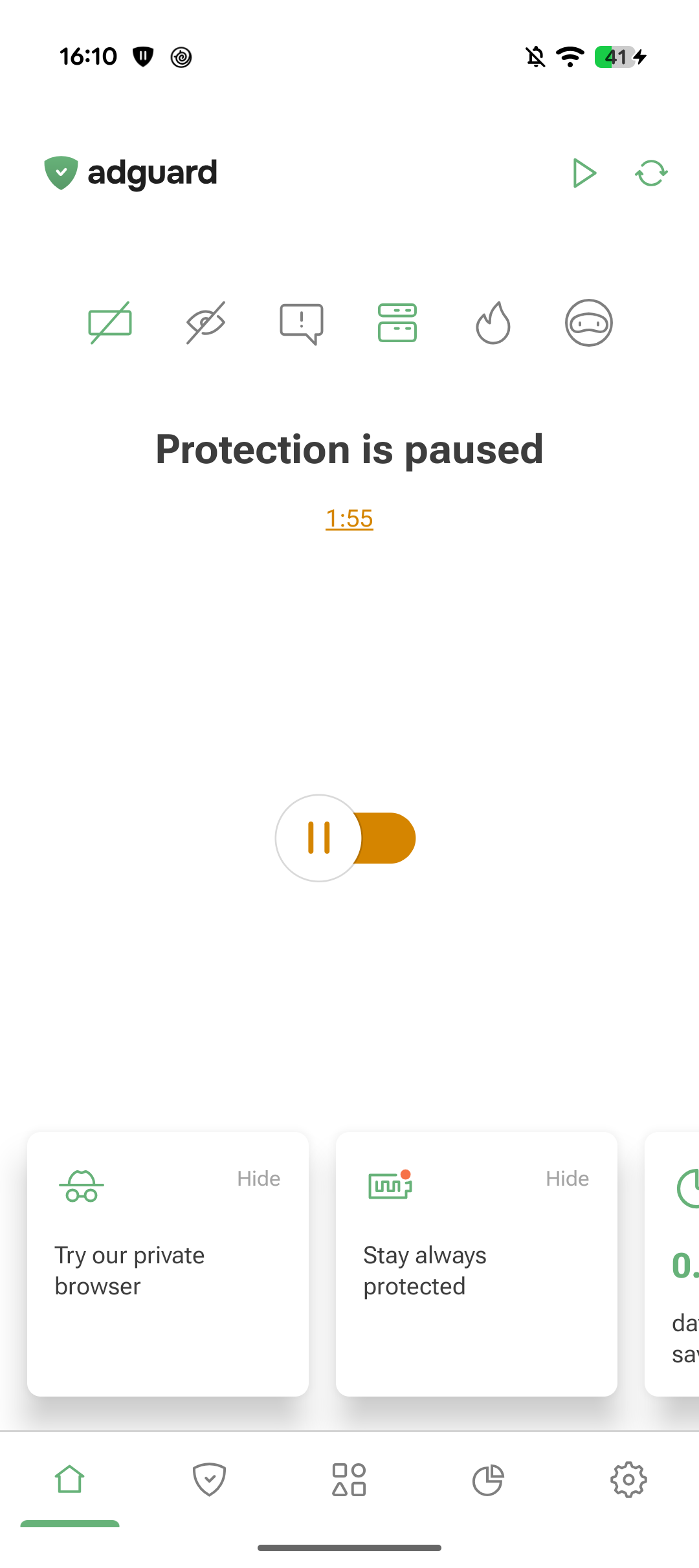
AdGuard Ad Blocker APK v4.15 Release Notes:AdGuard for Android v4.15 is a small update focused on usability improvements and bug fixes. While this release doesn’t introduce major new functionality, it brings a few long-requested enhancements designed to make everyday use of AdGuard more convenient.Temporary protection pausesOne of these improvements is the new option to temporarily pause protection. When disabling protection, you can now choose to have it automatically turn back on after 30 seconds, 2 minutes, or 5 minutes. !Pause protection *mobile This feature is particularly useful when you need to check whether a website, app, or network issue is related to filtering. Instead of disabling protection and having to remember to turn it back on later, you can set a timer and allow AdGuard to restore protection automatically. It’s a small quality-of-life improvement, but one that can save time and help ensure you don’t accidentally leave your device unprotected after a quick test or troubleshooting session.ChangelogImprovements
Fixes
Corelibs (Filtering engine)
DnsLibs (DNS filtering engine)
AdGuard for Android direct download links:AdGuard for Android TV direct download links: |
Free vs Paid
One important consideration is that the Android application isn't entirely unrestricted in its free version.
AdGuard states that the free version is primarily intended for browser ad blocking, while features such as application filtering, tracking protection, browsing security, and userscripts are part of the paid functionality.
Therefore, if your main reason for installing the APK is blocking ads inside Android applications and games, you'll want to consider the paid version.
Performance and Battery Usage
Because AdGuard processes network traffic locally, it necessarily adds another layer between applications and the Internet.
For normal usage, the overhead is generally modest, and blocking advertisements can actually reduce network traffic because unwanted content never needs to be downloaded. AdGuard specifically promotes reduced traffic and battery consumption as benefits of blocking advertisements.
The actual impact depends on the device, filtering configuration, number of enabled filters, and amount of traffic being processed.
The local VPN architecture also means Android's VPN interface will indicate that a VPN connection is active even though AdGuard is not necessarily routing traffic through a remote VPN server.
APK Installation
AdGuard provides the APK directly through its official website.
Download AdGuard for Android APK
AdGuard currently requires Android 9.0 or newer, at least 2 GB of RAM, and approximately 500 MB of free storage.
Because the application isn't available on Google Play, Android may require you to allow installation from the browser or file manager used to download the APK. Samsung devices running One UI 6 or newer may additionally have Auto Blocker enabled, which can prevent APK installation.
For security, I strongly recommend obtaining the APK directly from AdGuard rather than downloading modified or repackaged APKs from third-party sites.
Pros
System-wide ad blocking.
Blocks ads inside apps and games.
Works without root.
Local VPN-based filtering.
Tracker protection.
DNS filtering.
HTTPS filtering.
Annoyance blocking.
Browsing security.
Per-app filtering.
Firewall functionality.
Custom filtering rules.
Regularly updated filter lists.
No need to install a browser extension.
Official APK available directly from AdGuard.
Cons
Not available through Google Play.
Requires manual APK installation.
Full system-wide functionality requires the paid version.
Local VPN means another VPN-based service cannot normally run simultaneously.
HTTPS filtering can cause compatibility issues with some applications.
Advanced configuration can be complicated for beginners.
Some applications use techniques that make advertisement blocking difficult or impossible.
Who Should Use AdGuard for Android?
AdGuard is particularly suitable for users who want system-wide ad blocking without rooting their phone.
It's an excellent option if you want to block advertisements not only in Chrome or Firefox but also inside applications and games.
It's also attractive to privacy-conscious users who want tracker blocking, DNS protection, custom filtering rules, and per-application network controls.
If you only care about blocking advertisements in a browser, a browser content blocker may be simpler. But if you want to control network traffic across the entire Android device, AdGuard is considerably more powerful.
Final Verdict
AdGuard for Android is arguably one of the most complete non-root ad-blocking solutions available on Android.
Its local VPN architecture gives it system-wide visibility without requiring root, while the combination of content filtering, tracker protection, DNS filtering, HTTPS filtering, browsing security, firewall controls, and per-app management makes it much more than a conventional ad blocker.
The APK distribution model is slightly less convenient than installing an application from Google Play, but it is necessary because of Google's restrictions on network-level ad blockers.
For users who want to eliminate advertisements across both Android browsers and applications, AdGuard is one of the best options available.
Developer:
Adguard Software Ltd.
Operating System:
Android
Date Added:
2026-10-20T05:07:21.809Z
Categories:
Post a Comment/Report Broken Link: