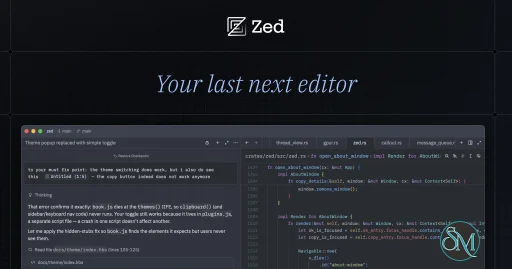
Zed is a high-performance code editor designed for developers who seek a fast, responsive, and modern development environment. Created by the team behind Atom and Tree-sitter, the editor is built primarily in Rust and leverages GPU acceleration to deliver a seamless editing experience.
Unlike traditional text editors, Zed integrates code editing, AI assistance, real-time collaboration, language server support, and Git tooling into a single native desktop application.
Its focus on performance makes it a compelling alternative to Visual Studio Code, particularly for developers who prefer a lightweight editor that does not rely on Electron-based architecture.
Features
High-Performance Code Editing
Zed is built around GPUI, its own GPU-accelerated user interface framework.
This architecture allows the editor to render text, interface elements, and animations efficiently. It is designed to provide responsive editing, fast navigation, and smooth interaction, even when working with large codebases.
The editor includes essential development features such as syntax highlighting, code folding, multiple selections, split panes, project navigation, and customizable keyboard shortcuts.
It also supports Vim-style editing through its built-in modal editing mode.
AI Coding Assistant
Zed includes an integrated AI assistant that helps developers understand, modify, and generate code.
Its Agent Panel provides a conversational interface where users can describe programming tasks and allow an AI agent to inspect project files, make changes, and execute supported tools.
Developers can connect different AI providers, including Anthropic, OpenAI, Google, and local model services. They can also configure their own API credentials and choose models according to their requirements.
AI assistance is not limited to chat. Zed also provides inline transformations, code generation, and editing suggestions directly within the editor.
External AI Agent Support
One of Zed's important capabilities is its support for the Agent Client Protocol (ACP).
This allows developers to use external coding agents directly inside Zed rather than relying exclusively on its built-in agent system.
Supported integrations include agents such as Claude Code, Gemini CLI, and Codex, depending on their ACP compatibility.
This makes Zed particularly useful for developers who already have preferred AI coding tools but want a unified editing environment.
Language Server Protocol Support
Zed supports the Language Server Protocol (LSP), providing intelligent programming assistance across many languages.
With the appropriate language servers installed, developers can access:
Code completion and suggestions.
Go-to-definition and references.
Diagnostics and error reporting.
Hover documentation.
Code actions and refactoring.
Symbol navigation.
This architecture allows Zed to support different programming languages without implementing every language-specific feature independently.
Real-Time Collaboration
Zed includes multiplayer collaboration capabilities that allow developers to work together in shared projects.
Users can invite collaborators, edit code simultaneously, follow other participants, and communicate through integrated voice and text features.
Screen sharing is also available on supported platforms.
This is useful for pair programming, code reviews, debugging sessions, and remote development teams that need to work together without constantly switching applications.
Git Integration
Zed includes built-in Git functionality for managing source code changes.
Developers can inspect modified files, review diffs, stage changes, create commits, and manage branches through the editor interface.
Its Git integration makes everyday source control operations more convenient without requiring a separate graphical Git client.
For advanced workflows, users can still access the integrated terminal and execute Git commands directly.
Integrated Terminal
Zed provides an integrated terminal that allows developers to run commands without leaving the editor.
This is useful for executing build tools, package managers, test suites, development servers, and Git operations.
Combined with project navigation and split panes, it provides a more unified development environment.
Extensions and Customization
Zed supports extensions that expand its language, theme, and development capabilities.
Users can install additional language support, syntax highlighting, themes, and other integrations through its extension system.
The editor also provides configurable settings, keymaps, themes, and project-specific configuration.
Developers can customize their environment to match their existing workflow rather than adapting entirely to the default interface.
Download Zed v1.30.2 - Code Editor - Software Mirrors |
|---|
Zed v1.30.2 - Code Editor for Windowszed-remote-server-windows-x86_64.zip | 33.45 MB |
Zed v1.30.2 - Code Editor for macOSzed-remote-server-macos-x86_64.gz | 34.13 MB |
Zed v1.30.2 - Code Editor for Linuxzed-remote-server-linux-x86_64.gz | 36.56 MB zed-remote-server-linux-aarch64.gz | 32.9 MB zed-linux-x86_64.tar.gz | 86.41 MB zed-linux-aarch64.tar.gz | 81.56 MB |
Zed v1.30.2 - Code Editor Source Code |
Zed v1.30.2 - Code Editor Release Notes:This week's release includes reduced GPU usage across the app, a model picker for AI commit message generation in the Git Panel, a setting to hide the title bar, support for GPT-6.1 Terra, and faster scanning of large projects.FeaturesAI
Git
Vim / Helix
Languages
Linux
macOS
Other
Bug Fixes
Breaking Changes and Notices
|
Performance and Compatibility
Performance is one of Zed's main selling points.
Its native Rust architecture and GPU-accelerated interface are designed to reduce the overhead commonly associated with Electron-based editors.
Zed supports macOS, Linux, and Windows, with builds for both x86-64 and ARM64 hardware where supported.
Linux users need a Vulkan 1.3-compatible graphics driver and the required desktop portal services. Windows requires a compatible DirectX 11 graphics device and a current graphics driver.
The editor also supports Intel and Apple Silicon Macs.
Zed is actively developed, and its feature set continues to evolve. However, performance still depends on hardware, graphics drivers, language servers, extensions, and the size of the project being edited.
System Requirements
Zed supports the following environments:
Windows: Windows 10 version 1903 or later, and Windows 11 version 22H2 or later. A 64-bit processor and DirectX 11-compatible GPU are required.
macOS: macOS 12 or later, with Intel and Apple Silicon support.
Linux: 64-bit x86-64 or ARM64, Vulkan 1.3-compatible graphics drivers, and required desktop portal services.
Additional requirements depend on the programming languages, language servers, extensions, and AI providers being used.
For AI features, users may need an API key, a compatible local model service, or access to an external coding agent.
Pros and Cons
Pros
Fast native application built with Rust.
GPU-accelerated interface.
Integrated AI coding assistant.
Supports multiple AI providers and external coding agents.
Real-time multiplayer collaboration.
Built-in Git integration.
LSP support for intelligent code editing.
Integrated terminal.
Extension and customization support.
Available on Windows, macOS, and Linux.
Open-source under GPL-3.0-or-later, with Apache-2.0 components where specified.
Cons
Linux requires Vulkan 1.3-compatible graphics support.
Some AI capabilities require external API access or subscriptions.
Language support may require separate language-server installation.
Extension ecosystem is smaller than Visual Studio Code's.
Not available as a supported web-based editor.
Collaboration and some advanced features depend on network connectivity and platform support.
How to Install
Zed provides official installation packages for Windows, macOS, and Linux.
Windows
Install through Winget:
winget install -e --id ZedIndustries.ZedmacOS
Install through Homebrew:
brew install --cask zedLinux
The official installation script supports common Linux distributions and both x86-64 and ARM64 architectures:
curl -f https://zed.dev/install.sh | shAlternatively, users can download platform-specific packages from the official website.
For developers interested in building Zed from source, the project provides platform-specific compilation instructions in its GitHub repository.
Final Verdict
Zed is an impressive code editor that combines performance, modern development tools, AI assistance, and collaboration in one application.
Its biggest advantage is its native architecture. Built with Rust and GPU acceleration, it provides a different approach to code editing compared with traditional Electron-based editors.
The integrated AI assistant and Agent Client Protocol support are also valuable additions. Developers can work with multiple AI coding tools without leaving their primary development environment.
However, its extension ecosystem is still developing, and some platform requirements, particularly Vulkan support on Linux, may limit compatibility with older hardware.
Overall, Zed is an excellent choice for developers looking for a fast, modern, and open-source code editor with built-in AI capabilities. It is especially attractive to users who want an alternative to Visual Studio Code without sacrificing essential development features.
Sources
Developer:
Zed Industries
Operating System:
Windows / macOS / Linux
Date Added:
2026-11-25T18:07:12.332Z
Categories:
Post a Comment/Report Broken Link: