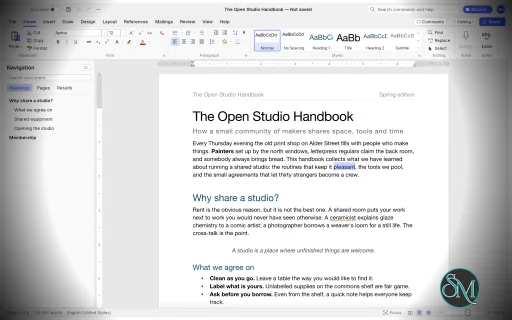
WordCraft is a free, open-source word processor designed as an alternative to Microsoft Word. Developed by the ArtCraft team, it is written in Rust and aims to reproduce familiar Word workflows while providing native applications for desktop operating systems and a browser-based version.
The application goes beyond basic text editing. It includes document formatting, styles, tables, page layout, references, comments, tracked changes, mail merge, and PDF export. It can open and save DOCX files, making it a potential option for users who regularly exchange documents with Microsoft Office users.
WordCraft also includes command-line tools and Model Context Protocol (MCP) integration, allowing compatible AI agents to create, inspect, edit, and export documents programmatically.
Although its feature set is extensive, WordCraft is still approaching maturity for everyday writing. Users who rely on complex Word documents or specialized publishing workflows should test compatibility before making it their primary word processor.
Features
Document Editing and Formatting
WordCraft provides a familiar ribbon-style interface with formatting controls for fonts, sizes, bold and italic text, underlining, colors, highlighting, superscript, and subscript.
It supports paragraph alignment, indentation, line spacing, tabs, borders, shading, and other layout options. The Format Painter lets users copy formatting between document elements, while built-in styles help maintain consistent formatting across longer documents.
The editor also includes AutoCorrect, smart quotes, automatic list formatting, find and replace with regular expressions, and standard undo and redo functionality.
These features make WordCraft suitable for writing reports, letters, essays, and other everyday documents.
DOCX Compatibility and File Formats
WordCraft supports reading and writing Microsoft Word's DOCX format. It also supports importing and exporting ODT, RTF, HTML, Markdown, and plain-text documents.
PDF export produces selectable text and supports links and bookmarks, making it useful for distributing reports and other finished documents.
The ability to work with common document formats is one of WordCraft's main advantages. However, opening a DOCX file does not guarantee that every element will render identically to Microsoft Word. Complex layouts, embedded objects, and less common formatting features should be checked after import.
Styles, Themes, and Page Layout
WordCraft includes paragraph and character styles, style sets, themes, and a live style gallery. Users can create or modify styles to maintain consistent formatting throughout a document.
Page-layout controls include margins, page size, orientation, columns, section breaks, page breaks, headers, footers, page numbers, watermarks, and page borders.
The application also supports automatic hyphenation, line numbering, drop caps, and text wrapping around pictures and shapes.
These capabilities are useful for creating structured reports, academic papers, business documents, and longer publications.
Tables, Images, and Graphics
WordCraft supports tables with merged and split cells, borders, shading, banded styles, sorting, and formulas. Rows can split across pages, and table headers can repeat on subsequent pages.
Images can be inserted, resized, cropped, rotated, recolored, and adjusted for brightness, contrast, and transparency. Additional features include picture styles, shapes, and text boxes with floating positioning and text wrapping.
The editor also supports converting text into tables and tables into text, helping users restructure information without recreating content manually.
References and Academic Writing
WordCraft provides a collection of tools for structured and academic documents, including:
Automatic tables of contents.
Footnotes and endnotes.
Citations and bibliographies in APA, MLA, Chicago, and IEEE styles.
Captions and tables of figures.
Cross-references and indexes.
Tables of authorities.
These tools make WordCraft particularly interesting for students, researchers, and professionals who work with long documents containing references and supporting material.
Users preparing formal academic submissions should verify that the generated references and formatting comply with their institution's requirements.
Comments, Track Changes, and Proofreading
WordCraft includes comments displayed in document margins or a dedicated pane. Track Changes allows users to review edits and accept or reject individual changes.
Document comparison, spelling and grammar suggestions, a thesaurus, word counting, and an accessibility checker provide additional support for reviewing and refining documents.
The application also includes document inspection and editing restrictions.
These features are valuable for collaborative editing and document review, although teams should test their specific review workflows before replacing established Microsoft Word processes.
Mail Merge
WordCraft supports mail merge using CSV data sources and document fields. Users can insert merge fields, configure address blocks and greeting lines, preview personalized documents, and generate merged output.
Envelope and label tools are also included.
This can help automate repetitive administrative tasks such as generating letters, notices, certificates, and personalized business documents.
AI and Command-Line Automation
WordCraft is designed to support both manual editing and programmatic document manipulation. Its editing engine exposes commands that are shared across the graphical interface, keyboard shortcuts, command search, CLI, JSON control channel, and MCP server.
The command-line interface supports document conversion, text extraction, structural inspection, rendering, and scripted editing.
For example, convert a Word document to PDF:
wordcraft-cli convert report.docx report.pdf
Extract its text:
wordcraft-cli text report.docx
Inspect the document structure as JSON:
wordcraft-cli inspect report.docx
These capabilities make WordCraft useful for batch processing, document-generation pipelines, and AI-assisted workflows. Compatible agents can inspect documents and execute editing commands without relying exclusively on screenshots or mouse interaction.
Download WordCraft v0.19.1 - Software Mirrors |
|---|
WordCraft v0.19.1 for Windowswordcraft-0.19.1-windows-x64.msi | 98.59 MB wordcraft-0.19.1-windows-x64-portable.zip | 123.91 MB wordcraft-0.19.1-windows-arm64.msi | 94.23 MB wordcraft-0.19.1-windows-arm64-portable.zip | 119.51 MB |
WordCraft v0.19.1 for macOSwordcraft-cli-0.19.1-macos-universal.zip | 109.49 MB wordcraft-0.19.1-macos-universal.dmg | 137.81 MB |
WordCraft v0.19.1 for Linuxwordcraft-0.19.1-linux-x86_64.tar.gz | 124.22 MB wordcraft-0.19.1-linux-x86_64.rpm | 125.44 MB wordcraft-0.19.1-linux-x86_64.pkg.tar.zst | 91.1 MB wordcraft-0.19.1-linux-x86_64.flatpak | 85.39 MB wordcraft-0.19.1-linux-x86_64.deb | 126.15 MB wordcraft-0.19.1-linux-x86_64.AppImage.zsync | 204.9 kB wordcraft-0.19.1-linux-x86_64.AppImage | 116.95 MB wordcraft-0.19.1-linux-riscv64.tar.gz | 122.45 MB wordcraft-0.19.1-linux-riscv64.rpm | 123.71 MB wordcraft-0.19.1-linux-riscv64.deb | 124.15 MB wordcraft-0.19.1-linux-aarch64.tar.gz | 119.75 MB wordcraft-0.19.1-linux-aarch64.rpm | 121.85 MB wordcraft-0.19.1-linux-aarch64.pkg.tar.zst | 88.88 MB wordcraft-0.19.1-linux-aarch64.flatpak | 81.28 MB wordcraft-0.19.1-linux-aarch64.deb | 122.73 MB wordcraft-0.19.1-linux-aarch64.AppImage.zsync | 197.41 kB wordcraft-0.19.1-linux-aarch64.AppImage | 112.66 MB |
WordCraft v0.19.1 for BSDwordcraft-0.19.1-freebsd-x86_64.tar.gz | 123.67 MB wordcraft-0.19.1-freebsd-aarch64.tar.gz | 118.35 MB |
Others Download related to WordCraft v0.19.1wordcraft-web-0.19.1.zip | 23.71 MB |
WordCraft v0.19.1 Source Code
WordCraft v0.19.1 Source code (zip)
WordCraft v0.19.1 Source code (tar.gz)
|
WordCraft v0.19.1 Release Notes: What's Changed- UI: vertical scrollbar track advances one screen (#5853) by @batistalucasv in #5892
- View: editable Markdown source view for .md files (#5826) by @batistalucasv in #6004
- Save As: on Linux the file type picked in the save dialog sets the extension (#6180) by @batistalucasv in #6232
- Clipboard: transfer copied images to system clipboard and preserve media across internal paste (#6205) by @batistalucasv in #6225
- docx: ignore w:lnNumType without w:countBy (#6209) by @batistalucasv in #6231
- Text boxes inside a group can be edited by @vangel76 in #6051
- Track style property changes (#2697) by @vangel76 in #2703
- ui: touchpad and mouse-wheel scroll speed settings (#6146) by @batistalucasv in #6167
- Layout: add Fit One Page (#6433) by @batistalucasv in #6436
- CI: run the Print job through the shared gate by @FredApps in #6369
- Fix: arrange.bounds on header picture writes page-anchored ODT frame by @batistalucasv in #5858
- fix: place a moved body object by its paragraph, unbreaking main (#5858, #5705) by @batistalucasv in #6536
- Tests: a page-fixed ODT frame keeps its page when moved (main's gate is red) by @FredApps in #6537
- Tests: restore the ODT frame test; #6536 fixed main in the code (#6537 contradicts it) by @FredApps in #6539
- repo: restore LF line endings in the files #6537 rewrote by @batistalucasv in #6541
- Route Word 97 binary parsing through craft-libs by @dylanmtaylor in #6565
- Migrate DOCX and RTF formats to craft-libs (#778) by @dylanmtaylor in #6603
- Fix CI formatting and clippy lints after craft-libs cutover by @dylanmtaylor in #6612
- fix(docx): fix main CI wordcraft-docx integration test failures by @dylanmtaylor in #6617
- fix(xtask): allow wordcraft-formats -> wordcraft-docx in INTRA_LAYER_ORDER by @dylanmtaylor in #6618
- Apply Format Painter on single-click release (#1455) by @FredApps in #2274
- Use Diagram and Decorative Text display names by @FredApps in #6040
- chore: cut over image codecs and zip to craft-libs by @dylanmtaylor in #6661
- UI: open font dropdown and select font name on click (#5914) by @batistalucasv in #5926
- M14: identify WordCraft correctly in the iframe title example by @MMexicann in #6717
- Keep TOC entries for tab-numbered headings on one line by @cute-johnny in #6738
- bs: Add Bosnian (bs) to the interface languages by @nine-codes in #4804
- .gitattributes: normalise text on add so CRLF cannot be committed again by @batistalucasv in #6543
- Interface size: Auto is capped to what fits the screen, Ctrl+Shift+0 returns to Auto (#4030) by @vangel76 in #5203
- M14: preserve existing PDF suffixes in web exports by @MMexicann in #6817
- geom: satisfy Clippy pedantic lints (M14) by @AxylumRust in #5073
- Reuse shared Base64 encoding for engine payloads by @dylanmtaylor in #6818
- Dialogs: group settings in soft panels of dialogs to improve readability by @fluorine in #4038
- UI: select font box text on click without opening dropdown (#6722) by @batistalucasv in #6731
- Tests: a reset control connection counts as closed (Windows Print flake) by @batistalucasv in #6448
- Ctrl/Cmd+Shift+V pastes text only when no formatting was copied, as in Word (#1537) by @benandez in #5616
- Review › Language: set the whole document's proofing language (#3518) by @benandez in #5810
- Save As and Export: Browse in WordCraft when the system dialog doesn't appear (#3535) (#3801) by @benandez in #5790
- File › Print: reopened, the page doesn't repeat the last job's message by @benandez in #5597
- Header pictures: while editing the header, a click selects its Behind Text picture wherever no header text covers it by @benandez in #5601
- CI: fix red SonarCloud on main by @benandez in #6859
- Layout: a paragraph over many pages lays out in linear time (#6757) by @RickiNano in #6759
- geom: delegate TIFF compression inspection to craft-tiff by @dylanmtaylor in #6863
- Metafiles: draw EMF+ bitmaps, pattern fills, clips and pen styles from craft-metafile (#6636) by @dotCooCoo in #6658
- M14: explain hyperlink URL input limits by @MMexicann in #6789
- M14: describe encrypted OpenDocument command support by @MMexicann in #6776
- M14: label Alt Text pane inputs for assistive technology by @MMexicann in #6726
- Tests: set the fit-one-page fixtures in bundled Inter so FreeBSD pages them like other hosts by @FredApps in #6887
- M14: explain invalid field code values by @MMexicann in #6725
- M14: describe all accepted mail-merge sort forms by @MMexicann in #6724
- M14: clarify initial and pane spelling-review wrapping by @MMexicann in #6720
- M14: distinguish font file and unpacked size limits in errors by @MMexicann in #6719
- M14: expose the keyboard shortcut capture name and current key by @MMexicann in #6716
- M14: describe canvas member listing without an index by @MMexicann in #6714
- M14: expose table-style formatting names and selection by @MMexicann in #6711
- M14: clarify dictionary-folder auto reset by @MMexicann in #6709
- M14: explain the bookmark name rules in validation errors by @MMexicann in #6706
- M14: expose required command inputs in discovery by @MMexicann in #6703
- M10: clarify Zotero command response shapes by @MMexicann in #6700
- M3: explain invalid font name values by @MMexicann in #6698
- M14: clarify when layout tests need explicit font initialization by @MMexicann in #6697
- M3: describe the 32-bit comment identifier limit by @MMexicann in #6696
- M14: document the selection collapse end parameter by @MMexicann in #6695
- M14: report the supported ICO image bounds by @MMexicann in #6694
- M7: document the explicit stop flag for protection by @MMexicann in #6690
- M14: list xtask version and point layering help at public docs by @MMexicann in #6688
- edit.replace reports whether it replaced and what it selected (#6877) by @RickiNano in #6879
- Insert › Shapes: the Arrow tile is the block arrow it inserts (#6768) by @RickiNano in #6882
- M14: correct control protocol parameter examples by @MMexicann in #6684
- Track Changes: a deleted list item's number is drawn as deleted text (#4828) by @D13GOOOO in #4836
- Render: keep a metafile with huge bitmaps in the cache instead of parsing it on every repaint by @vangel76 in #5494
- M14: expose file-browser row names and selection by @MMexicann in #6790
- M14: restore save stamps after immediate web-save errors by @MMexicann in #6824
- M14: document optional run commands and PNG save options by @MMexicann in #6687
- M14: link PDF revision guidance to the workspace manifest by @MMexicann in #6685
- M14: keep the type_text description in one MCP table row by @MMexicann in #6683
- M14: align release guide with scheduled dry runs by @MMexicann in #6682
- M15: correct English proofing credits in README by @MMexicann in #6681
- Field dialog: text fields have a Format list for capitalization by @dotCooCoo in #5062
- fix(ui): Recent shortens long names and paths to the row (#5212) by @marcwgls in #5321
- #3773: a WordCraft process saves only the preferences it changed by @ljkx in #5258
- #3720: budget hostile large parameters, and cap the TOC title by @socrabs151 in #5824
- Compare: preserve per-segment formatting in word_diff (#3749, stage 0) by @reubgr in #5569
- geom: fix Rect collapse, sanitize deserialized Rect, accept non-ASCII… by @Bardanghimire in #5880
- Layout: Word 2003's indent rules start a line right after a float before the indent (#5939) (#5940) by @benandez in #6905
- Table Design: show Shading label beside the color menu arrow by @Nghiathan13 in #2016
- Table borders no longer look blue and uneven by @vangel76 in #6048
- M14: report missing --cmd values before CLI options by @MMexicann in #6686
- Enter in a paragraph with a drop cap no longer copies the drop cap by @vangel76 in #6793
- docs: prefer shared craft-libs implementations by @dylanmtaylor in #6862
- KeyTips: two-letter command badges can be completed (#4498) by @MichaelMuClaude in #4499
- UI: CJK text gets an installed CJK font in builds without craft-fonts and craft-i18n by @arcanii in #4637
- fix(ui): allow Start at 0 in Page Number Format (#4911) by @Zaxaerith in #4927
- Layout: pin the leading-float space-before rule's edge cases (follow-up to #5440) by @naxvog in #5999
- UI: Invalidate Home Styles preview textures on font changes (#5957) by @batistalucasv in #6029
- M14: keep selected file names intact in the built-in browser by @MMexicann in #6777
- Equations: an empty shown n-ary limit survives linear text (#6076) by @kiwi5boy in #6085
- Compare: "Show changes at:" keeps its labels on one line (#6046) by @SenuraMalaka in #6145
- Linux: draw on the GPU that drives the screen (#6016) by @Ahmad-b1995 in #6158
- References: TOC, index, table of figures and page cross-references use the section's page number format (#3856) by @tpawley2001 in #5971
- Layout: typing in a long document is about 5 times faster with proofing on by @fluorine in #6207
- #5231: Alt column widths on the ruler are in the measurement unit, written the region's way by @Nghiathan13 in #6408
- #6503: a straight " in Find also finds curly double quotes by @Nghiathan13 in #6507
- #6438: a right-to-left table's move handle sits at its top-right corner, and dragging it moves the whole table by @Nghiathan13 in #6477
- Shapes: a rounded rectangle without a corner size of its own takes the preset's default (#6546) by @Menonro in #6547
- #6282: print preview follows FILENAME text, fonts, texture limit and exact size by @Nghiathan13 in #6478
- Layout: the automatic space after a Latin run beside East Asian text follows the Latin face by @Nghiathan13 in #6589
- backstage: the side menu scrolls when the window is too short for it (#6639) by @dotCooCoo in #6647
- Recovery: removing a record's folder waits for files Windows is still deleting by @pakiat in #6666
- M14: clarify finite positive CLI scale errors by @MMexicann in #6691
- Dependencies: take craft-libs main at 453b0da782 by @dotCooCoo in #6886
- #2786: Home › Bullets: Define New Bullet… dialog and Change List Level › by @Nghiathan13 in #2860
- #3917: Text Outline and Shape Outline › Weight show a line sample for each weight by @Nghiathan13 in #3933
- Shapes: lines move by their body and resize by their ends by @pakiat in #4393
- Tests: review.language's no-proofing case uses zxx, not fr-FR by @benandez in #6944
- inspect_document marks the page fields of headers and footers (#4467) by @D13GOOOO in #4474
- KeyTips: a compact button's badge no longer covers its icon (#4497) by @MichaelMuClaude in #4503
- CI: skip every performance test under coverage instrumentation by @benandez in #6873
- #778: the ZIP entry-count guard delegates to craft-zip by @benandez in #6948
- #778: a clipboard DIB's size is read by craft-image-codecs' BMP probe by @benandez in #6949
- Fonts: tell where a missing font can be downloaded (Get the Missing Fonts) by @alehel in #6826
- #778: pin craft-libs main with the shared cutover prerequisites by @benandez in #6954
- #778: plain-text detection comes from craft-mime by @benandez in #6950
- #778: Read Aloud's SSIP wire helpers come from craft-ssip by @benandez in #6951
- doc: cut legacy encoding tables over to craft-codepage by @dylanmtaylor in #6785
- #778: land the picture-probe and MCP cutovers (#6955, #6956) on main by @benandez in #6960
- #778: progress log: file formats, codecs and protocols come from craft-libs by @benandez in #6962
- Layout: no line break after the '?' of a query, nor after a slash before an underscore by @dfgodvan in #5096
- Fonts: fallback no longer keeps unneeded font families in memory by @arcanii in #2345
- #2702: a missing font is drawn in its font table's altName, as Word does by @Nghiathan13 in #2711
- Paragraph dialog: Special box sets First line and Hanging indents by @pakiat in #4922
- Tables: percentage cell widths size their columns whichever rows give them by @pakiat in #5074
- Fields: PDFs and prints show body PAGEREF pages, as Word fills them in by @pakiat in #5129
- Say in the placeholder when a picture is too large to decode by @Silvertree2010 in #5638
- Borders: lines meet in closed corners, as in Word by @naxvog in #1757
- fix(styles): pair w:bCs and w:iCs with w:b and w:i in built-in styles (#4198) by @ovezthaking in #4219
- fix(engine): a drag between narrow columns leaves them as they are by @tsw2k in #4964
- IME: the composition is drawn in the text's font and size, and CJK in it no longer shows boxes by @arcanii in #3022
- Screen readers: headings and list items come one level too deep (#3173) by @squalorso in #4768
- #3172: the Paste button's name has no macOS key on Windows and Linux by @squalorso in #4980
- Wayland: 600 pt minimum width for GNOME split window tiling (#5886) by @batistalucasv in #5912
- Save As starts in the folder of the open file by @marcoarnulfo in #4209
- zotero: keep Word-only wire framing local and add bounds tests by @dylanmtaylor in #7099
- Adopt the shared AGENTS.md (RFC-0072) by @aiongg in #7102
- fix(render): frame shapes draw with a hole; frame presets open as frames by @tsw2k in #6162
New Contributors- @cute-johnny made their first contribution in #6738
- @nine-codes made their first contribution in #4804
- @AxylumRust made their first contribution in #5073
- @RickiNano made their first contribution in #6759
- @reubgr made their first contribution in #5569
- @Ahmad-b1995 made their first contribution in #6158
- @ovezthaking made their first contribution in #4219
- @tsw2k made their first contribution in #4964
Full Changelog: v0.18.1...v0.19.1 |
Performance and Compatibility
WordCraft is written in Rust and uses a modular architecture for document editing, typography, pagination, rendering, and file conversion. Its interface uses the native GPU-oriented egui framework rather than Electron or Tauri.
The project emphasizes responsive editing through cached paragraph layout and on-demand page rendering. Its developers report that typing in a 188-page document triggers layout recalculation in approximately 1.4 milliseconds. This is a project-reported benchmark rather than an independent performance test.
WordCraft supports macOS, Windows, Linux, BSD, and browsers through WebAssembly. It can read and write DOCX files and supports several additional document formats.
The main limitation is compatibility maturity. The project's roadmap identifies real-world DOCX testing, native printing, and signed application builds as remaining work. Charts, SmartArt, the equation editor, and the Draw tab are also listed as future development areas.
Consequently, WordCraft should not yet be assumed to offer complete feature parity with Microsoft Word, particularly for complex business documents and specialized workflows.
System Requirements
Operating systems: Windows, macOS, Linux, and BSD.
Browser support: WebAssembly build for compatible browsers.
Document formats: DOCX, ODT, RTF, HTML, Markdown, and plain text.
Export: PDF and page images, in addition to supported document formats.
Build requirements: Rust and the project's documented dependencies.
The project does not provide a comprehensive minimum hardware specification in the information reviewed. Actual performance will depend on document complexity, fonts, embedded images, and system resources.
Pros and Cons
Pros
Free and open-source under the MIT or Apache 2.0 license.
Familiar ribbon-style interface inspired by Microsoft Word.
DOCX reading and writing support.
Extensive formatting, styles, tables, and page-layout tools.
References, citations, footnotes, indexes, and tables of contents.
Comments, Track Changes, and proofreading tools.
Mail merge with CSV data sources.
PDF export with selectable text, links, and bookmarks.
Native desktop applications and a browser-based version.
CLI and MCP support for document automation.
Offline spelling and grammar features without requiring cloud processing.
Cons
Still approaching maturity for everyday writing and production use.
Complex DOCX compatibility needs more real-world validation.
Native printing and signed application builds remain development priorities.
Charts, SmartArt, and the equation editor are not yet complete features.
Does not provide full Microsoft Word feature parity.
Professional workflows may require additional testing and workarounds.
How to Install
The simplest option is to download a package from the project's GitHub Releases page, if a suitable build is available for your operating system.
To build and run WordCraft from source, install Rust and the required development dependencies, then execute:
git clone https://github.com/storytold/wordcraft
cd wordcraft
cargo run --release -p wordcraft -- --sample
To open an existing document:
cargo run --release -p wordcraft -- report.docx
For browser-based use, navigate to the web application directory and start the development server:
cd apps/wordcraft-web
trunk serve
The development server will provide a local address for opening WordCraft in a browser. Refer to the official repository for detailed build dependencies, release packages, and platform-specific instructions.
Final Verdict
WordCraft is an ambitious open-source word processor that combines familiar document editing with advanced formatting, references, review tools, mail merge, and automation. Its support for DOCX and PDF, together with additional formats and offline functionality, makes it a promising alternative for users who want more control over their document workflow.
Its command-line interface and MCP integration are especially interesting for developers and organizations that generate or process documents programmatically. The extensive feature set also makes it worth exploring for students, writers, and office users.
The biggest concern is maturity. WordCraft covers many of Microsoft Word's ribbon features, but feature coverage is not the same as complete behavioral compatibility. Users who depend on complex documents, advanced diagrams, equations, or established printing workflows should test their files carefully before switching.
For everyday writing and experimentation with open-source office software, WordCraft is worth trying. For mission-critical document production, it is better treated as a developing alternative until its compatibility and printing workflows have been validated against real-world requirements.
Post a Comment/Report Broken Link: