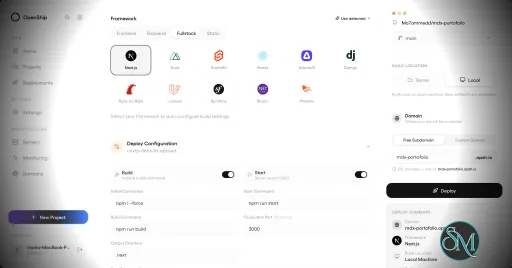
Openship is an open source application deployment platform that simplifies building, deploying, operating, and scaling applications on your own infrastructure. It combines Git-based deployments, container management, SSL automation, application monitoring, managed services, and a modern web interface into a single platform. Designed as an alternative to managed platforms such as Vercel, Netlify, and Render, Openship gives developers full ownership of their infrastructure while maintaining a streamlined deployment experience.
Deploying applications to self-managed servers often requires configuring Docker, reverse proxies, SSL certificates, deployment pipelines, and monitoring separately. Openship brings these capabilities together into a unified platform that works with cloud VPS providers, dedicated servers, and homelabs.
Unlike many self-hosted deployment tools that install build agents directly on production servers, Openship builds application images externally and deploys immutable containers over SSH. This keeps production systems focused on serving applications while simplifying rollbacks and updates.
The platform is fully open source under the AGPL-3.0 license and supports both self-hosting and managed cloud hosting.
Key Features of Openship
Git-Based Deployments
Applications are deployed automatically from Git repositories. Every commit can trigger a build, resulting in versioned container images that are easy to deploy or roll back.
Deploy Anywhere
Openship supports deployment to:
Virtual private servers
Dedicated servers
Home labs
Cloud virtual machines
Openship Cloud
The deployment workflow remains consistent regardless of the hosting environment.
Zero Downtime Deployments
The platform automatically routes traffic to newly deployed containers after they are ready, reducing downtime during updates. Previous versions remain available for quick rollback if necessary.
Automatic SSL
SSL certificates are automatically provisioned through Let's Encrypt, eliminating manual certificate management for hosted applications.
Integrated Monitoring
Developers can monitor deployments, view application logs, inspect metrics, and manage previous releases directly from the web dashboard, desktop application, or CLI.
Managed Infrastructure Services
Beyond application deployment, Openship includes managed services such as PostgreSQL, MySQL, Redis, MongoDB, and a built-in transactional email service with support for multiple domains.
Multiple Interfaces
Users can manage infrastructure through:
This flexibility makes Openship suitable for both manual administration and automation workflows.
Open Source
Every component of the platform is publicly available, allowing organizations to audit the source code, customize functionality, and avoid vendor lock-in.
Download OpenShip v0.9.11 - Software Mirrors |
|---|
OpenShip v0.9.11 for WindowsOpenship-win32-x64.zip | 242.02 MB |
OpenShip v0.9.11 for macOSOpenship-x64.dmg | 275.32 MB Openship-arm64.dmg | 281.75 MB |
OpenShip v0.9.11 for LinuxOpenship.AppImage | 190.14 MB openship-v0.9.11-linux-amd64.tar.gz | 64.7 MB openship-email-v0.9.11-linux-amd64.tar.gz | 75.29 MB Openship-arm64.AppImage | 191.12 MB |
Others Download related to OpenShip v0.9.11openship-dashboard-v0.9.11.tar.gz | 35.67 MB openship-cli-v0.9.11.tar.gz | 45.78 MB |
OpenShip v0.9.11 Source Code
OpenShip v0.9.11 Source code (zip)
OpenShip v0.9.11 Source code (tar.gz)
|
OpenShip v0.9.11 Release Notes: Recommended update for Desktop sign-in recovery, assistant connections, repository
scans and deployment reliability. Includes every change merged into main since
0.9.10, with mail administration improvements and clearer runtime security updates.
Assistants and Desktop
- Codex sign-in on hosted instances — use device-code sign-in on Cloud, VPS
and remote assistant hosts, while keeping browser sign-in on the local Desktop
host. Explain the available method in AI connections, use the shared ChatGPT
mark, and update the Mindwire runtime and SDK to 0.1.61.
- Desktop account recovery — preserve verified sign-ins during refresh and
startup, and remember the administrator selected through Desktop's authenticated
sign-in. Missing or stale Local User cookies recover to that saved identity
without selecting an unrelated user's session or changing account permissions.
- Claude Code on macOS — make the system keychain available inside the
isolated assistant home so sign-in can complete.
- Investigations and questions — start an explicitly requested deployment
investigation when the assistant is ready. Answer agent questions above the
composer while retaining drafts, separate answer state and retry behavior. Keep
expanded questions focused and the latest-messages control readable.
- Assistant workspace setup — keep connection setup inline and use the shared
drawer for agents and automations. Preserve unfinished configuration and the
underlying chat, recover access to changed specialists, and refresh activation
reviews when saved settings change.
Deployments, routing and security
- Compose command updates — resolve authored command expressions against the
current service environment during deployment and Apply environment. Preserve
referenced file defaults and explicit command edits without exposing internal
source metadata as environment values.
- Environment apply failures — show structured startup, health, restart and
OOM evidence while retaining the existing replacement and rollback flow. Keep
credentials and unrestricted provider error text out of responses, monitoring,
notification failures and backup diagnostics.
- Static environment changes — offer Rebuild and redeploy for static sites
and single-app Cloud deployments whose variables cannot be applied through a
runtime-only refresh. Open the new build's progress and retain retry controls.
- Static 404 behavior — add an explicit SPA fallback setting to shared routing
controls, the API and openship.json. Keep SPA fallback enabled by default;
disabling it returns real 404 responses and uses 404.html when available.
- Compose edge inventory — inspect loopback upstream ports through the edge's
own connection, including mounted Docker sockets without host SSH. Quarantine
existing routes before allocating ports and continue refusing unreadable or
ambiguous inventory.
- Private repository scans — allow the only eligible connected server's
stored token when an organization has no local server. Ask for an explicit
server when several qualify, retain the choice across scan retries, and keep
public reads anonymous when no credential is needed.
- Parked Docker imports — offer an explicit finish-without-restart decision
for imports awaiting cutover. Keep originals untouched and provide actionable
guidance when a parked migration prevents project deletion.
- Cloud host boundaries — enforce shared safeguards against local workload
execution on the SaaS API host while retaining authorized managed-server and
SSH execution. Keep command availability probes separate from execution.
- Conditional security reviews — distinguish PHP's conditional session
upload-progress review from confirmed runtime vulnerabilities. Share advisory
guidance while retaining each service's confidence, progress and actions;
offer saved configuration and an editable, scoped Fix with AI request without
automatic submission. High and Critical warnings retain their priority.
- Database removal conflicts — reread controller state after explicit
Kubernetes version conflicts during database cleanup. Retain object identity,
ownership, generation and operation fences while tolerating status-only updates.
Mail and application catalog
- Fail2ban management — on self-hosted mail installations, inspect jail
counters and banned addresses from Health, the API, SDK and MCP. Review the exact
address and jail
before banning or unbanning; stale observations disable changes until refreshed.
- Direct alias senders — allow active direct aliases to authorize their owning
mailbox consistently across mail sender checks. Disabled aliases, external
forwards, catch-alls and alias chains grant no sender identity. Clarify the
distinction between incoming forwarding and direct-alias sending in the UI.
- Appwrite setup — deduplicate generated credential writes and verify owner
bootstrap before reporting success. Exclude the optional Geo service while its
upstream PHP runtime remains affected, and document the geolocation limitation.
- Security refresh verification — reject unchanged-image refreshes, track
manual remediation through deployment and runtime inspection, and show progress
or a verified failure instead of silently repeating an ineffective update.
Validate Compose hostname availability against scoped Cloud ownership receipts.
- Supabase images — update the catalog's Storage, Meta and Studio image pins
for the bundled Node.js/Brotli security fixes.
- RabbitMQ readiness — run probes as the image's RabbitMQ user and wait for
the management listener, avoiding the startup Erlang-cookie ownership race.
Dashboard, billing and documentation
- Theme restoration — render the saved base theme and background on the server
through a validated cookie. Preserve custom theme caching, System mode and
unsaved previews without flashing Light on refresh.
- Checkout returns — retain the purchasing organization, server and payment
receipt through hosted checkout and authorized organization switching. Keep
checkout retries tied to their original payment contract.
- Gateway failures — request JSON from the API and explain upstream proxy
errors with recovery guidance instead of showing an opaque status or HTML page.
- First-deployment analytics — wait for an active deployment before reading
traffic for a reserved domain. Start reads when deployment activates and retain
existing traffic during redeploys; genuine provider failures remain errors.
- Quickstart wording — remove an abrupt line break in the setup description.
Upgrade notes
- Update the API (including all replicas), dashboard and Desktop app together.
This patch adds no new control-plane database migration.
- If an older Desktop installation already shows only Local User and has no
saved authenticated identity, use Back to setup, Continue with Cloud and sign
in once. This preserves existing data and records the owner for future recovery.
- Apply direct-alias sender policy changes by updating the managed mail engine
image as well as the control plane. Custom SQL and host-native mail policies
remain operator-managed.
- Redeploy an existing generated static-site container after changing its SPA
fallback setting. Existing sites retain SPA behavior until explicitly changed.
- Runtime security refreshes verify the deployed result; an image that still
contains the affected runtime requires a corrected image configuration rather
than repeated redeployment. Appwrite's optional Geo service remains excluded. |
Performance and User Experience
Openship provides a polished user experience that lowers the barrier to self-hosting modern applications. The interface is clean, deployments are straightforward, and infrastructure management is considerably simpler than manually configuring Docker, reverse proxies, certificates, and monitoring tools.
One of its strongest advantages is keeping production servers free from build workloads. Images are built separately and transferred to the deployment target, improving reliability and reducing resource usage on live servers.
The project is under active development, with new features such as clustering and horizontal scaling planned for future releases. Community feedback has been largely positive, particularly regarding its ease of use and modern approach to self-hosted deployments.
Pros
Free and open source.
Supports deployment to your own infrastructure.
Zero downtime deployments.
Automatic SSL certificate management.
Git-based deployment workflow.
Built-in monitoring and rollback.
CLI, web, desktop, REST API, and MCP support.
No vendor lock-in.
Active development.
Cons
Still a relatively new platform.
Advanced clustering features are still under development.
Best suited for containerized applications.
Smaller community than established deployment platforms.
Who Should Use Openship?
Openship is an excellent choice for developers, DevOps engineers, startups, agencies, and organizations that want a modern deployment experience without relying entirely on managed cloud platforms.
It is especially appealing to users who want the simplicity of services like Vercel while maintaining complete ownership of their servers, applications, and deployment pipeline.
Final Verdict
Openship successfully bridges the gap between traditional self-hosting and modern cloud deployment platforms. Its Git-driven workflow, automated infrastructure management, integrated monitoring, and open source philosophy provide an impressive developer experience without sacrificing control.
Although the platform is still evolving, it already delivers a compelling alternative to commercial deployment services and has strong potential to become a leading open source application platform.
Post a Comment/Report Broken Link: