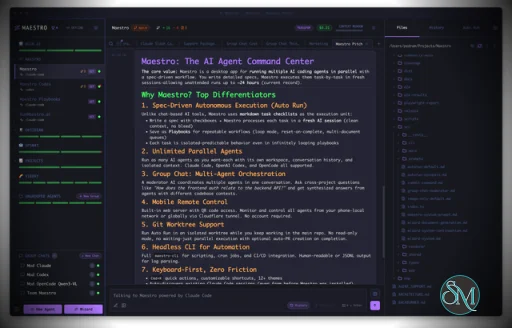
Maestro is a cross platform desktop application built to orchestrate multiple AI agents with isolated contexts. Each agent operates independently while still being managed under a unified command center. This allows users to execute complex workflows, parallel tasks, and long running processes efficiently.
The tool is open source and actively developed, targeting users who work with AI assisted development, research, automation, and experimentation.
Download Maestro v1.0.4 - AI Agent Command Center - Software Mirrors |
|---|
Maestro v1.0.4 - AI Agent Command Center for WindowsMaestro-Setup-1.0.4-x64.exe | 194.7 MB Maestro-Portable-1.0.4-x64.exe | 194.44 MB |
Maestro v1.0.4 - AI Agent Command Center for macOSmaestro-1.0.4-x64-mac.zip | 249.04 MB maestro-1.0.4-x64-mac.dmg | 250.97 MB maestro-1.0.4-arm64-mac.zip | 242.63 MB maestro-1.0.4-arm64-mac.dmg | 244.6 MB |
Maestro v1.0.4 - AI Agent Command Center for Linuxmaestro-1.0.4-x86_64.rpm | 144.77 MB maestro-1.0.4-x86_64.AppImage | 249.41 MB maestro-1.0.4-arm64.deb | 176.24 MB maestro-1.0.4-arm64.AppImage | 249.67 MB maestro-1.0.4-amd64.deb | 181.95 MB maestro-1.0.4-aarch64.rpm | 139.81 MB |
Maestro v1.0.4 - AI Agent Command Center Source Code
Maestro v1.0.4 - AI Agent Command Center Source code (zip)
Maestro v1.0.4 - AI Agent Command Center Source code (tar.gz)
|
Maestro v1.0.4 - AI Agent Command Center Release Notes: 1.0.4 Highlights
💻 The file editor is a real code editor now. Edit a code file and you get autocomplete, auto-closing brackets, quotes and tags, multiple cursors (Option-click, Cmd+D for the next match, Shift+Option-drag for a column), Cmd+/ to toggle a comment, and move or duplicate a line. The find bar replaces too: Enter replaces the current match, Cmd+Enter replaces all in one undo, and regex mode fills in $1. Right-click a selection to quote it into the agent's message or send it to another agent with its file and line numbers. Vim keybindings are one switch away in Settings > Display.
🔍 Review an agent's changes like a pull request. In the Git Diff viewer, click or drag across line numbers (or walk the lines with the arrow keys and press C) to pin a comment, collect comments across files in a Review tray, and send them to the agent as one review. Each comment names its file and lines and quotes the hunk it was left on, a busy agent gets the review after its current turn, and pending comments survive closing the viewer until you send or discard them. A comment whose code changed before you sent it is marked Outdated instead of pointing at the wrong lines. Agents can now leave the same kind of review on another agent's changes, and if you customized the CLI prompt in Settings > Maestro Prompts, you keep your version.
🎯 Design Mode: click an element in a browser tab and hand it to the agent. Turn it on with the pointer button in the address bar or Cmd+Shift+C, point at the part of the page you mean, and click. The agent's message gets a selector that finds it, its HTML, the styles that shape it, a screenshot cropped to it, and your note. Cmd+Enter adds it and keeps picking, so one message can carry several elements, and the page's buttons do not fire while you pick.
Also in 1.0.4
- 🧰 A provider that is not installed says so. When an agent's CLI is missing, Maestro reports it as not installed and gives you the install command for your platform to copy, instead of "Agent exited with code 1" and a restart that fails the same way. Install runs that command for you in a built-in terminal, and Retry resends the message that failed once it succeeds. It also names a missing runtime such as Node.js, and the setup wizard does the same.
- 🩹 Auto Run pauses for you only as a last resort. When a task seems to need a person (a key, a visual check, a sign-off), the agent now builds and tests everything it can, notes the rest under Manual Follow-Up, and moves the human step to the end of the document, so one late pause replaces a stall in the middle of the run. Ordinary failures get a real fix-and-retry first, playbooks from the wizards put human steps in the last phase, and Goal-Driven runs keep working around a blocker before they call it a deadlock. Your own instructions and CLAUDE.md / AGENTS.md still win, and if you customized these prompts in Settings > Maestro Prompts you keep your version and can compare it with the new default there.
- 🙋 Agents finish the work before they ask. In chat, an agent now does every part of a task that does not depend on your answer, takes a sensible default when a choice is cheap to undo (and says which), and saves its questions for the end. Explicit instructions and CLAUDE.md / AGENTS.md still win, and a customized system prompt in Settings > Maestro Prompts is kept as yours.
- 🖼️ Ask for a mockup and the agent draws it. Static screens and layout options come back as inline pictures in the reply, two or three directions side by side with real copy, instead of a written description. Anything you should click or play still opens in Concerto.
- 🔗 Prompt Links: a link that runs a prompt. Make a
maestro://run link that opens a new tab in the agent you pick and sends a prompt you wrote, then put it in a calendar event, a note, a bookmark or a script. A link is one-shot by default, can allow more uses or an expiry, can be revoked at any time, and carries only a random token, so a leaked link can run only the prompt it was made with. Turn it on in Encore Features, then open it with Opt+Cmd+Shift+L, the command palette, or Create Prompt Link in any AI tab's menu.
- 📊 The Usage Dashboard's numbers are right. The Activity Heatmap shows the hours you actually worked instead of an estimate, Codex cached tokens are no longer counted twice, agent cards show their own query count instead of their whole provider's, and Auto Run and Cue totals leave out runs that never finished. Every range is whole calendar days (Last 7 Days is seven full days), and a panel reloads only when its own data changes.
- 📈 Agents Over Time in the Usage Dashboard. The Agent Overview tab now charts how many agents you had at the end of each day in the selected range, with the current count and how many were created and deleted in that range. Worktree agents and agents made by a merge or a send-to-agent count too.
- ⚡ Token speed for more providers. The Usage Dashboard's tokens-per-second figures now cover OpenCode, Pi, Oh My Pi, Qwen3 Coder, Copilot-CLI (output speed only) and Claude Code agents on an SSH host, timed from their live output as each call happens, not only Claude Code and Codex. When a range has no timed calls, the dashboard names the providers it can measure.
- 🎙️ Pasted text arrives exactly as you pasted it. The composer, group chat input and Prompt Composer no longer trim a text paste, so the trailing space a dictation tool adds on purpose is kept and the next word does not run into the last one.
- 🖱️ The tab bar's search and + menus open on hover. Rest the pointer on them to peek without losing your place in the composer; a click still pins the menu.
- 📡 A dead SSH remote gets one clear dialog. It names the remote, the reason, and the agents on it, with Check Now and Dismiss, re-checks on its own, and tells you when the remote is back. It only appears for the agent you are looking at or a turn that just failed, a run that never reached its host reports the outage instead of a crash, and a save that cannot reach the host says "Unable to connect over SSH".
- 🐢 Long Goal-Driven runs no longer stop as stalled when each iteration gains less than one percent. Agents now report progress with decimals on large, measurable goals, and a move like 48.27% to 48.33% counts, so a slow, steady run keeps going instead of restarting its elapsed time and iteration count. A customized Goal-Driven prompt in Settings > Maestro Prompts keeps your version.
- 📁 Claude in TUI mode works again for agents with Additional Directories. Claude Code 2.1.326 asks to confirm each extra folder and defaults to "No, exit", so every turn failed after about two seconds. Maestro now says yes for the folders you gave the agent, and refuses any other folder or unknown startup dialog with a clear error instead of a silent exit.
- 🧭
Cmd+[ and Cmd+] step through exactly the agents the Left Bar shows, under the unread filter, a search, nested groups, and the Starred section, instead of landing on hidden rows or skipping visible ones.
- ⌨️ Editing a queued message into a slash command runs that command, so a queued
/commit expands your custom command instead of going out as text. Claude in TUI mode also ends the turn at once on an unknown slash command, instead of an error five minutes later.
- ✍️ Replaying a message leaves your draft alone. Replay, re-send after a recovery, and prompt macros no longer clear the text you were typing or take its staged images, and a replay while the composer is in
! mode goes to the agent instead of running as a shell command.
- 💬 Send Feedback recovers from a sign-in failure. It interviews you with the provider you actually use, says plainly when that provider is not signed in, and offers to switch to another one without losing the conversation. A screenshot that fails to upload no longer loses the report, and a double submit no longer files two issues.
- 🛡️ Privacy is one click away. A Privacy button in the About window, in Settings > About, and a Privacy Policy command in the command palette open the current privacy page, which says what Maestro sends off your machine and how to turn it off.
- 📝 Previews in Settings > Maestro Prompts and the Memory viewer are formatted. Headings, lists and paragraph spacing render as styled markdown instead of plain unstyled text.
- 🧷 An agent pinned to its own binary runs that binary everywhere. Group chat participants and
maestro-cli send, playbook and goal turns used the provider's default program instead, so a custom build or wrapper you set on the agent was skipped.
- 🧩
maestro-cli does what you asked: encore enable and disable change only the features you name, create-agent with an SSH remote runs its turns in the remote directory instead of failing every one, and open usage-dashboard --tab switches a dashboard that is already open.
- 🐟 Login and install commands report failure honestly. In fish, in PowerShell, and when the install download fails, a failed sign-in or install no longer looks like a success.
- 🎵 The floating media player never cuts off its controls. It stays wide enough for every button, whichever ones the file and the queue add.
- 📋 Task badges in the Auto Run document list line up in one column, whatever their digit count.
- 📱 A phone on the web interface no longer pauses Cue on the desktop when it locks or goes to the background.
- 📂 Dismissing the truncated file tree banner sticks across agent switches and restarts. The warning icon beside the path still brings it back.
- 🧾 History keeps the whole question you asked another agent in its summary line, instead of cutting it at 60 characters.
- 🐧 The Linux arm64 build runs on older distributions, such as Ubuntu 22.04, instead of needing a system library newer than they ship.
- 🪵 System Log entries show the real error instead of
{}.
Full Changelog: v1.0.3...v1.0.4
|
Key Features
Maestro allows users to run multiple AI agents in parallel while keeping their context, state, and execution separated. This enables large tasks to be broken down and handled simultaneously.
The Auto Run and Playbook system lets users define workflows that execute steps automatically. These workflows can loop, batch tasks, or run unattended, making them suitable for long or repetitive operations.
Maestro supports group chat coordination where multiple agents collaborate within a single task. The tool handles routing and coordination to produce unified results.
Remote monitoring and control features allow users to observe and manage agent activity even when away from the main workstation.
A built in command line interface enables headless execution and scripting, allowing Maestro to integrate into broader automation workflows.
Ease of Use
Maestro is designed for users with technical experience. While it is not a beginner focused tool, its interface is structured for efficiency, especially for users familiar with development tools and multitasking environments.
Once configured, workflows are repeatable and easy to manage.
Performance and Compatibility
Maestro runs on Windows, macOS, and Linux. Performance scales based on system resources and the number of agents running concurrently. The application remains responsive even during complex orchestration tasks when used on modern hardware.
Because Maestro coordinates agents rather than performing heavy computation itself, overall performance largely depends on external AI services and configurations.
Pros and Cons
Advantages include powerful multi agent orchestration, parallel execution, automation through playbooks, command line support, and open source flexibility.
Limitations include a learning curve for new users, reliance on external AI models for functionality, and a focus on advanced workflows rather than simple chat usage.
Final Verdict
Maestro is a capable and thoughtfully designed orchestration tool for managing AI agents at scale. Its focus on parallel workflows, automation, and centralized control makes it a strong choice for advanced users working with AI assisted tasks.
For those who need structured AI agent orchestration rather than simple interaction, Maestro delivers a reliable and efficient solution.
Maestro is an open source agent orchestration tool that provides a centralized desktop environment for managing and running multiple AI agents and workflows simultaneously. It is designed for developers and advanced users who need structured coordination, parallel execution, and automation across AI driven tasks.
Maestro focuses on improving productivity when working with multiple agents by offering orchestration, monitoring, and workflow control from a single interface.
Post a Comment/Report Broken Link: