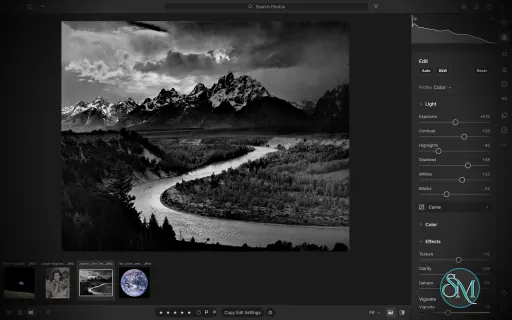
LightCraft is a free, open-source photo management and RAW development application designed as an alternative to Adobe Lightroom. Built in Rust, it combines photo library organization with a comprehensive set of image editing tools, allowing photographers to adjust exposure, refine colors, apply local corrections, and prepare images for export without modifying their original files.
LightCraft is designed for desktop use on Windows, macOS, and Linux, with a WebAssembly version that runs in a browser. It also supports automation through a command-line interface and the Model Context Protocol (MCP), making it an interesting option for photographers who want local control over their workflow.
Features
Non-Destructive Photo Editing
LightCraft keeps original images intact and stores editing operations separately. You can experiment with different adjustments without permanently changing the source files.
Its editing tools include exposure, contrast, highlights, shadows, whites, blacks, tone curves, white balance, vibrance, and saturation. The application uses a wide-gamut, 32-bit floating-point processing pipeline designed to preserve tonal and color information throughout editing.
Color Grading and Presets
The color tools include an eight-band Color Mixer, RGB tone curves, and separate color grading controls for shadows, midtones, and highlights. These features provide flexibility for natural photo correction as well as creative color treatments.
LightCraft also includes built-in presets and lets users save custom looks. You can copy, paste, or synchronize selected adjustments across multiple photos, which is useful when editing a collection of images from the same shoot.
Local Masking and Adjustments
LightCraft supports brush masks, linear gradients, and radial gradients, along with selection tools for luminance, color, sky, subject, and background. Masks can be combined, subtracted, intersected, and inverted.
Local adjustments let you change exposure, contrast, color, texture, sharpness, and other properties in specific parts of an image. This helps users refine skies, brighten subjects, or create more controlled lighting effects without applying every adjustment globally.
Crop, Geometry, and Black-and-White Editing
The cropping tools support common aspect ratios, straightening, rotation, flipping, and manual geometric transformations. Composition overlays help photographers align images and refine framing.
For monochrome photography, LightCraft includes black-and-white conversion, an eight-band monochrome mixer, and additional color grading controls for creating tinted or split-tone results.
Photo Library Management
LightCraft includes tools for organizing photo collections, including folders, albums, smart albums, stacks, virtual copies, ratings, flags, labels, filtering, searching, and sorting.
Its local-first approach avoids requiring an online account or cloud catalog. The project describes its catalog as a human-readable log of editing operations, making it easier to inspect, back up, and replay changes.
Command-Line and AI Automation
In addition to its graphical interface, LightCraft provides a command-line application for rendering images and applying adjustments. MCP support allows compatible AI agents to interact with the application through an automation interface.
These capabilities are useful for repeatable editing tasks, scripted workflows, and experimentation with AI-assisted photo processing.
Download LightCraft v0.19.0 - Software Mirrors |
|---|
LightCraft v0.19.0 for Windowslightcraft-0.19.0-windows-x86.msi | 92.54 MB lightcraft-0.19.0-windows-x86-portable.zip | 111.9 MB lightcraft-0.19.0-windows-x64.msi | 94.99 MB lightcraft-0.19.0-windows-x64-portable.zip | 116.69 MB lightcraft-0.19.0-windows-arm64.msi | 90.77 MB lightcraft-0.19.0-windows-arm64-portable.zip | 111.85 MB |
LightCraft v0.19.0 for macOSlightcraft-cli-0.19.0-macos-universal.zip | 115.15 MB lightcraft-0.19.0-macos-universal.dmg | 120.65 MB |
LightCraft v0.19.0 for Linuxlightcraft-0.19.0-linux-x86_64.tar.gz.asc | 228 B lightcraft-0.19.0-linux-x86_64.tar.gz | 116.4 MB lightcraft-0.19.0-linux-x86_64.rpm.asc | 228 B lightcraft-0.19.0-linux-x86_64.rpm | 117.42 MB lightcraft-0.19.0-linux-x86_64.pkg.tar.zst | 89.98 MB lightcraft-0.19.0-linux-x86_64.flatpak.asc | 228 B lightcraft-0.19.0-linux-x86_64.flatpak | 83.37 MB lightcraft-0.19.0-linux-x86_64.deb.asc | 228 B lightcraft-0.19.0-linux-x86_64.deb | 118.11 MB lightcraft-0.19.0-linux-x86_64.AppImage.zsync.asc | 228 B lightcraft-0.19.0-linux-x86_64.AppImage.zsync | 192.53 kB lightcraft-0.19.0-linux-x86_64.AppImage.asc | 228 B lightcraft-0.19.0-linux-x86_64.AppImage | 109.87 MB lightcraft-0.19.0-linux-riscv64.tar.gz.asc | 228 B lightcraft-0.19.0-linux-riscv64.tar.gz | 113.16 MB lightcraft-0.19.0-linux-riscv64.rpm.asc | 228 B lightcraft-0.19.0-linux-riscv64.rpm | 114.21 MB lightcraft-0.19.0-linux-riscv64.deb.asc | 228 B lightcraft-0.19.0-linux-riscv64.deb | 114.66 MB lightcraft-0.19.0-linux-aarch64.tar.gz.asc | 228 B lightcraft-0.19.0-linux-aarch64.tar.gz | 110.99 MB lightcraft-0.19.0-linux-aarch64.rpm.asc | 228 B lightcraft-0.19.0-linux-aarch64.rpm | 112.92 MB lightcraft-0.19.0-linux-aarch64.pkg.tar.zst | 86.88 MB lightcraft-0.19.0-linux-aarch64.flatpak.asc | 228 B lightcraft-0.19.0-linux-aarch64.flatpak | 78.49 MB lightcraft-0.19.0-linux-aarch64.deb.asc | 228 B lightcraft-0.19.0-linux-aarch64.deb | 113.74 MB lightcraft-0.19.0-linux-aarch64.AppImage.zsync.asc | 228 B lightcraft-0.19.0-linux-aarch64.AppImage.zsync | 183.9 kB lightcraft-0.19.0-linux-aarch64.AppImage.asc | 228 B lightcraft-0.19.0-linux-aarch64.AppImage | 104.94 MB |
LightCraft v0.19.0 for BSDlightcraft-0.19.0-freebsd-x86_64.tar.gz | 115.75 MB lightcraft-0.19.0-freebsd-aarch64.tar.gz | 110.13 MB |
Others Download related to LightCraft v0.19.0release-signing-key.asc | 803 B lightcraft-web-0.19.0.zip | 70.86 MB |
LightCraft v0.19.0 Source Code
LightCraft v0.19.0 Source code (zip)
LightCraft v0.19.0 Source code (tar.gz)
|
LightCraft v0.19.0 Release Notes: What's Changed- Use crw craftlib by @rwoldberg in #3503
- security(web): ?bench runs on demo photos in an unsaved library, never the stored one by @dylanmtaylor in #3646
- #3601: the Square Grid's badge band sits on the photo itself by @rahul05ranjan in #3604
- lightcraft-cli: calibrate walks folders with the engine's bounded walk by @dylanmtaylor in #3643
- security(engine): Find Missing Photos hashes only regular files, no further than their size by @dylanmtaylor in #3704
- security(engine, faces): index repeated membership scans in photo move, keywords, import planning, sync and rename by @dylanmtaylor in #3709
- security(geocode): bound dataset reads, per-line fields, and the inflate error text by @dylanmtaylor in #3718
- security(logging): a log message cannot begin a record of its own by @dylanmtaylor in #3720
- security(tests): test fixture directories are created exclusively, never reused from a predictable name by @dylanmtaylor in #3721
- security(raw): linear sparse planning, distinct-byte allocation bound, opcode list budget, ORF strip length by @dylanmtaylor in #3679
- security(engine): sidecar copies, backups and version checks read regular files only by @dylanmtaylor in #3677
- catalog: bound keyword list path expansion and index synonym merges by @dylanmtaylor in #3641
- security(web): restore plans its writes first; cap render workers by @dylanmtaylor in #3669
- security(engine): embed only fonts inside the asset checkout; no line breaks in cargo instructions by @dylanmtaylor in #3670
- security: staging and probe files are created new, never written through an existing entry by @dylanmtaylor in #3673
- security(engine): the library folder is protected from folder.move however its path is spelled by @dylanmtaylor in #3676
- security(raster, segment): resample tall narrow images columns first by @dylanmtaylor in #3678
- Issue #2249: a teleconverter combination never inherits the bare lens's profile by @eliets2 in #3660
- #2361: lens corrections crop inside the corrected photo by @emmertex in #3012
- LR-EDIT-OPTICS-PROFILE: Sigma 10-18 mm exception on the ILCE-6700 by @Enthendor in #2733
- security(lensdb): bound the names calibrations copy, read database files through the opened regular file by @dylanmtaylor in #3697
- LR-MASK-GEOMETRY: masks stay on the photo under lens corrections, Upright, Transform and Rotate by @OneSlips in #3550
- LR-EDIT-OPTICS-PROFILE: enable Sony ILCE-7M3 embedded distortion correction (rebase of #1384) by @janickm in #3144
- LR-EDIT-OPTICS-PROFILE: preserve unknown crop factors in lens profiles by @r3d42-git in #2676
- LR-EDIT-OPTICS-PROFILE: the lens database is offered on first launch and downloads on request, the library is looked up, Optics names the profile by @OneSlips in #3073
- LR-EDIT-OPTICS-PROFILE: the log says where the lens database was read from and what it holds, and warns when it has no lenses by @FredApps in #3738
- Pass the Linux signing key to the release workflow by @dylanmtaylor in #3759
- LR-EXP-WATERMARK: decomposed Korean and Vietnamese export text draws whole (#3480) by @chordpli in #3489
- LR-VIEW-HISTOGRAM: the histogram and HDR settings flow between SDR and HDR by @JordyUSA in #1460
- About: credits tables fit without side-scrolling and their columns resize by @FredApps in #3726
- LR-EXP-LOCATION: an export subfolder never leaves the destination folder (#2571) by @insideTheFlux in #2600
- LRC-LIB-VISUALSEARCH: Find Similar Photos reads the photos off the UI thread by @insideTheFlux in #3496
- Logging: each render request and how it ended, at debug level (#2682) by @insideTheFlux in #2772
- GPU-FULL: more of the render on the GPU, loupe drafts from GPU textures by @OneSlips in #1065
- LR-META-LOCATION: place names always download into the settings folder (#2575) by @insideTheFlux in #2659
- LR-EDIT-DETAIL-SHARPEN: Radius and Detail work, and sharpening acts at pixel scale (#757) by @radialmonster in #762
- PERF-STEP-STALL: stepping and flagging never wait for the drive, and no change is ever dropped by @OneSlips in #3557
- Convert Negative 1/4: lightcraft-film, the negative conversion maths by @smyrgeorge in #2490
- LR-VIEW-SURVEY: the × on a survey tile removes the photo again by @Yeetjof in #3715
- Auto Sync: As Shot, Auto and Temp apply to each selected photo's own white balance by @OneSlips in #3571
- LR-BEHAV-RENDER-FIDELITY: calibrated Contrast and Blacks in process V3 (#523) by @AlexChambers in #1383
- Tests: two catalog flakes; a readback waits as long as a render by @FredApps in #3777
- pipeline: apply 8x8 ordered Bayer dithering to prevent display banding by @mynameisdeleted in #3509
- LR-PROF-IMPORT: import the user's own DNG camera profiles (.dcp) by @OneSlips in #1063
- Light tests allow a level of 8-bit dither by @FredApps in #3779
- Culling: the loupe uses built previews; photos prepared ahead and in the background by @OneSlips in #3077
- Detail: Remove Hot Pixels, on for newly imported raws (#1345) by @PiMinusMax in #1350
- LR-EDIT-DETAIL-DENOISE: built-in BM3D denoising with GPU acceleration by @esli1283 in #2982
- LR-BEHAV-TITLEBAR: the Windows title bar takes LightCraft's theme at launch (#3381) by @insideTheFlux in #3650
- LR-PREF-DISPLAY: on Windows, previews follow the monitor's colour profile by @insideTheFlux in #2439
- GPU tests allow a level of 8-bit dither by @FredApps in #3789
- LR-LIB-PEOPLE: face boxes drawn on a photo as stored land on the upright photo (#2674) by @insideTheFlux in #2857
- xtask ci: --no-fail-fast test runs; flaky-test policy by @FredApps in #3791
- CI: stop a hung gate at 80 min with a process list by @FredApps in #3794
- Docs: drop the Last updated / Change header line that every PR conflicted on by @FredApps in #3790
- deps: craft-update with flate2's miniz backend (fixes larger-than-raw ZIP TIFFs on Windows) by @FredApps in #3800
- #2270: a host bridge for pages framing the web build (?host=parent) by @francoisgn in #2315
- feat(web): page host mode, so a page can host LightCraft in its own document (builds on #2315) by @helenkwok in #3591
- CI: Windows leg for pull requests that change Windows code, or labelled full-ci by @FredApps in #3793
- Issue #315: the second launch on Windows can load the Vulkan driver and crash before any window by @eliets2 in #3667
- Test Create Preset name box restores on escape, keeps text on return by @eliets2 in #3773
- Report the lens database contents and missing XML files in the log by @eliets2 in #3809
- catalog: resync finds the retry record from the end, not every marker (#2124) by @eliets2 in #2179
- Issue #2165: a Lightroom collection that can't nest goes under the nearest set instead of failing the import by @THEtheChad in #3145
- LR-BEHAV-RENDER-FIDELITY: process V5 rolls raw tone curves off into white in stops, so raising Exposure keeps highlights (#1632) by @AlexChambers in #3783
- Export: built-in presets for Instagram Feed, Story / Reel, Web / Portfolio, Full Resolution (#2104) by @eliets2 in #2209
- Add GFX100S II to the spectral camera matrix table by @eliets2 in #3139
- shortcuts: H toggles mask pins while masking by @eliets2 in #1458
- Import review: say what the folder scan left out by @eliets2 in #2944
- Cut edited thumbnails from the decoded source, not the file by @eliets2 in #3810
- catalog: history steps and versions share segmentation grids (#2154) by @eliets2 in #2203
- Give the pipeline one exact output size instead of re-fitting by @eliets2 in #3749
- Presets change only the settings they name (fixes #2159) by @eliets2 in #2207
- Apply Auto settings to every selected photo by @eliets2 in #3808
- LR-IMP-FORMATS: pure-Rust clean-room compressed Olympus ORF bitstream decoder by @bd78 in #3775
- Extend CR3 white level to actual sensor saturation by @eliets2 in #3805
- Keep a stitched panorama at the photos' own resolution by @eliets2 in #3806
- ui: first-run onboarding tour and What's New after an update by @eliets2 in #2206
- Tests: the next folder drop gets 20 seconds to land by @FredApps in #3834
- never-crash: deny the panic lints in every crate root; GPU asserts become fail paths (#2137) by @eliets2 in #2170
- Paint clipped pixels red/blue when clipping warnings (J) are on by @Silvertree2010 in #3638
- Import review: an optional batch-edit recipe for newly imported photos by @eliets2 in #2940
- Tests: clipping warnings crush the shadows with Blacks by @FredApps in #3839
- Colour noise reduction: joint linear chroma filter with speck brake, CPU and GPU (#815) by @PiMinusMax in #1348
- Add flash, exposure bias and serial rules to smart albums by @eliets2 in #3821
- Remove the dead Cloud button from the top bar by @eliets2 in #3832
- Face boxes: drag a box's body to move it by @eliets2 in #3846
- Arm the window renderer marker before probing the driver by @eliets2 in #3817
- Write camera make and lens make to EXIF on export by @eliets2 in #3828
- Fix mismatched source/destination rects in before/after zoom window renders by @eliets2 in #3842
- Picture Package and Custom Package pages can print cut guides at each cell's corners by @eliets2 in #3843
- Match renamed missing files by content when size is unknown by @eliets2 in #3852
- Treat a first intersect mask component as its base selection by @eliets2 in #3854
- Copy the shared house rules into AGENTS.md by @FredApps in #3857
- Use adapter texture limit for probed window device by @eliets2 in #3853
- Issue #3768: dialog_role tests draw glyphs only craft-fonts has as boxes when built without it by @THEtheChad in #3769
- Stabilize sidebar month-name test fixture by @FredApps in #3859
- WEB-WORKER-PARITY: compare serialized jobs with the CPU reference (#3778) by @lostwald in #3782
- GPU float output for the HDR render (F32Hdr) by @eliets2 in #3856
New Contributors- @rahul05ranjan made their first contribution in #3604
- @janickm made their first contribution in #3144
- @r3d42-git made their first contribution in #2676
- @mynameisdeleted made their first contribution in #3509
- @esli1283 made their first contribution in #2982
- @helenkwok made their first contribution in #3591
- @bd78 made their first contribution in #3775
- @lostwald made their first contribution in #3782
Full Changelog: v0.18.1...v0.19.0 |
Performance and Compatibility
LightCraft is written in Rust and uses background rendering to keep the interface responsive during common editing operations. The project reports that it can display embedded camera previews or cached renders quickly while preparing full-resolution images in the background.
The application supports Windows, macOS, and Linux, as well as a browser-based WebAssembly build. Available Linux packages include AppImage, DEB, and RPM formats, with builds for x86-64 and ARM64 systems.
However, LightCraft is still a developing project. Its feature list should not be interpreted as proof of complete Adobe Lightroom compatibility. Photographers with established Lightroom workflows should verify RAW camera support, editing results, and catalog migration before moving their primary library.
System Requirements
Operating systems: Windows, macOS, and Linux.
Browser support: A WebAssembly build is available.
Processor architectures: Linux releases include x86-64 and ARM64 builds.
Build requirements: Rust and the project's documented dependencies are needed to compile from source.
The project does not establish a comprehensive minimum hardware specification in the information reviewed. Actual performance will depend on image resolution, RAW processing requirements, and available system resources.
Pros and Cons
Pros
Free and open-source under the MIT and Apache 2.0 licenses.
Non-destructive editing preserves original photos.
Extensive controls for exposure, tone curves, color grading, and local adjustments.
Photo library organization tools for managing larger collections.
Native applications for major desktop operating systems.
Browser-based build for experimentation without a traditional desktop installation.
Command-line and MCP support for automation.
Local-first workflow without a mandatory cloud account or subscription.
Cons
Still under active development, so feature completeness and reliability may vary.
Compatibility with existing Lightroom catalogs and established workflows needs verification.
RAW format support may not cover every camera model or file variation.
Users accustomed to Lightroom may encounter differences in editing behavior and output.
Advanced automation and browser workflows may require additional setup.
Published minimum hardware requirements are limited.
How to Install
The simplest option is to download a suitable package from the project's GitHub Releases page. Linux users can choose the available AppImage, DEB, or RPM package, while macOS and Windows packages are also provided.
For users who prefer to build from source, install Rust and the required development tools, then run:
git clone https://github.com/storytold/lightcraft
cd lightcraft
cargo run --release -p lightcraft
To open a specific photo folder, pass its path when launching the application:
cargo run --release -p lightcraft -- ~/Pictures/trip
To try the browser-based build, follow the project's WebAssembly setup instructions and run:
cargo xtask web --serve
The project also provides a command-line renderer for scripted workflows. Consult the official documentation for supported formats, available adjustment parameters, and platform-specific installation details.
Final Verdict
LightCraft is a promising open-source alternative for photographers who want a local photo library and RAW editing workflow without relying on a commercial subscription. Its combination of non-destructive editing, color grading, masking, presets, and catalog management makes it more ambitious than a basic image editor.
Its strongest differentiators are its Rust-based architecture, local-first design, and automation support. These features may appeal to technical users and photographers interested in building repeatable editing workflows.
The main reservation is maturity. Before switching from Lightroom, users should test their own camera RAW files, compare exported images, and confirm that the library features they depend on are available and reliable. LightCraft is worth trying, but photographers with demanding production workflows should evaluate it alongside their existing tools rather than assume full feature parity.
Post a Comment/Report Broken Link: