KillerPDF is a lightweight PDF conversion and document processing application that focuses on simplicity, speed, and privacy. Instead of relying on cloud-based services, it performs PDF operations locally on your computer, allowing you to convert, merge, split, compress, and manage PDF documents without uploading sensitive files to external servers.
For users who frequently work with confidential documents, KillerPDF offers a practical alternative to online PDF tools.
Many online PDF services require users to upload documents before processing them. While convenient, this approach may not be suitable for business documents, contracts, invoices, or personal files.
KillerPDF addresses this by processing documents locally whenever possible. This reduces privacy concerns while also eliminating the need to wait for files to upload and download.
The application is designed with a straightforward interface that emphasizes common PDF tasks over complex editing features.
Key Features of KillerPDF
PDF Conversion
KillerPDF supports converting documents between PDF and various file formats, making it easier to work with reports, presentations, and office documents.
The conversion process is simple and requires only a few steps.
Merge PDF Files
Users can combine multiple PDF files into a single document.
This feature is useful for creating reports, assembling scanned documents, or organizing related files into one PDF.
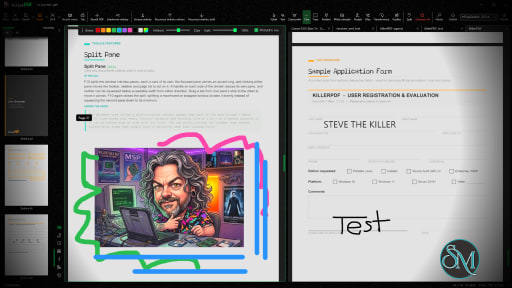
Split PDF Documents
Large PDF files can be divided into smaller documents or individual pages.
This makes it easier to extract specific sections without modifying the original file.
PDF Compression
The built-in compression tool helps reduce PDF file sizes while maintaining acceptable document quality.
Smaller files are easier to email, upload, and archive.
Local Processing
One of KillerPDF's strongest advantages is local document processing.
Keeping files on your own computer improves privacy and may also speed up processing for large documents since there is no need to transfer files over the internet.
Easy-to-Use Interface
The application focuses on essential PDF tools with a clean interface that is suitable for beginners.
Most operations require only selecting a file, choosing the desired action, and saving the result.
Download KillerPDF v1.9.6 - Software Mirrors |
|---|
KillerPDF v1.9.6 for WindowsKillerPDF.exe | 42.08 MB KillerPDF-Store.exe | 101.55 MB KillerPDF-Portable.exe | 101.55 MB |
Others Download related to KillerPDF v1.9.6SHA256SUMS.txt | 360 B KillerPDF-1.9.6-src.zip | 47.7 MB |
KillerPDF v1.9.6 Source Code
KillerPDF v1.9.6 Source code (zip)
KillerPDF v1.9.6 Source code (tar.gz)
|
KillerPDF v1.9.6 Release Notes:
1.9.6 adds Swedish and Korean. The rest is interface refinements and bug fixes.
Fixed
- Dragging a signature onto the page no longer crashes KillerPDF when a file it needs is missing (#515).
- While editing text, the font list no longer closes on a click or the mouse wheel, a font-only change on a scanned line sticks, and More settings stays open. Closing More settings with a click no longer leaves the window ignoring the mouse (#467).
- Merging works when an untagged PDF goes into a tagged one (#495), and with pages that have a zero-size ArtBox, BleedBox or TrimBox, like Excel exports (#455).
- Pages and notes dated with an hour-only time zone, like
+01, merge and take new comments instead of being refused (#524, thanks @andretorresdg).
- Run as administrator, opening a file while KillerPDF is open sends it to the open window instead of starting a second one. Images to PDF from Explorer makes one PDF from all the images again.
- Editing existing text keeps its real typeface and weight when the PDF hides them behind generic names, as Word exports do. Bold Arial stays bold Arial instead of turning into plain Segoe UI (#431).
- Import form data reads FDF files from pdftk, fdfgen and other tools that leave out the cross-reference table (#525, thanks @jayhemnani9910).
- Making a new folder in the file dialog no longer freezes the window on a share that stopped answering.
- Large tiled JPEG 2000 images use far less memory again, 134 MB instead of 361 MB for a large scan.
- Chinese, Japanese and Korean draw in the right fonts and at the right size in the toolbar, sidebar, title bar and status bar (#490).
- Pinch zoom on a touchpad holds the page still instead of letting the text jump (#494).
- Ctrl+click adds marks to a selection like Shift+click, and a single text box's card shows Arrange (#504).
- After a language change, the Restore last session bar and the start screen's Recent list switch to the new language too.
- Under Trash Polka, drop-down lists and the file dialog's panes carry the ink, Yellow buttons draw dark text, and changing the accent no longer stalls on a hung redraw.
- A sidebar menu too tall for the window scrolls instead of running off the bottom, and the keyboard shortcuts card fits its contents.
- One mouse wheel notch scrolls 120 pixels in the file dialog's folder tree and the customize drawer, up from 60 and 40.
- Card tile arrows are as bright as their labels (#508), menus in the document pane keep all four corners rounded, and tabs join their page without a seam at every app size.
- On 98SE, menus, confirm dialogs, tab titles and the window frame match Windows 98.
Changed
- Merge PDFs on the toolbar makes a new document with the open file listed first, instead of adding to the open file. The page card's Merge still inserts after that page (#495).
- Switching between Single, Two-page and Continuous keeps your zoom, and leaving the thumbnail grid returns to the zoom you had (#521, thanks @Shakil-Ahmmed-Dev).
- In the Open and Save dialogs, File type sits on the File name row, and its box matches the name box with the ink and grain in its list. The recent-locations arrow is larger and turns red on hover like a close X, and its list is a regular dropdown list that lines up under the path box.
- Under Trash Polka, a card's main button sits on dark ink with an accent outline. The Yellow accent is a bright yellow with dark text instead of a brownish gold.
- Menu nav buttons, dialog buttons and card toggles are slimmer, so card tiles keep their own width in two-page view.
- The About card has a new tagline in every language, an icon that spans the wordmark and tagline, and a monospace SHA-256 line.
- The tray icon's card shows the KillerPDF logo over Open and Exit, like the other cards.
Added
- Swedish and Korean interface languages, machine-translated to start, with OCR for both (#511).
- The print window has a Color section that manages print colors with an RGB printer profile, a rendering intent and black-point compensation, and previews how the page will print. It asks the printer driver to skip its own color management and says when the driver confirms it (#520).
- Save as offers EPUB beside PDF and writes the same book as Export. The tab stays on its PDF.
- The Open dialog takes several files at once. Enter opens them as tabs, and Shift+Enter opens them together in a new window (#513).
- Merge files has Arrange pages, which shows every page as a thumbnail so you can reorder pages or drop some before merging (#495).
- Highlight works on scans and pictures by highlighting the box you drag where there's no text (#514).
- After an update, a What's new card shows that version's changelog once, with a box to turn it off.
- The page card's top box has its own pencil, so you can reorder or hide its tiles too (#496).
- Ctrl+Shift+U turns pages upside down.
- While customizing a card, Alt+arrow keys move the focused tile, and a screen reader hears its new position.
|
Performance and User Experience
KillerPDF performs common PDF tasks quickly and provides an uncomplicated workflow.
Because the application focuses on core document processing rather than advanced publishing features, the interface remains easy to understand even for first-time users.
Performance depends primarily on the size and complexity of the documents being processed, but common operations such as merging, splitting, and compression are generally completed quickly.
Pros
Simple and easy to use.
Local document processing for better privacy.
PDF conversion tools.
Merge and split PDF files.
PDF compression.
Fast processing.
Suitable for everyday document management.
Lightweight interface.
Cons
Lacks advanced PDF editing features found in professional software.
Feature set is more limited than comprehensive PDF suites.
Platform availability may be limited depending on the release.
Some specialized workflows may require dedicated PDF editing software.
Who Should Use KillerPDF?
KillerPDF is a good choice for students, office workers, freelancers, and home users who regularly perform basic PDF tasks such as converting, merging, splitting, and compressing documents.
It is especially suitable for users who prefer processing sensitive files locally instead of uploading them to online services.
Final Verdict
KillerPDF focuses on doing common PDF tasks efficiently without unnecessary complexity. Its emphasis on local processing makes it attractive for privacy-conscious users, while its clean interface keeps everyday document management simple.
Although it is not intended to replace professional PDF editing software, it covers many of the most frequently used PDF operations with minimal effort.
Post a Comment/Report Broken Link: