Kandev is an open source AI-powered development environment designed to orchestrate multiple coding agents in parallel. Rather than acting as a single AI coding assistant, Kandev provides a Kanban-style workspace where developers can assign tasks to different AI agents, review their work, manage Git worktrees, and create pull requests from a unified interface. It supports multiple AI providers, is self-hostable, and runs entirely without telemetry, making it an excellent choice for teams and developers who want greater control over AI-assisted software development.
As AI coding assistants become more capable, developers often want to run several agents simultaneously. Managing multiple terminal windows quickly becomes difficult, especially when reviewing changes, tracking conversations, and merging code.
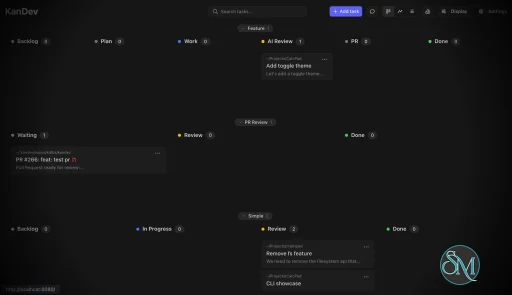
Kandev solves this problem by providing a visual development environment with Kanban and pipeline views. Each task can run in its own Git worktree, allowing several AI agents to work independently without interfering with one another. Developers can then review generated code, compare changes, and approve pull requests from a single workspace.
Key Features Kandev
Multi-Agent Orchestration
Kandev can launch multiple AI coding agents simultaneously, allowing different tasks to be completed in parallel. This significantly improves productivity when working on larger projects.
Kanban Workflow
The built-in Kanban board helps organize development tasks, track progress, and visualize AI-assisted workflows in a familiar project management interface.
Integrated Code Review
Instead of switching between terminal windows, Kandev provides a unified workspace with:
File editor
Git diff viewer
File tree
Terminal
Browser preview
Agent conversations
This makes reviewing AI-generated code much more efficient.
Multiple AI Provider Support
Kandev supports numerous AI coding agents through the Agent Client Protocol (ACP), including:
Claude Code
OpenAI Codex
GitHub Copilot
Gemini CLI
Amp
Auggie
OpenCode
Developers are free to choose the provider that best fits their workflow.
Flexible Execution
Agents can run in several environments:
Local processes
Docker containers
Remote SSH servers
Cloud executors
This flexibility allows teams to scale workloads without relying solely on local hardware.
Git Worktree Management
Each task runs in its own Git worktree, reducing merge conflicts and allowing multiple features or bug fixes to be developed simultaneously.
Self-Hosted and Privacy Focused
Kandev is fully self-hostable and collects no telemetry. Organizations that handle sensitive source code can keep their development environment entirely within their own infrastructure.
Cross-Platform Support
The application runs on Windows, macOS, and Linux. It can be installed using Homebrew, NPX, npm, or by building directly from source.
Download Kandev v0.104.0 - Software Mirrors |
|---|
Kandev v0.104.0 for Windowskandev-windows-x64.zip | 82.62 MB kandev-windows-x64.tar.gz | 82.62 MB kandev-windows-x64-full.zip | 146.79 MB kandev-windows-x64-full.tar.gz | 146.79 MB kandev-desktop-windows-x64-Kandev_0.104.0_x64-setup.nsis.zip | 59.79 MB kandev-desktop-windows-x64-Kandev_0.104.0_x64-setup.exe | 59.79 MB |
Kandev v0.104.0 for macOSkandev-macos-x64.tar.gz | 81.68 MB kandev-macos-x64-full.tar.gz | 145.7 MB kandev-macos-arm64.tar.gz | 77.23 MB kandev-macos-arm64-full.tar.gz | 141.24 MB kandev-desktop-macos-x64-Kandev_0.104.0_x64.dmg | 87.43 MB kandev-desktop-macos-x64-Kandev.app.tar.gz | 89.01 MB kandev-desktop-macos-arm64-Kandev_0.104.0_aarch64.dmg | 83.02 MB kandev-desktop-macos-arm64-Kandev.app.tar.gz | 84.87 MB |
Kandev v0.104.0 for Linuxkandev-linux-x64.tar.gz | 81.74 MB kandev-linux-x64-full.tar.gz | 145.91 MB kandev-linux-arm64.tar.gz | 75.43 MB kandev-linux-arm64-full.tar.gz | 139.6 MB kandev-desktop-linux-x64-Kandev_0.104.0_amd64.deb | 90.15 MB kandev-desktop-linux-x64-Kandev_0.104.0_amd64.AppImage.tar.gz | 153.82 MB kandev-desktop-linux-x64-Kandev_0.104.0_amd64.AppImage | 155.24 MB kandev-desktop-linux-x64-Kandev-0.104.0-1.x86_64.rpm | 90.15 MB kandev-desktop-linux-arm64-Kandev_0.104.0_arm64.deb | 84.53 MB kandev-desktop-linux-arm64-Kandev_0.104.0_aarch64.AppImage.tar.gz | 146.51 MB kandev-desktop-linux-arm64-Kandev_0.104.0_aarch64.AppImage | 147.87 MB kandev-desktop-linux-arm64-Kandev-0.104.0-1.aarch64.rpm | 84.54 MB |
Others Download related to Kandev v0.104.0 |
Kandev v0.104.0 Source Code |
Kandev v0.104.0 Release Notes:[!WARNING] macOS, Windows desktop installers in this release are unsigned development builds. They may require manual OS security bypasses and are not trusted downloads.> If macOS blocks Kandev after you verify the checksum, run:>
xattr -d com.apple.quarantine /Applications/Kandev.app 0.104.0 - 2026-11-26Features
Bug Fixes
Documentation
|
Performance and User Experience
Kandev offers a modern interface that combines project management with AI-assisted development. The Kanban workflow feels natural for teams already using agile methodologies, while the integrated review tools reduce context switching between editors, terminals, and Git clients.
The application performs well even when managing multiple concurrent AI sessions, thanks to its orchestrator architecture and support for isolated execution environments. Since it is still a relatively young project, some features continue to evolve rapidly, but active development and frequent updates indicate strong momentum.
Pros
Free and open source.
Supports multiple AI coding agents.
Parallel task execution.
Built-in Kanban workflow.
Excellent integrated code review tools.
Self-hostable with no telemetry.
Flexible execution using local, Docker, SSH, or cloud environments.
Active development.
Cons
Still a relatively new project.
Best suited for experienced developers.
Requires compatible AI agent tools and API access.
Advanced workflows may require some initial configuration.
Who Should Use Kandev?
Kandev is ideal for software developers, engineering teams, AI-assisted coding enthusiasts, and DevOps professionals who frequently work with multiple AI coding agents.
It is especially valuable for teams that want to coordinate parallel AI workflows, maintain human review before merging code, and avoid vendor lock-in by supporting multiple AI providers.
Final Verdict
Kandev introduces a fresh approach to AI-assisted software development by treating AI agents as collaborative team members rather than standalone chatbots. Its combination of multi-agent orchestration, Kanban project management, integrated code review, and self-hosted architecture makes it one of the most promising open source AI development environments currently available.
Although the project is still evolving, its rapid development pace, privacy-focused design, and flexible architecture make it an excellent choice for developers looking to scale their AI-assisted workflows.
Post a Comment/Report Broken Link: