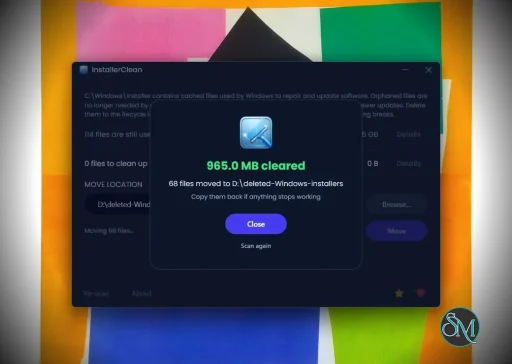
InstallerClean is a small Windows tool that helps detect and remove leftover files, folders, and registry entries created by installed software. It is built for users who want to keep their system clean without manually digging through directories.
InstallerClean is a focused utility designed to clean up files and traces that remain after uninstalling programs. While many uninstallers remove the main application, leftover data often stays behind. InstallerClean aims to fix that with a simple and lightweight approach.
The application is typically portable, meaning it can run without installation and does not add extra load to your system.
Download InstallerClean v3.8.0 - Software Mirrors |
|---|
InstallerClean v3.8.0 for WindowsInstallerClean-slim.exe | 5.67 MB InstallerClean-portable.exe | 5.67 MB |
InstallerClean v3.8.0 Source Code |
InstallerClean v3.8.0 Release Notes:InstallerClean 3.8.0InstallerClean now runs on the .NET Framework 4.8 that comes with Windows, so no download has to carry its own copy of .NET. That makes the downloads a fraction of the size: the setup is about 6 MB instead of 93 MB, the portable is about 6 MB instead of 64 MB, and the command-line tool is about 4 MB instead of 37 MB.Which files it lists
Moving and deleting
Updates
In the window
Starting up
If a script reads the command line or the Application log
Downloads
Build it yourselfBuilt with .NET SDK 10.0.115 from the v3.8.0 tag. The portable and the command-line tool are each one exe that ILRepack merges from the Release build, made bydotnet build src/InstallerClean/InstallerClean.csproj -c Release -p:RestoreLockedMode=true -p:OneFile=true and dotnet build src/InstallerClean.Cli/InstallerClean.Cli.csproj -c Release -p:RestoreLockedMode=true -p:OneFile=true; the slim download is the portable's exe under the slim's name. Release builds are deterministic, so building that tag yourself, on that SDK and with those flags, gives you the same bytes and the same hashes for the portable and the command-line tool; the README's Checking the download itself section has the detail. The installer gives the same hash too, compiled with Inno Setup 6.7.1 through scripts/compile-setup.ps1, which stamps every file it packs with the commit's date and time.
VirusTotal
DonateInstallerClean is free. If it helped, you can say thanks by card, Apple Pay or Google Pay through Ko-fi, or with Kakao Pay or Naver Pay in Korea, Pix in Brazil or BLIK in Poland. Leave a tip here |
Key Features of InstallerClean
Leftover File Detection
InstallerClean scans your system for files and folders that remain after uninstalling applications. This helps free up disk space and reduce clutter.Registry Cleanup
It can identify unused or orphaned registry entries related to removed programs, helping maintain system organization.Simple Interface
The tool is designed to be straightforward. Users can scan and clean with minimal steps, making it accessible even for non technical users.Portable Usage
InstallerClean often runs as a portable application, so you can use it on multiple systems without installation.Fast Scanning
The scanning process is quick and does not heavily impact system performance.
User Experience
InstallerClean is easy to use, with a minimal interface that focuses on functionality. It does not overwhelm users with advanced settings, which makes it suitable for quick maintenance tasks.
However, advanced users may find it lacks deeper customization compared to more comprehensive system cleanup tools.
Performance and Compatibility
The software performs efficiently and works on most Windows systems. It is lightweight and does not consume significant resources during scanning or cleaning.
Because it targets leftover files specifically, it complements rather than replaces full system maintenance tools.
Pros
Lightweight and fast
Simple and easy to use
Helps remove leftover files and registry entries
Portable and convenient
Cons
Limited advanced features
Not as comprehensive as full system cleaners
Requires careful review before deleting files
InstallerClean is ideal for users who frequently install and uninstall software and want to keep their system tidy. It is also useful for those who prefer simple tools over complex system utilities.
InstallerClean delivers a focused solution for removing leftover files after uninstallations. While it is not a full system optimizer, its simplicity and efficiency make it a valuable addition to basic PC maintenance tools.
Post a Comment/Report Broken Link: