Ghost Downloader is a free, open-source download manager designed to handle nearly all common types of downloads within a single application. It supports HTTP, FTP, BitTorrent, magnet links, eD2k, HLS, MPEG-DASH, YouTube, and Bilibili, serving as a versatile alternative to various specialized download tools.
A particularly compelling feature of Ghost Downloader is its browser integration. Its companion extension detects media resources on websites and sends them directly to the desktop application. Users can select video quality, subtitles, and individual episodes without needing to manually extract download URLs.
Developed using Python and Qt, Ghost Downloader offers native applications for Windows, macOS, Linux, and Android. Additionally, it provides a command-line interface, an aria2-compatible RPC API, and an extensible system for adding new features.
Download Ghost Downloader v4.6 - Software Mirrors |
|---|
Ghost Downloader v4.6 for WindowsGhost-Downloader-v4.6-Windows-x86_64.zip | 37.95 MB Ghost-Downloader-v4.6-Windows-x86_64-Setup.exe | 36.62 MB |
Ghost Downloader v4.6 for macOS |
Ghost Downloader v4.6 for LinuxGhost-Downloader-v4.6-Linux-x86_64.tar.xz | 62.72 MB Ghost-Downloader-v4.6-Linux-x86_64.AppImage | 82.08 MB |
Ghost Downloader v4.6 for Android |
Ghost Downloader v4.6 Source Code |
Ghost Downloader v4.6 Release Notes:[!NOTE] Updates will be less frequent due to my studies. Thank you for your understanding. Feedback is always welcome. Buy me a coffee: Donate New Features 🎉
Improvements 🔧
Bug Fixes 🐛
Feature Pack Updates 📦The following updates may have already been delivered via automatic pack updates.
[!NOTE] 由于本人学业原因, 更新节奏有所放缓, 敬请谅解. 欢迎继续提供反馈. 请我喝杯咖啡: 捐赠项目 新功能 🎉
功能优化 🔧
问题修复 🐛
功能包更新 📦以下更新可能已通过自动更新提前推送。
Downloads
[!TIP] 🐧 Linux Install Script / Linux 安装脚本 - GitHub:
- 国内镜像:
Full Changelog: v4.5.11...v4.6 |
Features
Multi-Protocol Download Manager
Ghost Downloader combines several download engines in one interface, reducing the need for separate applications.
Supported download protocols and formats include:
HTTP and HTTPS.
FTP and FTPS.
BitTorrent and magnet links.
eD2k.
HLS and M3U8.
MPEG-DASH.
YouTube.
Bilibili.
HTTP and FTP downloads support multiple connections, resumable transfers, and adjustable thread counts. The application can automatically increase the number of download threads when it detects that additional bandwidth is available.
For torrent downloads, users can inspect the contents of a torrent and select individual files instead of downloading everything.
Video and Audio Downloads
Ghost Downloader provides specialized download support for online video platforms, particularly YouTube and Bilibili.
Users can select available video qualities, audio tracks, subtitles, playlists, and individual episodes. It also supports downloading selected clips and handling multi-part content.
For websites that deliver video and audio separately, Ghost Downloader can download both tracks and merge them automatically using FFmpeg.
This is particularly useful for high-resolution videos that use separate audio and video streams.
Browser Integration and Media Detection
One of Ghost Downloader's strongest features is its companion browser extension.
The extension monitors network requests and identifies media resources loaded by websites. When it detects a playable video, it can display a download button directly over the video player.
The extension also provides a resource list containing media requests detected on the current page. Users can inspect available streams, select video quality, and send the chosen resources to the desktop application.
Supported workflows include:
Automatic video detection.
Download buttons on supported video players.
Media resource inspection.
Multiple video-quality selection.
Separate audio and video track detection.
Automatic audio and video merging.
Browser download takeover.
Batch image downloading.
The extension works alongside the desktop application, so users do not need to manually copy media URLs between applications.
For login-protected content, the extension can preserve the browser's authentication context when transferring supported downloads. However, DRM-protected streaming content cannot simply be downloaded as playable files through this feature.
Cat Catch Integration
Ghost Downloader integrates with Cat Catch, a browser resource-detection extension that provides additional media capture capabilities.
This integration expands its ability to detect content that ordinary network-resource inspection might miss.
Additional capture methods include:
Media recording.
WebRTC capture.
Browser cache capture.
Advanced resource inspection.
These capabilities are particularly useful when dealing with websites that deliver media through more complicated streaming mechanisms.
BitTorrent and Magnet Downloads
The built-in BitTorrent engine supports torrent files and magnet links.
Users can inspect torrent contents, select specific files, manage download tasks, and control transfer activity from the main interface.
The application also supports tracker subscriptions and configurable BitTorrent settings. Its Feature Packs architecture allows the torrent engine to be maintained separately from the main application.
M3U8 and MPEG-DASH Live Recording
Ghost Downloader supports downloading and recording HLS and MPEG-DASH streams.
For supported live streams, it can record incoming segments while the stream is running. It also supports automatic decryption for supported streams and merges the output after recording stops.
This makes it useful for capturing supported live broadcasts and saving streaming media for offline viewing.
Its streaming capabilities are not limited to live recording. Regular VOD streams can also be downloaded through the browser detection and media-processing workflow.
Download Acceleration
Ghost Downloader uses multi-threaded downloads and automatic bandwidth detection to improve transfer performance.
Its smart chunking system adjusts the number of download threads based on available network capacity rather than requiring users to manually configure every download.
The application also supports browser-like TLS fingerprint emulation. This helps with websites that reject conventional download clients or require browser-like network characteristics.
Users can configure TLS fingerprint behavior, proxy settings, and request headers to troubleshoot download failures.
Actual download speed still depends on the source server, network conditions, connection limits, and the selected download method.
Task Management and Automation
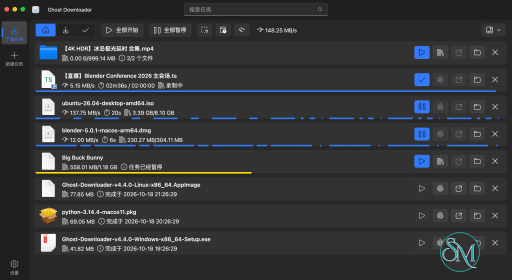
Ghost Downloader provides a centralized interface for managing multiple downloads.
Users can:
Pause and resume tasks.
Retry failed downloads.
Modify download URLs.
Change request headers.
Adjust connection threads.
Configure proxies.
Organize downloads into categories.
Apply automatic file classification.
Download multiple URLs in batches.
Configure automatic shutdown or hibernation after downloads finish.
The ability to modify URLs, headers, and proxy settings while a task is running is particularly useful when troubleshooting downloads that require changing network parameters.
Command-Line Interface
Ghost Downloader includes a command-line utility called ghd, which can be installed through the application's settings.
It allows users to manage downloads without opening the graphical interface.
Available commands include:
ghd probe <url>to inspect a URL before creating a download task.ghd add <url>to add and start downloads.ghd tasksto list existing tasks.ghd task <taskId>to display task information.ghd pause <taskId>to pause downloads.ghd start <taskId>to resume downloads.ghd remove <taskId>to remove tasks.ghd wait <taskId>to wait for downloads to finish.
For example, you can inspect a torrent and download only selected files:
ghd probe "https://example.com/file.torrent"

ghd add "https://example.com/file.torrent" \
  --select 0,3 \
  -o ./downloads
This makes Ghost Downloader useful for shell scripts, automation workflows, and users who prefer command-line download management.
aria2-Compatible RPC API
Ghost Downloader provides an aria2-compatible RPC interface for third-party applications.
Existing tools that communicate through the aria2 RPC protocol can integrate with Ghost Downloader without requiring an entirely different task-management workflow.
It also supports integrations with tools such as LinkSwift.
This is an important advantage for users who already rely on external download managers, scripts, or browser extensions that support aria2.
Feature Packs and Extensibility
Ghost Downloader uses a modular Feature Packs architecture to separate download engines and specialized functionality from the main application.
Different packs provide capabilities such as:
HTTP downloads.
BitTorrent.
eD2k.
M3U8 streaming.
Bilibili integration.
FFmpeg processing.
ZIP handling.
Wrapped download links.
The modular approach allows individual components to receive updates independently of the main application.
The Feature Packs system is already operational, although its public plugin API is still being developed. Users should distinguish between the existing internal pack ecosystem and a fully documented third-party plugin API.
Android Application
Ghost Downloader is also available as an Android application.
The mobile version supports downloading files and recording supported M3U8 live streams. It can continue downloads in the background, making it useful for users who want to manage transfers directly from their smartphones.
Android also supports sharing links with Ghost Downloader, allowing URLs from other applications to be sent to the download manager.
The mobile version is not identical to the desktop application, and some advanced desktop features and integrations are unavailable.
Performance and Compatibility
Ghost Downloader is developed primarily in Python and uses PySide6 for its graphical interface. Its asynchronous architecture and specialized download engines handle different transfer types, while external components provide functionality such as torrent downloads, media processing, and video extraction.
Its performance features include:
Multi-threaded HTTP and FTP downloads.
Automatic bandwidth detection.
Resumable downloads.
Asynchronous task management.
Browser-compatible TLS fingerprinting.
Separate download engines through Feature Packs.
FFmpeg-based media merging.
Supported platforms include:
Windows 10 or later, x86_64 and ARM64.
macOS 13 or later, Intel and Apple Silicon.
Linux with glibc 2.35 or later, x86_64 and ARM64.
Android 10 or later, ARM64.
The Linux packages include AppImage, DEB, and compressed archives. Arch Linux users can also find community-maintained AUR packages.
One hardware limitation worth mentioning is that Qt 6.6 and later no longer support processors without AVX instructions. Older x86 systems without AVX may therefore be incompatible with the desktop application.
Ghost Downloader is distributed under the GNU General Public License v3.0.
System Requirements
Desktop:
Windows 10 or later, macOS 13 or later, or a compatible Linux distribution.
x86_64 or ARM64 processor.
AVX instruction support for applicable Qt-based desktop builds.
glibc 2.35 or later for Linux.
Internet connection.
Additional disk space for downloaded files and temporary media processing.
Android:
Android 9 or later.
ARM64-v8a processor.
Storage permissions for downloaded files.
Background execution permissions where required by the device manufacturer.
Optional components:
Browser extension for media detection and download takeover.
FFmpeg-based processing for supported media merging workflows.
Proxy configuration for networks that require it.
Pros and Cons
Pros
Supports multiple download protocols in one application.
Handles HTTP, FTP, BitTorrent, magnet, and eD2k downloads.
Supports YouTube and Bilibili downloads.
Browser extension provides automatic media detection.
Supports HLS and MPEG-DASH streaming downloads.
Includes live-stream recording capabilities.
Automatic bandwidth detection and multi-threaded downloads.
Supports resumable downloads.
Provides an aria2-compatible RPC API.
Includes a command-line interface for automation.
Modular Feature Packs architecture.
Available on Windows, macOS, Linux, and Android.
Free and open-source under GPL-3.0.
Cons
Some advanced features require additional configuration.
Browser media detection does not bypass DRM protection.
Android and desktop versions do not offer identical functionality.
Linux requires a relatively recent glibc version.
Older processors without AVX are unsupported by applicable Qt builds.
The public third-party plugin API is still being developed.
Complex streaming downloads can depend on website changes and external media-processing components.
How to Install
Ghost Downloader provides prebuilt installers for Windows, macOS, Linux, and Android through its official GitHub releases.
Windows
Download the Windows installer or portable ZIP archive from the releases page.
For the installer:
Download the Windows setup executable.
Run the installer.
Follow the installation instructions.
Launch Ghost Downloader.
The portable archive can be extracted and launched without a conventional installation.
macOS
Download the appropriate DMG package for Intel or Apple Silicon.
Open the downloaded DMG file, move Ghost Downloader into the Applications folder, and launch it.
Linux
Ghost Downloader provides AppImage, DEB, and compressed archive packages.
For Debian or Ubuntu, download the appropriate DEB package and install it:
sudo apt install ./Ghost-Downloader-*-Linux-x86_64.debAlternatively, use the official installation script:
curl -fsSL \
  https://raw.githubusercontent.com/XiaoYouChR/Ghost-Downloader-3/main/scripts/install.sh \
  | sh
Android
Download the ARM64 APK from the official releases page and install it on your Android device.
Depending on your Android configuration, you may need to allow installation from the source used to download the APK.
Configure the Browser Extension
After installing the desktop application, install the companion browser extension and pair it with Ghost Downloader.
Once connected, the extension can detect media resources on supported websites and send download tasks directly to the desktop application.
You can then select available video qualities, subtitles, and other media options without manually copying URLs.
Enable the Command-Line Interface
Open Ghost Downloader settings and locate the Command Line Tool option.
After installation, verify that the command is available:
ghd --helpYou can then use ghd to inspect URLs, add downloads, pause tasks, and automate download workflows.
Final Verdict
Ghost Downloader is an impressive all-in-one download manager that goes beyond conventional HTTP download acceleration. Its support for BitTorrent, FTP, eD2k, M3U8, MPEG-DASH, YouTube, and Bilibili makes it a versatile tool for handling different types of downloadable content.
Its biggest advantage is the integration between the desktop application and browser extension. Automatic media detection, quality selection, audio and video merging, and browser download takeover create a convenient workflow that eliminates much of the manual work involved in downloading online media.
The command-line interface and aria2-compatible RPC API are additional strengths, particularly for advanced users who want to integrate downloads into scripts and existing workflows. Its Android application also makes the project more versatile than desktop-only alternatives.
There are some limitations. DRM-protected content remains inaccessible through ordinary media capture, platform support is not completely uniform, and advanced streaming downloads can require additional troubleshooting. The public plugin API is also not yet fully available.
Overall, Ghost Downloader is a strong choice for users who want a single application for file downloads, torrents, online videos, streaming media, and automated download management.
Sources
Developer:
Halcyon Chen
Operating System:
Windows / macOS / Linux / Android
Date Added:
2026-11-25T13:19:49.203Z
Categories:
Post a Comment/Report Broken Link: