WordCraft is a free, open-source word processor designed as an alternative to Microsoft Word. Developed by the ArtCraft team, it is written in Rust and aims to reproduce familiar Word workflows while providing native applications for desktop operating systems and a browser-based version.
The application goes beyond basic text editing. It includes document formatting, styles, tables, page layout, references, comments, tracked changes, mail merge, and PDF export. It can open and save DOCX files, making it a potential option for users who regularly exchange documents with Microsoft Office users.
WordCraft also includes command-line tools and Model Context Protocol (MCP) integration, allowing compatible AI agents to create, inspect, edit, and export documents programmatically.
Although its feature set is extensive, WordCraft is still approaching maturity for everyday writing. Users who rely on complex Word documents or specialized publishing workflows should test compatibility before making it their primary word processor.
Features
Document Editing and Formatting
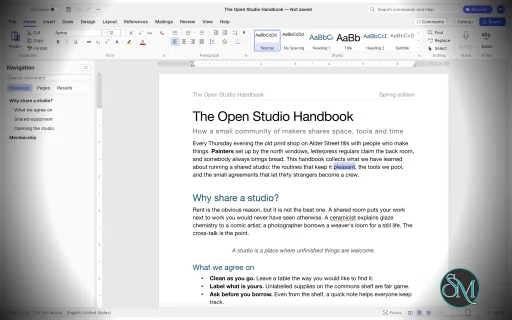
WordCraft provides a familiar ribbon-style interface with formatting controls for fonts, sizes, bold and italic text, underlining, colors, highlighting, superscript, and subscript.
It supports paragraph alignment, indentation, line spacing, tabs, borders, shading, and other layout options. The Format Painter lets users copy formatting between document elements, while built-in styles help maintain consistent formatting across longer documents.
The editor also includes AutoCorrect, smart quotes, automatic list formatting, find and replace with regular expressions, and standard undo and redo functionality.
These features make WordCraft suitable for writing reports, letters, essays, and other everyday documents.
DOCX Compatibility and File Formats
WordCraft supports reading and writing Microsoft Word's DOCX format. It also supports importing and exporting ODT, RTF, HTML, Markdown, and plain-text documents.
PDF export produces selectable text and supports links and bookmarks, making it useful for distributing reports and other finished documents.
The ability to work with common document formats is one of WordCraft's main advantages. However, opening a DOCX file does not guarantee that every element will render identically to Microsoft Word. Complex layouts, embedded objects, and less common formatting features should be checked after import.
Styles, Themes, and Page Layout
WordCraft includes paragraph and character styles, style sets, themes, and a live style gallery. Users can create or modify styles to maintain consistent formatting throughout a document.
Page-layout controls include margins, page size, orientation, columns, section breaks, page breaks, headers, footers, page numbers, watermarks, and page borders.
The application also supports automatic hyphenation, line numbering, drop caps, and text wrapping around pictures and shapes.
These capabilities are useful for creating structured reports, academic papers, business documents, and longer publications.
Tables, Images, and Graphics
WordCraft supports tables with merged and split cells, borders, shading, banded styles, sorting, and formulas. Rows can split across pages, and table headers can repeat on subsequent pages.
Images can be inserted, resized, cropped, rotated, recolored, and adjusted for brightness, contrast, and transparency. Additional features include picture styles, shapes, and text boxes with floating positioning and text wrapping.
The editor also supports converting text into tables and tables into text, helping users restructure information without recreating content manually.
References and Academic Writing
WordCraft provides a collection of tools for structured and academic documents, including:
Automatic tables of contents.
Footnotes and endnotes.
Citations and bibliographies in APA, MLA, Chicago, and IEEE styles.
Captions and tables of figures.
Cross-references and indexes.
Tables of authorities.
These tools make WordCraft particularly interesting for students, researchers, and professionals who work with long documents containing references and supporting material.
Users preparing formal academic submissions should verify that the generated references and formatting comply with their institution's requirements.
Comments, Track Changes, and Proofreading
WordCraft includes comments displayed in document margins or a dedicated pane. Track Changes allows users to review edits and accept or reject individual changes.
Document comparison, spelling and grammar suggestions, a thesaurus, word counting, and an accessibility checker provide additional support for reviewing and refining documents.
The application also includes document inspection and editing restrictions.
These features are valuable for collaborative editing and document review, although teams should test their specific review workflows before replacing established Microsoft Word processes.
Mail Merge
WordCraft supports mail merge using CSV data sources and document fields. Users can insert merge fields, configure address blocks and greeting lines, preview personalized documents, and generate merged output.
Envelope and label tools are also included.
This can help automate repetitive administrative tasks such as generating letters, notices, certificates, and personalized business documents.
AI and Command-Line Automation
WordCraft is designed to support both manual editing and programmatic document manipulation. Its editing engine exposes commands that are shared across the graphical interface, keyboard shortcuts, command search, CLI, JSON control channel, and MCP server.
The command-line interface supports document conversion, text extraction, structural inspection, rendering, and scripted editing.
For example, convert a Word document to PDF:
wordcraft-cli convert report.docx report.pdf
Extract its text:
wordcraft-cli text report.docx
Inspect the document structure as JSON:
wordcraft-cli inspect report.docx
These capabilities make WordCraft useful for batch processing, document-generation pipelines, and AI-assisted workflows. Compatible agents can inspect documents and execute editing commands without relying exclusively on screenshots or mouse interaction.
Download WordCraft v0.6.1 - Software Mirrors |
|---|
WordCraft v0.6.1 for Windowswordcraft-0.6.1-windows-x86.msi | 74.22 MB wordcraft-0.6.1-windows-x86-portable.zip | 88.73 MB wordcraft-0.6.1-windows-x64.msi | 75.53 MB wordcraft-0.6.1-windows-x64-portable.zip | 91.39 MB wordcraft-0.6.1-windows-arm64.msi | 72.91 MB wordcraft-0.6.1-windows-arm64-portable.zip | 88.94 MB |
WordCraft v0.6.1 for macOSwordcraft-cli-0.6.1-macos-universal.zip | 81.83 MB wordcraft-0.6.1-macos-universal.dmg | 99.52 MB |
WordCraft v0.6.1 for Linuxwordcraft-0.6.1-linux-x86_64.tar.gz | 92.35 MB wordcraft-0.6.1-linux-x86_64.rpm | 93.09 MB wordcraft-0.6.1-linux-x86_64.flatpak | 66.72 MB wordcraft-0.6.1-linux-x86_64.deb | 93.59 MB wordcraft-0.6.1-linux-x86_64.AppImage.zsync | 308.66 kB wordcraft-0.6.1-linux-x86_64.AppImage | 88.12 MB wordcraft-0.6.1-linux-riscv64.tar.gz | 91.42 MB wordcraft-0.6.1-linux-riscv64.rpm | 92.16 MB wordcraft-0.6.1-linux-riscv64.deb | 92.5 MB wordcraft-0.6.1-linux-aarch64.tar.gz | 89.87 MB wordcraft-0.6.1-linux-aarch64.rpm | 91.11 MB wordcraft-0.6.1-linux-aarch64.flatpak | 64.03 MB wordcraft-0.6.1-linux-aarch64.deb | 91.71 MB wordcraft-0.6.1-linux-aarch64.AppImage.zsync | 300.33 kB wordcraft-0.6.1-linux-aarch64.AppImage | 85.74 MB |
WordCraft v0.6.1 for BSDwordcraft-0.6.1-freebsd-x86_64.tar.gz | 94.92 MB |
Others Download related to WordCraft v0.6.1wordcraft-web-0.6.1.zip | 14.13 MB |
WordCraft v0.6.1 Source Code
WordCraft v0.6.1 Source code (zip)
WordCraft v0.6.1 Source code (tar.gz)
|
WordCraft v0.6.1 Release Notes: What's Changed- Hyperlinks cover only their own text (#413) by @vangel76 in #449
- Groups keep rotated members' orientation; group resize; ink erase after rotation (#441, #442, #443, #445) by @vangel76 in #474
- Mail merge: SKIPIF, NEXT, IF in preview, header/footer fields (#427, #428, #429, #430) by @vangel76 in #478
- Options: interface size setting (#475) by @vangel76 in #480
- Citations: eight more bibliography styles (#383) by @vangel76 in #388
- Backstage: the side menu is fixed width, no dead resize handle by @vangel76 in #504
- CLI: a closed stdout ends quietly instead of panicking (#508) by @vangel76 in #510
- .doc import fixes: piece bold, section kinds, orientation, list overrides, style inheritance, alternate font names (#458–#463) by @vangel76 in #484
- Dialogs: switching tabs keeps the window's top edge in place (#507) by @vangel76 in #511
- Spelling: common words like "desktop" are recognised (#520) by @vangel76 in #522
- Equation fixes: numbering removal, control colour, undo for navigation edits, LaTeX text spaces (#444, #446, #447, #448) by @vangel76 in #487
- Import/export fixes: TXT encodings and list labels, RTF Unicode, ODT styles and cell colours, HTML borders and pre spaces, LaTeX alignment groups (#433–#440) by @vangel76 in #482
- i18n(es): consistent tú register, fix swapped Page Up/Page Down by @diegozpy in #514
- i18n: add Turkish (tr) interface translation by @PbyLoyth in #494
- i18n audit: full ribbon sweep, and the table style sample in the interface language (re-lands #313's last three commits) by @dkhlapov in #411
- Docs: collapse duplicate rows left by parallel merges by @vangel76 in #372
- Add Word's common keyboard shortcuts by @vangel76 in #338
- Field codes: show, edit, update, unlink, lock and step through fields like Word by @vangel76 in #349
- Move paragraphs up/down, promote/demote headings, Go Back (Shift+F5) and Alt+X Unicode toggle by @vangel76 in #351
- ci: refactor workflows to use storytold/craft-common-actions by @dylanmtaylor in #639
- i18n: add Russian (ru) interface translation by @dkhlapov in #300
- Customize Keyboard dialog (#368) by @vangel76 in #378
- Customize Ribbon and Quick Access Toolbar (#379) by @vangel76 in #384
- Tight and Through text wrapping follow the object's outline by @vangel76 in #360
- Choose which side of an object text wraps on by @vangel76 in #364
- Phonetic Guide: ruby text (furigana, pinyin) over base text by @vangel76 in #296
- Enclose Characters: put a character in a circle, square, triangle or diamond by @vangel76 in #301
- Insert › Icons: a library of original icons, a searchable picker and Icon Color by @vangel76 in #318
- Mail merge: use Excel and OpenDocument spreadsheets as recipient lists by @vangel76 in #341
- Balance newspaper columns before a continuous section break by @vangel76 in #353
- Drawing Canvas: insert a canvas and draw shapes, pictures and text boxes inside it by @vangel76 in #356
- Documents keep their own footnote separators and continuation notice by @vangel76 in #361
- Right-to-left tables and sections by @vangel76 in #365
- Shape Format › Text: direction, alignment and linked text boxes (#369) by @vangel76 in #380
- Footnote and Endnote options per section (#385) by @vangel76 in #390
- Track Changes: moves (w:moveFrom/w:moveTo) (#400) by @vangel76 in #404
- Document grid: lines per page and characters per line (#391) by @vangel76 in #401
- Draw: Lasso Select, Add Pen, Ink to Shape and Ink Replay (#395) by @vangel76 in #408
- References dialogs: Caption, Index, Table of Contents, Create Source (#402) by @vangel76 in #410
- Accessibility: Alt Text pane for every object, Mark as decorative, deeper checker (#386) by @vangel76 in #396
- Dialogs: Line Numbers, Hyphenation, Language, Envelopes and Labels (#407) by @vangel76 in #414
- Insert › Chart: create and edit column, bar, line, pie, area, scatter and doughnut charts (#409) by @vangel76 in #415
- Content controls: keep, show and edit w:sdt (#381) by @vangel76 in #392
- WordArt text effects and transforms, and shape connectors (#416) by @vangel76 in #481
- Compare, Restrict Editing and AutoCorrect Options dialogs (#412) by @vangel76 in #476
- Editing fixes: Center range, undo grouping, Change Case runs and offsets, Bold undo at caret (#418, #419, #420, #421, #424) by @vangel76 in #477
- Layout fixes: mirrored margins, tall headers/footers push the body, endnote continuation, footnote caret on continuation pages (#452, #453, #454, #456, #457) by @vangel76 in #490
- Chinese interface: keep a system CJK fallback after the bundled face; find PingFang on macOS 12 (#486) by @vangel76 in #495
- Fixes: tracked paste marks, plain paste blank lines, paragraph marks in Replace All, Delete/Split columns and cells, Font dialog (#417, #422, #423, #431, #432, #466) by @vangel76 in #479
- Fixes: footnotes in table cells, NUMPAGES, bookmark link pages, bookmark around final table, INCLUDEPICTURE results by @vangel76 in #483
- Accessibility: the document canvas exposes its text to screen readers (#488) by @vangel76 in #489
- Font list: installed Chinese fonts are listed, by their Chinese names in a Chinese interface (#505) by @vangel76 in #506
- Paragraph dialog: mirror indents, same-style spacing, suppress line numbers, don't hyphenate (#512) by @vangel76 in #519
- Right-click on a picture or shape: Wrap Text submenu (#513) by @vangel76 in #521
- File › Options: Word's panes with working settings (#485) by @vangel76 in #492
- Templates and Add-ins: attached template, update styles, Organizer (#377) by @vangel76 in #382
- Vertical text for sections (w:textDirection) (#491) by @vangel76 in #496
- Outline view: Outlining tab, levels, collapse/expand, Show Level (#493) by @vangel76 in #499
- Insert › SmartArt: create and edit list, process, cycle, hierarchy, pyramid, radial, matrix and venn graphics (#497) by @vangel76 in #503
- CI: FreeBSD and Windows ARM64 nightly and on release, not per PR by @echelon in #530
- README: which AUR package to install (#509) by @dkhlapov in #616
- Windows: DX12 starts without shipped DXC DLLs (#603) by @vangel76 in #609
- docx: fix clippy large_enum_variant on main by @echelon in #779
- Styles: Update to Match Selection takes the selection's formatting (#555) by @vangel76 in #562
- AutoFormat: +---+ tables, arrow bullets, smileys inside words, border-line undo (#546) by @vangel76 in #547
- Find and Replace: special characters (^p, ^t, …) and wildcards (#543) by @vangel76 in #553
- Mini toolbar: every button fits, flush font box, proper dropdown arrows, dark-mode font list (#535) by @vangel76 in #540
- Fonts: system fallback reads each font file once (#605) by @vangel76 in #610
- Numbering: Chinese, Japanese and Korean number formats (一、二、三 …) (#534) by @vangel76 in #561
- Font dialog: separate Asian and Latin text fonts (#505) by @vangel76 in #536
- Chinese documents: character-unit indents, .doc indents and line spacing, floating tables, blank pages (#534) by @vangel76 in #550
- DOCX: theme colours and theme fonts take precedence over the fixed values, as in Word by @LloydNicholson in #626
- Open and save Word XML Document (Flat OPC); open Word 2003 XML (#548) by @vangel76 in #560
- Find: each Find Next in the dialog moves one match (#468) by @alexanderalber in #556
- Contributors: add my own entry (alexanderalber) by @alexanderalber in #566
- IME composition text uses document fallback fonts instead of boxes (#565) by @MarekSpodBiedry in #578
- Layout › Page Setup: the group launcher opens the Page Setup dialog (#471) by @alexanderalber in #563
- Web: a CSV picked as recipients no longer turns the next TXT drop into recipients (#472) by @MarekSpodBiedry in #579
- Zotero: a pending citation no longer edits a replacement document (#470) by @MarekSpodBiedry in #580
- Zotero: a note with a picture stays when its citation moves to body text (#469) by @MarekSpodBiedry in #581
- Pictures in headers/footers can be moved, resized and rotated by @DevCoderMax in #591
- Paragraph dialog: OK keeps Exactly and At Least line spacing (#467) by @alexanderalber in #564
- rustdoc: no links to private items in the UI crate (#665) by @dkhlapov in #683
- Brand licence: name WordCraft, not DesignCraft (#664) by @dkhlapov in #682
- Fonts: Palatino Linotype / Book Antiqua prefer Palatino look-alikes (#670) by @vangel76 in #677
- fix(docx): preserve omitted paragraph defaults by @OPUZZLES in #647
- Drag after a double/triple-click extends the selection by words/paragraphs (#549) by @dkhlapov in #649
- Open playlists and other text files (.m3u, .m3u8, .log, .ini, …) (#569) by @dkhlapov in #648
- Table: a vertical merge lays out and hit-tests as one cell (#640) by @vangel76 in #669
- DOCX diagrams: theme-styled shapes and connectors, arrowheads, canvases, VML lines (#611) by @dkhlapov in #671
- Complex scripts: shape Myanmar, Khmer and Indic text; caret and line breaks respect syllables (#604) by @dkhlapov in #652
- More Colors… and a Colors dialog for custom colours (#606) by @dkhlapov in #666
- Print: preview, page range, copies and collate on File > Print (#641) by @vangel76 in #674
- Print Markup: comments in PDF, print, images and text copies (#589) by @dkhlapov in #667
- Design tab: style set gallery gets its own box, no overlap with Colors and Fonts (#638) by @vangel76 in #673
- Security: pictures travel in the reply, exported links keep only safe targets (#678, #679) by @petycomp in #681
- docs: fix coordination error in ROADMAP.md by @lunar-me in #715
- Release workflow: pass the Azure signing secrets by @echelon in #752
- layout: make Myanmar fallback tests deterministic by @echelon in #807
- View: Hide White Space between pages in Print Layout (#645) by @vangel76 in #684
- Add fonts at run time: Add Font…, drop a font file, font.add (#582) by @dkhlapov in #668
- References › Table of Authorities: labelled Insert, plus Update Table (#661) by @dkhlapov in #693
- Input field borders reach 3:1 contrast in both themes (#657) by @dkhlapov in #696
- Pictures: WMF drawings fill their frame like Word plays them by @naxvog in #739
- Ink: draw the live pen stroke in the dark-page colour while drawing, not only after lifting the pen (#730) by @MarekSpodBiedry in #746
- Backspace still erases while Shift is held (#707) by @MarekSpodBiedry in #747
- Dark theme: readable text on the accent (#655) by @dkhlapov in #704
- Let dialogs be dragged by their title bar instead of pinning them to the screen centre (#732) by @MarekSpodBiedry in #748
- Layout: multiple line spacing adds its leading below the text, like Word by @naxvog in #719
- Web: add wordcraft.ico as favicon via Trunk by @GhostMitra in #717
- Track Changes: deletions in balloons (Show revisions in balloons now work) by @Matty-PW in #734
- Layout: a page total in the footer no longer lays the body out twice (#771) by @dkhlapov in #773
- speech: launch Windows PowerShell by full path for Read Aloud by @SteamSmith in #792
- Save As: a bare filename typed in the dialog now saves correctly (#689) by @notdezzi in #757
- Selection: dragging past the viewport edge auto-scrolls (#688) by @notdezzi in #758
- #755: Line Numbers and Hyphenation measure in the Options unit by @edurbs in #795
- M8.1: Bibliography DOCX round-trip: support extended fields (#410) and upstream sync (#532) by @yefan911 in #790
- Ruler: the horizontal scale mirrors for right-to-left paragraphs (#692) by @notdezzi in #756
- Ribbon and context-menu Paste insert the system clipboard's text (#584) by @MarekSpodBiedry in #593
- MacOS window close by @nusenyaw66 in #539
- fix: protect original files during native saves by @OPUZZLES in #621
- Caret: glide and fade like Word for Windows; File › Options › Advanced › Animation turns it off by @arcanii in #570
- Linux: open/save works without a portal file dialog (#576) by @vangel76 in #583
- Accessibility Options: Animation effects setting that follows the system by @JeremyYao in #791
- fix(docx): preserve custom XML stores through saves by @OPUZZLES in #612
- Tables: resize by dragging column borders, row borders and the corner handle (#217) by @rabis7575 in #600
- fix(docx): preserve unstyled TOC result ranges by @OPUZZLES in #617
- .doc import: inline pictures, floating pictures and basic shapes (#551) by @vangel76 in #558
- i18n: add Italian interface (it) by @fabiodalez-dev in #598
- Add German (de) interface language by @arekown in #574
- M15: Polish interface, and Polish spelling, grammar and hyphenation by @witkowski01 in #346
- i18n: add Czech (cs) interface translation by @DanielKnourek in #387
- Linux: the display theme asks the desktop, not winit by @gyurix in #298
- Fix CJK fallback mixing serif/sans faces within one run by @jeleesky in #567
- Open Word documents with WordCraft by default (file associations + Options button) by @vangel76 in #304
- Tests: linear-time checks measure CPU time, robust under load by @echelon in #850
- Linux: default to XWayland for file drag-and-drop on Wayland desktops by @dylanmtaylor in #220
- Preserve independent complex-script formatting during DOCX round trips by @shirizhaki in #366
- Numeral display modes: Arabic, Hindi, Context and System digits (view.numeral) by @abdo4312 in #501
- Fix bulleted list toolbar button active state by @Cyberverse-cent0 in #651
- web: use File System Access API showSaveFilePicker with download fallback by @GhostMitra in #728
- Backstage: add Save As page and close on successful save by @GhostMitra in #727
- Fix sentence-capitalization suggestions after ellipses by @ripdog in #742
- Fix paragraph alignment focus by @Osaym in #690
- ui-egui: fix Windows clippy in desktop_theme by @echelon in #872
- Interface colours come from the theme (#656) by @dkhlapov in #705
- Dark theme: gallery previews no longer bright white (#663) by @dkhlapov in #706
- Skip non-English runs in proofing instead of flagging them (#100) by @regalf in #741
- Added some fixes to the spanish "Info" Page on Wordcraft by @SammyL-eo in #695
- One drop-down marker on every ribbon button (#659) by @dkhlapov in #697
- Menu buttons grey out while their command is disabled (#658) by @dkhlapov in #698
- Ribbon: large-button labels end above the group titles (#653) by @dkhlapov in #699
- Layout › Paragraph: fields fit above the title and line up (#654) by @dkhlapov in #703
- KeyTips: Quick Access Toolbar badges, saved option and native Alt fix (#620) by @m1ssha in #709
- Add paginated Reading Mode with smooth column navigation by @ripdog in #740
- i18n: add French (fr) interface by @pechnikov2026-star in #729
- i18n(hu): complete the Hungarian catalog again by @Skaywalker in #842
- Bidi: auto-detect RTL paragraph direction when typing Kurdish, Arabic and Hebrew by @Hevarh1 in #713
- Layout: an inline picture wider than the text keeps its size, like Word by @naxvog in #745
- Fix Navigation pane expanding for long headings by @ripdog in #759
- i18n: complete Turkish interface catalog with 2,170 entries and full … by @yeniufuklar-com in #774
- MCP: confine file access with --automation-read-root and --automation-write-root (#769) by @isaac-levine in #798
- Persist the custom dictionary across sessions (#40) by @regalf in #796
- DOCX: preserve native Word ink on save by @OPUZZLES in #592
- AutoCorrect: TWo INitial CApitals, cAPS LOCK and table-cell capitals (#544) by @vangel76 in #545
- Affix engine: FLAG UTF-8, 128 flag bits, continuation classes, FORBIDDENWORD (#100) by @edurbs in #782
- Portuguese proofing: pt-BR spelling, suggestions, grammar and hyphenation (#100) by @edurbs in #797
- Hyphenation: Bulgarian text follows the Bulgarian syllable rules by @bulgariamitko in #826
- i18n: add Bulgarian (bg) interface translation by @bulgariamitko in #825
- ODT import reads page size, orientation and margins from styles.xml (#810) by @MarekSpodBiedry in #829
- Paste keeps other programs' formatting; clipboard pictures on Wayland (#687, #833) by @dkhlapov in #847
- New documents follow the system region: A4, centimetres and decimal comma outside the US (#838) by @dkhlapov in #857
- Ctrl/⌘+F focuses the Find box, so typing searches (#772) by @Yasas-Sri in #823
- Comment cards show the time as well as the date (#812) by @MarekSpodBiedry in #828
- fix(ui): equation gallery tiles follow the dark theme (#817) by @MarekSpodBiedry in #827
- Accept and Reject at the caret cover a tracked change split by a comment (#809) by @MarekSpodBiedry in #830
- Keep the font table and embedded fonts when saving a .docx (#770) by @MarekSpodBiedry in #831
- Zoom after One Page keeps one page per row (#768) by @MarekSpodBiedry in #832
- Tables: row borders stay apart around a vertical merge (#640) by @rabis7575 in #841
- PDF export: internal links in linear time by @echelon in #937
- fix(windows): start 32-bit builds on OpenGL so launch no longer exits by @odedigo in #839
- Ribbon keytip letters like Word for Windows by @echelon in #922
- fix(ui): draw non-Latin file names in the window caption by @odedigo in #840
- Table of contents entries drawn plain, as in Word by @echelon in #930
- Ribbon groups fit above their labels (View › Show, Developer › Controls, Layout › Paragraph) by @manucarcor in #910
- Alt+Q moves to "Tell me" command search (#819) by @dkhlapov in #849
- Spaces and tabs don't make a line taller by @echelon in #931
- .doc: tab stops and section breaks read correctly by @echelon in #925
- Word 365 cover pages: freeforms in groups, text-box margins and Resize to fit (#743) by @dkhlapov in #843
- Heading numbers from a style's list level (6.4.5, not 6.15) by @echelon in #926
- A list label raises its line, but doesn't deepen it by @echelon in #928
- Sorting and table numbers follow the text's language (#836, #837) by @dkhlapov in #844
- Hidden end-of-cell marks (hideMark) by @echelon in #939
- ROADMAP: progress log table renders again by @echelon in #947
- layout tests: fix clippy in a_hidden_cell_mark_takes_no_room by @echelon in #948
- Text frames placed like Word's and kept on save by @echelon in #935
- List indents and style indents combine like Word by @echelon in #927
- AutoCorrect: the English replacement list applies only to English text (#835) by @dkhlapov in #846
- Keep with next splits a paragraph that doesn't fit anyway by @echelon in #933
- Start on File › Home when launched with nothing to open (#766) by @dkhlapov in #853
- An empty continuous section mark takes no room by @echelon in #940
- Undo history list beside the Quick Access Toolbar's Undo (#701) by @dkhlapov in #855
- Paragraph-relative floats start above the space before by @echelon in #941
- i18n(es): translate the equation gallery and built-in style names by @diegozpy in #854
- Text after a column break uses the new column's width by @echelon in #934
- Space before at the top of a page like Word by @echelon in #932
- Tables: select, insert and move with the mouse; double-click a border to AutoFit by @rabis7575 in #637
- Kerning and automatic paragraph spacing like Word by @echelon in #923
- No automatic spacing between list items by @echelon in #924
- Shift+F10 opens the context menu at the caret (#821) by @echelon in #920
- Tables: the right-click menu offers the table's commands by @rabis7575 in #694
- Tables: drags and Shift+arrows over cells select whole cells by @rabis7575 in #722
- Rulers: table column and row markers; indents in a cell measured from it by @rabis7575 in #710
- Alt+Q opens Search like Word (#819) by @echelon in #919
- Tables: Ctrl, Alt, left-edge and selected-cells border drags by @rabis7575 in #720
- Ctrl+F searches in the Navigation pane; one Find and Replace dialog (#712) by @echelon in #921
- Fonts: documents use the craft-fonts Simplified Chinese face (fixes FreeBSD CI after #567) by @dkhlapov in #888
- Smooth scrolling through a very large table (#811) by @dkhlapov in #891
- Save Changes prompt answers from the keyboard (#861) by @dkhlapov in #870
- Section breaks no longer delete the selected text (#852) by @dkhlapov in #875
- Click in the left margin selects lines (selection bar) (#856) by @dkhlapov in #879
New Contributors- @diegozpy made their first contribution in #514
- @PbyLoyth made their first contribution in #494
- @dylanmtaylor made their first contribution in #639
- @alexanderalber made their first contribution in #556
- @DevCoderMax made their first contribution in #591
- @OPUZZLES made their first contribution in #647
- @petycomp made their first contribution in #681
- @lunar-me made their first contribution in #715
- @GhostMitra made their first contribution in #717
- @Matty-PW made their first contribution in #734
- @SteamSmith made their first contribution in #792
- @notdezzi made their first contribution in #757
- @yefan911 made their first contribution in #790
- @nusenyaw66 made their first contribution in #539
- @arcanii made their first contribution in #570
- @JeremyYao made their first contribution in #791
- @rabis7575 made their first contribution in #600
- @fabiodalez-dev made their first contribution in #598
- @arekown made their first contribution in #574
- @DanielKnourek made their first contribution in #387
- @gyurix made their first contribution in #298
- @jeleesky made their first contribution in #567
- @shirizhaki made their first contribution in #366
- @abdo4312 made their first contribution in #501
- @Cyberverse-cent0 made their first contribution in #651
- @ripdog made their first contribution in #742
- @Osaym made their first contribution in #690
- @regalf made their first contribution in #741
- @SammyL-eo made their first contribution in #695
- @m1ssha made their first contribution in #709
- @pechnikov2026-star made their first contribution in #729
- @Skaywalker made their first contribution in #842
- @Hevarh1 made their first contribution in #713
- @yeniufuklar-com made their first contribution in #774
- @isaac-levine made their first contribution in #798
- @bulgariamitko made their first contribution in #826
- @Yasas-Sri made their first contribution in #823
- @odedigo made their first contribution in #839
- @manucarcor made their first contribution in #910
Full Changelog: v0.5.0...v0.6.1 |
Performance and Compatibility
WordCraft is written in Rust and uses a modular architecture for document editing, typography, pagination, rendering, and file conversion. Its interface uses the native GPU-oriented egui framework rather than Electron or Tauri.
The project emphasizes responsive editing through cached paragraph layout and on-demand page rendering. Its developers report that typing in a 188-page document triggers layout recalculation in approximately 1.4 milliseconds. This is a project-reported benchmark rather than an independent performance test.
WordCraft supports macOS, Windows, Linux, BSD, and browsers through WebAssembly. It can read and write DOCX files and supports several additional document formats.
The main limitation is compatibility maturity. The project's roadmap identifies real-world DOCX testing, native printing, and signed application builds as remaining work. Charts, SmartArt, the equation editor, and the Draw tab are also listed as future development areas.
Consequently, WordCraft should not yet be assumed to offer complete feature parity with Microsoft Word, particularly for complex business documents and specialized workflows.
System Requirements
Operating systems: Windows, macOS, Linux, and BSD.
Browser support: WebAssembly build for compatible browsers.
Document formats: DOCX, ODT, RTF, HTML, Markdown, and plain text.
Export: PDF and page images, in addition to supported document formats.
Build requirements: Rust and the project's documented dependencies.
The project does not provide a comprehensive minimum hardware specification in the information reviewed. Actual performance will depend on document complexity, fonts, embedded images, and system resources.
Pros and Cons
Pros
Free and open-source under the MIT or Apache 2.0 license.
Familiar ribbon-style interface inspired by Microsoft Word.
DOCX reading and writing support.
Extensive formatting, styles, tables, and page-layout tools.
References, citations, footnotes, indexes, and tables of contents.
Comments, Track Changes, and proofreading tools.
Mail merge with CSV data sources.
PDF export with selectable text, links, and bookmarks.
Native desktop applications and a browser-based version.
CLI and MCP support for document automation.
Offline spelling and grammar features without requiring cloud processing.
Cons
Still approaching maturity for everyday writing and production use.
Complex DOCX compatibility needs more real-world validation.
Native printing and signed application builds remain development priorities.
Charts, SmartArt, and the equation editor are not yet complete features.
Does not provide full Microsoft Word feature parity.
Professional workflows may require additional testing and workarounds.
How to Install
The simplest option is to download a package from the project's GitHub Releases page, if a suitable build is available for your operating system.
To build and run WordCraft from source, install Rust and the required development dependencies, then execute:
git clone https://github.com/storytold/wordcraft
cd wordcraft
cargo run --release -p wordcraft -- --sample
To open an existing document:
cargo run --release -p wordcraft -- report.docx
For browser-based use, navigate to the web application directory and start the development server:
cd apps/wordcraft-web
trunk serve
The development server will provide a local address for opening WordCraft in a browser. Refer to the official repository for detailed build dependencies, release packages, and platform-specific instructions.
Final Verdict
WordCraft is an ambitious open-source word processor that combines familiar document editing with advanced formatting, references, review tools, mail merge, and automation. Its support for DOCX and PDF, together with additional formats and offline functionality, makes it a promising alternative for users who want more control over their document workflow.
Its command-line interface and MCP integration are especially interesting for developers and organizations that generate or process documents programmatically. The extensive feature set also makes it worth exploring for students, writers, and office users.
The biggest concern is maturity. WordCraft covers many of Microsoft Word's ribbon features, but feature coverage is not the same as complete behavioral compatibility. Users who depend on complex documents, advanced diagrams, equations, or established printing workflows should test their files carefully before switching.
For everyday writing and experimentation with open-source office software, WordCraft is worth trying. For mission-critical document production, it is better treated as a developing alternative until its compatibility and printing workflows have been validated against real-world requirements.
Post a Comment/Report Broken Link: