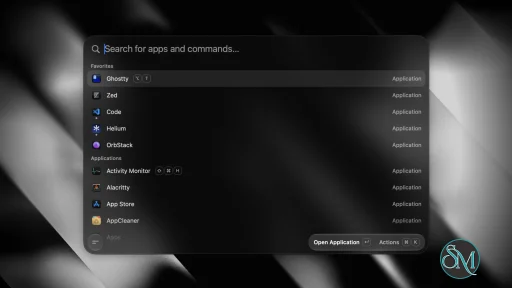
Tinycast is a free, open-source launcher for macOS that combines application search, global hotkeys, clipboard history, file search, quick actions, snippets, window management, and other utilities in a native SwiftUI and AppKit interface. It is designed as a lightweight alternative to larger launcher applications and uses no third-party dependencies or Electron.
Features
Tinycast provides a fuzzy-search application launcher that can find and open installed applications, pin favorites, show running applications, and quit applications. A global hotkey opens the launcher from anywhere in macOS. Per-application hotkeys can also be assigned to quickly focus or hide applications.
The built-in clipboard history stores searchable text and images and allows previously copied content to be pasted back into the application being used. File search uses Spotlight instead of maintaining a separate file index.
Tinycast includes a calculator with mathematical operations, unit conversions, and live currency and cryptocurrency conversions. Quicklinks can turn URLs, searches, files, and deep links into searchable commands.
The application also includes Apple Shortcuts integration, Markdown snippets, custom shell commands, system actions, and 34 window-management actions based on common Rectangle-style operations.
Additional features include calendar and meeting integration, a Markdown notes editor, an emoji picker, AI chat, text Quick Actions for rewriting and translation, and support for running Raycast extensions natively through SwiftUI. Settings can also be exported or imported from Raycast.
Download Tinycast v0.11.12 - Software Mirrors |
|---|
Tinycast v0.11.12 for macOSTinycast-Universal-0.11.12.zip | 14.6 MB Tinycast-Universal-0.11.12.dmg | 14.74 MB Tinycast-0.11.12.zip | 7.96 MB Tinycast-0.11.12.dmg | 8.03 MB |
Tinycast v0.11.12 Source Code
Tinycast v0.11.12 Source code (zip)
Tinycast v0.11.12 Source code (tar.gz)
|
Tinycast v0.11.12 Release Notes: What's Changed- Stabilize Settings sidebar icons on window open by @Risengan in #941
- Keep the palette open while an extension's file picker is up by @list-jonas in #940
- Read fitted icon alpha directly from bitmap bytes by @kmplngj in #960
- Keep pinned entries when clearing clipboard history by @abue-ammar in #966
- Run an extension's menu bar command, and draw its item natively by @list-jonas in #963
- Render transparent extension SVG fills correctly by @list-jonas in #970
- Run got-backed extensions by constructing tls.TLSSocket by @list-jonas in #967
- Open the palette without re-rendering it first by @abue-ammar in #964
- Close command output with Escape by @list-jonas in #1006
- Progressive blur for the Settings window by @mmshivesh in #1009
- Add Globe hotkey bindings by @Risengan in #1010
- Add Window Mode previews to Settings by @Risengan in #1014
- Build clipboard file URLs without touching the disk (Closes #998) by @tomelliot in #1022
- Fix deeplink fallbackText prefilling extension search by @qeude in #1035
- Keep node shim exports alive through esbuild's __toESM by @FezVrasta in #1038
- Render borderless panels with Liquid Glass by @abue-ammar in #1046
- Let Settings detail use native window background by @Risengan in #1049
- Let the calendar menu bar item hide when there is nothing to show by @abue-ammar in #1048
- Show tomorrow's date on meeting rows by @abue-ammar in #1050
- Follow the system's 24-hour clock in calculator times by @abue-ammar in #1052
- Drag files and apps out of the palette by @abue-ammar in #1053
- Polish alias and shortcut recorder controls by @Risengan in #1051
- Clear the shortcut of an app that has been deleted by @abue-ammar in #1054
- Reload Switch Windows and menu search on a restored screen by @abue-ammar in #1055
- Rebuild root search ranking and add Suggestions by @abue-ammar in #1057
- Add OAuth authentication for HTTP MCP servers by @notsoshu in #1077
- Let Settings choose how many tool call rounds a reply may run by @notsoshu in #1078
- Add a show/hide button to every secret field by @notsoshu in #1079
- Group back-to-back tool calls and keep the composer's chips clear by @notsoshu in #1080
- Open the model menu without laying out every model by @notsoshu in #1082
- Offer Tinycast's MCP servers on the Codex and Claude routes by @notsoshu in #1081
- Add an AI Chat window with a conversations sidebar by @rubnogueira in #1047
- Scroll PDFs and preview undeclared code files in Search Files by @abue-ammar in #1087
- Paste clipboard entries as plain text and offer it as the default action by @abue-ammar in #1088
- Keep AI commands out of Suggestions by @abue-ammar in #1092
- Report Grok failures instead of Claude's missing response by @iuriio in #1043
- Show the camera again when the join preview reopens by @abue-ammar in #1095
- Close Dictionary and extension commands on a second hotkey press by @abue-ammar in #1096
- Add a Dismiss action to the calendar menu bar by @FezVrasta in #1107
- Render markdown tables in extension Detail views by @list-jonas in #1116
- Stack a List detail's metadata under its markdown by @list-jonas in #1119
- Show distinct pressed states for modal actions by @quanru in #1105
- Keep SwiftUI's named keys out of the ASCII recovery by @FezVrasta in #1106
- Stream spawned child output to extensions as it arrives by @list-jonas in #1126
- Find aliases and camelCase names by any word, and stop matching pane identifiers by @abue-ammar in #1127
- Open Clipboard History on the newest clip, below the pins by @abue-ammar in #1130
- Keep calendar commands searchable with meetings out of the launcher by @abue-ammar in #1132
- Even out menu separators and keep scrolled menus off their edges by @abue-ammar in #1133
- Find apps named only in a zh-Hans folder by that name by @abue-ammar in #1135
- Let Codex start when Tinycast is launched from Finder or the Dock by @notsoshu in #1134
- Keep Backspace and the caret inside inline argument fields by @abue-ammar in #1138
- Draw Detail markdown images at their own size instead of capping them at 220pt by @list-jonas in #1137
- Move feature enable switches to the top of Settings pages by @Risengan in #1144
- Fix selection across Summarize sections by @Risengan in #1146
- Copy the text in a clipboard image with ⇧⌘T (#1030) by @mwmcode in #1147
- Walk into a project's windows with Rooms by @abue-ammar in #1155
- Detect installed CLIs when the login shell is fish by @notsoshu in #1153
- Launch Mission Control through LaunchServices so Show Desktop runs on macOS 27 by @abue-ammar in #1156
- Settle WebAssembly promise APIs in the extension runtime by @abue-ammar in #1158
- Allow cancelling in-flight Quick Actions from the progress HUD by @ganeshmshetty in #1159
- Show extension list titles passed as { value, tooltip } by @list-jonas in #1161
- Load extensions that bundle undici (#1039) by @abue-ammar in #1162
- Copy the whole calculation on Shift-Command-Return by @abue-ammar in #1163
- Make Settings lists and controls more consistent by @Risengan in #1165
- Refine settings toolbar navigation controls by @Risengan in #1171
- Preserve launcher center across interface sizes by @Risengan in #1173
- Refine launcher snapping and alignment feedback by @Risengan in #1174
- Fix note list marker layout while editing by @Risengan in #1178
- Add Find in floating notes by @Risengan in #1180
- Read thousand, million and billion after a calculator amount by @abue-ammar in #1182
- Keep clipboard order during Paste and Keep Window Open by @abue-ammar in #1187
- Add an opt-in settings.json mirror, and custom Snippets and Notes folders by @abue-ammar in #1186
- Stop child processes from hanging their caller after they exit by @abue-ammar in #1188
- Notes top right placement by @Risengan in #1190
- Scroll to an extension when opening its settings by @list-jonas in #1191
- Fix Quick Actions on selected text in floating notes by @Risengan in #1194
- Add share action to Cmd+K by @koalazub in #1195
- Declare Reminders access, so extensions can ask for it by @list-jonas in #1201
- Rebuild the AI Providers panel: a list with pages, a say over models, and per-tool launch settings by @notsoshu in #1206
- Align the search query with the row titles by @abue-ammar in #1216
- Wait for typing to pause before a throttled extension search runs by @list-jonas in #1217
- Run QR Code Generator's PNG output, and clear its loading toast by @list-jonas in #1225
- Scale the message pill with Interface Size by @jeandre-db in #1224
- Harmonize icon sizing across launcher lists by @Risengan in #1218
- Paste history one entry at a time with Paste Sequentially by @abue-ammar in #1221
- Let Empty Trash follow Finder's own warning preference by @abue-ammar in #1227
- Show extension toasts as a glass pill in the footer, and match the HUD by @list-jonas in #1235
- Let a snippet take its own global shortcut by @abue-ammar in #1229
- Let Codex run on a custom provider that needs no OpenAI sign-in by @notsoshu in #1231
- Fix Frequently Used emoji layout, ordering, and selection tint by @Risengan in #1234
- Render LaTeX math in AI chat and Quick AI replies by @notsoshu in #1238
- Show leading
<think> blocks from OpenAI-compatible providers as reasoning by @notsoshu in #1236 - Open the Quick AI model switcher with ⌘P by @notsoshu in #1239
- Keep the palette caret visible after a Light/Dark switch by @abue-ammar in #1253
- Add window management shortcut presets by @svenjacobs in #1261
- Install extensions from GitHub; search only the Raycast Store by @abue-ammar in #1262
- Drag the Settings window from an open editor by @abue-ammar in #1263
- Use the Tinycast bolt as the menu bar icon by @abue-ammar in #1264
- Add a details page for meetings by @abue-ammar in #1265
- Show the day's agenda in the calendar menu bar menu by @abue-ammar in #1266
- Add Force Quit Application to an app's actions menu by @abue-ammar in #1267
- Search emoji in the Mac's preferred languages by @abue-ammar in #1268
- Stop StoreRow's state enum from hiding SwiftUI's State by @abue-ammar in #1269
- Keep extension menu bar items off until the user turns them on by @list-jonas in #1270
- Render HTML
![]() tags in extension Detail markdown by @list-jonas in #1274 tags in extension Detail markdown by @list-jonas in #1274 - Website: changelog page and a hero palette that matches the app by @abue-ammar in #1281
New Contributors- @mmshivesh made their first contribution in #1009
- @tomelliot made their first contribution in #1022
- @FezVrasta made their first contribution in #1038
- @rubnogueira made their first contribution in #1047
- @iuriio made their first contribution in #1043
- @quanru made their first contribution in #1105
- @mwmcode made their first contribution in #1147
- @ganeshmshetty made their first contribution in #1159
- @koalazub made their first contribution in #1195
- @jeandre-db made their first contribution in #1224
- @svenjacobs made their first contribution in #1261
Channel: stable · Version: 0.11.12 · Bundle ID: com.tinycast.app
Built from fa1c2bb2849dd826abc43b9343abad835607bdcf. Full changelog
Recommended: install via Homebrew — it clears the quarantine flag automatically on every install and update, so there's nothing to run by hand:
brew trust --tap abue-ammar/tinycast
brew install --cask abue-ammar/tinycast/tinycast
On an Intel Mac, install abue-ammar/tinycast/tinycast-universal instead — same app, built with both slices.
This build is self-signed. If you download the DMG directly instead of using Homebrew, macOS will refuse to open it until you clear the quarantine flag once:
xattr -dr com.apple.quarantine "/Applications/Tinycast.app"
|
Performance and Compatibility
Tinycast is built with SwiftUI and AppKit rather than Electron. The project states that it has zero third-party dependencies and targets a memory footprint of under 100 MB.
The current development requirements specify macOS 26 or later and Xcode 26 for building the application from source. The project provides separate installation options for Apple silicon and Intel Macs running macOS 26.
macOS 15 Sequoia is supported through a separate Homebrew package, but the project identifies this build as no longer maintained. This means users on Sequoia can still install the dedicated version, but it does not receive the same ongoing maintenance as the current macOS 26 release.
Tinycast requires Accessibility permission for features that paste or expand text into other applications. The project states that snippet keystrokes are matched locally and are not stored or sent elsewhere.
System Requirements
Current version:
macOS 15 Sequoia:
Developers building Tinycast from source need macOS 26 or later and Xcode 26.
Pros and Cons
Pros
Free and open source
Native SwiftUI and AppKit application
No Electron
No third-party dependencies
Low memory target
Fast application launcher
Global and per-app hotkeys
Searchable clipboard history
File search through Spotlight
Calculator and conversions
Apple Shortcuts support
Markdown snippets
Custom shell commands
Window management
System actions
Markdown notes
AI chat
Text rewriting, translation, and summarization
Native Raycast extension support
Raycast settings import
Backup and restore
No telemetry
Cons
Current maintained release requires macOS 26
macOS 15 Sequoia build is no longer maintained
Accessibility permission is required for some features
AI functionality requires the user to provide an AI key or have a supported AI account
Raycast extension compatibility may vary by extension
How to Install
The easiest installation method is Homebrew. First, add the Tinycast Homebrew tap and trust the third-party tap, then install the package matching your Mac. Apple silicon Macs running macOS 26 use the standard Tinycast package, while Intel Macs use the universal package.
For macOS 15 Sequoia, the project provides a separate tinycast-sequoia package. Beta builds are also available for Apple silicon Macs running macOS 26 or newer.
After installation, open Tinycast and configure a global shortcut under Settings > General. Pressing the shortcut opens the launcher, where applications and commands can be searched immediately. Additional shortcuts, snippets, and other features can be configured from their respective settings sections.
Final Verdict
Tinycast is a feature-rich macOS launcher that goes beyond application search. Its native implementation combines launching, clipboard history, file search, shortcuts, snippets, window management, notes, system controls, and Raycast extension support without relying on Electron.
The biggest limitation is its current operating system requirement. The maintained release targets macOS 26, while the macOS 15 Sequoia build is no longer maintained. Users who meet the current requirements get a lightweight, open-source launcher with a broad feature set.
For Mac users looking for a native alternative to larger launcher utilities, Tinycast provides a comprehensive collection of everyday productivity tools in a single application.
Post a Comment/Report Broken Link: